A manager is trying to finish a quarterly review before the leadership meeting. Sales notes sit in Slack. Product decisions are buried in meeting transcripts. Customer complaints live in Zendesk exports. Marketing has performance summaries in Google Drive, but nobody remembers the final version. Engineering has the latest spec, but only in an email thread with six forwards.
This is what knowledge loss looks like in most companies. The work happened. The decisions were made. The insight exists. People just can't get to it when it matters.
That isn't a personal productivity issue. It's a systems issue. IBM notes that 47% of digital workers struggle to find the information or data needed to do their jobs effectively, and Gartner has found that many employees spend nearly 20% of their time searching for internal information in IBM's overview of generative AI for knowledge management. For non-technical managers, that usually shows up as slower reporting, repeated questions, inconsistent customer answers, and teams recreating work they already did.
AI for knowledge management matters because it changes the job of a knowledge base. Instead of acting like a storage closet, it starts acting more like a usable memory layer for the business. If you're exploring tools such as Google's NotebookLM, this kind of practical NotebookLM training helps non-technical teams understand how to work with internal documents instead of just uploading them and hoping for the best.
Your Company Knows More Than It Thinks
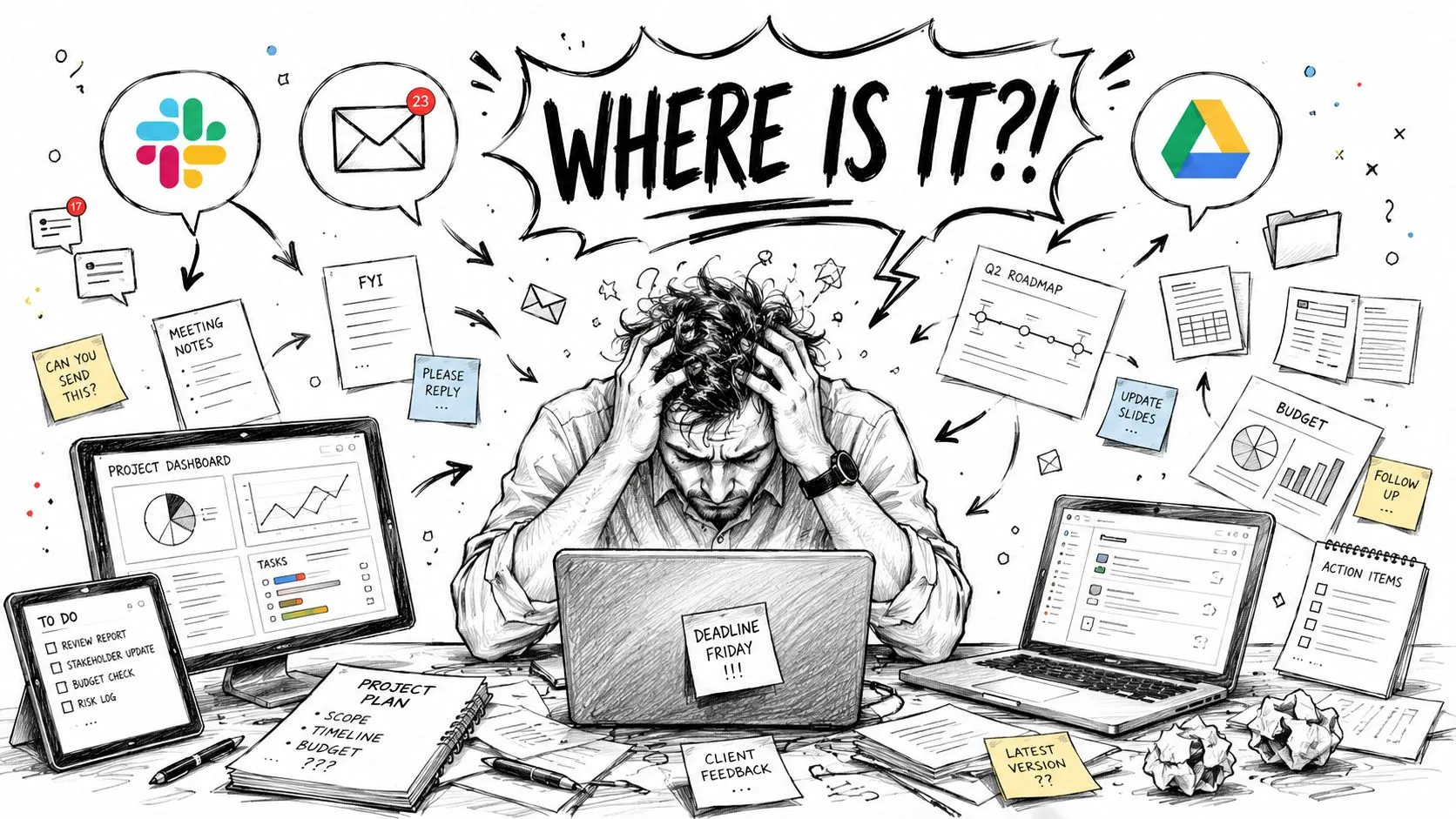
Most companies don't have a knowledge shortage. They have a retrieval problem.
A team launches a campaign, learns which message resonated, documents part of it in a slide deck, discusses the rest in Slack, then moves on. Three months later, another team asks the same question and starts from zero. Nobody intended to hide the answer. The answer just never became easy to find.
Where managers feel the pain first
Non-technical managers usually see the damage before IT does. A report takes too long because the source material is fragmented. A new hire asks five people for the same policy. Customer-facing teams give slightly different answers because each person found a different document. Meetings become search sessions.
Practical rule: If people ask "Does anyone have the latest version?" every week, you don't have a documentation problem alone. You have a knowledge management problem.
The issue gets bigger as the business adds more tools. Slack, Google Drive, Notion, Confluence, SharePoint, CRM notes, call transcripts, project docs, recorded meetings, and support tickets all contain useful knowledge. Traditional filing habits can't keep up with that volume and messiness.
Why AI changes the equation
AI for knowledge management helps because it doesn't rely only on perfect folders and disciplined tagging. It can interpret natural language questions, search across connected systems, and bring back something closer to an answer instead of a list of files. That changes the daily experience for managers. They stop hunting for artifacts and start getting usable context.
In practice, the biggest mindset shift is simple:
- Old model: Store documents and hope people can find them.
- Better model: Connect work data and let the system surface what matters.
- Best model: Use AI to turn scattered work into usable organizational memory.
This is why AI for knowledge management has moved from a nice-to-have into an operating issue. The companies that get value aren't necessarily the ones with the fanciest stack. They're the ones that treat knowledge as a workflow, not an archive.
What AI for Knowledge Management Actually Means
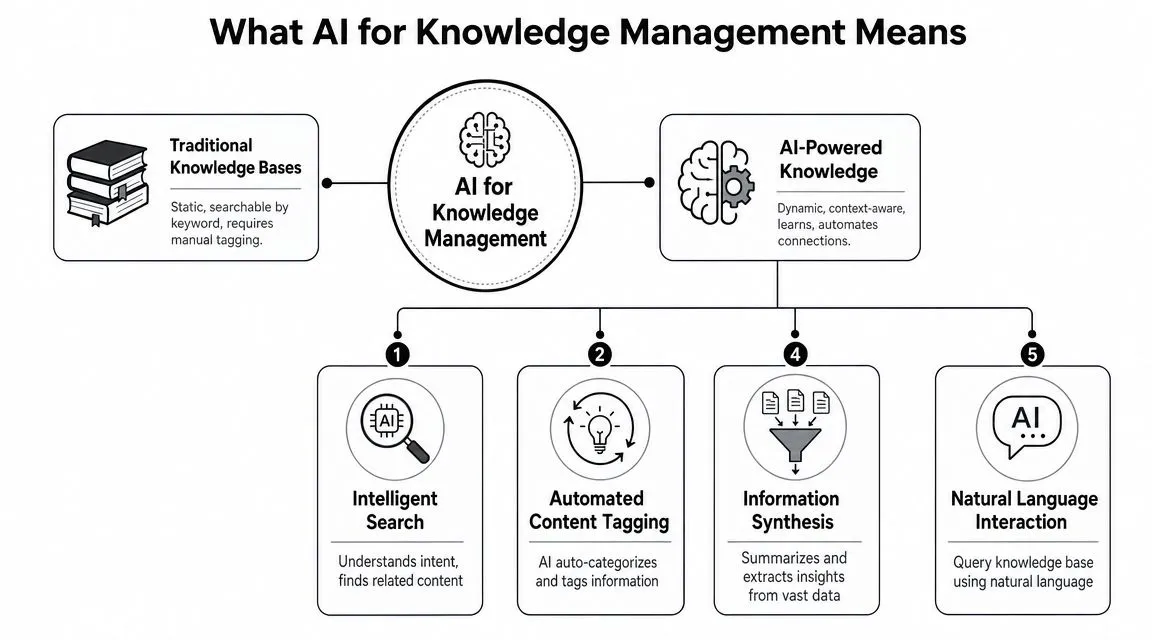
Traditional knowledge bases work like digital libraries. They can store a lot, but they expect users to know what to search for, where to search, and which keywords the original author used.
AI-powered knowledge systems behave more like internal research assistants. You ask a question in plain language. The system interprets what you mean, looks across connected sources, ranks what seems most relevant, and often summarizes the answer. That difference is the heart of AI for knowledge management.
The three capabilities that matter most
ClickHelp explains that AI knowledge management systems improve retrieval quality by combining NLP, machine learning, and semantic search, which lets them interpret query intent and automatically classify, summarize, and rank content based on context and user history in its write-up on AI-powered knowledge management. For a non-technical manager, that translates into three useful capabilities.
- Natural language understanding: People can ask normal questions like "What did we decide about enterprise pricing?" instead of guessing exact file names.
- Semantic search: The system looks for meaning, not just matching words. A search for "handoff process" can still find documents labeled "transition workflow."
- Generated synthesis: The tool can summarize long material, compare sources, and draft a first-pass answer.
A quick visual helps make that distinction clearer.
What it looks like in day-to-day work
A weak setup returns twenty documents and leaves the employee to figure it out. A strong setup returns a short answer, linked sources, and maybe a suggestion for the right owner or expert.
That's why I tell managers not to ask whether a vendor "has AI." Almost every vendor says yes now. Ask better questions instead:
| Question | Why it matters |
|---|---|
| Can it search across our actual systems? | Isolated AI on top of one repository won't solve cross-team knowledge gaps. |
| Does it show source context? | Users need to verify where answers came from. |
| Can it summarize without hiding nuance? | Short answers are useful only if people can inspect the underlying material. |
| Can it respect permissions? | A smart answer is a problem if it exposes the wrong content. |
A knowledge system becomes useful when employees trust both the answer and the path back to the source.
What doesn't work is treating AI as decoration. Adding a chatbot to bad content usually gives you faster access to bad content. The retrieval layer matters, but the quality of the underlying material still matters too.
Real-World Business Value and Use Cases
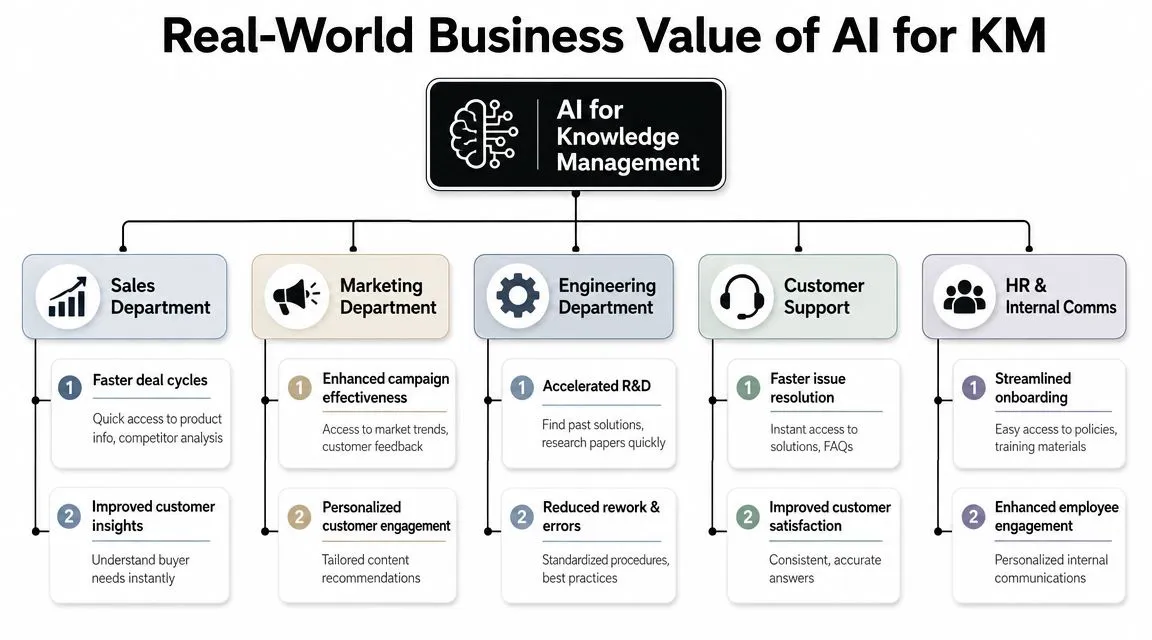
The biggest practical gain doesn't come from one perfect repository. It comes from connecting scattered sources into one retrieval layer. IndataLabs highlights that the strongest practical gain comes from using AI to connect emails, documents, and databases into a unified retrieval layer, which supports role-based recommendations, faster onboarding, and proactive gap detection in its guide to AI knowledge management.
That sounds abstract until you look at department-level work.
Sales stops improvising from memory
Before AI-supported KM, sales reps often ask around for the latest deck, pricing exception, competitor comparison, or implementation answer. During live calls, that lag is expensive. Reps either stall, guess, or promise a follow-up.
With a connected retrieval layer, sales can pull approved battle cards, product positioning, past objections, and relevant case materials from one place. The value isn't just speed. It's consistency. The rep gives the answer the company wants given, not whatever happens to be remembered in the moment.
A good sales use case usually includes:
- Approved messaging: The system prioritizes current positioning over old collateral.
- Contextual retrieval: Reps can search by customer problem, not only by file name.
- Expert routing: If the answer isn't documented well, the system can point to the likely internal owner.
HR and internal operations get fewer repeat questions
HR teams deal with the same pattern every week. Someone wants the parental leave policy, equipment rules, travel guidance, or onboarding checklist. Most of that knowledge exists, but employees don't know where to look or don't trust that what they found is current.
AI for knowledge management helps HR by reducing friction around routine questions. It can surface the policy, summarize it in plain language, and link the source document. For new hires, role-based recommendations are especially useful because a finance hire and a customer support hire don't need the same starting materials.
Customer support and service teams answer faster
Support teams usually have the raw material already. Macros, past tickets, product notes, known issues, release documentation, and escalation guides exist somewhere. The problem is that agents need answers in the middle of an interaction, not after a scavenger hunt.
Manager's test: If a support lead still says "Ask Alex, she knows all the edge cases," the company hasn't converted expertise into a system yet.
AI-supported KM works well here because it can retrieve relevant material from mixed sources, summarize the likely fix, and expose gaps in the knowledge base. When the tool repeatedly fails on a certain issue, that's not just a search problem. It's a content gap the team can now see.
Marketing and product teams find signal in messy inputs
Marketing rarely loses knowledge in polished reports. It loses it in feedback forms, campaign retros, customer calls, sales objections, and comment threads. Product teams lose it in decision logs, sprint notes, and handoff conversations.
AI for knowledge management proves particularly valuable for non-technical teams. It can connect those weak signals and make them reusable. Instead of asking one colleague what happened last quarter, a manager can pull patterns from distributed material and get a usable starting point for planning, messaging, or process changes.
Practical Prompt Templates for Everyday Tasks
The underrated value of AI for knowledge management is knowledge capture from messy work, not just document lookup. Glean notes that newer AI-enabled KM increasingly extracts knowledge from unstructured sources such as meeting transcripts and email threads, then structures it without manual tagging in its discussion of best practices for implementing AI in knowledge management systems.
That matters because undocumented decisions are where teams lose the most context.
Prompting works best when the task is narrow
Managers often start with prompts that are too broad. "Analyze all of this" usually returns bland output. Better prompts define the role, the source material, the output format, and the decision you need to make.
Use the templates below as working drafts. Paste in the relevant source material, then adjust the output section to match your team's format.
| Goal | Role | Prompt Template |
|---|---|---|
| Summarize a meeting | Team lead | "Review this meeting transcript. Extract the key decisions, unresolved questions, action items, owners if named, and deadlines if mentioned. Present the output in a short bulleted summary, then add a section called 'What needs follow-up'." |
| Turn notes into an SOP | Operations manager | "Using the notes and existing process documentation below, draft a one-page SOP for [process]. Keep the steps in order. Flag any missing information or ambiguous instructions instead of inventing them." |
| Identify internal experts | Project manager | "Based on these project updates, documents, and meeting notes, identify the people most closely associated with [topic]. For each person, summarize their likely expertise, related projects, and the documents or decisions that support that conclusion." |
| Build onboarding material | HR manager | "Create a first-week onboarding guide for a new [role] using the policies, team docs, and training notes below. Organize it into what they need to know on day one, week one, and by the end of the first month." |
| Compare conflicting documents | Department head | "Compare these documents on [topic]. Show where they agree, where they conflict, and which document appears more current based on the wording and references inside the files. End with a recommendation for which version should be reviewed by the owner." |
| Capture tacit knowledge | Chief of staff | "Read this email thread and meeting transcript. Extract the unstated decisions, assumptions, risks, and handoffs that are implied but not written as formal action items. Present the result as an internal decision log." |
| Draft a reusable article | Knowledge manager | "Using the materials below, draft a knowledge base article for non-expert employees. Include a short summary, step-by-step guidance, common mistakes, and when to escalate to a human owner. Cite the source material by document name in brackets." |
| Prepare for a stakeholder update | Program manager | "Synthesize these updates into a leadership-ready summary. Include progress, blockers, decisions needed, dependencies, and any inconsistencies across teams that leadership should know before the meeting." |
What good prompts include
Three additions improve output quality fast:
- Source boundaries: Tell the model to use only the material you provide.
- Uncertainty handling: Ask it to flag missing or conflicting information.
- Output structure: Specify bullets, a table, a decision log, or an SOP.
If you want to turn this into a repeatable workflow, learning how to create knowledge base articles with AI helps teams move from ad hoc prompting to consistent internal documentation.
What to avoid
Don't ask the model to "fill in gaps" unless you're comfortable reviewing every line. In knowledge management, invention is worse than incompleteness.
Use AI first to expose ambiguity, not to hide it.
Also avoid dumping mixed-quality material into one prompt without context. A transcript, a stale SOP, and a draft policy can produce a confident but messy answer if you don't tell the system what should be treated as primary.
A 4-Phase Implementation Roadmap
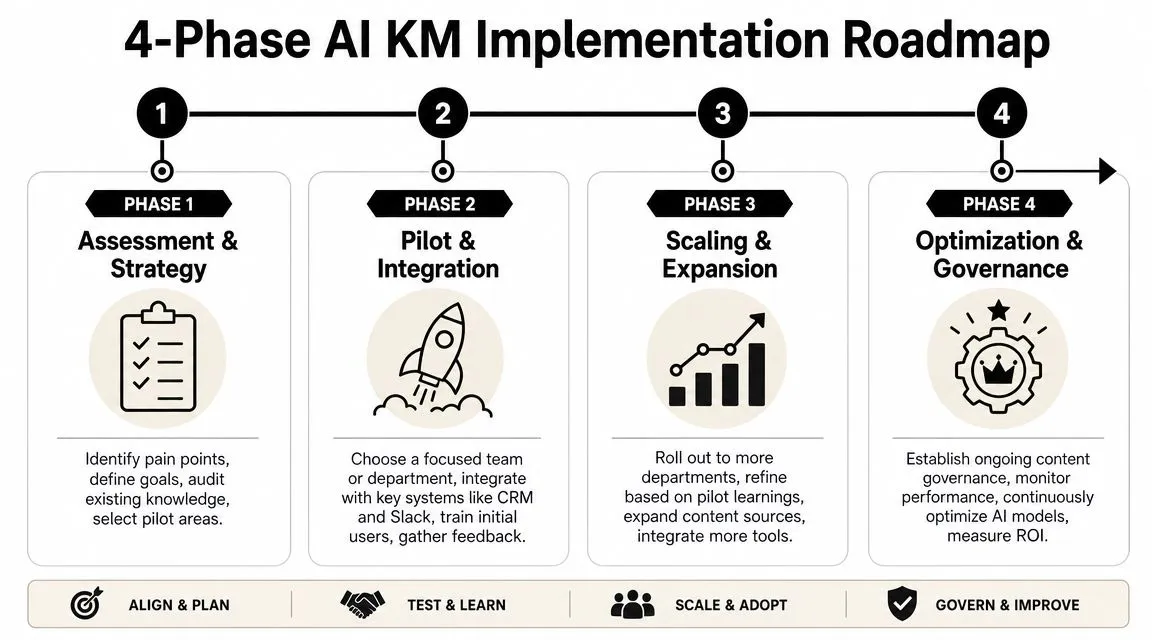
Most AI KM rollouts fail for a boring reason. The company buys a tool before it defines what problem the tool is supposed to solve.
A better rollout is phased, operational, and small enough to survive first contact with reality. I've seen this work best when managers lead the use-case definition and operations owns the governance process early.
Phase 1 starts with knowledge hygiene
Start by auditing what the team uses. Not everything needs to go into the first implementation. Focus on the sources people already trust or repeatedly ask for.
Look for:
- High-friction knowledge: Policies, product docs, onboarding guides, support resolutions, sales collateral.
- Messy but valuable signals: Meeting notes, transcript archives, recurring email threads, shared folders.
- Known failure points: Duplicate documents, unclear owners, stale pages, conflicting versions.
This phase is also where you define success in plain business terms. Faster onboarding. Fewer repeated HR questions. More consistent support responses. Shorter prep time for leadership updates.
Phase 2 should stay narrow
Pick one team and one use case. Don't start with a company-wide assistant. Start with a contained workflow where the pain is obvious and the source material is available.
Good pilot choices include onboarding, policy retrieval, support resolution guidance, or sales enablement. Weak pilot choices are broad "answer anything" deployments. They sound impressive in demos and create disappointment in production.
A solid pilot usually has four ingredients:
- A clear user group such as support agents or HR coordinators
- A known source set such as a help center, policy folder, and meeting archive
- A named owner who can review output quality
- A feedback loop that captures failures, confusion, and missing content
Phase 3 is where governance becomes visible
Governance is what separates a useful assistant from a risky one. A recent review in the academic literature stresses that successful AI-enabled KM depends on strong leadership commitment and adaptable governance, and that organizations need ownership, review workflows, and rules for stale knowledge so the system doesn't amplify bad content in this review of AI-enabled knowledge management.
For managers, governance doesn't need to mean bureaucracy. It means answering simple operational questions:
| Governance question | What you need decided |
|---|---|
| Who owns each content area? | A person or team accountable for accuracy |
| What gets reviewed first? | High-risk policies, customer-facing answers, regulated content |
| What happens when sources conflict? | A documented escalation and approval path |
| How do stale docs get handled? | Archive, relabel, or exclude from retrieval |
| What should AI never summarize alone? | Sensitive, legal, financial, or policy-critical material |
If your team wants a practical path for connecting internal files to a focused assistant, this kind of guide on how to create a custom GPT powered by Google Drive is useful because it mirrors how many non-technical teams begin.
Governance isn't red tape. It's the reason employees trust the system enough to use it twice.
Phase 4 is adoption, not just rollout
Once the pilot works, scale by expanding source coverage and training habits, not by adding every feature. Most users need a small set of repeatable workflows. Search for policy. Summarize a meeting. Draft an SOP. Find the current approved answer.
Managers should also watch for two failure modes.
- Tool obsession: The team debates vendors for months and never cleans the source material.
- Silent drift: The pilot works, then content owners stop reviewing documents and quality declines.
At scale, AI for knowledge management becomes less about the interface and more about operating discipline. The best systems feel simple to end users because someone did the hard work of ownership, scope, and review behind the scenes.
Measuring Success and Planning Your Next Steps
A launch isn't success. Usage alone isn't success either. The question is whether people get trusted answers faster and stop recreating work.
For non-technical managers, the best measures are usually operational and easy to observe. Start with a short before-and-after pulse check on search friction. Ask users whether they can find what they need without asking a colleague. Track whether teams use approved templates and current documents more consistently. Watch onboarding closely. If new hires stop depending on one "go-to person" for basic answers, the system is doing useful work.
Keep the scorecard simple
Use a small review set such as:
- Search effort: Are employees spending less time hunting for internal information?
- Answer consistency: Are teams using the same approved guidance?
- Knowledge reuse: Are people pulling from existing material instead of rebuilding it?
- Onboarding experience: Can new hires self-serve more of the basics?
- Gap visibility: Can you now see where documentation is missing or stale?
Don't wait for a perfect enterprise plan. Pick one team, one workflow, and one owner. Then run a pilot long enough to see where the system helps, where it confuses people, and where your content is weaker than you thought.
Small pilots are easier to govern, easier to evaluate, and much easier to fix.
Frequently Asked Questions About AI for KM
How do we choose the right AI knowledge management tool
Start with integration and trust, not flashy features. The right tool should connect to the systems your team already uses, respect permissions, and show users where answers came from.
A short vendor checklist helps:
- Connected sources: Can it work across Drive, Slack, docs, wikis, tickets, and internal systems you already rely on?
- Source transparency: Does it link back to the originating content?
- Permission handling: Can it preserve role-based access?
- Usability: Will non-technical staff ask it questions in real work?
- Governance support: Can owners review, refine, and remove bad content?
If a demo looks magical but can't explain sourcing, permissions, or review workflows, keep looking.
What is a realistic budget for a pilot project
Think in categories, not a single number. Budget for software access, internal setup time, content cleanup, stakeholder review, and basic user training. In many organizations, the hidden cost isn't the tool. It's the time needed to identify owners, reconcile duplicate content, and review outputs.
Keep the pilot narrow enough that your team can support it without turning it into a side project nobody owns. A smaller pilot with clear usage beats a broad rollout with unclear accountability.
How do we make sure the AI doesn't share sensitive information
This comes down to architecture and process. Choose enterprise-grade tools that preserve existing access controls. Limit the initial source set. Exclude sensitive repositories until you know how the system handles retrieval and summarization.
Then add operating rules:
- Permission-first design: Users should only see what they already have rights to access.
- High-risk exclusions: Keep legal, finance, and policy-sensitive material under stricter review.
- Human review: Require oversight for sensitive summaries and externally shared outputs.
- Content ownership: Make someone accountable for what enters the system and what stays current.
The safest AI KM systems aren't the ones with the loudest marketing. They're the ones with clear boundaries.
If you want practical, copy-paste workflows for tools like ChatGPT, Claude, Perplexity, and other AI systems used in real office work, AI Academy is a strong place to start. It's built for non-technical professionals who want fast lessons, prompt templates, and hands-on tutorials they can apply immediately to reporting, documentation, research, and daily team operations.