You're probably here because “full stack” keeps showing up in meetings, job posts, product discussions, and AI tool demos, and nobody has given you a clear explanation that doesn't assume you already know how to code.
Maybe you manage a website project and keep hearing phrases like “front end is blocked by the API” or “we need to update the database schema first.” Maybe you work in marketing and want to understand why a landing page change can take longer than expected. Maybe you're an analyst, founder, or operations lead trying to make better decisions around web products without becoming an engineer.
That's where the idea of a full stack web developer becomes useful.
A full stack developer isn't just “someone who knows a lot of tools.” They're someone who understands the whole path from a user clicking a button to a system saving data and returning a result. That broad view matters because web work often breaks down at the handoff between business goals and technical execution. The person who can see both sides often becomes the translator, builder, and reality-checker.
That role keeps growing in importance. The U.S. Bureau of Labor Statistics projects 13% job growth from 2020 to 2030 for the broader web developer category, compared with 6% average growth for all occupations, which points to continued demand for people who can work across digital products, as noted in this web development job outlook overview.
For non-technical professionals, the goal isn't to memorize syntax. It's to understand the moving parts, ask better questions, and use modern AI workflows to deploy full stack projects rapidly when you need a prototype, a proof of concept, or a clearer conversation with your dev team.
Introduction The Bridge Between Idea and Reality
A manager asks for a “simple dashboard.” Marketing wants lead sources, sales wants territory filters, leadership wants mobile access, and legal wants tighter permissions. A designer mocks up a clean screen. Then the development team asks questions nobody expected.
Where does the data come from? Who can see what? What happens if a record is missing? Should the page load instantly with partial data, or wait for everything? Can users export it? Should it work on phones?
Many teams get stuck when the business side talks about outcomes and specialists on the technical side talk about components. A full stack web developer often bridges that gap because they can trace a request across the entire product, from the browser to the server to the database and back again.
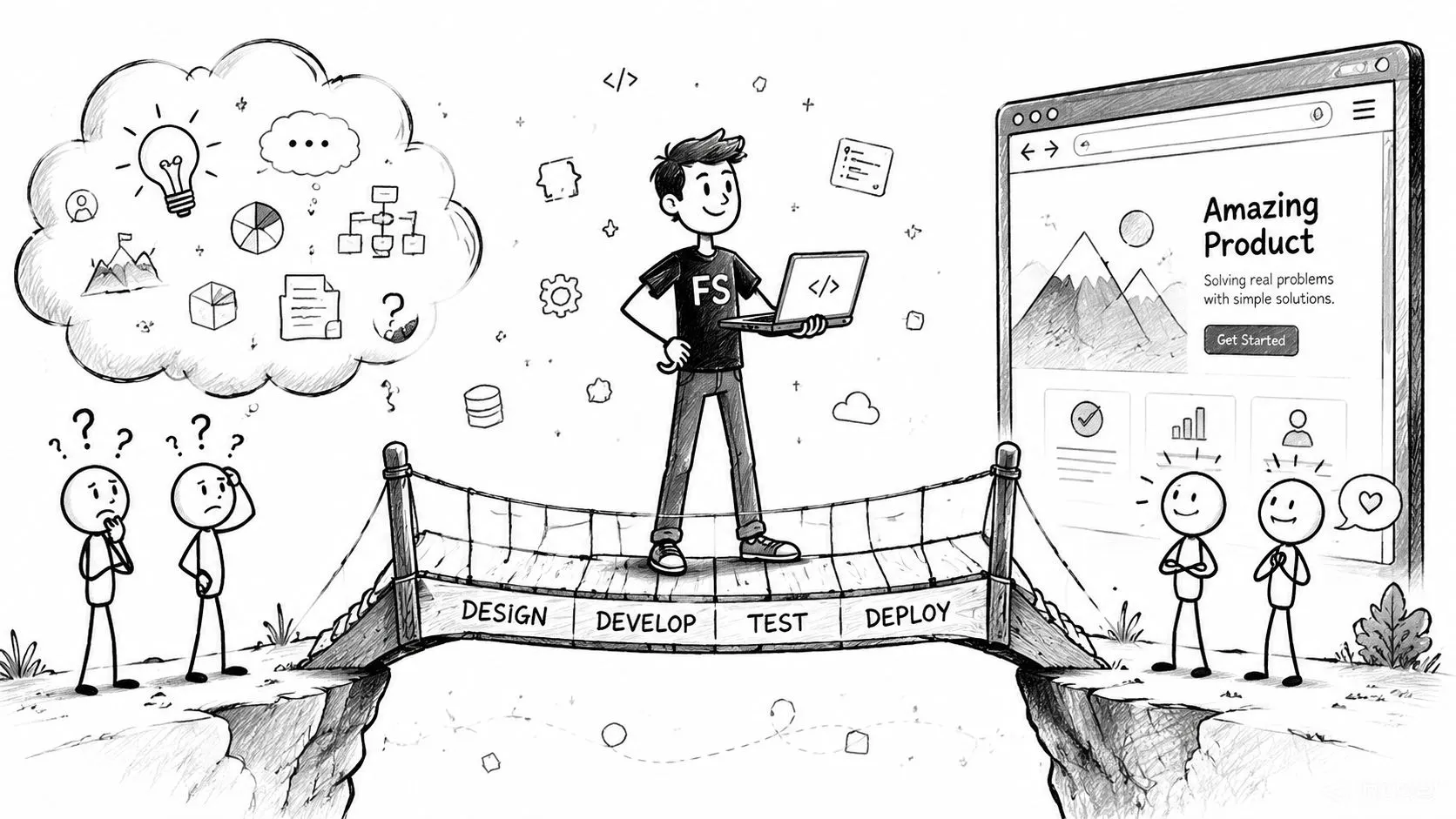
Think of this person as part architect, part builder, part translator. They can discuss the user experience with a designer, understand the business rule behind a feature request, and then connect that request to the logic and data structure needed to make it work.
Practical rule: When a project spans customer experience, business logic, and stored data, someone has to understand all three or the team spends its time translating instead of shipping.
For non-technical colleagues, this matters because you don't need to write the code to follow the flow. Once you understand the role, meetings become easier to decode. You'll know why some changes are quick, why others ripple through multiple systems, and why “just add one field” sometimes isn't simple at all.
Anatomy of a Web App Front-End vs Back-End
Most confusion around web development comes from one issue. People can see the website, but they can't see the machinery behind it.
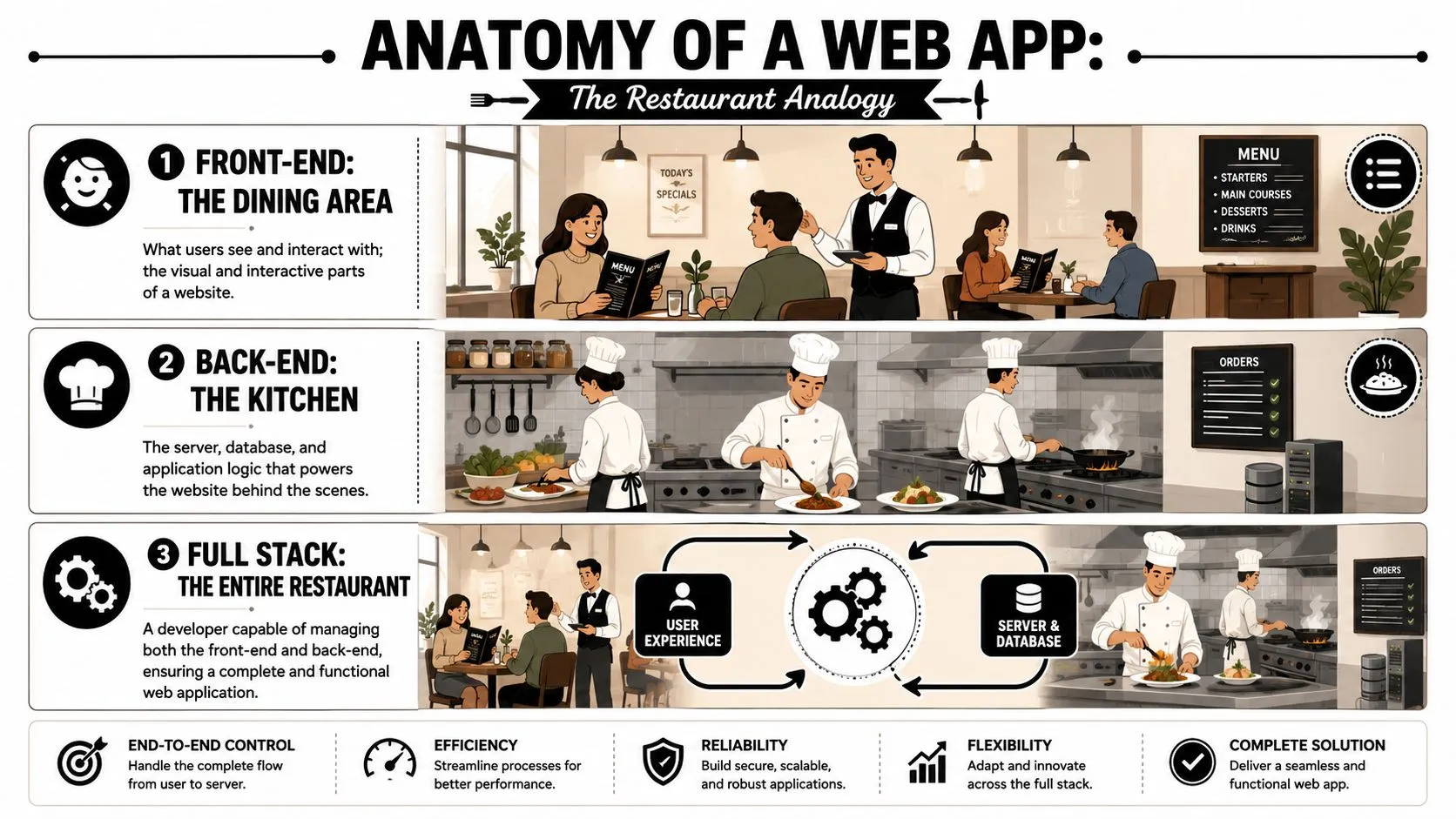
A simple analogy helps. Think of a web app as a restaurant.
The front end is what the user touches
The front end is the dining area. It includes the menu, tables, lighting, and the way staff interact with guests. In a web app, that means the parts users see and click in a browser.
Buttons, forms, navigation, product cards, charts, search bars, confirmation messages. That's front-end territory.
AWS describes full stack development as work across both the frontend and backend, and lists technologies such as HTML, CSS, JavaScript, Node.js, Express.js, Django, and PHP in the skill set that often supports end-to-end application building in its guide to full stack development concepts.
If you're non-technical, here's the plain-English version:
- HTML gives the page structure.
- CSS controls visual styling.
- JavaScript adds behavior and interactivity.
If a form expands after you click a checkbox, a chart updates without reloading the page, or a button turns gray after submission, that's front-end behavior.
The back end handles the invisible work
The back end is the kitchen. Guests don't see it, but that's where orders are received, prepared, checked, and sent out. In a web app, the back end handles logic, rules, data storage, and communication between systems.
When a user signs in, the back end verifies credentials. When someone places an order, it processes the transaction. When a dashboard loads sales numbers, it pulls data from a database or another service.
Here's a useful mental model:
- Front end asks
- Back end decides
- Database remembers
That simple sequence explains a surprising amount of modern software.
To make it more concrete, think about a newsletter signup form. The front end shows the form and captures the email address. The back end checks whether the format is valid, decides what to do with the submission, and sends the data to a database or email platform. The database stores the record so it can be used later.
A full stack web developer can understand and often work on both halves. They don't just make the dining room look nice. They also know how the kitchen receives, prepares, and serves the order.
For a quick visual walkthrough, this explainer helps reinforce the concept:
If the front end looks right but the data is wrong, the problem may live in the back end. If the data is correct but users can't submit the form, the problem may live in the front end. That distinction saves a lot of confusion in meetings.
The Full Stack Developer's Toolkit Common Stacks and Tools
“Tech stack” sounds more intimidating than it is. It just means the combination of tools a team uses to build a web app.
If the restaurant analogy still works for you, a stack is the kitchen setup. One restaurant may use wood-fired ovens and hand-made pasta tools. Another might use sushi counters and cold storage systems. Both serve food, but the workflow is different.
What a tech stack actually means
A full stack web developer usually works with a coordinated set of technologies rather than random tools picked one by one. The stack shapes how quickly a team can build, what kind of app fits naturally, and how easy the system is to maintain.
Some stacks are popular because they use JavaScript across large parts of the app. That matters because JavaScript remains dominant, used by 65.6% of developers, according to this roundup of web development statistics. The same source notes that 77% of developers use AI coding tools like GitHub Copilot, which tells you something important about the current workflow. Modern development isn't just about hand-writing every line. It's increasingly about guiding, reviewing, and refining machine-assisted output.
Common Full Stack Tech Stacks Compared
| Stack | Core Technologies | Best For |
|---|---|---|
| MERN | MongoDB, Express.js, React, Node.js | Interactive web apps, dashboards, single-page applications |
| MEAN | MongoDB, Express.js, Angular, Node.js | Structured enterprise-style apps with opinionated front-end patterns |
| LAMP | Linux, Apache, MySQL, PHP | Content-heavy sites, traditional web apps, many legacy business systems |
| Django-based stack | Django, Python, database, HTML/CSS/JS | Apps that need strong structure, admin workflows, rapid backend setup |
| Firebase-centered stack | Front-end framework plus Firebase services | Fast prototypes, authentication, hosted databases, lighter backend setup |
A stack isn't “best” in the abstract. It's best for a context.
For example, a startup testing a new customer portal may value speed and hosted infrastructure. A larger company with internal compliance requirements may prefer a more controlled architecture. A content team with an older CMS may rely on PHP because that's what the system already uses.
If you're trying to understand lightweight backend options, this guide to Firebase tools and workflows is a useful reference because it shows why some teams choose managed services instead of building every server component from scratch.
Why AI tools changed the workflow
This is the part many non-technical readers care about most. The toolkit now includes AI assistants, not just programming languages and frameworks.
That changes the role in two ways.
First, developers can move faster on repetitive work such as scaffolding pages, generating boilerplate, and suggesting test cases. Second, non-engineers can participate earlier by using AI to create rough prototypes, draft interface copy, map user flows, or generate a first-pass structure that a developer can review.
Working rule: AI is strongest when the problem is clear. Vague prompts create vague software.
You don't need to know how to implement React or Express to benefit from this shift. You do need enough vocabulary to say, “We need a form on the front end, validation in the back end, and a place to store submissions.” That's the collaboration layer where non-technical professionals become much more effective.
Essential Skills Beyond the Code
The strongest full stack developers don't succeed because they know the most syntax. They succeed because they can make decisions that connect user needs, business goals, and technical constraints.
That matters if you hire developers, manage them, or work alongside them. You're not only evaluating whether they can build. You're evaluating whether they can think.
Translation matters more than jargon
A good full stack web developer can take a fuzzy request like “customers keep dropping off at signup” and turn it into concrete questions.
Is the form too long? Is mobile layout breaking? Are password rules confusing? Is the confirmation email delayed? Is the backend validation rejecting legitimate entries?
That kind of translation is part technical skill, part business awareness. It's also why some developers feel easy to work with and others don't, even when both are technically capable.
Useful signals to watch for in collaboration:
- They ask clarifying questions early. They don't rush into building before understanding the business rule.
- They explain tradeoffs plainly. Instead of hiding behind jargon, they tell you what will be fast, risky, durable, or expensive.
- They connect symptoms to layers. They can say whether an issue is likely interface, logic, data, or performance related.
Good product judgment beats flashy output
A flashy demo can hide weak thinking. Solid product judgment is quieter.
A skilled full stack developer cares about error states, permissions, data quality, and maintainability. They know that a feature isn't finished just because the happy path works. They think about what happens when users click twice, enter bad data, lose connection, or come back a week later.
That broader thinking affects outcomes people outside engineering care about. Performance is a good example. A page can be visually beautiful and still frustrate users if it loads slowly or feels sluggish. If you want a non-technical explanation of what affects responsiveness, this article on improving web app speed gives useful context.
Good software work often looks like careful prevention. The team notices fewer surprises because someone anticipated them.
If you remember one thing from this section, make it this. The best full stack developers aren't only builders. They're risk reducers.
A Realistic Career Path Roles Growth and Salary
The title sounds broad because the job is broad. But broad doesn't mean vague. Over time, full stack developers usually grow through recognizable stages of responsibility.
How responsibilities change over time
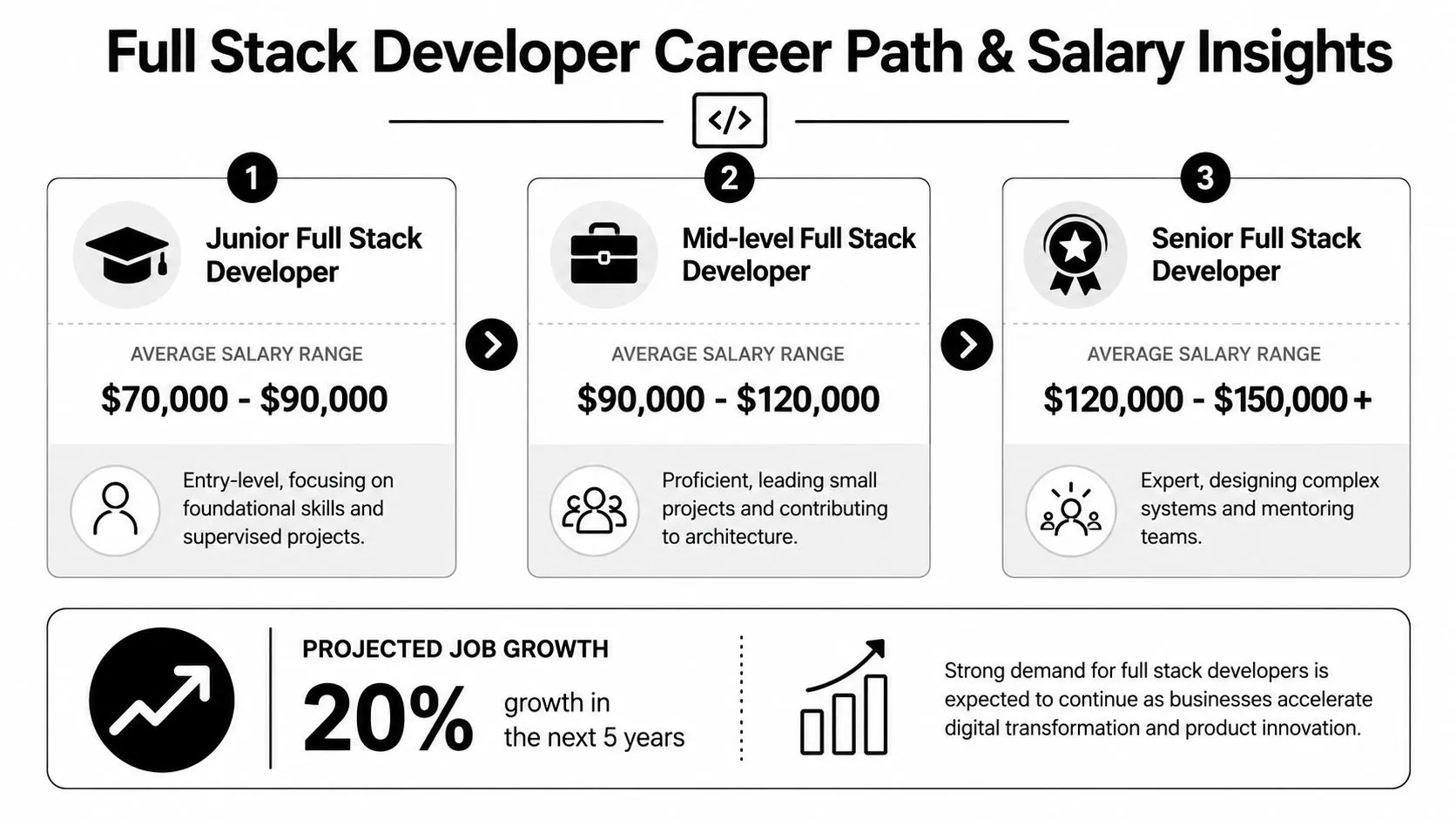
A junior developer usually contributes within a defined part of a project. They may build a page from a design, connect an existing API, fix bugs, or adjust database queries with guidance. Their value is in execution and learning speed.
A mid-level developer usually works more independently. They can own a feature from planning through release, spot issues across layers, and make sensible implementation choices without constant oversight.
A senior full stack developer typically does more than deliver tickets. They shape architecture, mentor teammates, reduce technical risk, and help the business understand what's realistic. They often become the person who can say, “This feature sounds simple, but the data model makes it complex,” and explain why in language non-engineers can use.
Here's the practical version for managers:
- Junior: Needs direction and review
- Mid-level: Owns delivery with context
- Senior: Owns systems, tradeoffs, and mentoring
Why the role is well paid
Breadth has market value because it reduces handoff friction. A person who can understand interface behavior, backend logic, and maintenance concerns can often move a product forward with fewer coordination delays.
Coursera reports a median total salary of $119,000 per year in the U.S. for full-stack developers in its overview of the full stack developer role and salary. The same source ties that value to end-to-end responsibilities such as UX design, backend and database management, and web service maintenance.
That salary figure doesn't mean every job is glamorous or that every posting is well scoped. It does tell you the market places a premium on people who can handle more than one layer of a web product.
If you want a human example of how this career can evolve in practice, the developer story of Andres Sierra is worth reading. Stories like that help make the title feel less abstract.
For people on the hiring side, broad capability doesn't remove the need to match role level carefully. Someone who can “do a bit of everything” isn't automatically senior. If you're building teams or job-search systems around talent evaluation, resources like job search workflows with Clay can also help you think more systematically about role targeting and candidate fit.
Your First Steps A Learning Path for Non-Technical Minds
If you're not trying to become a professional engineer, don't start with “learn everything.” Start with understanding how web products behave.
That shift matters because modern tools let non-technical professionals participate earlier than before. The most useful path isn't memorizing syntax first. It's learning the concepts well enough to design, critique, prototype, and collaborate.
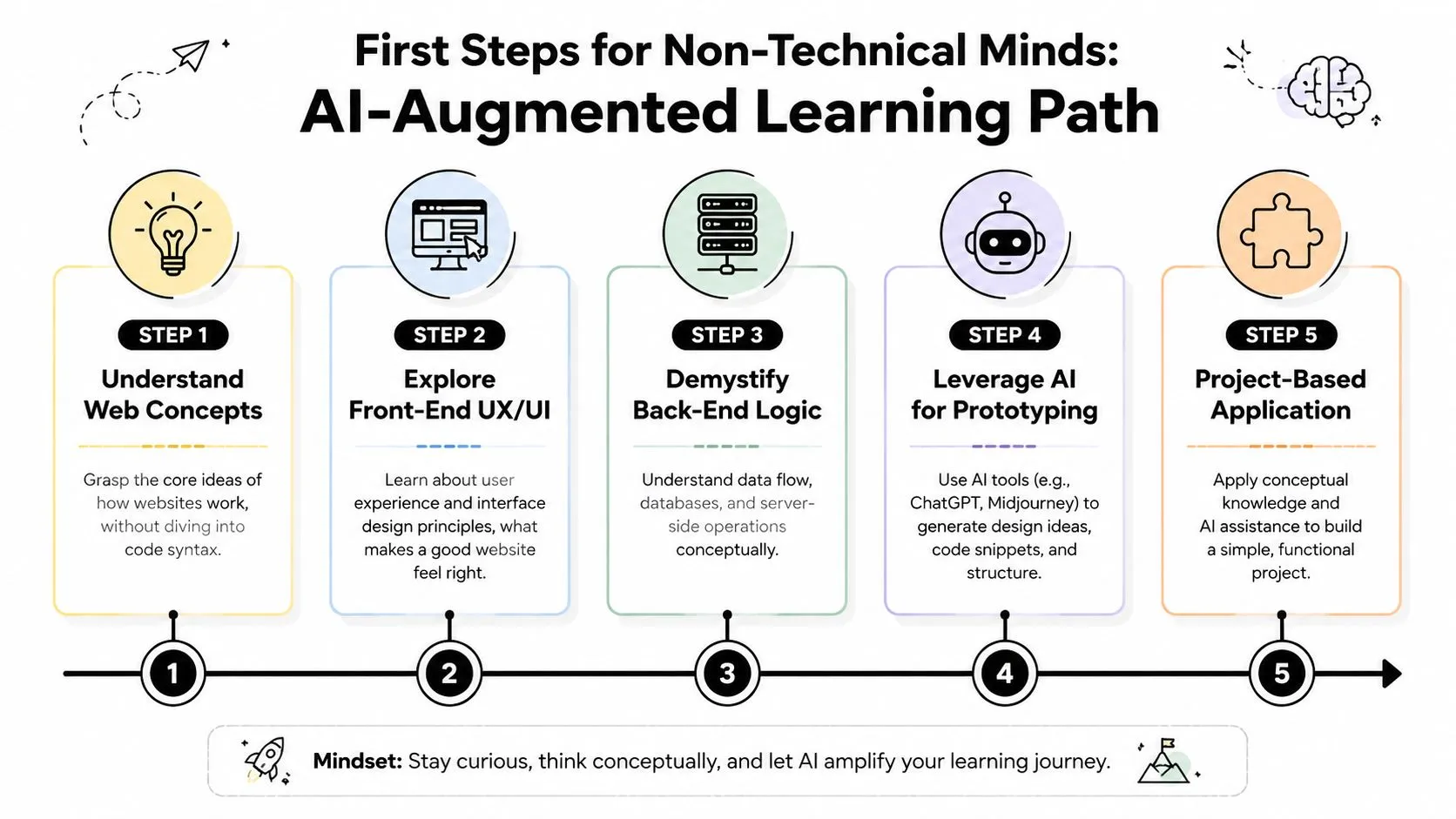
The direction of travel is clear. The World Economic Forum projects that 65% of future full-stack roles will require AI orchestration skills over pure coding. For non-engineers, that's encouraging. It means knowing how to frame problems, direct tools, and evaluate outputs is becoming more valuable.
Start with systems not syntax
Use this sequence as your mental roadmap.
-
Pick one web app you already use
Choose something familiar, like a CRM, analytics dashboard, booking flow, or ecommerce site. Don't ask, “How do I code this?” Ask, “What are the pieces?” Look for login, navigation, form submission, search, saved data, and notifications.
-
Deconstruct the front end
Open a page and identify structure, content, and behavior. Which elements are static text? Which parts respond to clicks? Which inputs appear to validate in real time? This trains your eye to separate layout from logic.
-
Map the back-end assumptions
Every visible action usually depends on an invisible rule. If a dashboard shows “only my accounts,” there must be permission logic. If a checkout totals tax automatically, there must be calculation logic. If a profile remembers settings, there must be stored data somewhere.
-
Learn the language of requests and responses
You don't need to build APIs to benefit from understanding them. A browser asks for data. A server responds. Sometimes the request succeeds. Sometimes it fails. Once you understand that loop, technical conversations stop sounding mystical.
Use AI as a thinking partner
AI tools are especially useful when you treat them as tutors, prototypers, and translators.
Try prompts like:
- “Explain this signup flow as front end, back end, and database steps.”
- “Turn this product requirement into a developer-ready checklist.”
- “Create a simple prototype plan for a dashboard with filters, user roles, and export.”
- “List edge cases for a contact form used by mobile visitors.”
You can also use AI-native tools to turn an idea into something testable. A marketer can describe a lead capture app, generate a rough interface, ask for a backend schema in plain language, and hand that prototype to a developer for refinement. That's not replacing engineering. It's making the collaboration better from day one.
A useful habit: Ask AI to explain the same feature twice. Once for a user, once for a developer. The gap between those two answers teaches you a lot.
If you want a guided environment for experimenting with these workflows, a practical next step is learning how to create a full stack web app with AI. The value isn't in becoming instantly technical. It's in building intuition through hands-on examples.
The best beginner project is small and real. A content request form. A lead tracker. A simple internal dashboard. Something with inputs, rules, and saved data. That's enough to make the whole stack feel concrete.
Frequently Asked Questions About Full Stack Development
Do you need a computer science degree to understand or work with full stack development
No. You need conceptual clarity, product sense, and the ability to learn how systems fit together. For technical roles, employers may care more about demonstrated ability than academic background. For non-technical roles, understanding the workflow and vocabulary is often enough to improve collaboration dramatically.
Is a full stack web developer just a front-end developer who also knows some backend basics
Not quite. The difference is ownership across the whole application flow. A true full stack developer can think through interface behavior, server logic, data storage, and how those pieces affect one another.
How long does it take to become useful if you're non-technical
You can become useful much faster than you can become an expert. Understanding front end, back end, databases, and API basics is enough to ask sharper questions, write clearer briefs, and review product work with more confidence. Building deep engineering skill takes longer, but productive collaboration starts much earlier.
Is AI making full stack developers less important
No. It's changing how they work. AI can generate drafts, suggest patterns, and speed up repetitive tasks. People still need to define requirements, judge tradeoffs, catch mistakes, and connect software to business outcomes.
What's the best first goal for a manager or marketer
Don't aim to “become a developer” overnight. Aim to understand how a web product works from user action to saved data. Once that clicks, everything else becomes easier to follow.
If you want a practical way to build that understanding, AI Academy is a strong next step. It's designed for working professionals, not full-time engineers, and focuses on short, applied lessons that help you use AI tools to understand workflows, prototype ideas, and become far more effective in technical conversations.