Your team probably has at least one workflow that lives in too many places at once. Part of it is in Slack. Part is in someone's head. Part is in a doc with a title like “Final_v3_Updated.” When the work goes well, it feels like luck. When it goes badly, everyone scrambles.
That's usually the moment people start talking about process standardization. Unfortunately, they often picture bureaucracy, rigid rules, and extra admin. For non-technical teams, that framing turns a useful idea into something people avoid.
A better way to think about it is simple. Process standardization gives recurring work a dependable path, so people stop reinventing the basics and can focus on judgment, creativity, and exceptions. For marketers, HR teams, sales managers, analysts, and customer-facing teams, that shift can make daily work calmer and much easier to improve. It also matters more now because digital workflows move fast, involve more tools, and increasingly include AI in the loop.
What Process Standardization Really Means
Process standardization means agreeing on the best current way to do repeatable work, then making that way easy to follow. It's not about making every task identical. It's about removing unnecessary variation in the parts that shouldn't be a surprise.
A recipe is the easiest analogy. If five people bake the same cake with five different ingredient lists, oven temperatures, and timing, you won't get reliable results. A standard recipe doesn't kill skill. It protects the basics so the baker can focus on presentation, flavor tweaks, or fixing a problem when something unexpected happens.
Workflows behave the same way. When your team standardizes client onboarding, campaign approvals, hiring coordination, or weekly reporting, you're creating a shared route. Consider GPS as an analogy. The destination is clear, the main turns are mapped, and people don't waste energy debating the obvious parts every single time.
Practical rule: Standardize the repeatable parts of work so people can spend more time on the parts that require judgment.
That's why strong teams don't just ask, “Do we have a process?” They ask, “Can two people follow it and produce a consistently good result?” If the answer is no, the work may be documented, but it isn't yet standardized in a meaningful way.
A helpful way to start is by reviewing how mature your current workflow is. Resources like OKR Hub's workflow playbook are useful because they turn “we should be more organized” into concrete workflow thinking, especially for teams trying to reduce handoff chaos.
What people often confuse
Many teams mistake documentation for standardization. A doc alone doesn't create consistency. If nobody follows it, updates it, or checks whether it still matches reality, it's just shelfware in Google Drive or Notion.
In manufacturing, this gap is well documented. According to Symestic's explanation of execution maturity in process standardization, most plants only reach Level 1, where procedures are documented, or Level 2, where people are trained, while the operational gains come when organizations reach Level 3, where the standard is executed consistently, and Level 4, where adherence is enforced and measured.
That idea applies far beyond factories. A sales playbook no one uses, an onboarding checklist that changes by manager, or a prompt library that isn't maintained all have the same problem. The process exists on paper, but not in practice.
The Undeniable Benefits for You and Your Team
It's 4:40 p.m. on a Thursday. A marketer is hunting for the latest campaign brief, a sales rep is asking who approves a pricing exception, and an HR manager is rebuilding an onboarding checklist from an old Slack thread. Everyone is working hard. The friction comes from the route, not the effort.
That is why process standardization matters to people in real jobs. It removes repeat confusion from digital workflows so work moves with less stopping, guessing, and backtracking.
The simplest way to understand the benefit is to compare it to a GPS route. If every person drives to the same client site using their own shortcuts, a few will arrive fast, a few will get lost, and nobody can explain the best path to the next hire. A standardized process gives the team a reliable route. You can still take a detour when needed, but the default path is clear.
Here's what changes in practice:
- Less rework: Teams catch fewer preventable mistakes because the steps, inputs, and review points are clear.
- Cleaner handoffs: Sales, marketing, HR, and operations pass work forward with the right context instead of scattered notes and memory.
- Faster onboarding: New hires learn the job from a repeatable workflow, not only from shadowing whoever has time.
- Better delegation: Managers can assign work with confidence because “done” is defined.
- Stronger automation: AI tools and automations perform better when the underlying process is stable and the inputs are consistent.
For digital teams, that last point matters more than it first appears. AI does not fix a fuzzy workflow. It scales it. If your prompt, approval path, naming rules, or handoff steps change every time, AI outputs become harder to trust and harder to reuse.
A standardized workflow works like a good recipe. It doesn't tell a skilled cook to stop cooking. It makes sure the base method is dependable so people can focus on improving the dish. That is the standardization paradox in creative and AI-assisted work. More structure at the repeatable parts creates more room for judgment, originality, and speed where those qualities matter.
This is why marketers, HR teams, and sales teams often feel relief, not restriction, when standardization is done well. A content team gets a repeatable intake form and prompt template for first drafts. HR gets a consistent onboarding sequence across managers. Sales gets a clear qualification and follow-up process inside the CRM. People spend less time decoding the process and more time doing the work that needs their brain.
There is also a risk benefit. Every vague approval step, missing field, or inconsistent handoff creates avoidable exposure. A practical operational risk management framework for cross-team workflows helps teams spot where inconsistency creates errors, delays, or compliance problems before those issues spread.
The payoff is simple. Work feels lighter because fewer decisions have to be remade from scratch.
If your team plans to automate repetitive admin next, this guide to transforming your business with automation is a useful follow-on because cleaner processes make automation and AI much easier to set up without creating new confusion.
People also notice who improves the system. The person who clarifies a workflow, adds a reusable prompt template, or removes a handoff bottleneck becomes known for improving outcomes, not just completing tasks. That kind of visibility matters in every function.
Essential Frameworks and Governance Tools
A lot of process language sounds more intimidating than it is. SOP. RACI. SIPOC. BPMN. If you've seen these terms and tuned out, you're not alone.
The good news is that each one solves a different kind of problem. You don't need to master all of them at once. You just need to know which tool matches the issue in front of you.
Four tools in plain English
SOP stands for Standard Operating Procedure. This is the step-by-step recipe. It's best when someone needs clear instructions to complete a repeatable task, such as publishing a blog post, approving expenses, or setting up a new hire's first week.
RACI is a role-clarity tool. It answers who is Responsible, Accountable, Consulted, and Informed. If your problem is “too many people are involved and nobody knows who decides,” RACI is usually the fix.
SIPOC gives you a high-level map. It shows Suppliers, Inputs, Process, Outputs, and Customers. This is helpful when the team keeps arguing about where a process starts, what goes into it, and who receives the result.
BPMN stands for Business Process Model and Notation. The name is technical, but the purpose is simple. It creates a detailed visual map of a workflow, including decisions, branches, and handoffs across teams or systems. Use it when the work crosses functions or includes several exception paths.
If governance feels fuzzy, it helps to think in risk terms. Every undocumented handoff or vague approval step creates avoidable operational risk. That's why a practical framework for operational risk management fits well alongside standardization work. It helps teams see process design not just as efficiency work, but as protection against preventable failures.
Choosing the right tool for the problem
Here's a quick comparison.
| Framework | What It Is | Best Used For |
|---|---|---|
| SOP | A written step-by-step instruction set | Repetitive tasks that need consistency |
| RACI | A role and decision matrix | Clarifying ownership in team workflows |
| SIPOC | A high-level process map | Scoping a process before documenting details |
| BPMN | A detailed visual workflow diagram | Complex, cross-functional workflows |
A simple selection rule
Use the lightest tool that solves the problem.
- Choose SOP when people ask, “What are the steps?”
- Choose RACI when people ask, “Who owns this?”
- Choose SIPOC when people ask, “What counts as the process?”
- Choose BPMN when people ask, “Why does this break at handoffs?”
You also don't have to pick only one. A marketing launch process might start with a SIPOC to define the boundaries, use a RACI to sort approvals, and end with an SOP for execution.
The best framework is the one your team will actually use next week.
That matters because over-designed process systems often collapse under their own weight. If your team needs clarity for a recurring task, start small. A clean SOP in Notion or Google Docs is often more valuable than a beautiful but unused diagram.
Your AI-Powered 5-Step Implementation Checklist
A team usually feels process problems before it can name them. A campaign sits in review because no one knows who approves final copy. A recruiter rebuilds the same interview schedule from scratch. A sales rep asks, again, which leads are ready to hand off. Standardization fixes those repeat frustrations, and AI can cut the setup time without turning the work into red tape.
Used well, AI works like a fast first-draft partner. It helps you capture what people already do, spot gaps, draft clear documentation, and test weak points before you ask the whole team to follow a new process.
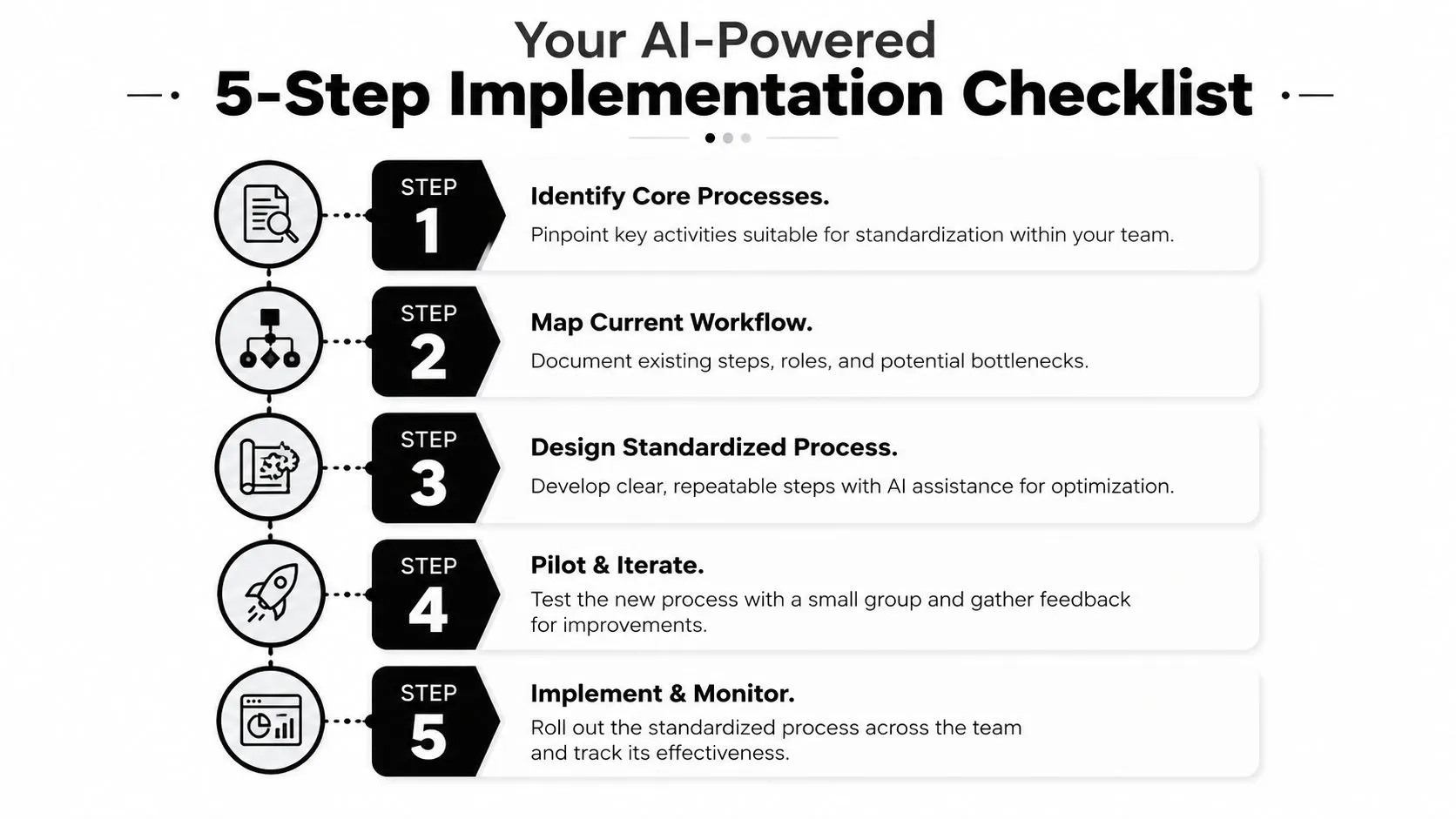
Step 1 identify the right process
Start with one workflow that repeats often and annoys several people. Good candidates include content approvals, lead handoff, interview scheduling, customer support triage, or monthly reporting requests.
A good first target usually has three traits. People complain about delays. The steps vary depending on who handles it. Handoffs between roles break down.
Ask:
- Where do delays keep happening? Look for repeated follow-ups, bottlenecks, and last-minute escalations.
- Where do people improvise too much? If each person has a different method, variation is already costing time.
- Where would clarity help multiple people? Focus on shared workflows, not private productivity habits.
Try this prompt in ChatGPT or Claude:
Act as a business operations consultant. Help me choose one workflow to standardize first. I'll list several recurring team processes and the pain points in each. Ask follow-up questions, then rank them by urgency, repeatability, and ease of implementation.
The logic matches strong AI adoption strategies for early workflow wins. Small, visible successes help teams trust the approach and keep going.
Step 2 map the current workflow
Capture the current process first. Treat it like tracing the route your team drives, not the route printed on the map.
That means documenting the side chats, the duplicate data entry, the approval waits, and the workarounds people rarely mention in formal meetings. If you skip that messy reality, your new standard will look neat on paper and fail in practice.
Interview the people doing the work. Ask what starts the process, which tool they open first, where they wait, what gets retyped, and what happens when the normal path breaks.
Prompt template:
Act as a business process analyst. I will describe how my team currently handles [process]. Ask me clarifying questions one at a time so you can create a detailed as-is workflow, including steps, handoffs, tools used, approval points, and common failure points.
Step 3 design the future standard
Now you can build the better version.
Use a recipe mindset here. Standardize the ingredients, timing, and handoff points. Leave room for judgment in the seasoning. That balance matters a lot in digital and AI-supported work, where too much freedom creates chaos and too much rigidity makes the process unusable.
For creative and knowledge work, standardize the parts that reduce rework:
- required inputs
- decision owners
- review checkpoints
- output format
- service-level expectations
- exception paths
Leave flexibility where expertise matters. A content team can keep freedom in headline ideas or prompt wording while still following one intake form, one review sequence, and one final asset checklist. That is how you handle the standardization paradox. The structure protects quality without flattening good judgment.
Prompt template:
Act as a process designer. Based on this current workflow, propose a simpler future-state process. Keep the parts that require judgment flexible, but standardize approvals, handoffs, required inputs, and final outputs. Present the result as numbered steps with role ownership and decision points.
A customer-facing example helps. If your team is working on support workflows, this guide to implementing AI for customer service can help you decide where AI should assist inside a clear process instead of creating another disconnected tool.
Here's a short explainer before the next resource. Seeing someone walk through process thinking can make the abstract feel much more practical.
Step 4 document and communicate the standard
Your first version does not need fancy software. It needs to be easy to find, easy to follow, and easy to update.
Write it for the person who is busy, new to the process, or covering for a teammate. Plain language beats polished jargon every time. A useful standard usually includes:
- Trigger: What starts the process
- Scope: What's included and what isn't
- Steps: The sequence in plain language
- Roles: Who does what
- Inputs and outputs: What comes in and what should come out
- Exceptions: What to do when the normal path doesn't fit
Prompt template:
Turn this future-state workflow into a practical SOP for a non-technical team. Use plain language. Include purpose, trigger, scope, roles, steps, exceptions, and a short checklist version for quick reference.
Step 5 monitor and improve
A process standard needs a trial run. Start with a small pilot, watch where people hesitate, and collect the questions they ask without being prompted. Those questions usually reveal what your document missed.
Look for concrete signals. Steps that get skipped. Approvals that still happen in chat. Inputs people do not have when they need them. Exceptions that show up so often they deserve their own rule.
Prompt template:
Review this SOP as if you were an operations manager. Identify ambiguity, missing steps, likely bottlenecks, and cases where team members may ignore the process. Then suggest a revised version and a short feedback form to collect pilot input.
Start with the smallest process that causes the biggest recurring annoyance. That is usually the fastest way to get proof that standardization can make work easier, even for teams doing creative or AI-assisted work.
Standardization in Action Role-Specific Examples
Abstract advice makes sense right up until someone asks, “What would this look like in my job?” That's where role-specific examples help.
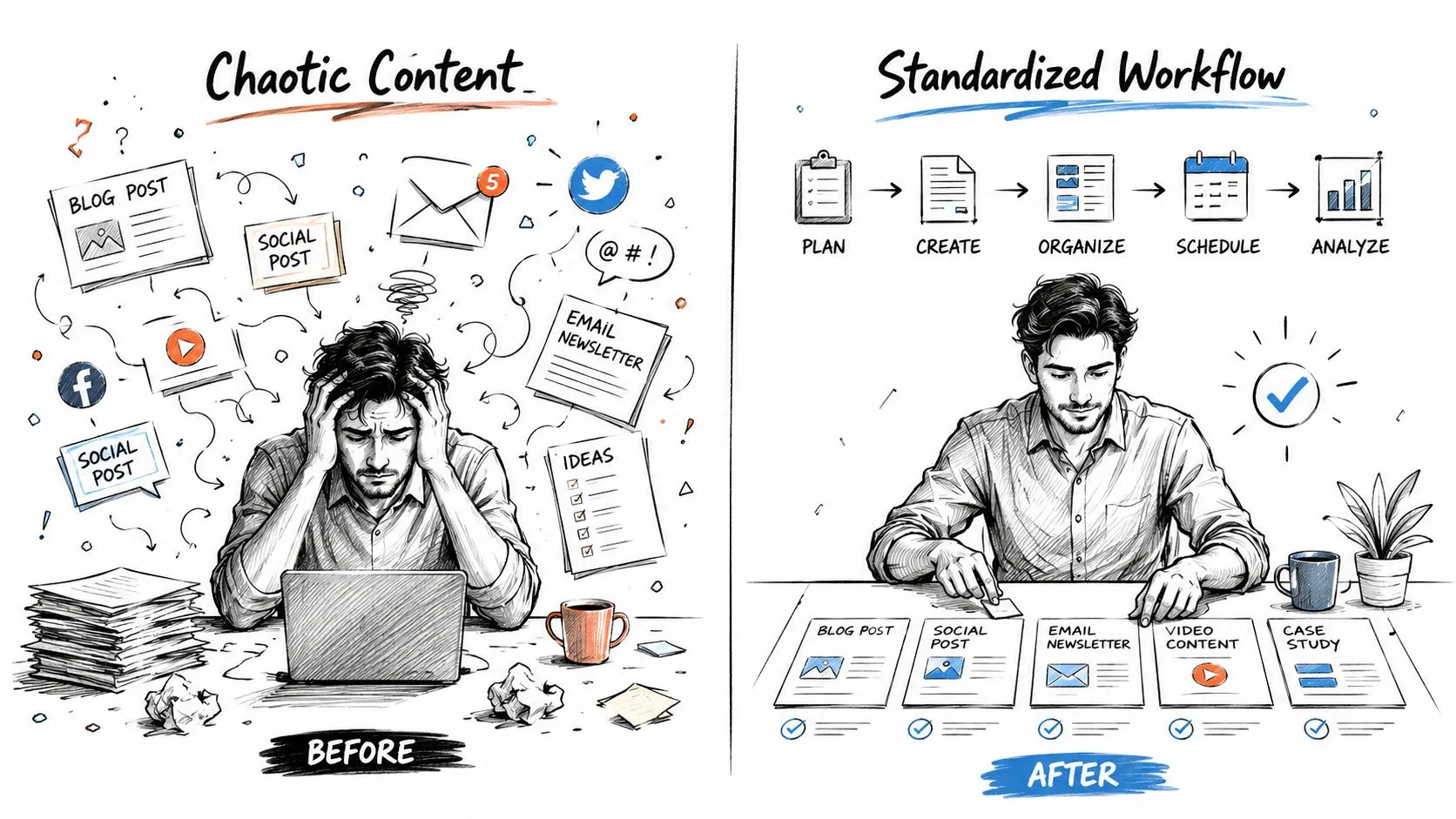
Marketing
Before standardization, a content team often works from a blur of ideas, pings, approvals, and rewrites. The strategist briefs in a doc. The writer asks for examples in Slack. Legal comments arrive late. Social needs resized assets nobody requested earlier.
After standardization, the team uses one intake form, one brief template, a defined review sequence, and a checklist for channel-specific assets. Writers still have freedom in angle and voice within the brand rules, but the handoffs stop breaking. The work feels less chaotic because the process does more of the remembering.
HR
HR teams often feel the pain during onboarding. One manager prepares a strong first week. Another forgets equipment, access, and training until the new hire arrives. The experience changes based on who happens to be organized.
A standardized onboarding workflow fixes that with a shared checklist, role ownership, and timing rules. If your team is building repeatable people processes, this resource on creating HR policies with AI is a practical companion because it connects policy drafting with the actual workflows people follow.
Sales
Sales teams usually see inconsistency in CRM hygiene and handoff quality. One rep logs clean notes and next steps. Another writes two vague lines and moves on. Forecast calls become debates because the data quality varies by seller.
A standardized sales process doesn't mean forcing every rep into the same style. It means defining critical standards. Required fields, stage exit criteria, handoff notes, and follow-up timing all become clear. Managers get more reliable visibility, and downstream teams don't need to reconstruct account history.
Analytics
Analytics teams often receive reporting requests that are incomplete from the start. Someone asks for “a dashboard” without defining audience, decisions, timeframe, or the exact metric logic. Analysts spend half their time clarifying the request and the other half reworking the output.
A standardized intake process changes the conversation. Requests now need a business question, owner, deadline, audience, and data source assumptions before work begins. Analysts produce fewer surprise iterations because the team agreed on the shape of a good request before analysis started.
Measuring Success and Avoiding Common Pitfalls
A standardized process should make work feel easier within a few weeks. Fewer follow-up messages. Fewer "who owns this?" questions. Fewer last-minute fixes.
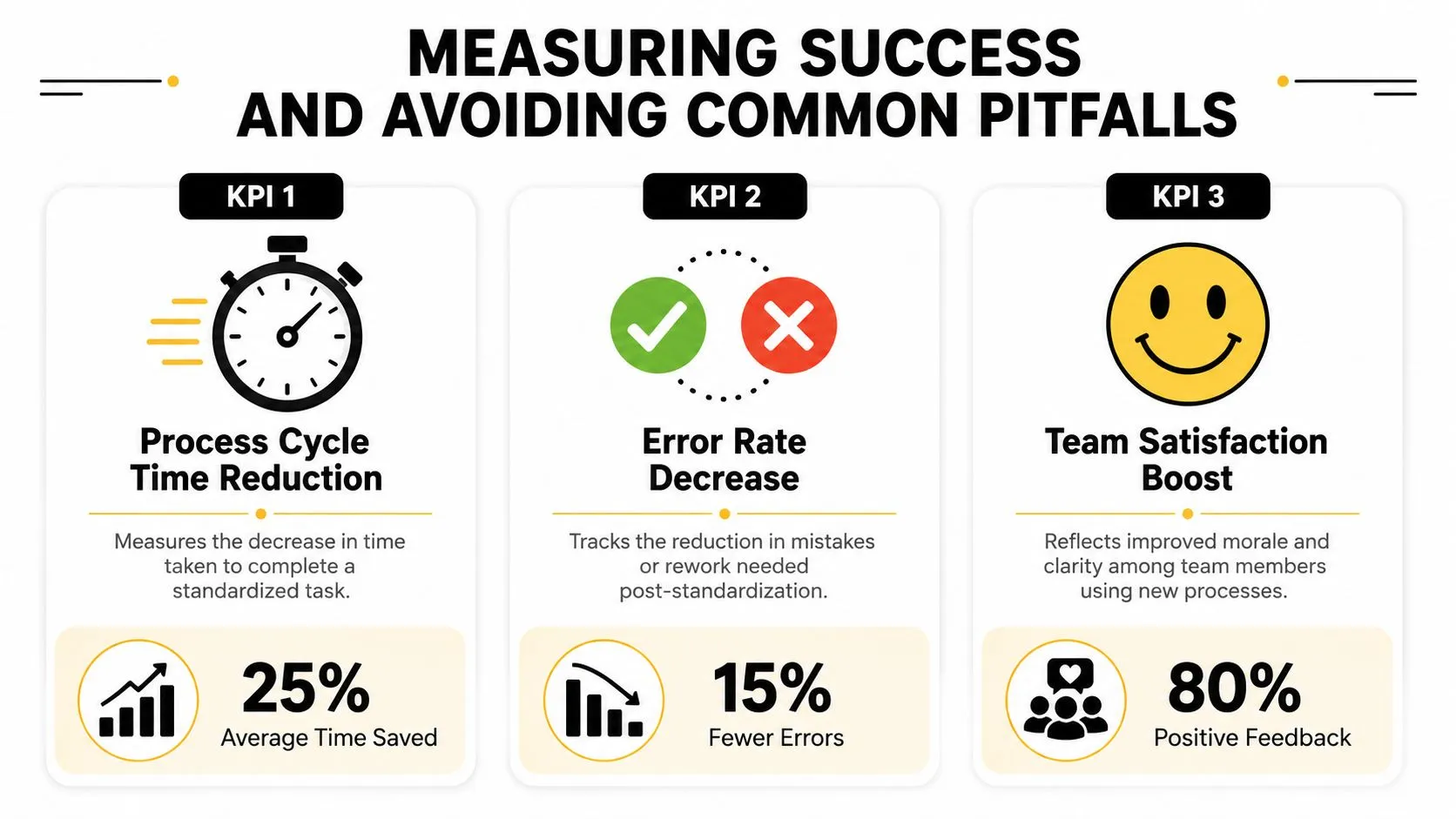
That is why measurement matters. You are checking whether the new route gets the team to the destination faster, with fewer wrong turns. Latenode's guidance on business process standardization recommends tracking at least three distinct KPIs per standardized process: one for speed, one for quality, and one for compliance.
What to measure
A practical scorecard can stay simple:
- Speed: Cycle time, throughput, or time from request to completion
- Quality: Error rate, rework rate, or number of corrections after review
- Compliance: Percentage of completions that followed the defined process
Compliance is the metric non-technical teams often miss.
If a hiring workflow still feels messy, or campaign approvals still bounce around, you need to know why. Is the standard poorly designed? Or are people skipping it because it is buried in a doc, unclear, or too slow to use? Without an adoption metric, those two problems look identical.
What usually goes wrong
One common problem is paper-only standardization. A team writes the SOP, saves it in a shared folder, and expects behavior to change. That is like printing a recipe and assuming dinner cooks itself. The true measure is whether the checklist, template, or form shows up inside the daily workflow people already use.
Another problem is standardizing too much. In digital work, especially with AI, teams sometimes try to script every decision. That creates the standardization paradox. The parts that repeat should be consistent, while the parts that require judgment should stay flexible. A marketer may need a fixed intake form for campaign requests, but still need freedom to shape the message. A recruiter may need a consistent interview scorecard, but still need room to probe an unusual candidate background.
A third problem is starting with tools before agreement. Teams build automations, prompts, or templates before they have defined the actual handoff, approval rule, or definition of done. That usually creates faster confusion. The process gets executed more quickly, but not more clearly.
AI can help here, but only if you use it in the right order. Use it first to map the current process, spot repeatable decisions, and draft a cleaner version. Then use it to create SOPs, forms, and prompt templates that support the standard. For example, an HR team could ask AI to compare five onboarding checklists and produce one shared version. A sales team could use AI to audit CRM notes and flag where reps are skipping required fields. Those are practical shortcuts, not theory.
One more trap is treating the standard as permanent. In AI-supported workflows, prompts, tools, and edge cases change quickly. A good process owner should review friction points regularly, update weak steps, and keep the standard current enough that people still trust it.
A safer pattern looks like this:
- Pilot first: Test the process with a small group and watch where people get stuck
- Review exceptions: If the same exception appears repeatedly, update the standard
- Keep ownership clear: One person should maintain the process and approve changes
- Use lightweight AI checks: Ask AI to summarize failure patterns, draft revisions, or compare actual work against the standard
Good standardization reduces repeatable confusion without flattening good judgment. That balance is what makes the process useful to marketers, HR teams, sales reps, and anyone else doing digital work that mixes structure with creativity.
From Chaos to Consistency Your Path Forward
Process standardization works best when you treat it as relief, not red tape. The point isn't to turn smart people into robots. The point is to remove repeatable confusion so smart people can do higher-value work.
For non-technical teams, that often means starting with one annoying workflow that keeps wasting time. A messy approval chain. A weak handoff. A reporting request process that always starts with missing information. Fix one of those well and people quickly see the value.
AI makes this easier because it can help you map the current state, draft a cleaner future state, write SOPs, and review weak spots before they create rework. Used well, it becomes a process partner. Not a replacement for judgment, but a fast assistant for structure, clarity, and iteration.
Start small. Pick one process. Standardize the parts that should be consistent. Leave room for judgment where the work benefits from flexibility. Then improve it as reality teaches you more.
If you want practical help building AI-supported workflows without getting buried in theory, AI Academy is a strong next step. It's built for working professionals who want fast, job-relevant lessons on tools like ChatGPT and Claude, with prompt templates and hands-on tutorials that make process improvement much easier to apply in real teams.