Is Adobe Podcast worth it in 2026?
Free Enhance Speech limits, the three US prices for Firefly Pro, and when a transcript editor is the better buy.
The quick answer
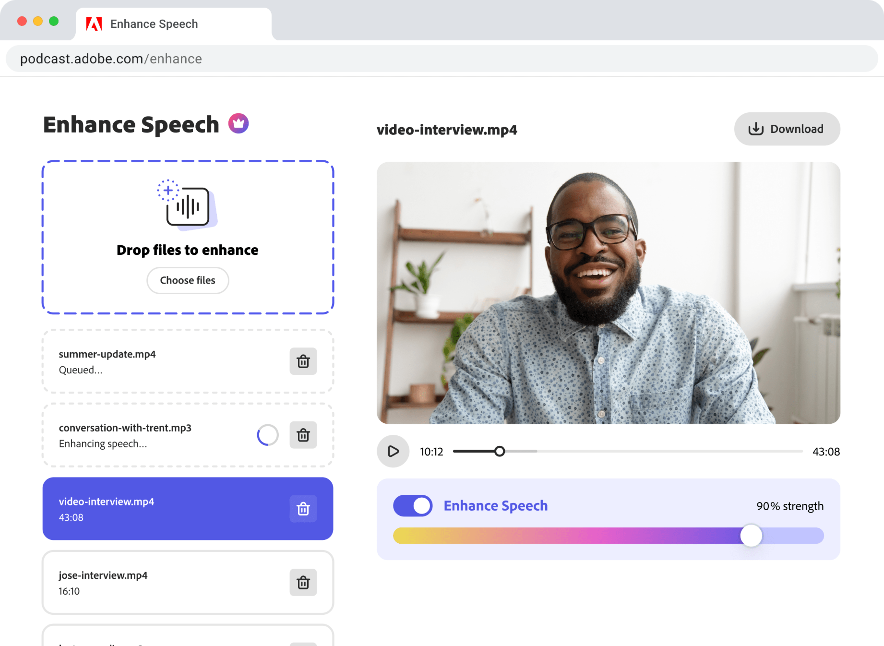
Adobe Podcast is worth paying for when one file runs past 30 minutes, you need video, or you will use the Firefly tools bundled with the upgrade. Free Enhance Speech takes audio only, up to that length and 500 MB, and stops at one hour a day. The paid plan is Firefly Pro: $19.99 a month before tax, $16.99 a month on a year-long plan billed monthly, or $167.99 paid up front.
Short answer: stay on the free plan if you can split each episode into audio files under the free cap and you only need one hour of cleanup a day. Pay when a single file is longer, you are enhancing video, or you want the Firefly credits that come with the upgrade. That upgrade is Firefly Pro, not a podcast-only subscription.
Adobe Podcast is a browser tool with three jobs. Enhance Speech cleans a recording. Studio records remote guests and lets you cut by deleting words in the transcript. Mic Check looks at your microphone. The plans page still talks about Premium, and the checkout it opens sells Firefly Pro with Podcast Premium included. Limits and prices below were read on Adobe's pages on 30 October 2026. This is not a hands-on test of the audio.
Adobe Podcast free vs Firefly Pro, as of 30 October 2026
Dollar amounts are before tax, read 30 October 2026 on Adobe checkout for the Firefly Pro offers that open from Adobe Podcast when the country is the United States. $14 a month and $239.88 are Adobe's own figures for the upfront plan's monthly equivalent and for twelve month-to-month payments. Feature caps are from the plans page.
| Feature | Free | Firefly Pro |
|---|---|---|
| Price | $0 | $19.99/mo, or $16.99/mo billed monthly for a year, or $167.99 paid up front |
| Enhance Speech input | Audio only | Audio and video (MP4, MOV, and more) |
| File cap | 30 minutes, 500 MB | 2 hours, 1 GB |
| Enhanced speech per day | 1 hour | 4 hours |
| Bulk upload and strength | One file at a time, no strength control | Bulk upload, plus speech, music, and ambience control |
| Studio projects | 30 minutes, 2 downloads a day | 2 hours, unlimited downloads |
| Speaker-separated originals | Not included | Included |
| Podcast logo on exports | Stays | Can be removed |
| Also in the plan | Mic Check | 4,000 generative credits a month, plus unlimited generation on select image models |
What you get
- ✓A usable free tier: short audio files, Mic Check, transcription, and transcript editing without a subscription.
- ✓A clear paid ceiling: 2-hour files, video, bulk upload, and 4 hours of Enhance Speech a day.
- ✓Mix control on the paid plan: separate adjustment for speech, music, and ambience, plus a strength slider.
- ✓Remote recording that keeps going: each guest is captured in their own browser, and the session keeps saving if a connection drops.
- ✓The upfront year is the cheap path among the three ways to pay, if you will stay the full term.
The trade-offs
- ✕A 30-minute free file cap splits a normal episode in two and can burn the whole daily hour.
- ✕The paid plan is a Firefly bundle. You pay for credits and image generation even if you only wanted cleaner speech.
- ✕The discounted monthly year has an exit fee after 14 days: 50% of the months left, on Adobe's US terms.
- ✕Studio is Chrome on desktop only, and you can enhance a whole project, not a single region.
- ✕Blocked in several countries, and speaker detection is missing on EDU plans.
Worth it if…
- →You regularly have a single file longer than the free cap, or you enhance video.
- →You will use the Firefly credits and image models that Firefly Pro includes.
- →You record remote guests in the browser and want each person on a separate original track.
- →You can pay the year up front and you expect to stay the full term.
Skip it if…
- →Your episodes are short audio and one hour of cleanup a day is enough.
- →You want filler-word edits and a full editor, which is a different product.
- →You might cancel an annual plan in the first few months.
- →You are in a country Adobe excludes, or you need Studio somewhere other than Chrome on a desktop.
What the free plan actually lets you finish
Adobe's feature comparison lists Free Enhance Speech as audio only, one file at a time, 30 minutes and 500 MB per file, and one hour a day. A 45-minute episode does not fit as one file. Split it into two pieces under that cap and 45 minutes of the daily allowance are used, leaving 15 minutes for other audio that day.
A weekly show can stay free if you accept the split and you do not need video, a strength slider, or several files in one sitting. Free Studio matches that shape: short projects, and two downloads a day. Mic Check, transcription, and cutting by deleting transcript text are included. Speaker-separated originals and a logo-free export are not.
The Podcast FAQ (updated 15 April 2026) says Enhance Speech does not write new speech or translate it. It filters noise and artifacts, adjusts pitch and volume, and normalizes level. Clearer speech and less background noise produce a better result. You can only enhance a whole project, not one region inside it. The audio you hear while a Studio session is live can differ from the file you download afterward, because the live mix is built for streaming.
What Firefly Pro costs in the US
The plans page button says Start free trial. It does not say how many days that trial lasts, so read the length on the checkout screen before you confirm. The paid rates behind it, before tax, are three ways to buy the same Firefly Pro plan.
Month to month is $19.99. Adobe's checkout also shows $239.88 as the cost of twelve of those payments. That is twelve bills, not one charge. A year-long plan billed monthly is $16.99 a month, or $203.88 over the year. Paying the year up front is $167.99, which the same checkout lists at $14 a month. Up front versus twelve monthly bills saves $71.89 (our arithmetic). Up front versus the year-long monthly plan saves $35.89 (our arithmetic).
Those dollars also buy video, bulk upload, a strength control, and separate handles for speech, music, and ambience, plus the longer file and daily caps in the table. Studio downloads are unlimited, and you can take the original recording split by speaker. The same plan includes 4,000 generative credits a month and unlimited generation on select image models. If you will not use the credits, you are still paying for them. Someone who already wants that image allowance is not buying a podcast tool on top. Our Firefly review covers the credit side.
Cancellation, Chrome, and the limits that remain
The cheap year is the one with the exit fee. Adobe's US subscription terms (updated 27 January 2026) say that after 14 days, an annual plan paid monthly charges a cancellation fee of 50% of the remaining balance. Cancel in month nine and you pay half of the three months left. At the $16.99 rate, three months is $50.97 and half is $25.49 (our arithmetic, not a fee Adobe prints for this plan). The same page says an annual plan paid up front is not refunded if you cancel before the year ends. Month to month does not use that early-termination fee.
Studio is narrower than "in your browser." Technical requirements (updated 4 August 2025) say it runs only in Google Chrome on desktop. Enhance Speech also runs in current Safari, Edge, and Firefox, on desktop and mobile. That page allows Studio uploads up to 5 GB and 2 hours, which is a ceiling. The free plan still stops projects at the short cap in the table. Finished audio is 48 kHz WAV at 16-bit, or 48 kHz MP3. Video exports are 1080p or 720p H.264. A separate track per speaker is a premium download.
Two more gates sit outside the price. The FAQ says Podcast is unavailable in China, Cuba, Iran, North Korea, Syria, Crimea, and the Donetsk and Luhansk regions. Speaker detection is not supported on EDU plans, and some accounts never see the option, depending on plan or region. Transcription in the product is a short language list: English, French, German, Hindi, Italian, Portuguese, and Spanish. Enhance Speech itself is language agnostic, which is a different claim from the transcript.
When a different tool is the actual purchase
Firefly Pro is the wrong invoice if the job is "remove ums and hand me a finished episode." Podcast will not replace a timeline. Descript is the closer buy when you want filler-word removal, studio sound, and text editing in one editor. Riverside is the closer buy when the product is the remote recording itself, with a separate track per guest and hosting after. Cleanvoice is the closer buy when you already edit elsewhere and only want the cleanup, billed by the hour of audio rather than as a creative suite.
Our ChatGPT podcast prompt pack has 30 prompts, counted on 30 October 2026 in the library entry 30 Best ChatGPT Prompts for Podcasters. They cover episode ideas, outlines, interviews, show notes, growth, and a production checklist. None of the 30 mention Adobe Podcast. The pack is the writing you do before you open Enhance Speech, which is the gap this subscription does not fill.
The verdict
For a weekly audio show you can split under the free cap, the free plan is the right price. Firefly Pro earns the fee when the file itself is too long, you are cleaning video, or you were already going to buy Firefly credits. Among the three ways to pay, the upfront year is the one that matches a tool you will still open in month ten.
The annual plan billed monthly looks cheaper than month to month and then charges you to leave. If you are testing Podcast against a transcript editor, stay month to month for a cycle, or stay on free and split the files. Do not buy the year because a single noisy interview annoyed you.
Better alternatives?
If it is not the right fit, these are worth a look.
Descript
A full transcript editor with studio sound and filler removal, for people who want the episode finished in one app.
Riverside
Remote recording with a separate track per guest, plus hosting, when the session matters more than a speech filter.
Cleanvoice
Cleanup billed by the hour of audio, for editors who already have a timeline and do not want a Firefly plan.
Adobe Firefly
The plan you are actually buying. Read it if the credits, not the speech cap, are the reason to pay.
Frequently asked questions
Is Adobe Podcast free?▾
Yes, with hard caps. Free Enhance Speech is audio only, one file at a time, up to 30 minutes and 500 MB, and one hour a day. Free Studio projects stop at that same length, with two downloads a day. Video, bulk upload, the strength control, speaker-separated originals, and logo removal are on Firefly Pro.
How much does Adobe Podcast Premium cost?▾
New checkout from Adobe Podcast sells Firefly Pro, not a separate Premium price. The US rates before tax are the three figures in the table: month to month, a year billed monthly, or one upfront payment. The plans page offers a free trial and does not state how many days it lasts. Read that on the checkout screen.
What if my recording is longer than 30 minutes?▾
Free Enhance Speech will not take it as one file. Split it under the free file cap, and remember the one-hour daily limit. Firefly Pro is the tier that accepts a long file and video. You still enhance the whole project, not a selected region.
Can I cancel Firefly Pro without a fee?▾
It depends on the commitment. After 14 days, Adobe's US terms charge an annual plan paid monthly 50% of the remaining balance. An annual plan paid up front is not refunded if you cancel before the year ends. Month to month does not use that early-termination fee.
Does Enhance Speech work in every language?▾
Adobe says Enhance Speech is language agnostic and does not translate or generate speech in another language. Results still depend on how clearly the person speaks and how loud the background is. The transcript is a shorter list: English, French, German, Hindi, Italian, Portuguese, and Spanish. Speaker labels are unavailable on EDU plans.