Your email calendar is full. You've already sent the newsletter, the promo, the welcome series tweak, and the “quick” resend that somehow took half your afternoon. Then you open your reporting dashboard and see the same frustrating pattern: decent effort, average results, and no clear answer for what to change next.
That's where many teams are right now. They're not lazy, behind, or “bad at email.” They're stuck in a batch-and-blast routine where every campaign gets built with care, but most decisions still rely on rough averages, old segments, and educated guesses.
AI for email marketing can help, but only if you treat it like a practical assistant instead of a magic box. You don't need to code. You don't need a data science team. You need a clear workflow, a few useful prompts, and a rollout plan that keeps your brand, data, and judgment in the loop.
From Overwhelmed to Optimized with AI
A marketer at a small SaaS company spends Monday writing a campaign for trial users. By Tuesday, she's changing subject lines. On Wednesday, she's second-guessing the send time. By Friday, the campaign has gone out, and the performance looks fine, but not better. That “fine” result is the trap. It doesn't fail badly enough to force a reset, but it doesn't improve enough to create momentum.
Most email teams know this feeling. They build campaigns by hand, reuse broad audience segments, and rely on what worked last quarter. The work gets done, but the process stays heavy.
AI changes that when you use it as a co-pilot for decisions that are hard for humans to do at scale. Not because marketers lack skill. Because no person can manually review every open pattern, click habit, browsing signal, and timing preference across an entire list in a realistic workday.
Practical rule: Use AI first where your team is repeating judgment calls at scale, not where creative strategy matters most.
That usually means tasks like spotting behavior patterns, drafting first-pass copy, suggesting subject line options, and helping determine who should receive which email and when. It can turn “send this to everyone who downloaded the guide” into “send this version to engaged evaluators, this one to quiet prospects, and hold back the people who are already getting too many emails.”
The shift isn't from human marketing to robot marketing. It's from manual guesswork to assisted decision-making. That's a much safer and more useful way to think about AI for email marketing.
What AI in Email Marketing Actually Means
Most non-technical marketers hear “AI” and picture something opaque, expensive, or hard to control. In email, it's usually much simpler than that.
Think of AI as a data-savvy intern
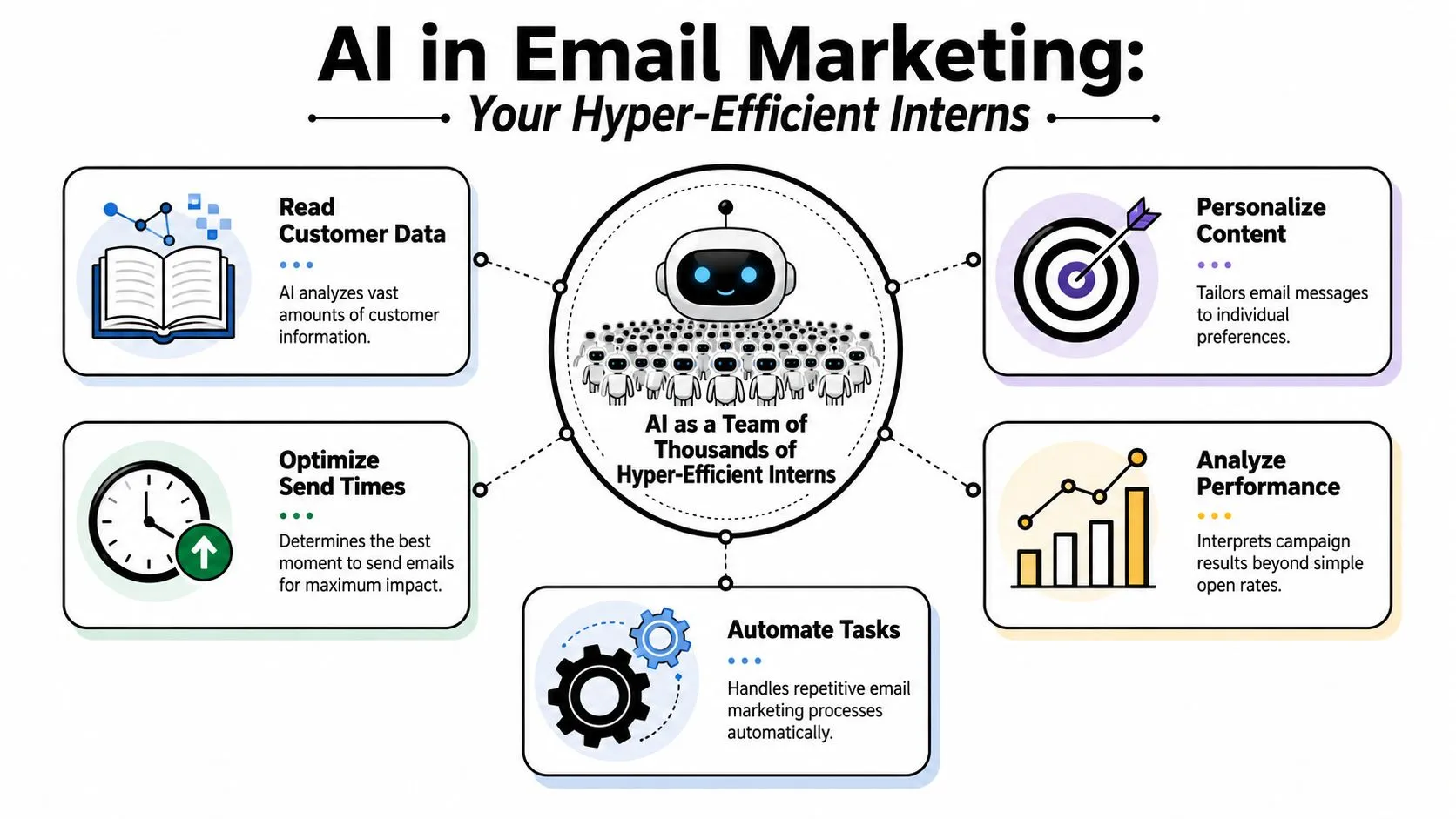
A good analogy is this: AI is like a room full of hyper-efficient interns who can read every customer interaction in seconds, organize patterns instantly, and draft ideas fast. But those interns still need a manager. They don't know your positioning, your compliance rules, your product nuance, or the line between “persuasive” and “off-brand.”
That's why the best way to use AI in email marketing is with supervision. You set the goal. You give the context. You review the output. The tool handles the speed and pattern recognition.
If you want a second perspective focused on business messaging and campaign workflows, this Guide to AI email for B2B marketers is a helpful companion read.
The three jobs AI does best
In practice, AI usually helps email teams in three ways:
- Pattern recognition: It spots groups of people who behave similarly. For example, subscribers who click product education emails but ignore discount-focused ones.
- Prediction: It estimates likely next actions, such as the best time to send or which users may be drifting toward inactivity.
- Generation: It creates drafts. That can mean subject lines, preview text, body copy, CTAs, or content variations for different segments.
Here's where people get confused. They assume all “AI” is generative, meaning text or images. That's only one slice of it. Some of the most valuable uses are invisible. A model notices that one cohort tends to respond late in the evening, while another engages after product-use milestones. You may never see that logic directly, but you'll see the recommendation it produces.
AI is most helpful when the task is repetitive, data-heavy, and still benefits from a marketer's final judgment.
That's why AI doesn't replace the strategist. It gives the strategist better raw material. You still decide what story the campaign tells, what offer is appropriate, and what your audience should feel, know, or do next.
Powerful AI Use Cases to Transform Your Emails
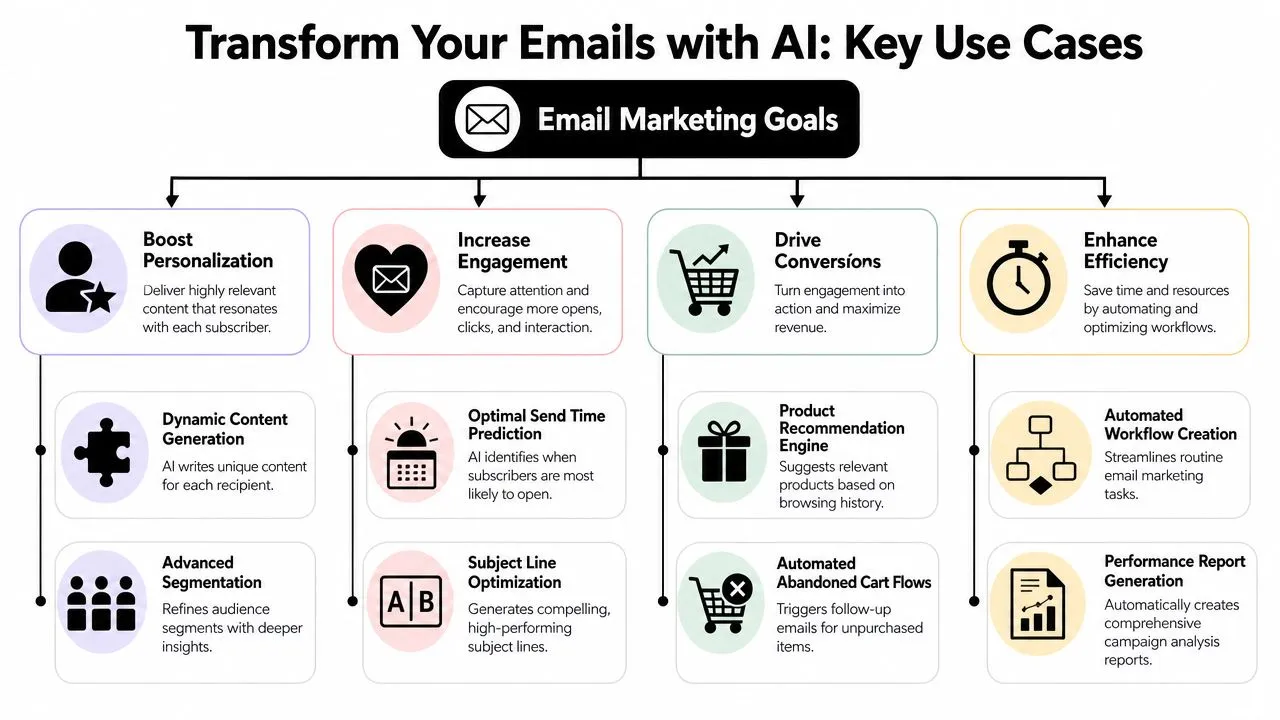
The easiest way to understand AI for email marketing is to tie it to familiar problems. Low engagement. Generic copy. Weak segmentation. Slow production. AI is useful when it solves one of those pains directly.
A broad industry benchmark made this practical for marketers. A major 2022 Adobe finding, cited in later industry roundups, reported that AI-driven email marketing increased click-through rates by 13% and revenue by 41% compared with non-AI campaigns, according to Wix's email marketing statistics roundup. That matters because it connects AI to core business outcomes, not just faster writing.
When segmentation gets smarter
Before AI, many teams segment with static filters: industry, signup date, job title, purchase history. Those still matter, but they don't capture intent very well.
With AI support, segmentation can become behavior-aware. Instead of one “trial users” bucket, you might break that audience into:
- Highly active evaluators: They log in often and click product education emails.
- Quiet but curious prospects: They visit pricing pages but don't engage much in email.
- Fatigued contacts: They've received several messages recently and engagement is dropping.
That kind of sorting changes the campaign itself. One group gets a product walkthrough. Another gets a comparison email. A third gets fewer messages for a while.
Where marketers feel the lift fastest
Some use cases deliver value quickly because they fit into existing workflows.
- Subject line generation: AI can produce multiple options in different tones, such as direct, curiosity-led, benefit-first, or urgency-light.
- Body copy drafting: Marketers can turn a rough outline into several versions for different segments without writing from scratch each time.
- Send-time decisions: AI can help determine when each recipient is more likely to respond instead of forcing one universal schedule.
- Content recommendations: For ecommerce or content-driven brands, AI can suggest products, articles, or next steps based on previous behavior.
- Workflow assistance: It can help build welcome, re-engagement, and post-purchase sequences faster by proposing email logic and copy blocks.
A lot of teams pair these AI tasks with automation basics. If you need a clean primer on those mechanics, EmailScout's email automation guide explains the foundations well.
This short video gives a useful visual overview before you build your own process.
If you want plug-and-play copy ideas, this set of ChatGPT prompts for email marketing is useful when you're staring at a blank screen.
Implementing Your First AI-Powered Campaign
Your first campaign shouldn't be ambitious. It should be controlled. Pick one audience, one business goal, and one place where AI can improve a decision you already make manually.
Start with one segment and one goal
A good first campaign might target subscribers who showed recent interest but didn't convert. That could be trial users who visited pricing, shoppers who browsed but didn't purchase, or leads who clicked a webinar follow-up but didn't book a demo.
Your goal needs to be narrow. Not “improve email.” Try something like:
- Increase clicks to a product page
- Recover inactive trial interest
- Drive repeat purchases from recent buyers
Once you know the goal, ask AI to help with the audience logic. You're not asking it to invent a strategy. You're asking it to help summarize behavior signals into a usable segment.
AI email marketing systems are most effective when they use predictive send-time optimization and behavioral segmentation together, as described in Litmus's guide to AI in email marketing. In simple terms, the model learns from historical opens, clicks, and conversion patterns to estimate the best delivery window for each recipient while also detecting over- or under-messaged groups.
That means your first AI campaign should combine both ideas. Who should get the email, and when should each person get it?
Build the campaign with prompts
You don't need fancy prompt engineering. You need clear instructions, the same way you'd brief a junior marketer.
Use this pattern:
- Role: Tell the tool who it should act like.
- Context: Explain your audience, offer, and brand.
- Task: Ask for one specific output.
- Constraints: Add tone, length, and compliance rules.
Here's a copy-paste table you can use.
AI Prompt Templates for Email Marketers
| Task | Prompt Template |
|---|---|
| Segment discovery | “Act as an email marketing analyst. Based on this audience description, suggest 3 useful behavioral segments for a campaign promoting [offer]. Audience details: [paste details]. For each segment, explain why they differ and what message angle fits best.” |
| Subject line ideas | “Act as a lifecycle email strategist. Write 10 subject lines for an email to [segment]. Goal: [goal]. Tone: [tone]. Avoid clickbait. Keep each option distinct. Also write matching preview text for the best 3.” |
| Body copy draft | “Act as a senior email copywriter. Draft a promotional email for [segment] about [offer]. Goal: [desired action]. Brand voice: [describe voice]. Structure: short opening, 3 benefit bullets, clear CTA, natural tone, no hype.” |
| Personalization angles | “Given this segment profile, suggest 5 ways to personalize the email beyond first name. Focus on behavior, product interest, customer stage, or likely objections.” |
| CTA testing | “Generate 12 CTA button options for this campaign. The audience is [segment]. The offer is [offer]. Mix direct, benefit-led, and curiosity-led wording. Keep them short.” |
| Send-time planning | “Review this summary of audience behavior [paste summary]. Recommend how to think about send timing and message frequency for each subgroup. Explain your reasoning in plain language.” |
| Quality check | “Review this draft email for clarity, brand consistency, repetition, and compliance risk. Flag any lines that sound too generic, too pushy, or not aligned with a human brand voice.” |
| Test plan | “Create a simple A/B test plan for this email. Suggest one variable to test first, what to hold constant, and what success signal to watch.” |
If you want a more guided walkthrough, this course on using ChatGPT to create an email marketing campaign is a practical resource for turning prompts into a finished send.
Launch with guardrails
Before sending, review the campaign like a human editor, not a passive approver.
Check these five areas:
- Segment logic: Does the audience match the message?
- Brand voice: Does the copy sound like your company, or like a generic assistant?
- Offer fit: Is the CTA appropriate for the recipient's stage?
- Frequency risk: Are you emailing people who already received too many recent messages?
- Fallback plan: If the AI-generated variation underperforms, do you have a control version ready?
Treat AI output as a strong draft, not a final deliverable.
A simple first workflow looks like this:
- Pull the audience data from your ESP or CRM.
- Ask AI to propose sensible sub-segments.
- Choose one segment manually.
- Generate subject line and body copy options.
- Edit for accuracy and tone.
- Apply send-time optimization if your platform supports it.
- Hold out a control group or at least compare against your usual process.
- Document what the AI changed.
That last step matters. If you don't document the difference between your standard campaign and your AI-assisted one, you'll struggle to learn anything from the result.
Measuring What Matters with AI Analytics
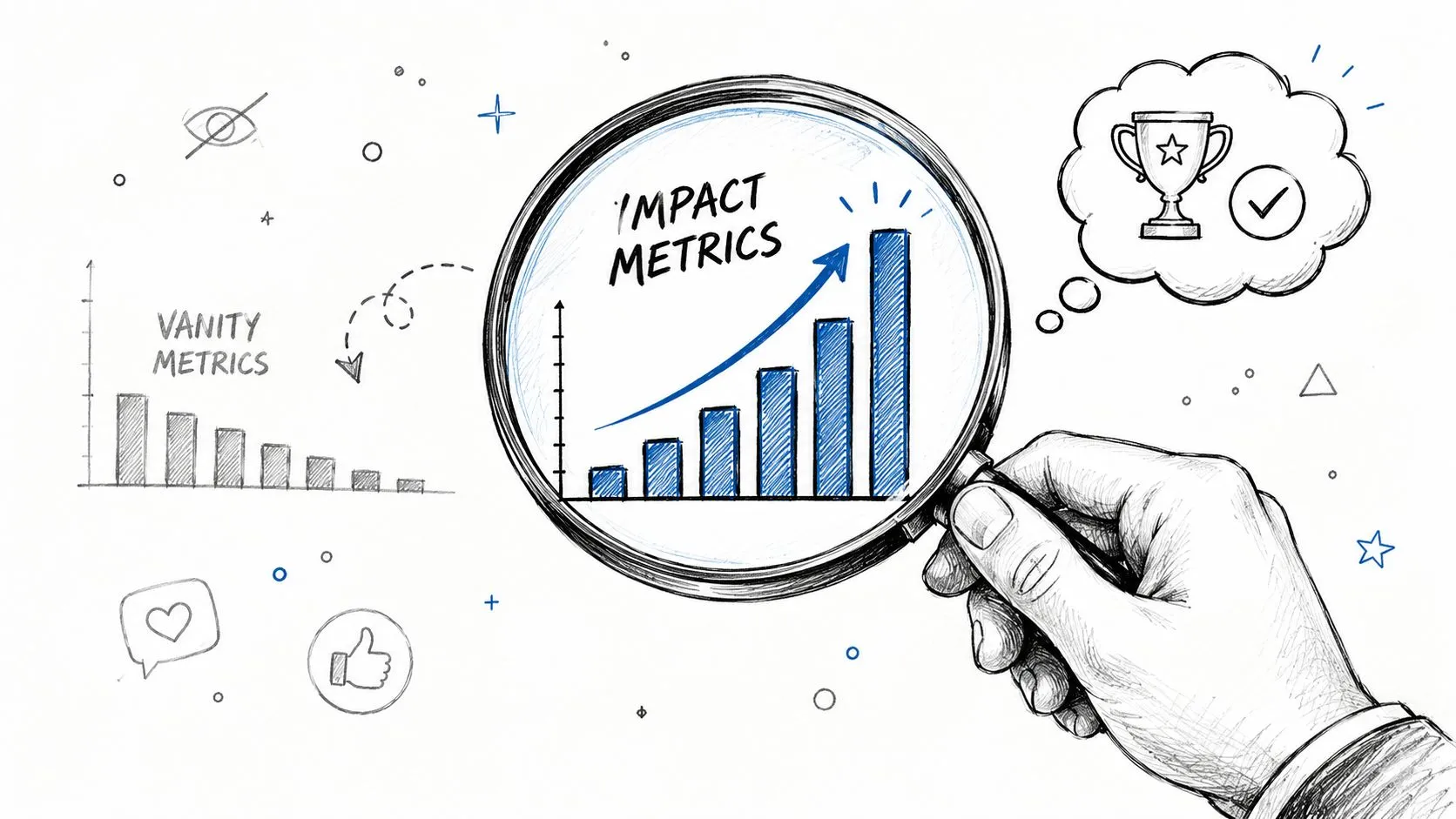
Many teams adopt AI, see a lift in surface-level engagement, and stop there. That's understandable, but it's not enough if you need to prove business value.
Why open rates aren't enough
A key gap in AI coverage is measuring real incrementality, not just open-rate uplift. Salesforce notes that AI can optimize send times, content selection, and subject-line testing, while Klaviyo emphasizes iterative testing and asking why a variant won, but neither gives a full method for isolating AI's causal impact versus baseline automation, as summarized in Salesforce's overview of AI for email.
That's the fundamental issue. If an AI-written subject line gets more opens, was that meaningful? Maybe. But if those extra opens didn't produce better downstream behavior, the business effect may be limited.
The useful question isn't “Did AI improve this metric?” It's “Did AI improve an outcome we care about?”
A practical measurement setup
For non-technical teams, the cleanest approach is a controlled comparison.
Use a simple framework:
- Create a control version: Build one campaign using your normal process.
- Create an AI-assisted version: Change one major element, such as segmentation, send-time selection, or copy drafting.
- Hold the rest steady: Keep the offer, target audience goal, and core CTA as similar as possible.
- Review downstream outcomes: Look past opens to clicks, conversions, revenue per email, repeat behavior, or retention-related actions.
You can also ask AI to summarize performance patterns after the campaign. That's different from trusting it to judge success on its own. A useful prompt might ask it to compare the control and assisted version, identify likely drivers, and list questions the team should investigate next.
A strong review cadence includes:
- Immediate signals: Delivery, clicks, unsubscribes, conversion actions
- Short-term quality: Which segment responded best, and whether frequency looked too high
- Business impact: Whether the campaign supported revenue, retention, or reactivation goals
Plainly put, AI analytics should help you answer “what changed, why did it change, and should we repeat it?” If you can't answer those three questions, your reporting is still too shallow.
A Smart Rollout Plan for AI in Email Marketing
The fastest way to create AI chaos is to give everyone access to a tool and hope good habits appear. They won't. Teams need boundaries before they need scale.
A better approach is phased adoption. Start with low-risk tasks. Expand only after your team has reviewed outputs, documented wins and misses, and agreed on quality standards.
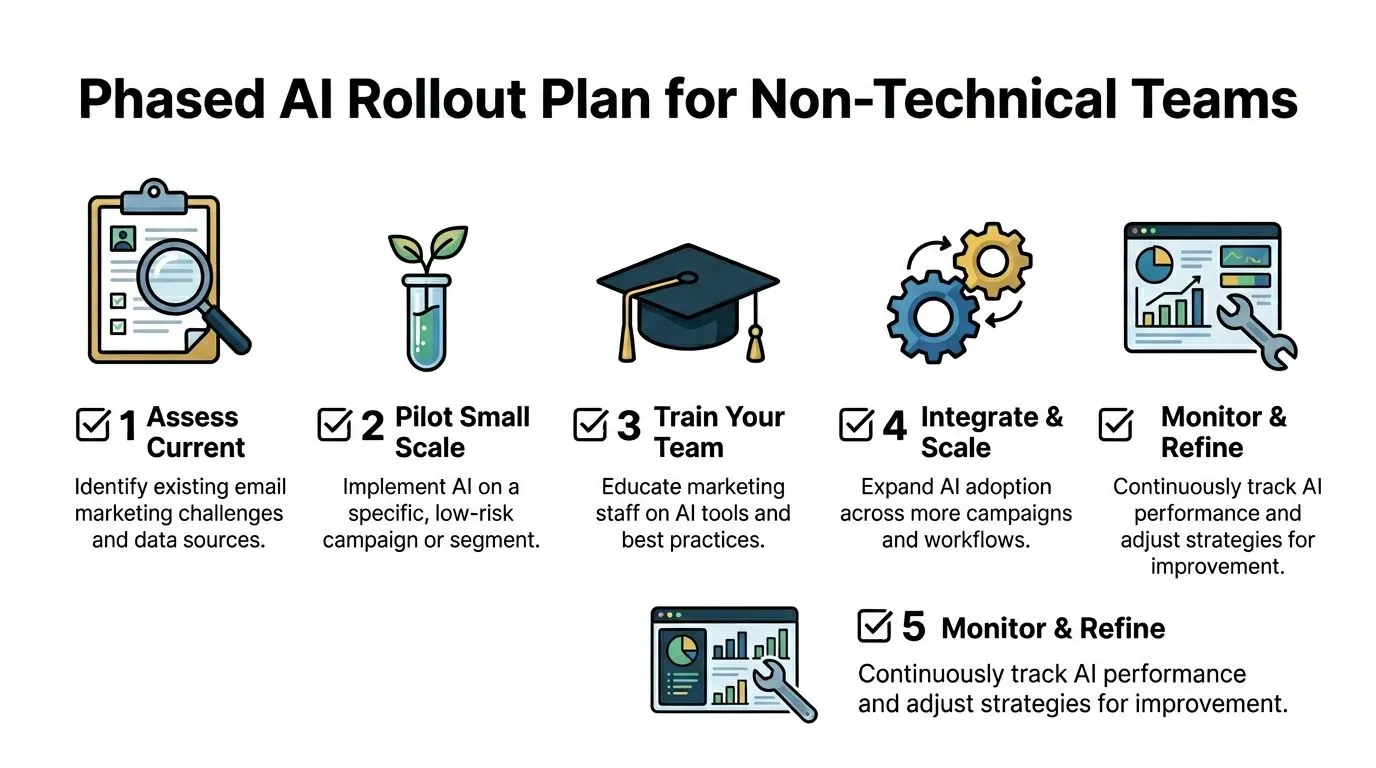
Phase one pilot
Choose one use case that is useful but contained. Subject line ideation is a strong starting point. So is first-draft body copy for one existing email flow.
At this stage, keep humans close to every step. Every output should be reviewed, edited, and approved manually. The point is to learn where the tool helps and where it tends to drift.
Phase two co-pilot
Once the team trusts the process, move into assisted production. AI can support segmentation ideas, content variations, and performance summaries, but marketers still make the final decisions.
Governance matters. A major underserved angle in AI for email marketing is governance, privacy, and human oversight. Klaviyo's guidance warns that AI should sit on top of a human-built foundation and still require human review for brand accuracy, segment validation, and performance checks, while opt-out handling and unsubscribe compliance remain mandatory, as explained in Klaviyo's discussion of AI pros and cons in email marketing.
Put that into policy. Don't leave it as a vague reminder.
Your team should define:
- Approved uses: Drafting copy, brainstorming tests, summarizing reports
- Restricted uses: Sensitive segmentation, compliance-sensitive messaging, unreviewed sends
- Review ownership: Who checks tone, legal risk, data use, and factual accuracy
- Data rules: What customer information can and can't be pasted into external tools
For broader operating habits, this guide to AI best practices for teams is useful when you're writing internal rules.
Human review isn't friction. It's quality control.
Phase three controlled autopilot
Only automate what has already been proven safe and effective. That might mean send-time optimization inside your ESP, product recommendation modules, or rule-based content assembly for recurring campaigns.
Even then, “autopilot” shouldn't mean invisible. Set regular checks for:
- Brand drift: Is the writing getting flatter or stranger over time?
- Audience fatigue: Are some cohorts receiving too much email?
- Compliance basics: Are consent status and opt-outs respected in every workflow?
- Performance decay: Is the automation still working, or just running?
The best AI rollout plans feel a little conservative at first. That's a good sign. Email is a trust channel. Once you send something off-brand, inaccurate, or poorly targeted, you can't unsend it.
Conclusion You Are Still the Email Strategist
The strongest case for AI in email marketing isn't that it writes faster. It's that it helps marketers make better decisions with less manual effort. It can spot patterns a human would miss, draft options a team can refine, and support timing and segmentation choices that are hard to manage by hand.
But none of that changes the core job. You still decide what the campaign is for. You still define the audience, protect the brand voice, and make judgment calls about tone, timing, and trust.
That's the opportunity for non-technical teams. AI can take some of the mechanical weight out of email work so marketers can spend more time on positioning, offer strategy, customer empathy, and testing smarter ideas.
Start small. Pick one campaign. Use AI to improve one decision. Review it carefully. Measure the result against something real. Then expand from there.
You don't need to become a machine learning expert. You need to become a better manager of intelligent tools. That's a much more practical skill, and it's already within reach.
If you want a practical way to build those skills, AI Academy is a strong next step. It's built for working professionals who want short, usable lessons on ChatGPT, Claude, Midjourney, Perplexity, and dozens of other AI tools, with prompt templates and workflows you can apply to marketing work right away.