You open one AI tool to summarize meeting notes, another to draft an email, and a third to clean up a spreadsheet. One gives a sharp answer. Another sounds confident but wrong. A third asks for data you probably shouldn't paste into a public chatbot. By noon, you're not saving time. You're managing uncertainty.
That's where most professionals are with AI right now. The issue usually isn't motivation. It's the lack of a simple system.
AI is no longer a fringe skill. A 2025 overview found that 87% of large enterprises had implemented cognitive solutions, employees were saving an average of 2 to 3 hours per week, and organizations using GenAI could see an average ROI of USD 3.7 for every dollar spent through disciplined use (Master of Code AI statistics). The pattern is clear. Value comes from using AI on purpose, not using it everywhere.
What most people need isn't more hype, more tools, or more prompt hacks. They need an AI Operating System. That means a personal and team-level set of rules for what you use AI for, what data you never share, how you check outputs, how you build repeatable workflows, and how you onboard other people without chaos.
Think of it as the working habits behind good AI use. Not theory. Not technical architecture. Daily behavior.
If you build that operating system, AI gets calmer. You stop guessing. Your prompts improve. Your risk drops. Your team starts producing work that is faster, more consistent, and easier to trust.
Introduction You Need an AI Operating System
Monday morning, a team opens three different AI tools to do the same job. One person asks for a client summary, another drafts a customer email, and a third uploads notes that should never leave the company. By noon, the team has moved faster, but no one is fully sure which output to trust, which tool to keep using, or what should have been reviewed by a human first.
That is the true problem. AI errors usually come from inconsistent habits, not bad intentions.
An AI Operating System gives individuals and teams a shared way to work. It works like a playbook for daily AI use. Instead of relying on memory or personal judgment in the moment, you set a few repeatable rules ahead of time. That makes AI easier to use well, especially for non-technical teams.
At a practical level, your AI Operating System should answer five questions:
- What work should AI handle first
- What information is safe to use
- How should prompts be structured
- When does a human review the output
- Which tools are part of the approved workflow
The goal is not to use AI everywhere at once. The goal is to use it the same way, on purpose, for the right kinds of work. For many professionals, the best starting point is predictable work with clear inputs and easy checks. If a task repeats often and the result can be reviewed quickly, it is usually a good candidate.
Three habits that define an AI Operating System
-
Start with repeatable tasks
Use AI where the work shows up again and again. Meeting summaries, first drafts, note cleanup, categorization, and routine analysis are safer starting points than judgment-heavy decisions. -
Separate drafting from approval
Fast output is not final output. Treat AI as the first pass, then assign a clear review step before anything is shared, submitted, or published. -
Turn team norms into checklists
Verbal guidance fades fast. A one-page checklist, a short prompt template, and a simple approval rule give people something they can follow without guessing.
Here is a useful test: if a task is frequent, structured, and easy to verify, AI is usually a strong fit.
Teams that apply AI well are rarely the ones with the fanciest tools. They are the ones with clear defaults. They know which prompt template to start from, which data is off-limits, who reviews the output, and where the final version belongs. That is what an AI Operating System does. It turns abstract best practices into everyday habits people can follow under real work pressure.
The Governance Foundation Your Ethical Compass
Governance sounds formal, but in practice it means something simple. What are your rules of the road? If your team can't answer that clearly, people will rely on instinct. That's when mistakes multiply.
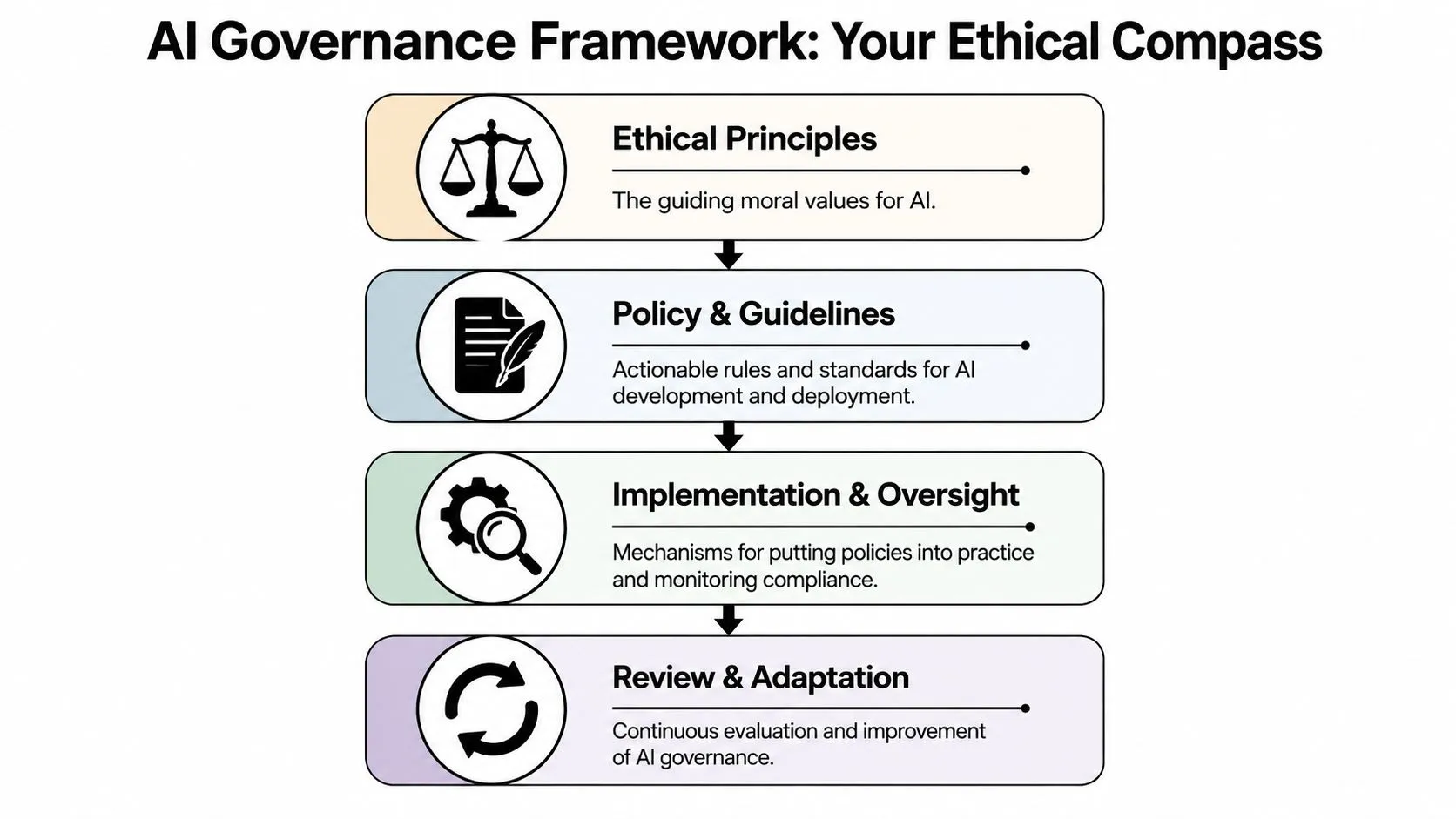
A useful governance foundation has three pillars. Not twenty. Three.
Three guardrails that keep AI useful
The first is ethical boundaries. Decide what AI should never do in your context. For example, should it make final hiring decisions, produce legal wording without review, or answer customers on sensitive topics without approval? Usually, the answer is no.
The second is security mindset. Treat every prompt like a possible data-sharing event. If you wouldn't paste it into a public forum, don't paste it into an unapproved AI tool.
The third is privacy pact. This is personal. Each employee should know what they are responsible for protecting, including customer details, internal strategy, financial data, and confidential drafts.
A missed part of AI best practices is who gets considered during design. Researchers at Northwestern argue that responsible AI should account for power structures, validity, sustainability, trust, and impact, and that community members should be included on interdisciplinary teams from the start (Northwestern on designing AI tools for underserved populations). In plain terms, if your workflow only works for highly technical users, fluent English speakers, or well-resourced teams, it isn't fully responsible.
For a visual way to think about policy layers, this overview of Enterprise AI governance principles is useful because it shows governance as a stack, not a slogan.

A simple personal governance checklist
Use these questions before you rely on AI output:
-
Should AI do this task at all
If the task affects people's rights, safety, pay, health, or legal standing, human review should stay central. -
Who could be harmed by a bad answer
Don't stop at the average user. Think about junior employees, customers with less context, and people working in constrained settings. -
Can I verify the result
If you can't check it, don't automate it. -
Am I using approved tools
Governance breaks when every employee invents their own stack.
Good governance doesn't slow useful work. It stops avoidable damage.
If your team struggles with verification, a practical next step is to adopt a shared review habit such as the checks described in this guide to AI fact checking.
Mastering the Art of the Prompt
Many believe prompting is about clever wording. It's not. It's about clear instructions. AI performs better when you remove ambiguity the way you would for a new employee.
If you've ever said, “This tool is inconsistent,” the prompt is often the hidden cause. Vague requests force the model to guess. Structured requests reduce guessing.
Use the RAPS prompt method
A simple framework for non-technical teams is RAPS:
| Element | What it means | Example |
|---|---|---|
| Role | Tell the AI who it should act like | “Act as a customer success manager” |
| Audience | Say who the output is for | “Write for a busy VP” |
| Purpose | Define the job to be done | “Summarize the issues and recommend next steps” |
| Scope | Set limits and format | “Use bullet points, keep it under 150 words, and only use the information below” |
Here's why this works. AI tools are strong pattern matchers. If you don't specify audience, purpose, and boundaries, the tool fills in the blanks itself. That's where generic output comes from.
For a broader primer on mastering AI instructions for intelligent chatbots, that resource gives helpful background on why structured prompting changes the quality of responses.
Weak prompt versus strong prompt
Weak prompt
“Summarize this report.”
That sounds reasonable, but it leaves out almost everything that matters. Who is the summary for? What kind of report is it? Should the AI focus on risks, actions, or key findings? How long should the summary be?
Stronger prompt using RAPS
“Act as a business analyst. Summarize the report below for a department head who has two minutes to read it. Focus on major findings, risks, and recommended actions. Use five bullets and a short closing sentence. If the report is unclear in any area, flag the uncertainty rather than guessing.”
That prompt usually produces something more usable because it defines the assignment.
Try building a personal prompt library with categories such as email drafting, meeting summaries, research cleanup, and spreadsheet explanations. A good starting point is to save prompts in a shared document or use a resource like this AI prompt library.
The prompt is your operating manual. When the instruction gets sharper, the output usually gets calmer.
A strong prompt also asks the model to show uncertainty. That matters. You don't want false confidence. You want useful first drafts that reveal where human judgment is still needed.
Protecting Your Data and Your Company
Many professionals freeze at this point. They want the speed of AI, but they don't want to expose customer data, internal plans, or confidential material. That caution is healthy.
The easiest rule is also the most important. Never treat every AI tool as if it has the same privacy standard. A public chatbot and an enterprise-controlled environment are not the same thing.
What never goes into a public AI tool
Use a simple red-list. Don't paste these into unapproved or public AI systems:
-
Personally identifiable information
Names tied to private records, contact details, identification numbers, or anything that can expose a customer or employee. -
Financial details
Budgets, payment records, pricing terms, compensation data, or unreleased forecasts. -
Trade secrets and internal strategy
Product roadmaps, acquisition plans, source documents, internal negotiations, and proprietary methods. -
Credentials or security material
Passwords, keys, access instructions, or internal security procedures.
Some people assume the only data risk is privacy. It's broader than that. Data quality also shapes model performance. IBM notes that AI data quality includes accuracy, completeness, reliability, representativeness, bias, label accuracy, and noise, and recommends profiling, lineage tracking, and continuous observability to catch missing values, outliers, and distribution shifts that can degrade outcomes (IBM on AI data quality).
That matters even for non-technical users. If the source material is messy, partial, or biased, the AI output will inherit those flaws.
How to sanitize information before use
You don't always have to avoid AI. Often you need to abstract the information first.
Try this process:
-
Replace names with roles
Use “Customer A,” “regional manager,” or “supplier” instead of real identities. -
Remove exact numbers when they aren't necessary
If the task is drafting messaging, a range or general description may be enough. -
Strip attachments down to the needed excerpt
Don't upload a full contract if one clause is all you need help understanding. -
State the task without the sensitive context
Ask for a template, framework, or rewrite pattern that you can apply privately later.
| Unsafe input | Safer alternative |
|---|---|
| “Draft a reply to this named customer with their order issue and account details” | “Draft a polite reply to a customer about a delayed order and billing concern” |
| “Analyze this internal acquisition memo” | “Summarize the risks typically covered in an acquisition memo” |
When teams follow AI best practices here, they can move faster without gambling with company information.
Building Your AI-Powered Workflow
A lot of people use AI as a one-step assistant. Ask one question. Get one answer. That's useful, but it leaves most of the productivity on the table.
The bigger gain comes from chaining tasks together. One tool captures input. Another organizes it. Another drafts the next action. Then a human checks the final version.
A visual workflow helps make that concrete.
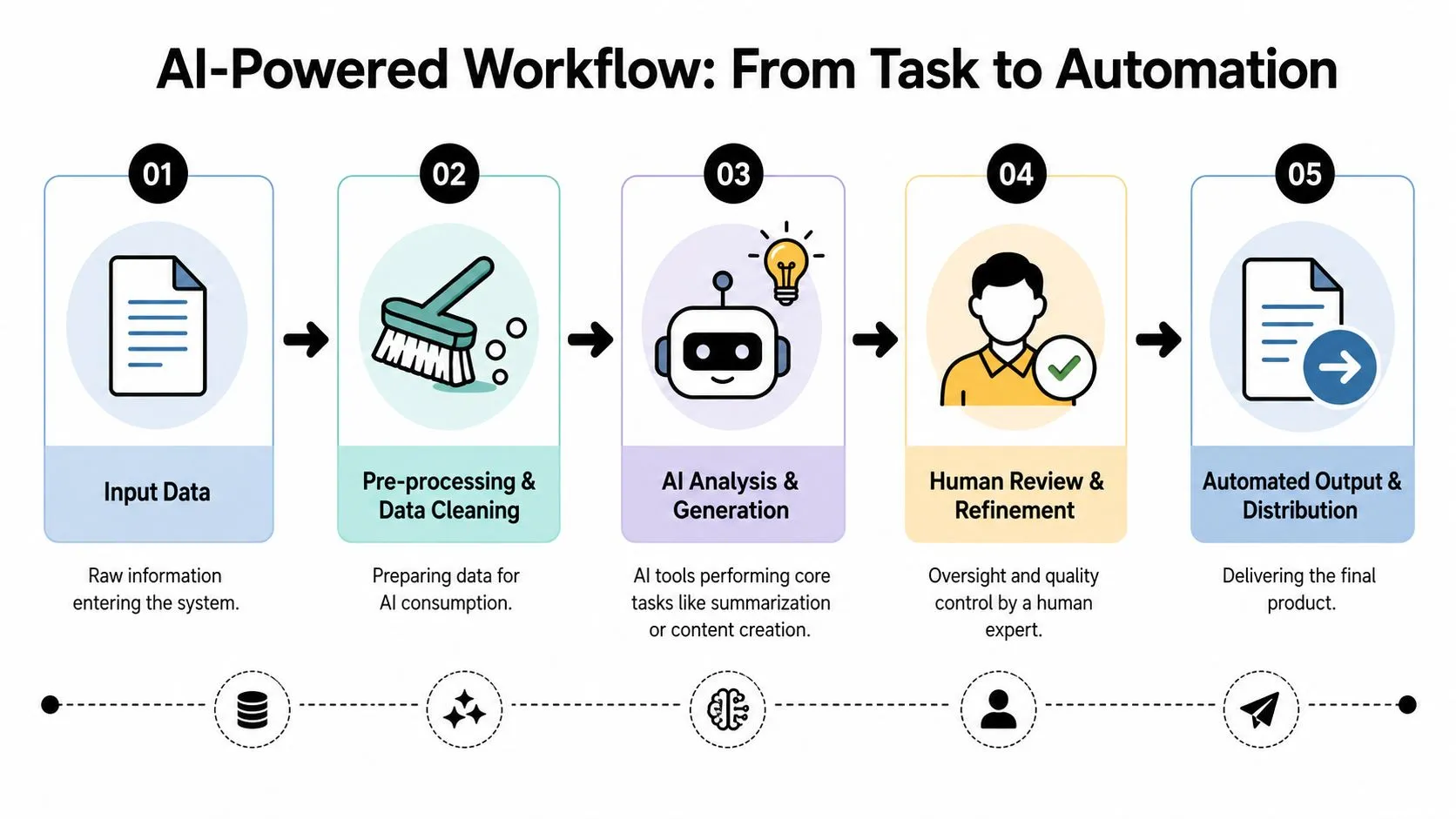
A before and after workflow example
Take a common task: handling customer feedback from calls.
Before AI
- A team member listens to the recording
- They write notes manually
- They pull out complaints and requests
- They draft a follow-up email
- A manager reviews it later
That process works, but it's slow and inconsistent.
After AI with a simple chain
- Step 1: Transcribe the call recording
- Step 2: Summarize the transcript into issues, sentiment, and requested actions
- Step 3: Draft a follow-up email based on that summary
- Step 4: Human reviewer checks tone, accuracy, and any promises made
- Step 5: Send and log the result in the team system
This is the kind of repetitive, measurable work where AI tends to help most. In a 2024 European Statistical System webinar, speakers described AI as useful for routine work such as data ingestion, classification, editing, anomaly detection, and imputation suggestion, but they stressed human oversight and a stepwise rollout model: start small, pilot new AI tools, and scale up what works (European Statistical System webinar on AI).
That advice applies far beyond official statistics. It's a strong operating rule for any business team.
For teams documenting repeatable procedures, a tool like the StepCapture AI SOP creator can help turn a working process into a standard operating guide people can follow.
A quick demo can help people see what a workflow mindset looks like in practice.
The human review step that teams skip
The weak point in many AI workflows isn't generation. It's handoff. People assume that because the summary looks polished, it's accurate enough to send.
Use a review checklist:
-
Check factual accuracy
Did the AI misstate dates, requests, or decisions? -
Check business risk
Did it make a commitment the team can't keep? -
Check tone and audience fit
Is the message appropriate for a customer, executive, or peer?
Start with one workflow, not ten. A controlled pilot teaches your team more than a broad rollout ever will.
How to Choose and Integrate the Right AI Tools
The market is noisy. Every week there's a new writing tool, meeting tool, automation agent, research assistant, or browser add-on. If you choose tools based on novelty, your team ends up with scattered subscriptions and overlapping features.
Use a scorecard instead.
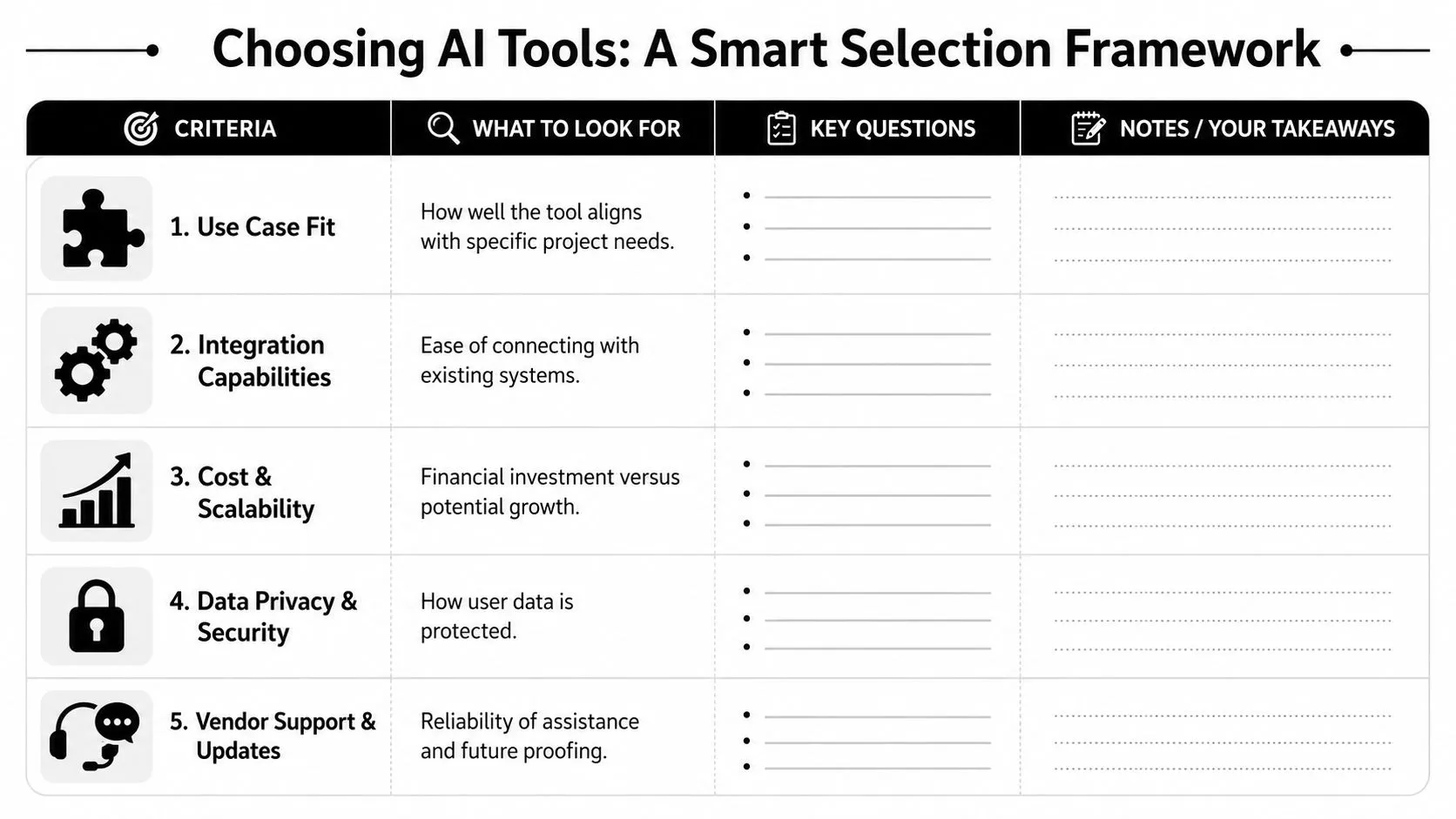
Use a simple tool scorecard
Rate each tool against four practical questions.
| Criterion | What to ask |
|---|---|
| Job to be done | Does it solve a recurring problem your team actually has? |
| Security and privacy | Does it match your company's approval standards and usage rules? |
| Integration | Can it connect to the tools you already use, or will it create extra manual work? |
| Usability | Can a non-technical employee learn it quickly and use it consistently? |
This sounds basic, but it prevents a common mistake. Teams often evaluate features before they evaluate fit. A powerful tool that doesn't connect to your workflow will sit unused.
Integration questions to ask before buying
Ask vendors or internal owners these questions before adoption:
-
Where will people use this tool most often
Inside email, documents, CRM, meetings, spreadsheets, or a separate dashboard? -
What is the approval process for data handling
Don't leave this as an assumption. -
Who owns the workflow after setup
Many AI projects fail because nobody maintains them. -
What happens when the output is wrong
There should be a correction path, not just enthusiasm.
If your team is comparing options for process work, this guide to AI tools for business automation is a practical place to map tools to actual jobs.
One useful category is training and workflow education. For example, AI Academy provides text-and-image tutorials, prompt templates, and structured learning paths for non-technical professionals using tools like ChatGPT, Claude, Midjourney, and Perplexity. That kind of resource can help teams reduce tool confusion if they need a shared learning layer rather than another standalone app.
Choose fewer tools, use them more thoroughly, and document where each one belongs.
Your Team AI Onboarding Checklist and Templates
Organizations onboard people to software, but not to AI behavior. That gap shows up fast. New hires know the tools exist, but they don't know the rules, the workflow standards, or the review expectations.
A better approach is to onboard people to the team's AI Operating System.
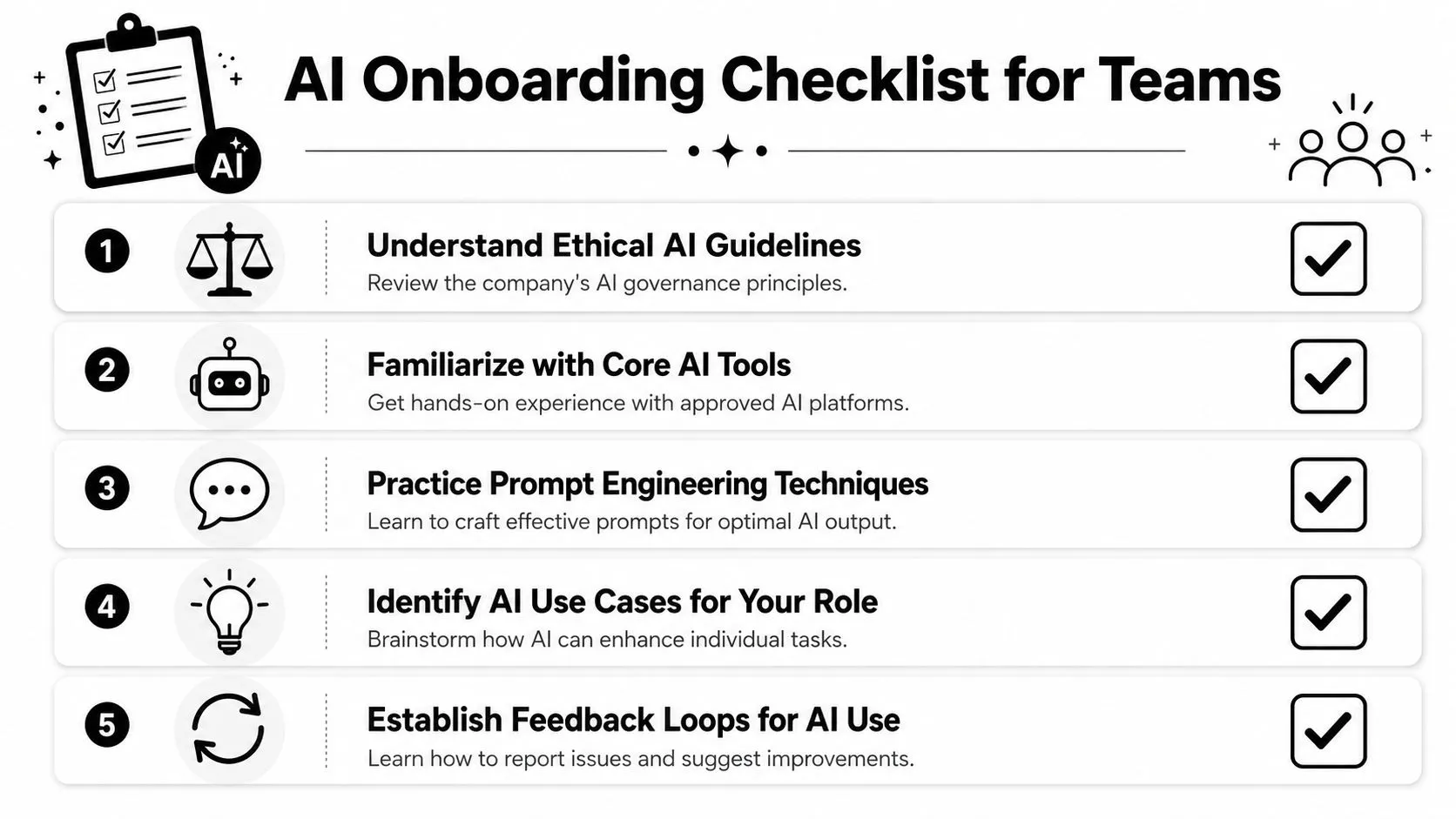
A ready-to-use onboarding checklist
Here's a practical checklist a manager can hand to a new team member.
-
Read the AI usage policy
Confirm what tools are approved, what data is restricted, and where human review is mandatory. -
Learn the prompt standard
Practice writing prompts with role, audience, purpose, and scope. -
Use one approved workflow end to end
Don't start with five experiments. Start with one repeatable process the team already trusts. -
Review output before sharing externally
Every draft must be checked for accuracy, tone, and unintended commitments. -
Log issues and edge cases
If AI produces a weak answer, save the example. Those failures are training material for the team. -
Know when to escalate
Sensitive decisions, customer conflict, legal wording, hiring, and financial communication need closer review.
Copy and paste prompt templates
These templates are intentionally simple.
“Act as an executive assistant. Summarize the text below for a busy manager. Use five bullets. Highlight decisions, risks, and next actions. If any point is uncertain, label it clearly.”
“Act as a marketing strategist. Brainstorm three angles for promoting this product to small business owners. Keep each angle distinct. For each one, include a short headline and one supporting idea.”
“Act as a customer success specialist. Rewrite this message so it sounds clear, calm, and helpful. Keep the facts the same. Remove jargon and keep it concise.”
For more mature teams, onboarding should also include one concept many business users never hear about: closed-loop data governance. Strong teams standardize formats, version changes, run careful labeling practices, split data into train, validation, and test sets, monitor drift through feature and label distributions and segment-level error rates, then retrain or adjust prompts and policies when performance slips. That pattern reduces hallucination risk and improves accuracy over time (GroupBWT on data for AI).
Most non-technical staff won't manage that pipeline directly. They should still know it exists, because it explains why reliable AI work depends on disciplined feedback and updates, not one-time setup.
Frequently Asked AI Best Practices Questions
| Question | Answer |
|---|---|
| What's the first AI use case I should try at work? | Start with repetitive work that has clear outputs and easy review, such as summaries, categorization, first-draft emails, or meeting follow-ups. |
| Can I trust AI answers if they sound confident? | No. Confidence and correctness aren't the same. Treat polished outputs as drafts until you verify them. |
| Do I need to learn coding to use AI well? | No. Most professionals get strong results by learning safe usage rules, structured prompting, and workflow design. |
| Should every team member use the same AI tool? | Not always, but every team should have approved tools and clear rules about where each one fits. |
| What if AI gives different answers to the same prompt? | Tighten the prompt. Add role, audience, purpose, scope, source material, and output format. Then compare results and keep the version that is easiest to verify. |
| How do I know if my team is ready for more automation? | You're ready when one workflow is stable, the data is handled safely, review steps are clear, and people know how to report failures and improve the process. |
If you want to build these habits with short, practical lessons instead of theory-heavy courses, AI Academy is built for working professionals. It covers tools, prompts, workflows, and everyday AI best practices in focused tutorials that help you apply what you learn on the job.