Your project plan probably isn't failing because the team lacks effort. It's failing in the quieter places. Status updates get rewritten three times. Meeting notes sit in someone's notebook. Risks show up late because nobody had time to look across all the moving parts. The PM becomes the routing layer for every reminder, follow-up, and formatting task.
That's where AI for project management starts to matter. Not as a futuristic replacement for the project manager, but as a practical way to remove the admin drag that steals attention from delivery. The teams getting value from AI aren't the ones chasing novelty. They're the ones using it to summarize faster, surface risks earlier, and make routine coordination less manual.
For non-technical managers, opportunity isn't learning how the models work. It's learning where AI fits into existing workflows, where it absolutely does not belong, and how to redesign your role around better judgment instead of more busywork.
Beyond the Buzzword What AI in Project Management Really Means
For many, “AI” still evokes either magic or job loss. In project work, it's usually neither. It's software that helps a PM process more information, reduce repetitive coordination work, and spot patterns that are easy to miss when the day is packed with meetings and stakeholder requests.
The practical version of AI for project management looks familiar. It drafts status updates from project data. It turns long discussion threads into action items. It flags likely bottlenecks by looking at historical and real-time signals. Used well, it behaves more like a reliable coordinator than a replacement decision-maker.
There's a business case for taking it seriously. A major 2024 PMI study found that organizations using AI-driven project management tools reported 61% of projects delivered on time, compared with 47% for organizations not using AI. The same study reported 64% of projects meeting or exceeding original ROI estimates versus 52% without AI, according to this summary of the PMI findings.
AI is most useful when the project already has too much information for one person to reliably synthesize by hand.
That's why the conversation shouldn't start with “Which tool has the most features?” It should start with “Which parts of our workflow are repetitive, delay-prone, or mentally expensive?” Typically, the answer includes reporting, meeting follow-up, intake triage, schedule adjustments, and first-pass risk review.
A good PM still does the hard human work. They negotiate trade-offs, calm stakeholders, challenge assumptions, and decide when to escalate. AI helps clear space for more of that work to happen.
The Core Capabilities of Your New AI Assistant
The easiest way to understand AI for project management is to stop thinking of it as a single thing. It's a bundle of capabilities. Some are excellent at turning messy inputs into usable drafts. Others are better at finding patterns, forecasting pressure points, or handling repetitive project admin.
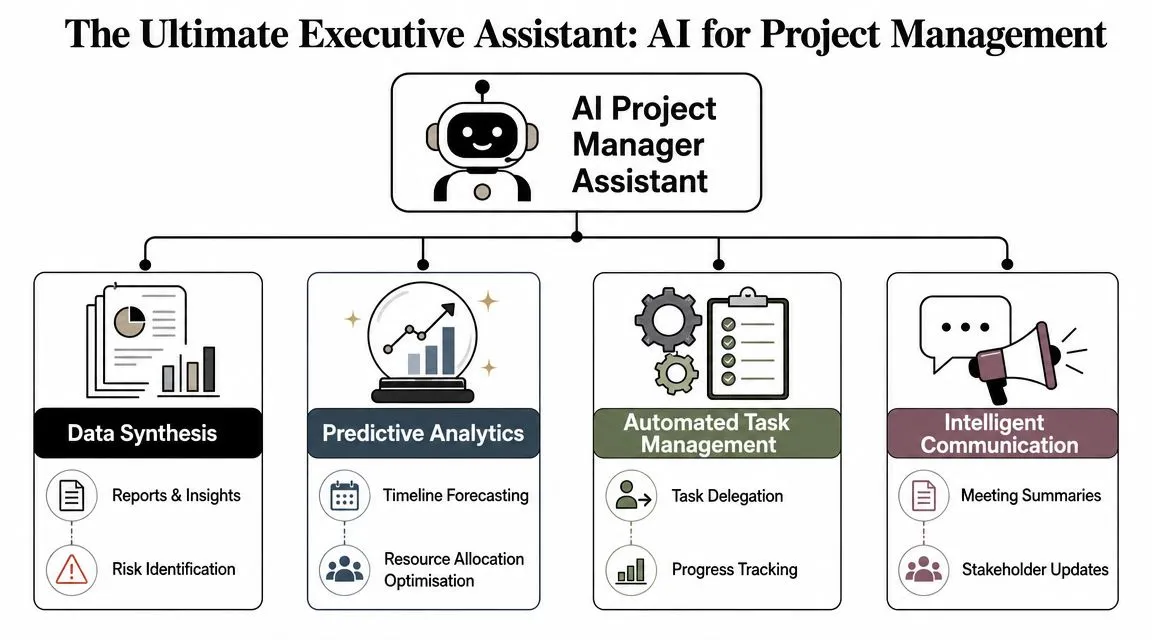
Think Assistant Not Oracle
The “assistant” analogy works because it sets the right expectation. A strong assistant can prepare material, organize information, and help you move faster. You still make the call.
In practice, these are the capabilities that matter most:
- Data synthesis: AI can read meeting transcripts, project briefs, email threads, and work-item histories, then turn them into summaries, draft reports, or risk lists.
- Automated task management: It can help assign routine work, generate reminders, and track progress across systems when the rules are clear.
- Intelligent communication: It drafts stakeholder updates, meeting recaps, and follow-up messages in a more consistent format.
- Predictive support: It scans patterns in project activity and can warn that a deadline, dependency, or staffing plan looks weak.
Where the Real Leverage Comes From
The strongest setups combine automation with predictive analytics. That matters because speed alone isn't enough. If AI only writes updates faster, you save admin time. If it also helps forecast delays or bottlenecks by mining historical and real-time data, you improve delivery judgment too. Atlassian's guidance describes this combination clearly, noting that AI can auto-generate status updates, assign routine tasks, and forecast delays or bottlenecks, which reduces administrative overhead and shifts managers toward higher-value planning and risk mitigation work in its overview of AI project management.
A simple way to think about it:
| Capability | What it handles well | Where PM judgment still matters |
|---|---|---|
| Drafting | Reports, summaries, recaps | Tone, context, sensitivity |
| Pattern spotting | Risks, delays, blockers | Prioritization, escalation |
| Workflow automation | Reminders, routine assignments | Exceptions, dependencies |
| Forecasting | Schedule pressure, capacity signals | Commitments, trade-offs |
Practical rule: Use AI first for work that is repetitive, text-heavy, and easy to verify.
Where teams struggle is trying to force AI into vague or politically sensitive work too early. If the input is unclear, the output is usually polished nonsense. In critical situations, a clean-looking answer can create false confidence. That's why the best results come from narrow, well-defined use cases first.
Key Use Cases Where AI Delivers Immediate Value
The first wins usually don't come from “advanced transformation.” They come from everyday friction. Teams feel value quickly when AI removes work that's necessary but tedious.
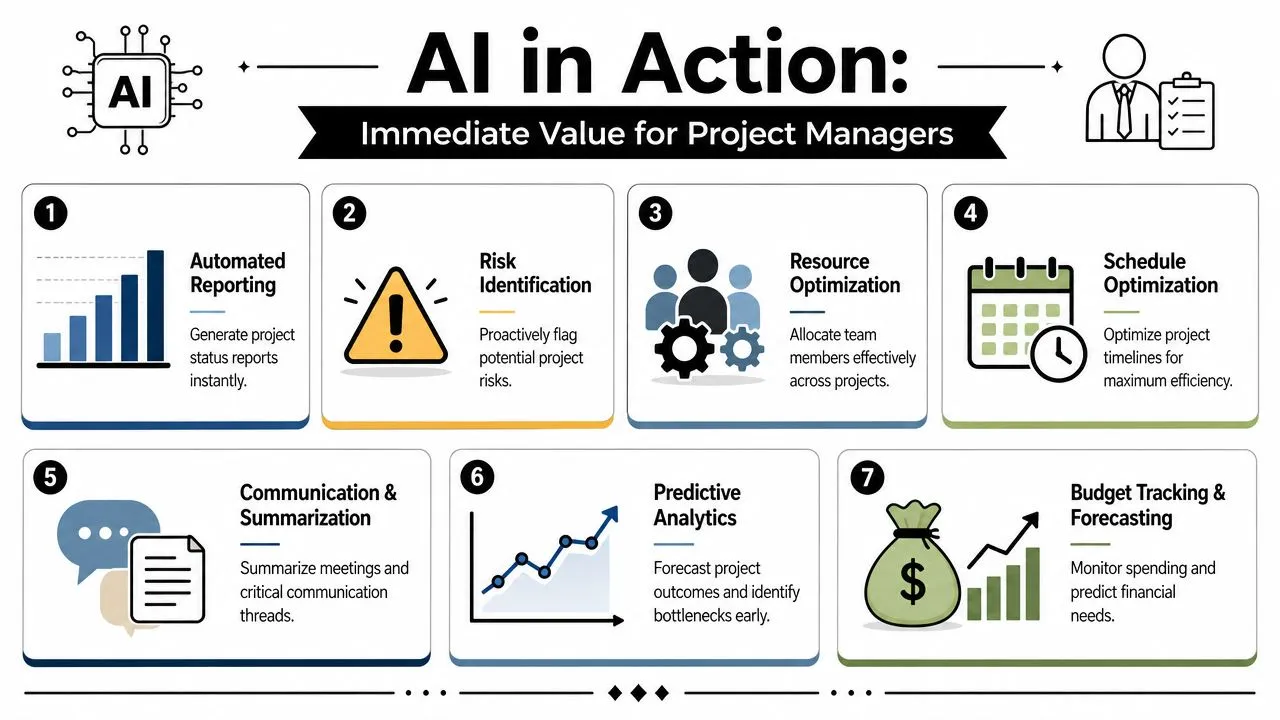
The Fastest Wins
Start with work that already has a repeatable pattern.
- Meeting recap production: Before AI, the PM sits through a meeting, scribbles notes, then turns them into a clean recap after the fact. With AI, a transcript becomes a draft summary, decisions list, open questions list, and owner-based follow-up.
- Status reporting: Instead of rebuilding the same weekly report from Jira, Asana, Monday.com, Slack, and email, AI can assemble a first draft based on recent activity. The PM then edits for nuance.
- Email and thread compression: Long back-and-forth discussions become digestible summaries with clear next steps. This is especially useful when new stakeholders join midstream.
- Project initiation drafts: AI can turn a rough business request into a first-pass charter, scope statement, milestone view, and assumptions list.
One practical companion to this is learning how to master action items with SpeakNotes, especially if your team loses follow-through between meetings. AI is good at extracting tasks, but the team still needs a clean habit for tracking who owns what.
Where Teams Feel the Relief
The next layer is less about drafting and more about anticipation.
A PM reviewing a schedule manually often sees what is directly visible. AI can help surface what's indirectly risky. It may notice that dependencies are stacking on one specialist, that unresolved blockers keep reappearing in standups, or that tasks are closing late in a pattern that suggests a delivery slip.
Here are a few use cases that consistently earn trust:
- Risk identification: Feed in the project brief, assumptions, dependencies, and team constraints. AI can produce a draft risk register with triggers and mitigation ideas.
- Resource balancing: When one team member becomes the hidden bottleneck, AI can flag uneven allocation and suggest alternatives for review.
- Schedule optimization: Draft timelines become easier to pressure-test when AI highlights likely collision points between tasks, reviews, and approvals.
- Budget monitoring support: AI can summarize spending notes, change requests, and delivery issues into a cleaner forecast discussion for the PM and finance partner.
If a use case helps the team respond earlier, not just document faster, it's usually worth keeping.
The common pattern is simple. AI works best where the PM used to spend time gathering, formatting, summarizing, and cross-checking. It works less well where the job depends on trust, negotiation, and organizational judgment.
Practical Workflows and Prompts You Can Use Today
A common hurdle for teams is getting started. You don't need a technical rollout to start using AI for project management. You need a few repeatable workflows, a habit of reviewing outputs, and prompts that ask for structured responses instead of generic text.
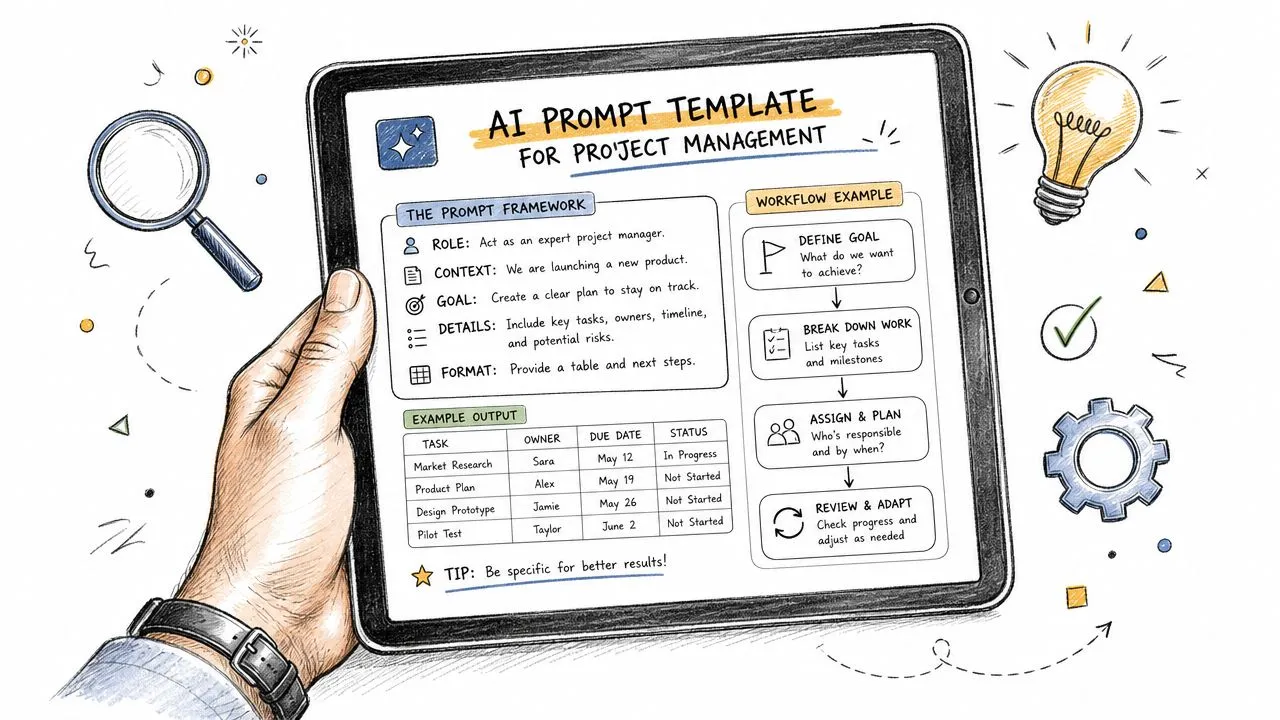
Workflow One Turn Raw Inputs into a Project Draft
Use this when a stakeholder gives you a rough request and you need a solid first draft fast.
Inputs to provide
- Business request: Paste the original ask.
- Constraints: Add timing, budget guardrails, team availability, and known dependencies.
- Desired output: Specify the exact document you want.
Copy-paste prompt
Act as a senior project manager. Using the information below, create a draft project initiation document. Include objective, scope, out-of-scope items, assumptions, dependencies, major milestones, risks, stakeholder groups, and open questions. Where information is missing, list it as an explicit clarification item instead of guessing. Format the output in clear sections and keep the language practical.
Project request:
Constraints:
Known stakeholders:
Deadline or timing expectations:
Known dependencies:
Success criteria:
This works well in ChatGPT, Claude, or built-in assistants inside tools like Notion, ClickUp, Asana, and Microsoft Copilot. If you want more examples, this collection of ChatGPT prompts for project management is useful for adapting the format to different PM artifacts.
Workflow Two Build Better Summaries and Action Lists
This is the easiest workflow to standardize across a team. Feed in a meeting transcript, call notes, or a long email thread. Ask for a summary with decisions, risks, blockers, and actions separated.
Copy-paste prompt
Summarize the material below as a project follow-up note. Produce these sections only: key decisions, action items with owner and due date if available, unresolved questions, risks mentioned, and a short stakeholder update written in plain English. If ownership is unclear, mark the item as “owner to confirm.” Do not invent details that are not in the source text.
Source material:
A good review habit is to check three things before sending the output:
- Ownership accuracy
- Decision wording
- Anything politically sensitive that needs softer phrasing
Here's a useful walkthrough on prompt design in action:
Workflow Three Use AI as a Risk and Decision Partner
AI is particularly helpful when you ask it to challenge a draft plan instead of praise it.
Copy-paste prompt for a risk register
Review the project description below and create a draft risk register. For each risk, include a short description, likely trigger, potential impact on scope, timeline, or team capacity, and a proposed mitigation. Separate risks caused by dependencies, unclear requirements, resource constraints, and stakeholder alignment issues. If a risk depends on unknown information, mark it for human review.
Project description:
Copy-paste prompt for schedule review
Review the following milestone plan as a delivery reviewer. Identify likely bottlenecks, hidden dependencies, decision points that could delay progress, and milestones that appear optimistic. Present your answer as observations, why each point matters, and what the PM should validate next.
Milestone plan:
A strong prompt tells the model what role to play, what format to follow, and where it must not guess.
The mistake I see most often is asking AI broad questions like “Help me manage this project.” That produces broad answers. Ask for a specific artifact, specific structure, and specific boundaries. The quality improves immediately.
Your Phased Roadmap for AI Adoption and Change Management
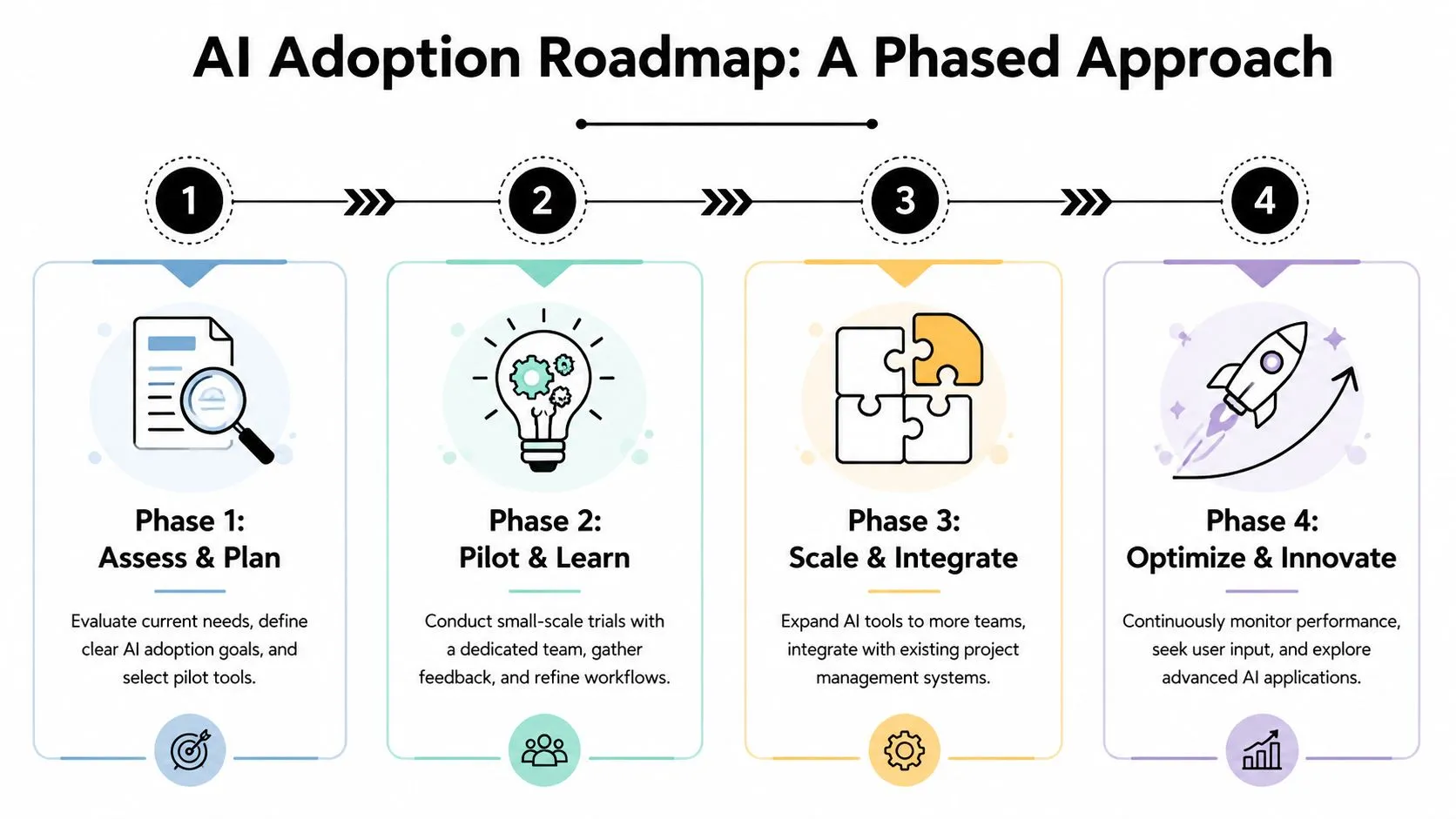
Rolling out AI across a project organization in one sweep usually creates resistance, uneven usage, and messy expectations. A phased approach works better because it gives the team space to learn what's useful, what needs controls, and which workflows deserve to change.
Phase by Phase Beats Big Bang Rollouts
Start small. Pick one team, one tool category, and a narrow set of approved use cases. Meeting summaries, status report drafting, and first-pass risk logs are good candidates because they're useful and easy to review.
Then formalize what good usage looks like.
- Phase 1, assess and choose: Identify admin-heavy tasks that drain PM time. Select tools that fit current systems instead of forcing a platform switch.
- Phase 2, pilot with a live team: Run the workflow in real projects. Collect examples of outputs that were helpful, weak, or risky.
- Phase 3, scale with guardrails: Turn the best prompts into templates, define review rules, and train adjacent teams.
- Phase 4, optimize: Refine workflows, retire weak use cases, and expand only where quality holds up.
For managers building the people side of the rollout, this guide to a change management plan from WeekBlast is a practical reference for communication and adoption planning. If you're connecting AI adoption to broader operating model design, this learning path on developing organizational strategies with AI is also a useful complement.
What the PM Role Looks Like After Adoption
The deeper change isn't the tool. It's the role design.
Recent commentary argues that AI is pushing project managers toward strategic leadership and systems thinking by offloading scheduling, reporting, and tracking. It also argues that routine PM work may be heavily automated by 2030, which shifts the question from tool features to process redesign, according to this discussion on the changing PM role.
That means the PM who adapts well becomes more valuable in these areas:
| Traditional time drain | Higher-value PM work after AI support |
|---|---|
| Manual report assembly | Stakeholder alignment |
| Chasing updates | Risk framing and escalation |
| Formatting notes | Decision facilitation |
| Rebuilding schedules | Scenario planning |
The PM role doesn't get smaller. The administrative portion gets thinner.
The teams that handle adoption best say the quiet part out loud. Some old tasks will matter less. New expectations around judgment, communication, workflow design, and data quality will matter more.
Navigating Pitfalls with Smart Governance and Oversight
The biggest mistake teams make with AI isn't underusing it. It's trusting it in the wrong places. A polished answer can feel authoritative even when the input was incomplete, biased, or outdated.
That's why governance matters. Not as a legal afterthought, but as part of delivery discipline. The strongest implementations define where AI can draft, where it can recommend, and where it must stop.
Decisions AI Can Support but Should Not Own
Some decisions are too consequential to leave to automated output. Guidance on generative AI in project management is clear on this point. Critical decisions, budget changes, timeline commitments, and risk responses still need human judgment, escalation paths, and bias audits, as outlined in this project management guidance on benefits and challenges of GenAI.
That aligns with what works in practice:
- Drafting is fine: Let AI prepare a status report or summarize a workshop.
- Recommendations are fine: Let it suggest likely risks, schedule issues, or resource concerns.
- Final authority is not fine: Don't let it commit to deadlines, approve budget changes, or determine final risk responses on its own.
A Lightweight Governance Model That Works
You don't need a huge policy document to get started. You need a few clear rules.
- Define approved use cases: Name the tasks where AI is allowed, such as summaries, first drafts, and structured analysis.
- Require human review for key outputs: Any artifact that affects external commitments, money, staffing, or formal risk posture gets checked by a person.
- Avoid black-box dependence: If the tool can't explain how it arrived at a recommendation, treat that recommendation as a prompt for investigation, not a conclusion.
- Protect sensitive information: Don't paste confidential material into tools that aren't approved for that data.
- Check for uneven impact: If AI suggestions repeatedly favor one team, one type of stakeholder, or one delivery pattern, review the data and assumptions behind it.
If your organization is also thinking about searchability, documentation, and institutional memory, this article on AI for knowledge management is a good companion topic. Many governance problems start upstream with messy knowledge, inconsistent naming, and poor source material.
Human oversight isn't friction. It's the mechanism that makes AI safe enough to trust.
Future-Proofing Your Career as a Strategic PM
The useful way to think about AI for project management is simple. Let the tools do more of the collecting, sorting, summarizing, and first-pass analysis. Use your time for the parts of project leadership that still depend on trust, judgment, and context.
That shift is good for PMs who are willing to redesign how they work. The old version of the role often rewarded responsiveness and documentation stamina. The newer version rewards systems thinking, sharper facilitation, stronger prioritization, and better escalation decisions.
What to Learn Next
Focus your next steps on capability, not hype.
- Trial one workflow this week: Meeting summaries, project draft generation, or risk register creation are strong starting points.
- Standardize prompts: Save your best prompts in a team library so quality doesn't depend on one person.
- Review outputs critically: Treat AI as a junior contributor with speed, not as a final approver.
- Strengthen adjacent skills: Data hygiene, stakeholder communication, and decision framing become more important as AI handles more admin.
The PMs who benefit most won't be the ones who know the most jargon. They'll be the ones who can build clean workflows, protect decision quality, and help teams adopt AI without adding chaos.
If you want practical help building those skills, AI Academy is a strong next step. It's built for working professionals who want fast, usable training on ChatGPT, Claude, automation, and real job workflows, without getting dragged into theory.