81% of B2B sales reps used AI tools in 2025, and those reps recovered an average of 2.5 to 4 hours per week of selling time according to Autobound's State of AI Sales Prospecting 2026. That stat changes the conversation. AI in sales isn't a side experiment anymore. It's part of the operating model.
Most advice on how to use AI in sales starts with tools. That's usually where teams go wrong. The first thing that determines whether AI helps your pipeline or creates more noise is the condition of your CRM. If your data is messy, your lead scoring will be messy, your personalization will be generic, and your forecasting will drift.
The practical path is simpler than most vendors make it sound. Clean the data. Pick one narrow use case. Train reps on real workflows. Review outputs daily. Scale only after the pilot proves it can save time or improve conversion quality.
Why AI in Sales Is No Longer Optional
Sales teams don't lose time only in meetings. They lose it in the gaps around meetings. Researching accounts, rewriting follow-ups, logging notes, updating stages, checking old threads, and preparing for calls all eat into selling time.
That's why the adoption number matters. When most of the market is already using AI, the primary disadvantage isn't that another team has better prompts. It's that their reps spend more of the week talking to buyers while yours are still buried in admin.
Manual work is still the real sales tax
The biggest shift AI creates isn't magical persuasion. It's operational relief. It handles the repetitive work that strong reps hate but still have to do.
A good sales AI workflow usually helps with tasks like these:
- Research compression: Pull company context, role context, and prior activity into one place before a call.
- Writing assistance: Draft first-touch emails, follow-ups, and call recaps from CRM context.
- Data capture: Turn transcripts and notes into structured CRM updates.
- Prioritization: Surface which accounts or leads deserve attention now.
AI works best in sales when it removes low-value effort and leaves the judgment to the rep.
That distinction matters. Teams often expect AI to close deals for them. It won't. It can help reps show up prepared, move faster, and personalize at scale. The closing still depends on discovery quality, timing, credibility, and judgment.
Where AI helps most
If you're learning how to use AI in sales, think in workflows rather than in software categories. The strongest early use cases usually live in four places:
| Workflow | What AI does well | What humans still own |
|---|---|---|
| Prospecting | Research, enrichment, segmentation, scoring | ICP decisions, account strategy |
| Outreach | Drafting, personalization inputs, variation testing | Tone, relevance, final send |
| Operations | Notes, summaries, CRM updates, prep briefs | Deal judgment, stakeholder management |
| Coaching | Pattern spotting from calls and replies | Coaching conversations, rep development |
That last point gets missed. AI doesn't only automate. It can also sharpen management. A manager can review patterns across outreach, objections, and follow-up quality much faster when AI organizes the inputs first.
The Critical Prerequisite Before You Buy Any AI Tool
Often, teams buy the tool first and inspect the data later. That order creates expensive confusion.
Bain found that successful AI pilots require removing “old, inaccurate, or confusing data, sometimes as much as 80%” before generative AI is deployed, and that 60% to 80% of AI initiatives stall at this hidden failure point according to Bain's 2025 technology report on AI in sales productivity. If your CRM is full of stale contacts, duplicate accounts, inconsistent stages, and half-complete notes, AI won't fix the mess. It will scale it.
Bad data breaks good tools
I've seen teams blame the model when the underlying issue was the record. The rep asks AI for a target list, but the territory field is inconsistent. The system drafts follow-ups, but the contact title is outdated. The manager wants better forecasting, but deal stages haven't been updated in weeks.
That's why data sanitation isn't admin busywork. It's the foundation of AI performance.
Practical rule: Don't connect AI to a CRM you wouldn't trust a new rep to work from on day one.
If you need a broader operating mindset for rollout, these AI best practices from AI Academy are a useful companion to the sales-specific checklist below.
A practical CRM sanitation checklist
Don't try to “clean everything.” Clean the fields that affect targeting, personalization, routing, and reporting.
- Remove duplicate records: Merge duplicate contacts, accounts, and open opportunities so AI doesn't create conflicting outputs.
- Standardize core fields: Lock down values for lead source, lifecycle stage, territory, industry, and deal stage. Free-text chaos ruins scoring and filtering.
- Archive stale contacts: If a record is old, inaccurate, or obviously unworkable, remove it from active workflows rather than letting AI keep resurfacing it.
- Fill missing basics: Job title, company name, owner, account status, and latest activity should be present before you automate anything downstream.
- Separate notes from facts: Keep structured fields clean. Don't bury critical facts in long note fields if you expect AI or reps to use them reliably.
A short weekly sanitation habit beats a massive one-time cleanup that nobody maintains. Sales ops can own standards, but reps have to participate. If reps don't trust the CRM, they won't trust the AI built on top of it either.
Supercharge Prospecting and Lead Qualification
Prospecting is where sales organizations often feel the first real lift from AI. According to Cirrus Insight's overview of AI in sales, AI-driven sales tools can increase lead volume by 50% while reducing operational costs by up to 60%. The same source notes that 71% of sales professionals say AI helps them identify and prioritize leads more effectively.
The key is to stop using AI as a list generator and start using it as a qualification assistant.
Start with a tighter ICP
Most weak prospecting starts with a vague ICP. If your definition of a good lead is “mid-market SaaS companies” or “operations leaders,” AI will give you a broad pile of names. That isn't useful.
Use an LLM like ChatGPT or Claude to sharpen your ICP before you build a list. Feed it your best customers, common pain points, buying triggers, deal blockers, and stakeholder patterns.
Prompt
“Act as a sales strategist. Based on these customers, closed-won notes, and common objections, build an ideal customer profile for outbound prospecting. Include company traits, buyer roles, likely pains, trigger events, disqualifiers, and a simple lead scoring rubric with must-have and nice-to-have criteria.”
Then pressure-test the output. Remove anything your reps can't verify quickly in real research. Good ICPs are usable, not impressive.
For teams evaluating software categories, this roundup of AI-powered outreach solutions is useful because it shows the difference between prospecting tools, sequencing tools, and personalization tools. Those categories often get mixed together.
Use AI to rank, not just find
Once your ICP is clear, use AI to help sort leads into priority levels, enabling non-technical teams to get immediate value.
A simple workflow looks like this:
- Pull a candidate list from your CRM, LinkedIn Sales Navigator, or prospecting database.
- Enrich each record with role, company description, industry, recent company signals, and existing engagement history.
- Ask AI to score the list against your ICP rubric.
- Review the top tier manually before launch.
You can run this process inside a sales engagement platform, a CRM with AI features, or a lightweight spreadsheet workflow paired with ChatGPT or Claude.
A useful scoring prompt:
“Review these leads against our ICP. Assign High, Medium, or Low priority. Give one sentence explaining the score for each lead based on role fit, company fit, likely pain, and available trigger signals. Flag any lead that looks attractive on paper but lacks buying relevance.”
For a more guided workflow on this exact stage, AI Academy's sales prospecting resource is a good reference for non-technical users who want repeatable prompts and process examples.
What doesn't work is blind trust. If the model ranks a lead highly because the company sounds similar to your best accounts, but the role has no purchase influence, the rep still has to catch that. AI speeds triage. It doesn't replace account judgment.
Craft Personalized Outreach That Actually Converts
Personalization at scale breaks down when reps confuse “specific” with “relevant.” Mentioning a prospect's recent post or company funding round doesn't help if the message still sounds templated.
The better use of AI is to gather context fast, draft a sharp opening, and then let the rep turn it into a message that sounds human.
Use AI for draft quality, not final quality
A rep can pull a prospect's role, company language, recent announcements, and likely pain points into one workspace using tools like Clay, ChatGPT, Claude, or built-in AI features in outreach platforms. The draft should do three things well:
- Anchor to a real business context
- Connect that context to a likely pain
- Open a conversation without sounding over-produced
Here's a prompt that works well for first-touch emails:
“Write a short opening paragraph for a cold email to a VP-level prospect. Use the notes below. Mention one relevant company or role context, connect it to a likely operational challenge, and keep the tone direct and natural. Avoid hype, flattery, and generic claims. End with curiosity, not a hard pitch.”
The rep still needs to edit. That's the difference between AI-assisted outreach and robotic outreach. Challenger's view is especially useful here. AI should contribute to coaching and human decision-making, creating a feedback loop where prospect responses shape future outreach, as described in Challenger's guidance for sales leaders using AI.
If your team needs a broader mental model for how AI helps with writing without replacing judgment, RedactAI's content creation guide is a solid read.
Build a feedback loop from replies
The strongest teams don't just use AI to write more messages. They use it to learn from replies.
A practical workflow looks like this:
| Input | What AI can do | What the manager or rep should do |
|---|---|---|
| Positive replies | Identify which message angles triggered interest | Turn those angles into approved patterns |
| Neutral replies | Spot where the ask was too early or unclear | Rewrite the opening and CTA |
| Negative replies | Group objections and mismatch signals | Tighten targeting and disqualifiers |
After each campaign, feed reply samples back into the model and ask it to classify themes. Then use those themes in coaching. Reps improve faster when they can see which personalization angles generated responses versus which ones only sounded clever internally.
A short explainer is useful here before reviewing actual examples:
The trade-off is simple. AI can increase outreach volume quickly. It can also make your team sound interchangeable if nobody reviews tone, context, and targeting discipline. Human-in-the-loop isn't a compliance step. It's the part that protects quality.
Automate Sales Operations and Improve Forecasting
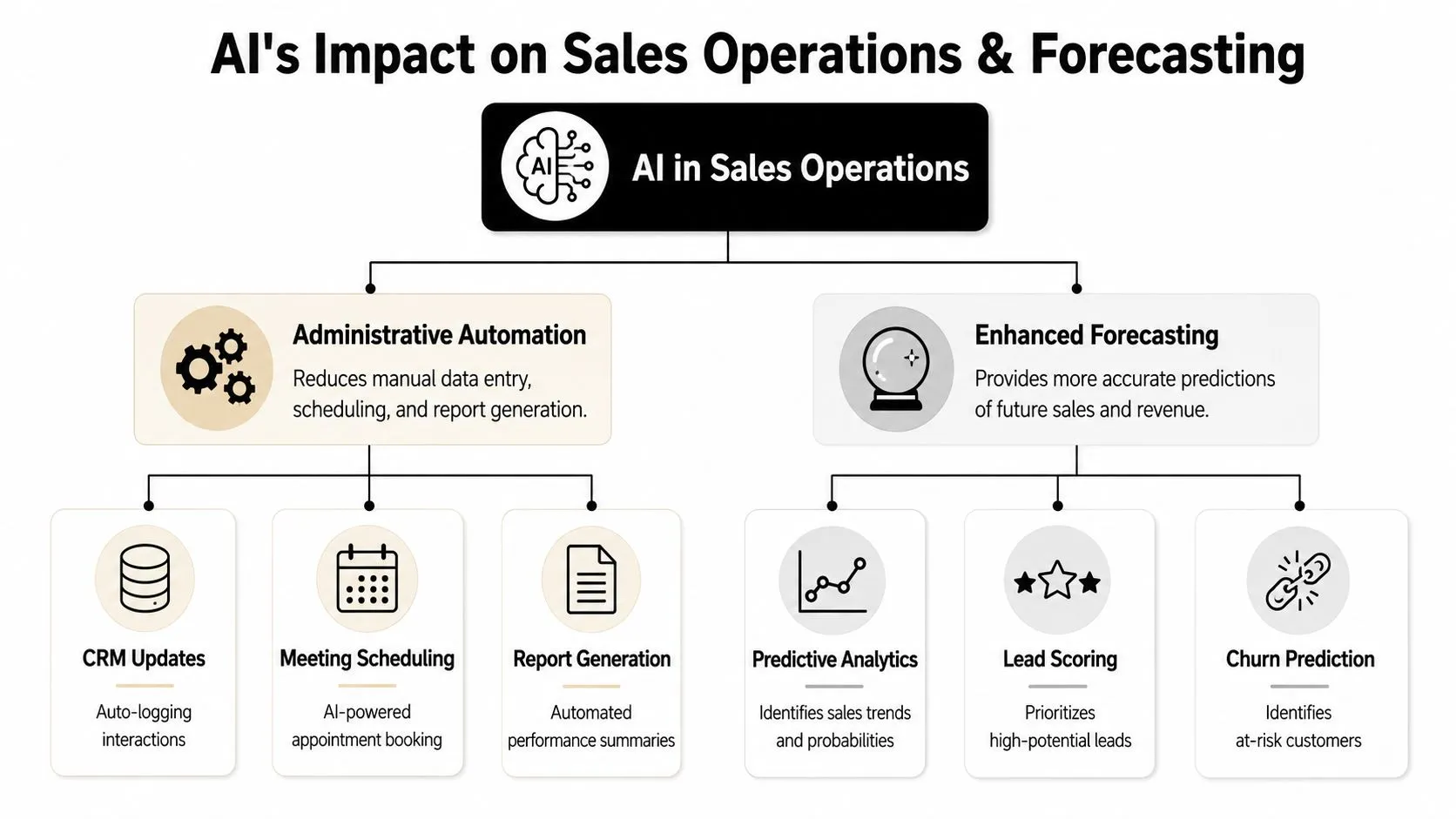
The easiest AI wins often happen after the prospect replies. Once meetings start, reps get overloaded with prep work, note capture, follow-up admin, and pipeline maintenance. That's where AI can improve execution in the background without changing the seller's style.
Pre-meeting prep
Before a discovery call, ask AI to build a one-page brief from your CRM notes, past emails, website copy, and public company information. The brief should be short enough to read in a minute or two.
A strong brief includes:
- Account snapshot: What the company does, who they sell to, and what likely matters now
- Stakeholder context: Role, likely priorities, and potential objections
- Conversation memory: Prior touchpoints, promised follow-ups, and open questions
- Call plan: Three questions worth asking and one risk to watch
That replaces the usual tab-hopping routine where a rep tries to piece context together from email threads, LinkedIn, and old notes.
Post-call summaries and CRM hygiene
This is one of the most practical uses of AI in sales because reps consistently delay it when their day gets busy.
Use an AI meeting assistant or your CRM's native AI to generate:
- A concise call summary
- Action items
- Next-step email draft
- Suggested CRM field updates
Then require the rep to approve or edit each item before it enters the system. That review step matters. If a model misreads a buying signal or invents certainty where the buyer was noncommittal, your pipeline data gets distorted fast.
Let AI write the recap. Let the rep own the record.
I also like a simple manager check here. Review a sample of call summaries each week and compare them against actual recordings or transcripts. You'll spot whether the system is capturing decision criteria, risks, and next steps accurately, or whether it's producing polished but shallow summaries.
Forecasting with cleaner signals
AI forecasting only gets useful when your team maintains consistent deal hygiene. If stages, close dates, and notes are sloppy, the output will still look precise but won't help much.
Where AI does add value is in surfacing patterns a manager can inspect faster, such as:
- deals with weak activity despite optimistic stage placement
- opportunities missing a clear next step
- accounts where engagement dropped after pricing or technical review
- reps who update fields late rather than in real time
That doesn't replace forecast calls. It improves them. Instead of asking reps to defend every number from scratch, managers can spend more time on exceptions, stalled deals, and risks that deserve intervention.
How to Implement AI and Manage Change on Your Team
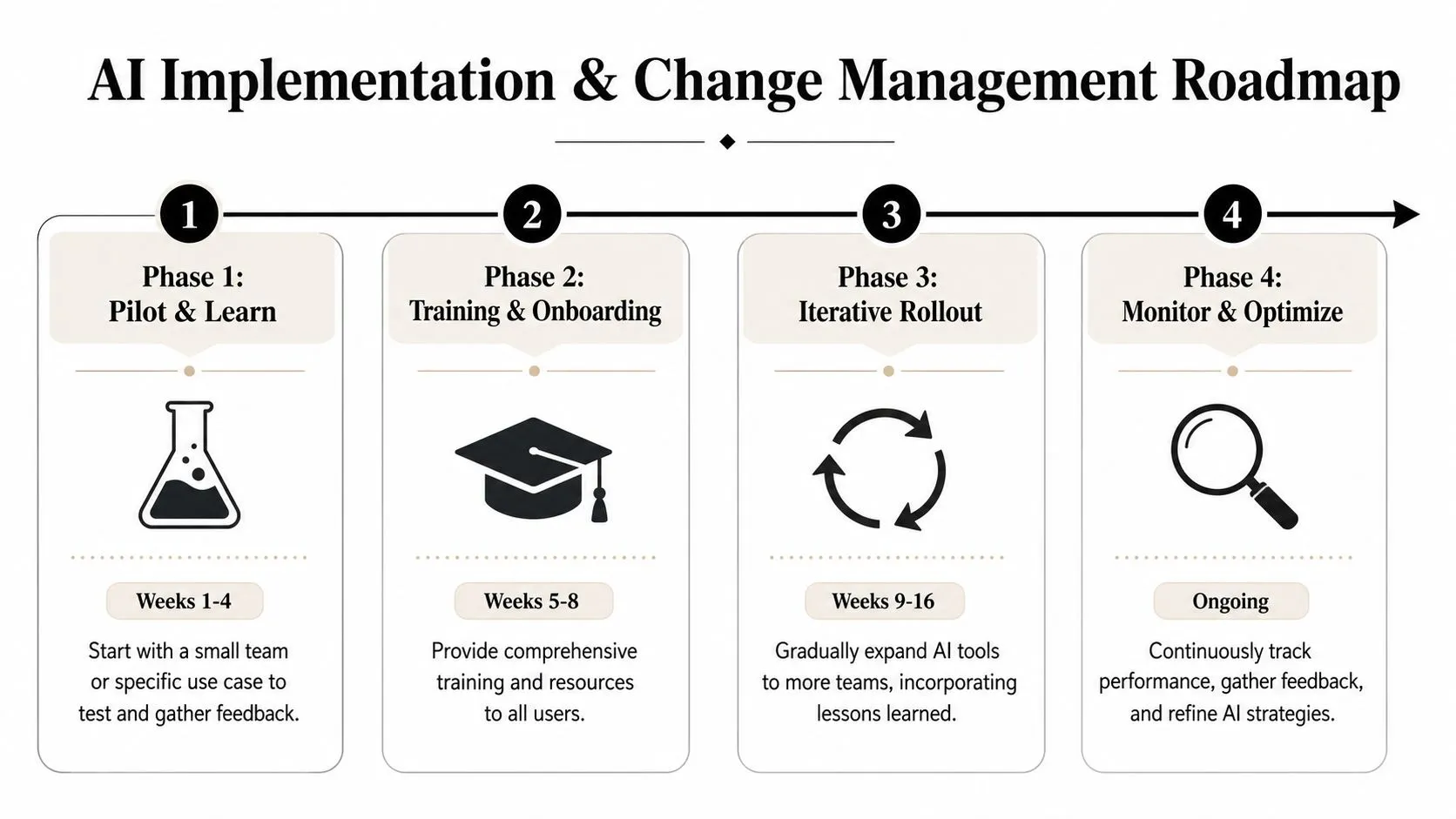
AI rollout fails when leaders treat it like a software install. It's a behavior change project. Reps need to know what to use, when to use it, what good output looks like, and where judgment still matters.
According to Prospeo's analysis of AI in sales implementation, specialized vendor tools for single workflows succeed 67% of the time. The same source says teams should select one narrow use case, run daily quality assurance for 90 days, and validate results such as a 15% to 20% increase in conversion rates before scaling.
Start narrow and train hard
Don't launch AI across prospecting, outreach, note-taking, forecasting, and coaching at once. Pick one workflow with obvious friction. Personalized first-touch email drafting is a common starting point. Call summaries can also work if your reps already record meetings consistently.
The pilot should include:
- One use case only
- A small test group
- A written prompt library
- Named reviewers for output quality
- A fixed review cadence
Training needs to be practical. Reps should practice with real accounts and live messaging, not generic sandbox examples. If you want a broader perspective on rollout patterns and adoption issues, Salesmotion's AI sales insights are worth reviewing.
For leaders building internal adoption plans, AI Academy's guide to AI adoption strategies is a useful resource because it focuses on how teams change habits.
What managers should inspect
Managers should inspect behavior before outcomes. If the process is weak, the numbers will be noisy.
Focus on questions like these:
- Are reps using the approved workflow or inventing their own?
- Are they editing AI outputs before sending?
- Are CRM updates getting more accurate or just faster?
- Are reply themes and objection patterns feeding back into coaching?
- Does the team trust the output enough to use it consistently?
The fastest way to kill adoption is to tell reps to use AI, then give them no standard for what “good” looks like.
The teams that win with AI usually frame it as assistance, not surveillance. Reps don't want another dashboard judging them. They want less admin, better prep, stronger messaging, and a cleaner path to quota. If the tool helps them do that, adoption gets much easier.
If you want a practical way to build these skills without sitting through bloated courses, AI Academy is built for working professionals. It offers step-by-step tutorials, prompt templates, and hands-on workflows for tools like ChatGPT, Claude, Perplexity, and many more, so you can apply AI directly to sales, research, content, reporting, and daily execution.