Two people on the same team can paste the same report into ChatGPT and get outputs that barely look related. One gets a clean executive summary with action items. The other gets fluffy filler, missing numbers, and the wrong tone. Then both assume the model is unreliable.
Usually, the model isn't the actual problem. The workflow is.
Large language models respond differently based on wording, context, and output instructions. That's why prompt quality matters so much, and why structured prompt libraries became useful as teams moved beyond casual experimentation. OpenAI-style prompting best practices led directly to reusable templates, and by 2024 to 2025 vendors and institutions were publishing structured libraries instead of expecting users to write every prompt from scratch, as shown in MLJAR's overview of AI prompts and prompt libraries.
If you're also trying to make your company's content easier for AI systems to understand and surface, Dokly's guide on how to make content visible to AI is worth reading alongside this. Prompt quality and content visibility are two sides of the same operational problem. You want better inputs and more predictable outputs.
A good AI prompt library solves the daily friction many groups quickly encounter. People save random prompts in Slack, Notion, Google Docs, or their own notes app. Nobody knows which version works best. New hires copy weak prompts. Strong prompts get buried. The team keeps “using AI,” but results stay inconsistent.
That's where a shared library changes things. It turns prompting from personal improvisation into a repeatable system.
Introduction From AI Chaos to Consistent Control
Monday morning, a team lead asks for a prompt to summarize customer interviews. By lunch, five versions are sitting in Slack. One produces tidy bullet points but misses objections. One gives a wall of text. One only works if the user already knows the product language. Another was tuned for a different model six months ago and now gives uneven results. The team still has no standard, so everyone keeps using their own version.
That is how prompt chaos shows up in real operations. The problem is not access to AI. The problem is that shared work starts depending on prompts nobody owns, reviews, or updates.
A prompt library fixes that by turning ad hoc prompting into a managed team asset. Instead of copying whatever worked once, teams use approved templates for recurring tasks, with clear instructions, expected output formats, and usage notes. That matters even more as companies try to operationalize AI across departments and figure out how to make content visible to AI, not just generate text on demand.
A prompt library is less about collecting clever prompts and more about setting a repeatable standard for AI-assisted work.
Without that standard, the hidden cost is rework. Someone rewrites the output for tone. Someone fixes the structure before it can go to a client or stakeholder. Someone else reruns the prompt because a required detail got dropped. Teams say AI is saving time, but the gains disappear in review, cleanup, and handoffs.
A shared AI prompt library gives teams control over repeatable tasks. It sets the default way to request common work, captures the context that should always be included, and makes quality easier to review across people and tools. That is where AI use starts to feel dependable enough for real business workflows, especially once multiple teams are contributing prompts and someone has to govern what stays, what gets updated, and what should be retired.
What Is an AI Prompt Library Really
An AI prompt library is a shared system for repeatable AI work. It stores approved prompts with the instructions, inputs, constraints, owners, and review details a team needs to use them the same way across roles and tools.
That definition matters because a folder full of saved prompts does not solve the team problem. It just preserves individual habits. A real library makes prompts usable by someone other than the person who wrote them, and governable by someone responsible for quality.
What makes it a library instead of a prompt dump
A prompt becomes library-ready when it answers the operational questions around the prompt, not just the prompt itself.
A useful entry usually includes:
- The task it handles
- The team or role it is for
- The fields a user needs to replace
- The required output format
- Usage notes or failure risks
- The owner and last review date
That structure is what turns prompting into shared process documentation. If legal, sales, support, and marketing all use AI, the library needs to do more than save time for one power user. It needs to reduce variation, make review easier, and give the team a clear default for common tasks.
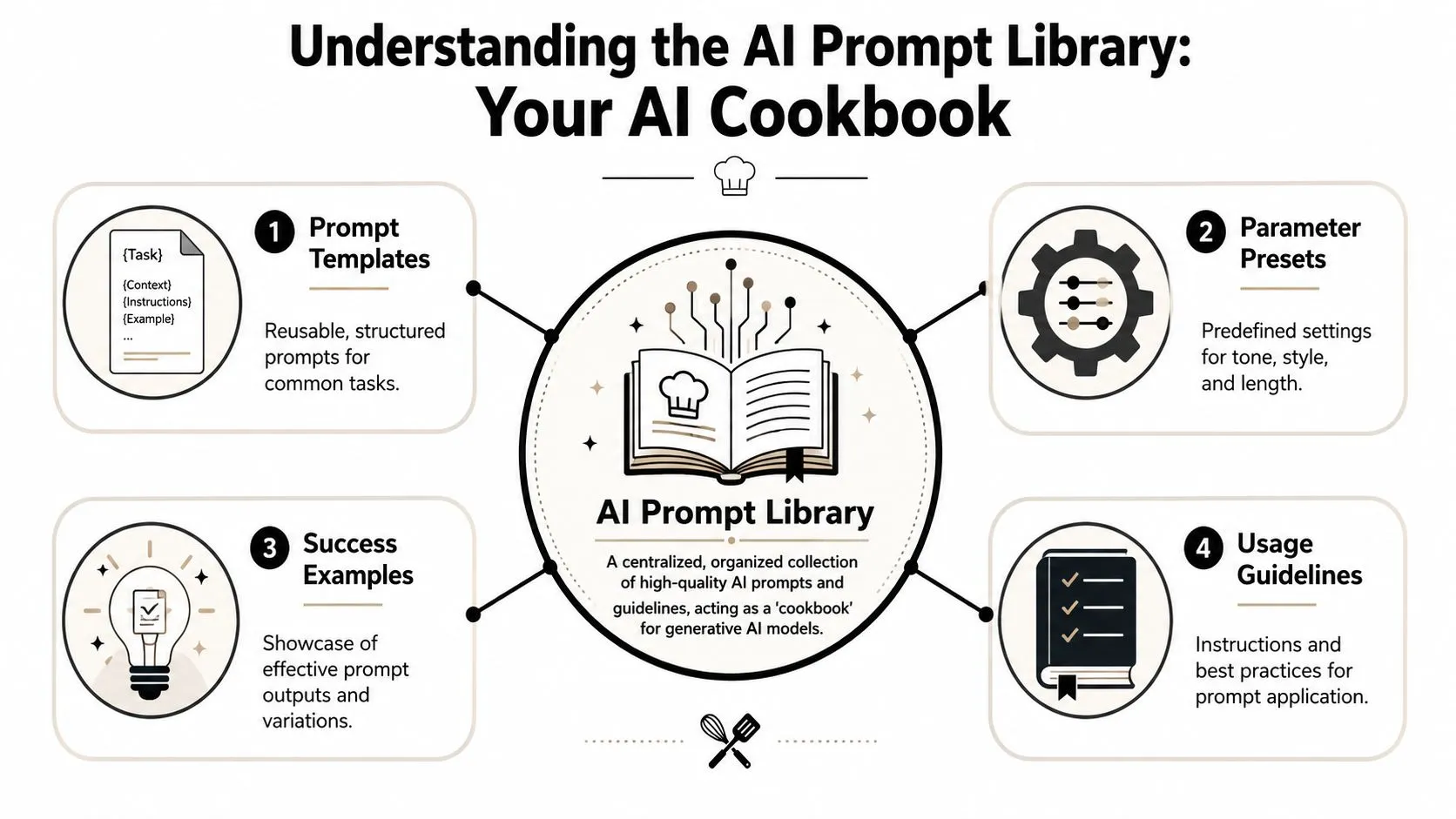
In practice, I treat a prompt library as part knowledge base, part workflow control. The prompt is only one layer. The surrounding metadata is what keeps the library usable after the original author changes roles, the model behavior shifts, or the team updates its standards. If you want a deeper grounding in how prompt structure works, this comprehensive guide for prompt engineering is a useful companion read.
The four parts every reusable prompt needs
A prompt entry does not need to be complicated. It does need enough structure that another teammate can run it correctly without a Slack message or handoff call.
-
Template
The base instruction for the task, such as “Summarize these interview notes for an executive audience.” -
Variables
Replaceable fields like[audience],[source text],[tone], or[product name]. -
Context and constraints
Rules that shape the response. This can include banned claims, required sections, reading level, compliance notes, or channel-specific limits. -
Output format
The exact shape of the answer. Bullet points, JSON, a memo, a table, or a Slack-ready update all produce different review paths.
Practical rule: If a teammate cannot tell what to replace, what good output looks like, and when to use the prompt, it is not ready for a shared library.
Stronger teams add two more fields over time. One is an example output so users can spot drift fast. The other is version history, which becomes important once prompts are tied to approval workflows, policy changes, or specific model settings.
That is the distinction. A prompt collection helps individuals remember what worked once. An AI prompt library helps a business repeat what works, review it, and keep it reliable as usage spreads.
Key Benefits of a Shared Prompt Library
A familiar pattern shows up once AI use spreads across a team. One person gets strong results, a few others copy fragments of their prompts, and within a month nobody is sure which version still works. Reviews get slower. Outputs drift. The same task starts producing three different answers depending on who ran it.
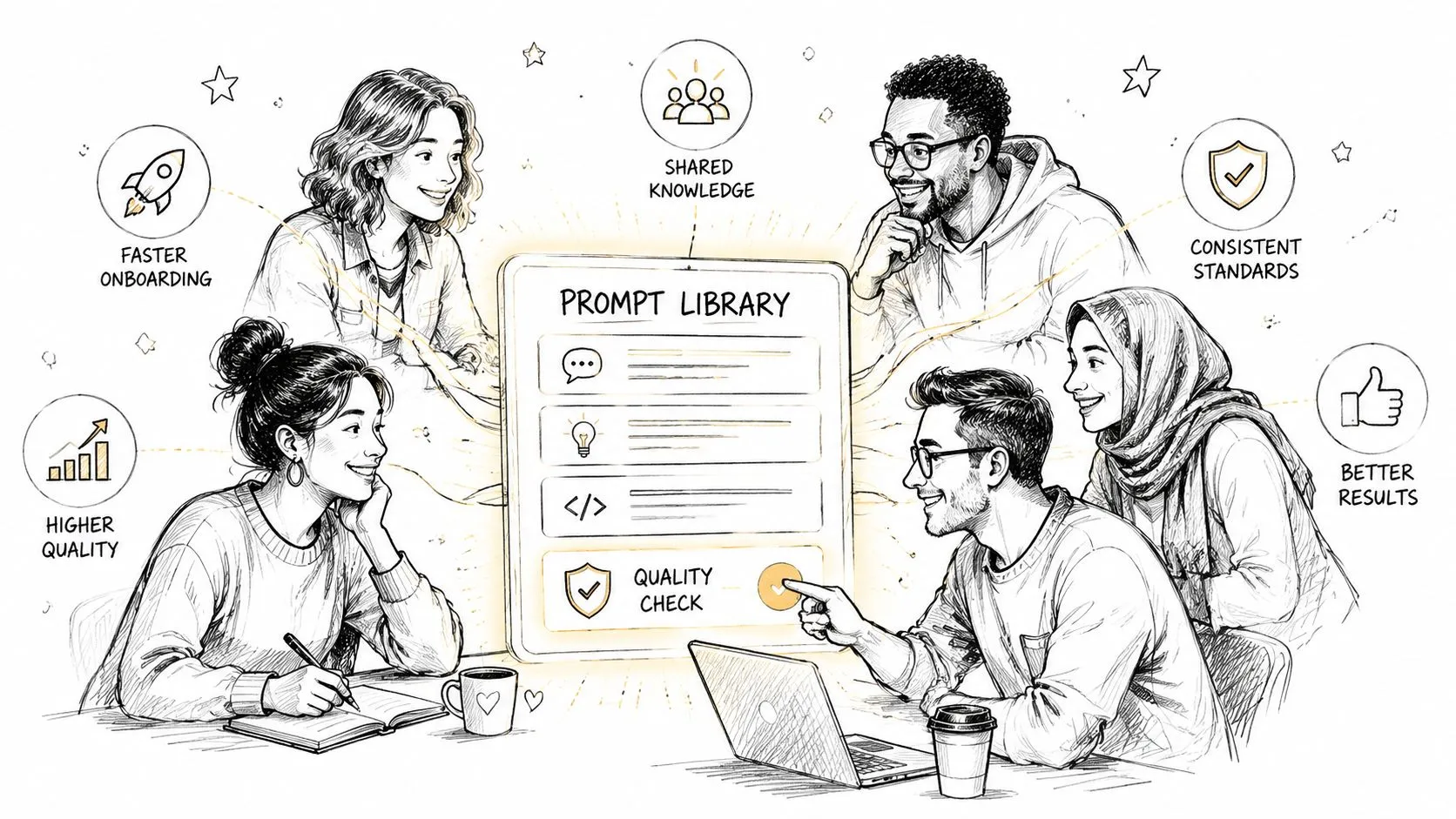
A shared prompt library fixes that operational mess. It gives the team a single place to find approved prompts, see which ones are current, and reuse proven instructions without rebuilding the task from scratch every time.
Consistency scales better than heroics
Teams get into trouble when prompt quality depends on one expert user. That setup works for a while, then breaks under normal business pressure. People copy outdated prompts into private docs, skip constraints, or tweak wording in ways that subtly diminish quality.
A shared library spreads good judgment across the team.
That matters because AI usage stops being a personal habit once it touches client work, reporting, hiring, support, or internal documentation. At that point, prompt quality affects consistency, review effort, and risk. Teams that already treat AI outputs as part of their knowledge system usually get more value from a library, because prompts become reusable operating assets instead of disposable chat inputs. This article on AI knowledge management workflows for teams connects closely to that idea.
What teams actually gain
The payoff is practical, and it shows up in day-to-day operations faster than many teams expect.
-
Higher baseline quality
People start from a tested prompt instead of a blank box. That usually means better context, clearer constraints, and outputs that need less cleanup. -
Faster onboarding
New hires can use working prompts on day one. They do not need to reverse-engineer how the best operator on the team gets reliable results. -
Captured expertise
Strong prompt patterns stop living in one person's memory, chat history, or bookmarks. The team keeps the method even if roles change. -
Less review friction
Standard output formats make approvals easier. Editors, managers, and subject matter experts know what they are reviewing and what "good" should look like. -
Better governance
Owners, review dates, and approved use cases give teams a way to control prompts tied to regulated, customer-facing, or brand-sensitive work.
There are trade-offs. A library with no curation turns into a junk drawer. A library with too much control becomes slow and nobody uses it. The right balance depends on the task.
For example, a brainstorm prompt can stay flexible. A prompt used for sales emails, legal summaries, performance reporting, or hiring notes needs tighter review, clearer constraints, and an owner who updates it when policies or model behavior change.
Strong prompt libraries focus first on high-frequency, high-visibility, and high-risk tasks.
That is usually where the time savings show up fastest, and where inconsistency costs the most.
How to Build Your First AI Prompt Library
The first version doesn't need a fancy tool. It needs a home, a structure, and a small set of prompts people will find useful.
Pick a home your team will actually use
The right storage location depends on behavior more than features.
A Google Doc is the fastest option to launch. Everyone already knows it, and nobody needs training. The downside is weak search, weak tagging, and fast clutter.
A Notion database works better when you want filters like role, task, tool, owner, and review status. It adds just enough structure without forcing a heavyweight rollout.
A dedicated prompt tool makes sense later, once usage is high and you care about permissions, version history, and analytics. Starting there too early often creates friction.
For teams that need examples before they build from scratch, these AI prompt templates for business are useful for seeing how task-based prompts are framed across business functions.
Start with a simple entry format
Every prompt entry should answer the same basic questions. If fields vary wildly, quality will drift.
Use something close to this:
-
Title
A specific name like “Weekly SEO performance summary” beats “analytics prompt.” -
Goal
One sentence on what job this prompt performs. -
Prompt template
The full reusable instruction with variables in brackets. -
Inputs required
What the user must paste in before running it. -
Expected output
Bullets, table, memo, JSON, draft email, or another defined format. -
Usage notes
When to use it, when not to use it, and what usually needs manual review.
The fastest way to train a team is to make every prompt page look familiar. Repeated structure lowers hesitation.
If users have to interpret the library before they can use the prompt, you've already added friction.
A good next step is to point people to a focused training path rather than dumping them into a giant resource pile. A collection like Prompting Essentials fits well here because it helps teams build a common baseline around prompt quality.
Here's a useful walkthrough format to pair with your internal rollout:
Build by role and task
Teams often organize badly on the first attempt. They create folders like “Marketing,” “Sales,” and “Operations,” then dump everything inside. That helps ownership, but not retrieval.
A better approach uses two layers:
| Organize by | Why it helps | Example |
|---|---|---|
| Role | Clarifies who should use the prompt | Recruiter, analyst, content marketer |
| Task | Clarifies what the prompt does | Write outreach email, summarize report, draft job description |
That combination makes search easier and avoids prompt sprawl. It also reveals gaps. If analysts have ten prompt entries and managers have none, that tells you where adoption is already happening and where support is missing.
Start with recurring jobs, not creative edge cases. Weekly summaries, campaign analysis, meeting follow-ups, job description drafts, and customer email responses are usually better first entries than “thought leadership ideation” or “brand voice experimentation.”
Copy-Paste Prompt Templates for Your Business
Most libraries get traction when people can use something immediately. These templates are written for shared use, not solo experimentation. Each one includes structure, variables, and clear output requirements.
If you want a broader set of examples to compare against, this library of ChatGPT prompts for business is a useful reference point.
Sample Prompt Library Structure
| Prompt Title | Business Function | Goal | Key Variables |
|---|---|---|---|
| Social post variations from article | Marketing | Turn one source asset into multiple platform-ready drafts | [article_text], [target_audience], [platform], [tone] |
| Weekly performance exception review | Analytics | Summarize key changes and flag issues requiring action | [weekly_data], [primary_kpis], [time_period] |
| Structured job description draft | HR | Convert hiring requirements into a consistent job post | [role_title], [team], [responsibilities], [requirements] |
Marketing template for social post variations
Use this when one blog post, newsletter, or product update needs several versions for different channels.
You are a marketing assistant.
Create 5 social media post variations based on the content below.
Audience: [target_audience]
Platform: [platform]
Tone: [tone]
Goal: drive interest without sounding hype-driven.Source content:
[article_text]Requirements:
- Keep each version distinct in angle and opening line
- Highlight one concrete takeaway in each post
- Avoid repeating the same CTA wording
- Do not invent facts beyond the source content
- Output as a numbered list
After the 5 posts, add:
- 3 alternate hooks
- 3 CTA options
- 5 hashtags relevant to the topic
Why this works: it asks for controlled variation, not random creativity. The prompt narrows the job, defines the source of truth, and forces reusable output components.
Analyst template for weekly performance review
For analytics, vague prompts are dangerous. The model should know exactly what to compare and when to escalate. Windsor.ai's prompt examples show how useful explicit thresholds can be, including week-over-week comparisons and rules such as flagging clicks that change by more than 20% or average position that drops by more than 3 ranks in their operational analytics prompt library.
Analyze the weekly performance data below.
Compare this week versus last week for each KPI.Data:
[weekly_data]Required tasks:
- Calculate week-over-week changes for the listed KPIs
- Summarize overall performance in plain English
- Create a movers table showing the largest positive and negative changes
- Flag any item where clicks changed by more than 20%
- Flag any item where average position dropped by more than 3 ranks
- Separate observations from recommendations
Output format:
- Executive summary
- KPI table
- Exceptions and alerts
- Recommended next actions
This prompt works because it turns a chat model into a workflow participant. It doesn't ask for “insights.” It asks for a specific analysis pattern.
HR template for job description drafting
Recruiters and hiring managers often lose time rewriting the same sections. A prompt library helps by standardizing structure without locking every role into identical language.
Draft a job description for the role below.
Role title: [role_title]
Team: [team]
Hiring manager notes: [hiring_context]
Core responsibilities: [responsibilities]
Must-have requirements: [requirements]
Preferred qualifications: [preferred_qualifications]
Work style or environment details: [work_context]Requirements for the draft:
- Use clear, direct language
- Avoid buzzwords and filler
- Separate must-have requirements from preferred qualifications
- Include a short team overview
- Include a responsibilities section with scannable bullets
- End with a concise candidate profile summary
Output in this order:
- Job summary
- Team overview
- Responsibilities
- Must-have requirements
- Preferred qualifications
- Candidate profile summary
This kind of prompt saves time because the format is fixed, but the role details remain flexible. That balance is what makes a shared library durable.
Maintaining and Growing Your Prompt Library
A prompt library starts as a convenience and becomes useful only when someone owns quality. Without maintenance, even good prompts decay. Models change. Team workflows change. Requirements change. Old prompts linger, and people stop trusting the library.
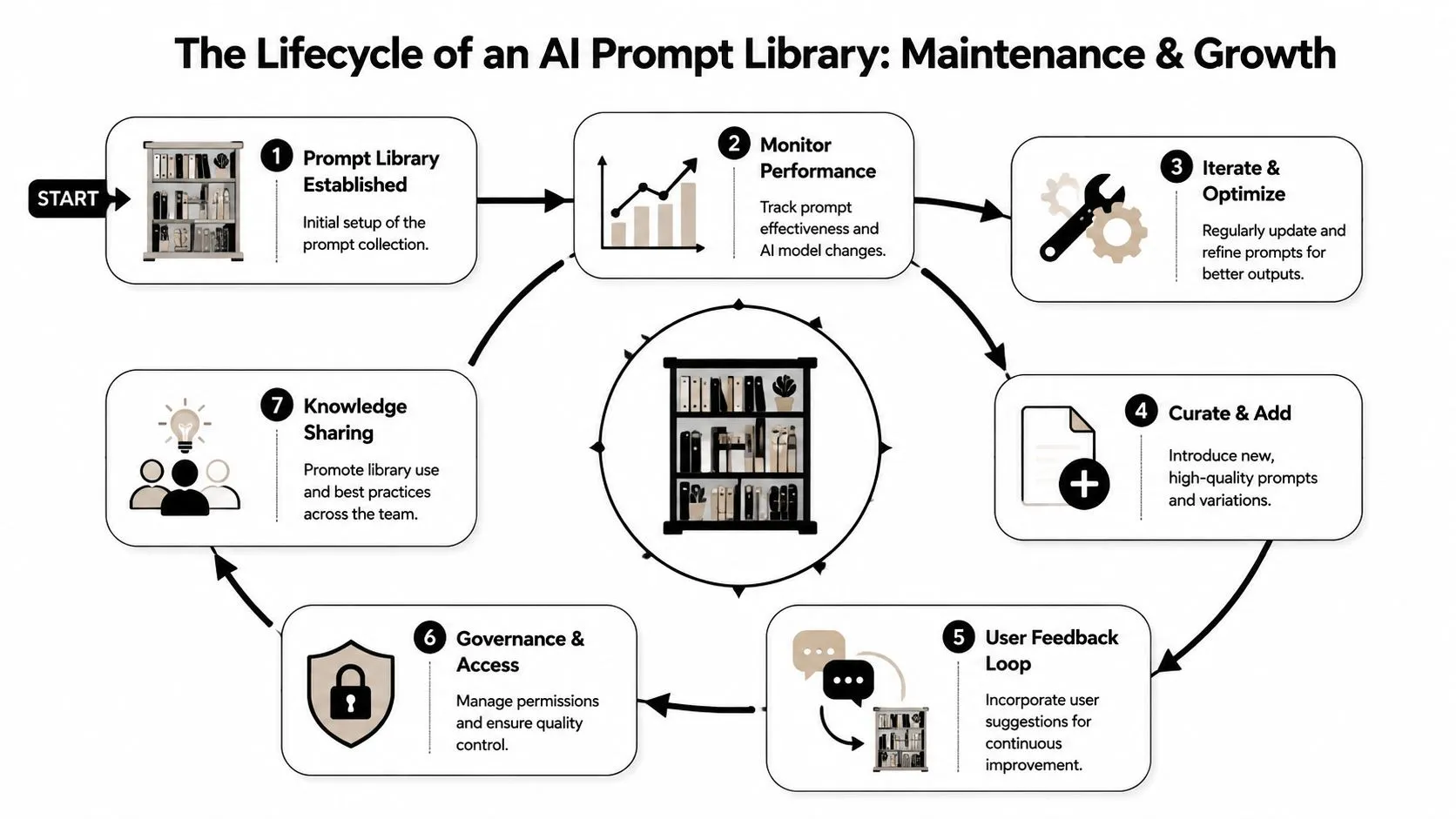
Treat prompts like operating procedures
The easiest mindset shift is this. A prompt used repeatedly for business work should be treated more like a lightweight SOP than a clever one-off.
That means each prompt needs:
- An owner who updates it when outputs drift
- A review date so stale prompts don't sit untouched
- A short approval path for new entries
- A retirement rule for prompts nobody uses or trusts
A quarterly review is usually enough for common applications. High-risk prompts, such as customer-facing messaging, hiring support, or executive reporting, should be checked more often.
Weak governance creates prompt sprawl. Strong governance keeps the library small, trusted, and used.
Governance that doesn't slow people down
Governance fails when it feels bureaucratic. Keep it light.
One practical model is to let anyone submit a prompt, require one owner per category, and approve only prompts that include a test case, example output, and usage notes. That filters out half-baked entries without blocking experimentation.
Use status labels that are easy to understand:
| Status | Meaning |
|---|---|
| Draft | Submitted but not approved |
| Approved | Ready for team use |
| Needs revision | Useful idea, weak current version |
| Retired | No longer recommended |
How to keep adoption from fading
People won't use the library just because it exists. They use it when it clearly saves them time on work they already do.
Good adoption habits are simple:
- Add library prompts to onboarding so new hires build the right habits early.
- Show before-and-after examples during team meetings.
- Pin the highest-value prompts in Slack, Notion, or your intranet.
- Ask managers to reference prompt titles in workflows, not “use AI if helpful.”
The strongest signal of success isn't library size. It's whether people stop writing the same weak prompts from scratch.
If you want practical help building these habits, AI Academy is a solid place to learn the tools, prompting patterns, and real workplace workflows that make AI useful beyond experimentation. It's built for working professionals who want short, actionable lessons, not theory-heavy courses.