One in three companies, representing approximately 33% of the global corporate sector, has faced major operational disruptions in just the last five years, with losses that often run into millions of dollars per incident, according to 6Sigma's overview of operational risk management. That number changes the conversation. Operational risk isn't a niche issue for banks, auditors, or compliance teams. It's a management issue.
If you lead a team, run projects, manage campaigns, approve vendors, or depend on software to get work done, you already live with operational risk every day. A missed handoff, an access mistake, a reporting delay, a weak approval process, or a tool outage can turn a normal week into a scramble. Most businesses don't fail because of one dramatic event. They get hurt by routine failures that nobody named, tracked, or owned early enough.
A good operational risk management framework gives you a practical way to prevent that. Think less “policy binder on a shelf” and more “home security system for the business.” You want sensors, locks, alerts, response plans, and someone checking whether the system still works.
Why Ignoring Operational Risk Is a Gamble You Cannot Win
A regional team launches a campaign on Monday. By noon, the landing page breaks because an update wasn't tested. Sales can't see incoming leads because a sync failed between tools. Customer support gets angry messages first, then leadership asks why nobody saw the issue coming.
That's operational risk.
It sounds formal, but the idea is simple. Operational risk is the chance that work breaks down because of people, processes, systems, or outside events. It's the risk behind missed approvals, bad handoffs, tool failures, weak access controls, poor training, and vendor disruptions. It shows up in marketing, finance, HR, IT, customer operations, and project delivery.
What it looks like in everyday work
For a non-expert, the easiest way to understand it is to stop thinking about “risk” as abstract danger and start thinking about avoidable friction with serious consequences.
- People risk: A new employee sends a pricing sheet that hasn't been approved.
- Process risk: Nobody owns the final review step before a campaign goes live.
- System risk: A dashboard refresh fails, and managers make decisions using stale data.
- External event risk: A vendor outage blocks a core workflow at the worst possible time.
None of these examples sounds dramatic on its own. That's why teams underestimate them.
Operational failures rarely announce themselves as “risk events.” They look like delays, confusion, rework, and exceptions until the cost becomes impossible to ignore.
An operational risk management framework is the business equivalent of a seatbelt and airbag. You hope you won't need it in a crisis, but its bigger value is preventive. It forces the company to ask basic questions early: What could go wrong? How bad would it be? Who owns the fix? How will we know if conditions are getting worse?
Why new managers struggle with this
New managers often assume risk management means stopping work, adding bureaucracy, or saying no. In practice, a good framework does the opposite. It lets teams move faster because the rules are clearer, the handoffs are cleaner, and the weak spots are visible before they become emergencies.
If your team keeps solving the same category of problem again and again, you don't just have bad luck. You probably have an unmanaged operational risk.
The Core Components of an ORM Framework
An operational risk management framework works like a home security system. You do not install cameras, locks, and alarms because you expect disaster every day. You install them so small failures are harder to trigger, easier to spot, and faster to contain.
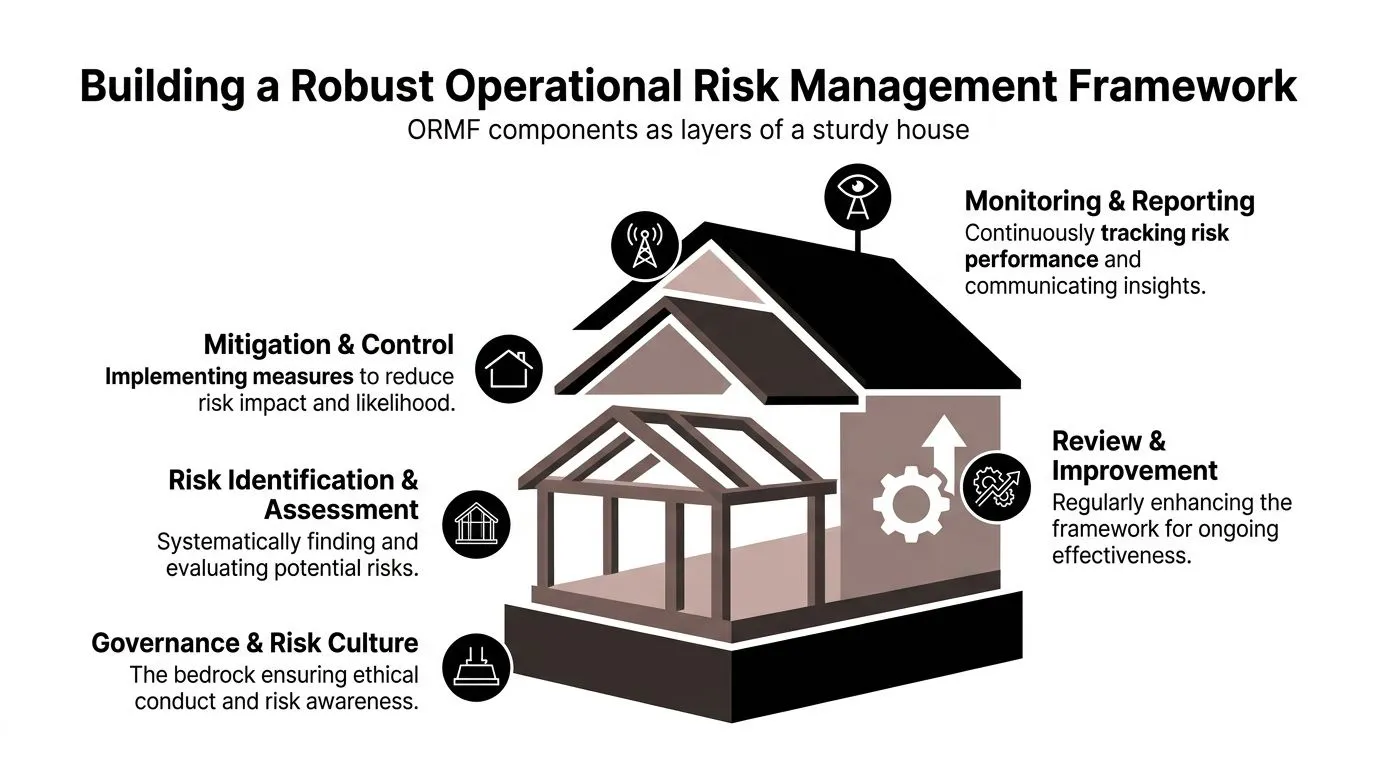
That same logic makes ORM easier to understand. A useful framework is not one big policy document. It is a set of connected parts that answer five practical questions. Who makes decisions? What can go wrong? Which risks matter most? What controls are in place? How do we know the controls still work?
Start with the foundation
The foundation is governance, risk appetite, and culture.
Governance defines ownership. It answers who can accept a risk, who must review it, and who gets pulled in when a threshold is crossed. Risk appetite sets limits. It clarifies how much downtime, process failure, vendor dependency, or data exposure the organization is willing to tolerate before leaders step in.
Without that foundation, managers create their own unofficial rules. One team accepts manual workarounds for weeks. Another escalates the same issue on day one. The result is inconsistency, not control.
Culture matters just as much. Teams need to believe that reporting a weak spot is part of doing the job well. Ethical expectations belong here too. If you are shaping standards for service delivery or third-party behavior, practical guidelines for ethical IT services can help turn abstract values into day-to-day operating choices.
A simple way to clarify this foundation is to pair risk discussions with a broader business view. A quick SWOT analysis template for team planning can help managers separate internal weaknesses they can fix from external threats they need to prepare for.
The four working parts
Once the foundation is clear, the framework runs as a cycle with four parts: identify, assess, treat, and monitor. The Institute of Operational Risk describes effective frameworks in similar terms, with clear processes for identifying risks, assessing them, controlling them, and reporting on them through an established governance structure in its operational risk sound practice guidance.
Here is the plain-English version.
-
Identification Teams look for failure points before they become incidents. Review workflows, handoffs, recurring exceptions, vendor dependencies, and past mistakes. For a marketing team, that could mean missed approvals, broken tracking pixels, or publishing access shared too widely.
-
Assessment
Every risk should not get the same response. Assessment helps you judge likelihood and impact so the team can focus attention where disruption would hurt delivery, revenue, customers, or compliance. -
Treatment
Treatment means deciding what to do about the risk. You might reduce it with a control, transfer part of it through insurance or contract terms, accept it within defined limits, or avoid it by changing the process entirely. -
Monitoring
Risks change because work changes. New tools, new vendors, staff turnover, and tighter deadlines can weaken controls that looked fine six months ago. Monitoring checks whether the risk level or control performance has shifted.
AI can make this cycle lighter to run. Teams now use workflow tools to flag missing approvals, detect unusual exceptions, summarize incident themes, and route alerts to the right owner. That matters for non-experts because the framework becomes easier to maintain without turning into extra admin work.
Control types that make the framework real
The term controls confuses new managers because it sounds technical. In practice, a control is something you put in place on purpose to lower the chance of failure or limit the damage if failure happens.
Four control types show up in almost every ORM setup:
- Preventive controls: Stop the issue before it starts. Examples include role-based access, required approvals, locked templates, and segregation of duties.
- Detective controls: Show that something is wrong or drifting off course. Examples include alerts, reconciliations, exception reports, and audit logs.
- Corrective controls: Help the team fix the problem once it has been detected. Examples include incident playbooks, rollback steps, and patch procedures.
- Recovery controls: Restore service, data, or operations after disruption. Examples include backups, failover options, and continuity plans.
Here is a simple way to test whether a control is real. Can you name the owner, the review schedule, and the action to take when it fails?
If the answer is no, the control exists mostly on paper.
That is why practical ORM works best when each component is tied to specific teams and measurable indicators. A project manager might track overdue approvals and missed handoff dates. An operations lead might watch system downtime, rework volume, and vendor incidents. A marketing manager might monitor broken campaign links, analytics discrepancies, and publishing errors. The framework becomes useful when people can see where risk lives in their own work.
Your Practical Roadmap to Implementing a Framework
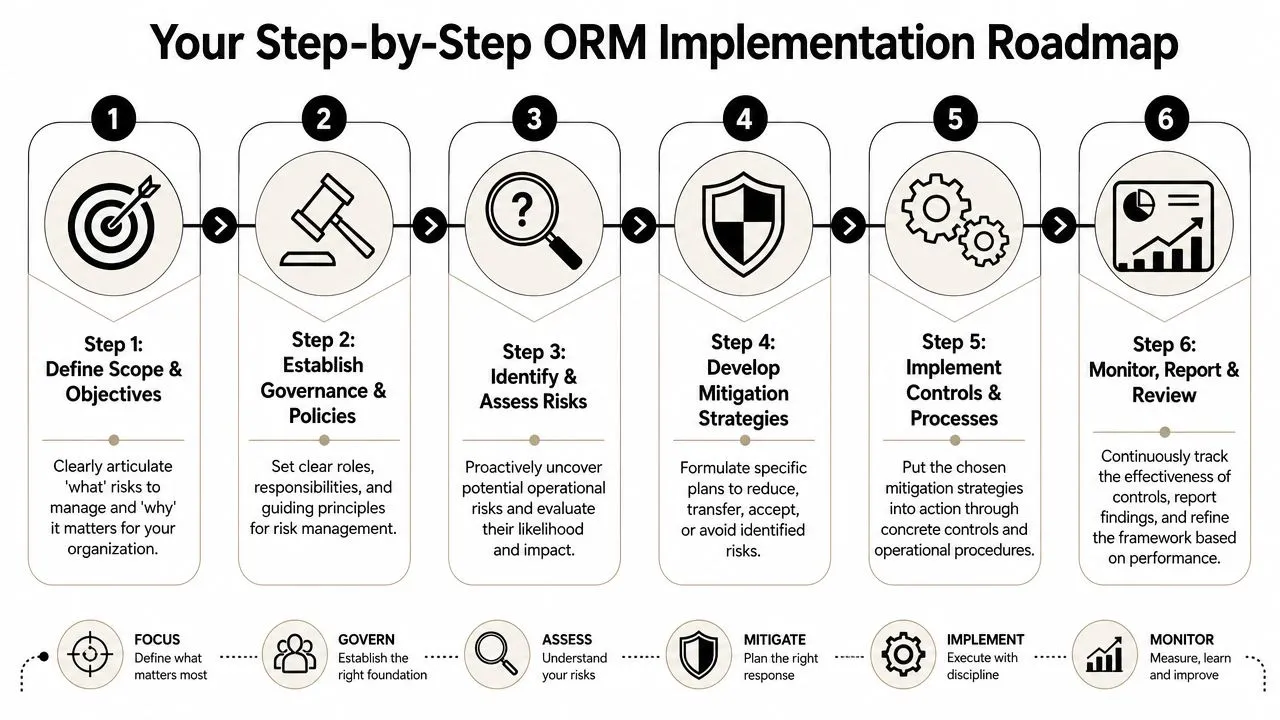
A lot of operational failures start in ordinary places. A skipped approval. An outdated spreadsheet. A vendor account that stayed active too long. That is why implementation should feel less like a compliance project and more like setting up a home security system. You start with the doors and windows that matter most, test what works, and add more coverage over time.
Most managers can build a useful first version this quarter with tools they already have. Shared spreadsheets, forms, dashboards, and a standing review meeting are often enough to get started.
Step 1 through Step 3
Step 1 is leadership alignment.
Start by choosing a manageable scope. One department, one workflow, or one recurring operational headache is plenty. A marketing manager might begin with campaign approvals, analytics accuracy, agency access, and launch continuity. An operations lead might focus on vendor onboarding, order handoffs, or inventory updates.
Vague scope creates vague ownership.
Step 2 is building a small cross-functional group. Include the people closest to the work, because they know where delays, workarounds, and failure points exist. A practical starting team often includes a process owner, an operations lead, a systems or IT contact, and one manager from the function affected by the risk.
Keep the group small enough to make decisions.
Step 3 is a risk identification workshop.
Treat this like mapping weak spots in a house before installing locks and alarms. You are not trying to predict every possible failure. You are trying to find the places where failure is most likely or most expensive.
Use prompts like these:
- What could fail?
- Where do handoffs break?
- Which tasks depend on one person or one tool?
- What would hurt customers, revenue, compliance, or delivery if it went wrong?
Capture answers in a simple risk register.
| Risk | Cause | Impact | Current Control | Owner | Status |
|---|---|---|---|---|---|
| Campaign launched with wrong pricing | Approval step skipped | Customer confusion and rework | Manual review by manager | Marketing lead | Open |
| Weekly report delayed | Data source refresh fails | Slow decisions | Analyst checks dashboard manually | Analytics manager | Monitoring |
| Vendor access not removed | Offboarding gap | Data exposure | HR notifies systems team | Ops manager | Needs improvement |
If the team struggles to separate internal process weaknesses from external threats, a simple SWOT analysis training resource can help organize thinking before the workshop starts.
Step 4 through Step 6
Step 4 is prioritization. Use a basic impact and likelihood grid. Keep the scoring simple enough that managers will use it. A delayed internal report might be inconvenient. Incorrect customer pricing during a launch can create refunds, support volume, and reputational damage. Those two items should not sit in the same priority bucket.
A quick rule helps here. If a risk could stop delivery, create customer harm, trigger a compliance issue, or consume major rework hours, review it first.
Step 5 is assigning treatment and controls.
Each significant risk should have four things attached to it:
- An owner: one person with clear accountability
- A response choice: avoid, reduce, transfer, or accept
- A control plan: the process, tool, or check that will change
- A review date: when the team will verify whether the fix is working
AI can speed up the admin work around this step, especially for non-experts. Teams can use tools such as ChatGPT or Claude to turn workshop notes into draft risk statements, summarize incident patterns, convert transcripts into a structured register, or draft action lists by owner. A simple tracker in Airtable, Notion, or Google Sheets is often enough to manage follow-up without waiting for a formal platform rollout.
That keeps the framework practical.
Step 6 is setting a monitoring cadence.
For an early-stage program, monthly reviews are usually enough. The meeting should be short, specific, and tied to decisions.
A useful agenda looks like this:
- Review newly identified risks
- Check overdue actions
- Look at warning indicators and recent incidents
- Escalate items outside tolerance
For example, a project manager might monitor missed handoff dates and overdue approvals. A marketing lead might track publishing errors, broken links, and analytics discrepancies. An operations manager might watch downtime, rework volume, and vendor exceptions. Those role-based KPIs make the framework easier to use because each team can see risk in its own language.
Start small and make it real. One living framework that a single team updates every month is more valuable than a polished document that nobody touches.
Choosing the Right Risk Treatment Strategy
A risk register is only useful if it leads to a clear decision. After a team names a risk and rates its severity, the next job is choosing the response that fits the business, the process, and the cost of action.
The easiest way to understand treatment is to compare it to home security. If a neighborhood has frequent break-ins, you have four basic choices. You can move house. You can add better locks and cameras. You can buy insurance. Or you can accept the remaining chance of loss because the threat is low and the cost of more protection is not worth it. Operational risk works the same way.
Risk Treatment Strategies Compared
| Strategy | What it means in practice | Example scenario |
|---|---|---|
| Avoidance | Stop the activity that creates the risk | A company pauses entry into a market where contract, privacy, and service obligations exceed its current operating capacity |
| Reduction | Add controls that lower the chance of failure or reduce the damage | A content team adds approval workflows, version control, and restricted publishing permissions to cut posting errors |
| Transfer | Shift part of the financial or operational exposure to a third party | A business uses insurance or outsources a specialist process to a vendor with stronger controls |
| Acceptance | Keep the risk within defined tolerance and monitor it | A manager accepts occasional low-impact reporting delays because the cost of fixing them would exceed the business impact |
These are not abstract categories. They are management choices.
New managers often jump straight to reduction because it feels responsible. Sometimes that is right. Sometimes it creates extra steps, more approvals, and higher operating cost without changing the exposure much. A good framework asks a simpler question first. Which response gives you the best tradeoff between risk reduction, speed, cost, and operational friction?
Acceptance causes the most confusion, so it deserves plain language. Acceptance is not ignoring a problem. It is a documented decision that the remaining exposure is tolerable, someone owns it, and the team will keep watching for changes.
A practical way to choose is to test each risk against four questions:
- Can we stop the activity without hurting the business? If yes, avoid it.
- Can a control reduce the likelihood or impact enough to justify the effort? If yes, reduce it.
- Can a supplier, insurer, or specialist partner handle part of the exposure better than we can? If yes, transfer it.
- If none of the above makes sense, is the remaining risk still within tolerance? If yes, accept it and monitor it.
That sequence keeps teams from overengineering simple problems.
Role-based examples make this easier to apply. A marketing lead might avoid risk by declining a rushed campaign that bypasses legal review. An operations manager might reduce risk by adding a daily exception check for failed orders. A project manager might transfer risk by using a specialist contractor for a complex migration. A small analytics discrepancy in a weekly dashboard may be accepted if it does not affect customer commitments or financial reporting.
For teams that want more consistency, a course on creating compliance checklists for industry regulations can help turn treatment choices into repeatable review steps. The same logic also applies to less obvious exposures, such as credential leaks or external threat monitoring. Security teams handling those cases may use outside intelligence sources, including this guide for dark web OSINT investigations, to decide whether reduction, transfer, or acceptance is the right response.
Modern tools can speed up the mechanics here. AI can turn incident notes into draft treatment options, summarize recurring failure patterns, and suggest control ideas by function. A manager still makes the decision, but the prep work gets faster, which matters when several teams are building their framework at once.
Good risk treatment is not about eliminating uncertainty. It is about choosing a response on purpose, documenting why, and making sure the control fits the problem.
Monitoring and Reporting That Actually Informs Decisions
A framework starts paying off when it helps someone make a better call on a normal workday. That means monitoring cannot read like a compliance archive. It has to work more like a home security panel. One signal says everything is normal. Another says check the side door. A third says act now.
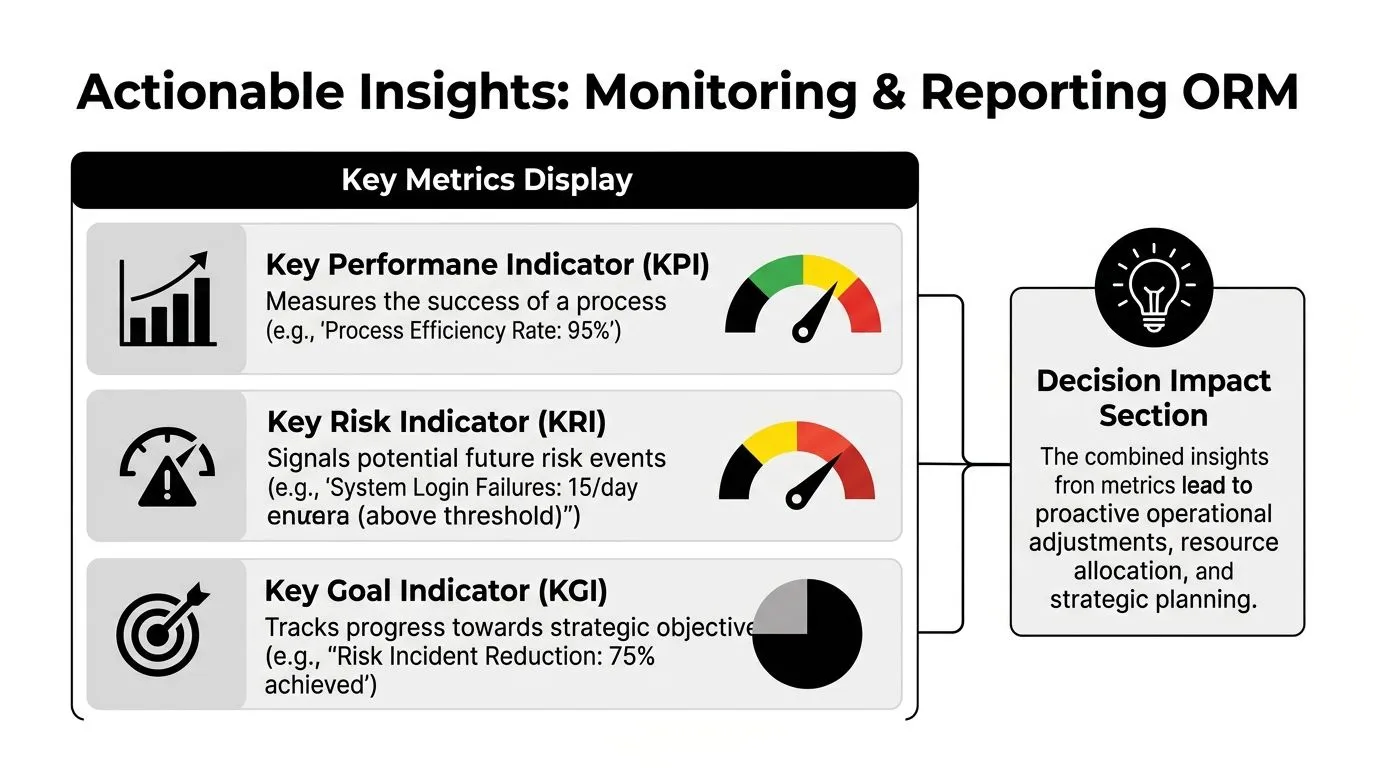
KPIs tell you what happened and KRIs warn you what may happen
New managers often mix up KPIs and KRIs because both are just numbers on a dashboard. The difference is timing and purpose.
A KPI confirms whether a process produced the result you wanted. A KRI shows whether the conditions around that process are getting less stable. KPIs are the score after the play. KRIs are the signs your defense is starting to break.
That distinction matters because operational risk usually builds before it becomes visible in the final outcome.
Examples by role make this easier:
-
Marketing KPI: Campaign launched on time
-
Marketing KRI: Number of approval exceptions before launch
-
Operations KPI: Orders processed accurately
-
Operations KRI: Number of unresolved system workarounds
-
Project management KPI: Milestones completed
-
Project management KRI: Number of tasks blocked by single-person dependency
A useful KRI has three traits. Someone owns it. It connects to a known risk. It leads to a decision. If a metric never changes anyone's behavior, it is reporting clutter.
Use thresholds that trigger action
A metric without a threshold leaves people guessing. Is five missed approvals a problem or not? Is a backlog of twelve incidents manageable or a warning sign? A good framework answers that before the pressure hits.
A simple three-zone model works well for non-expert teams because it removes ambiguity:
- Green: Normal monitoring
- Yellow: Review the trend, confirm ownership, and check whether controls are slipping
- Red: Escalate, assign action, and track the issue to closure
This setup works like a traffic light. Green does not mean the risk is gone. It means the process is still operating within acceptable limits. Yellow tells managers to pay attention early, while options are still cheap. Red signals that delay will likely increase cost, disruption, or customer impact.
A dashboard without thresholds is decoration. Managers need to know what level triggers action and who responds.
For cybersecurity-sensitive environments, external intelligence can make KRIs more useful. If your team tracks credential exposure, leaked brand mentions, or suspicious activity tied to company assets, this guide for dark web OSINT investigations shows how outside monitoring can support earlier detection.
Report differently for different roles
One of the fastest ways to make reporting useless is to send everyone the same pack.
Senior leaders need a short view of exposure and movement. They want to know which risks are rising, which red items remain unresolved, whether current exposure sits within risk appetite, and where patterns cut across departments.
Operational managers need the working view. They need to see KRIs by process, failed control tests, overdue actions, recurring exceptions, and root causes that keep showing up in incidents.
That difference is practical, not political. A board member decides where attention and resources go. A department manager decides what to fix by Friday.
Modern tools can reduce reporting effort without turning the process into a black box. AI can summarize incident notes into a weekly brief, group similar failures into themes, and draft role-based updates from the same source material. Dashboards in Power BI, Looker Studio, Airtable, or Notion can then present the right level of detail to each audience. The result is less manual formatting and more time spent acting on what the signals mean.
Common Pitfalls and How to Avoid Them
The biggest problems in operational risk management rarely come from lack of intelligence. They come from good intentions applied badly.
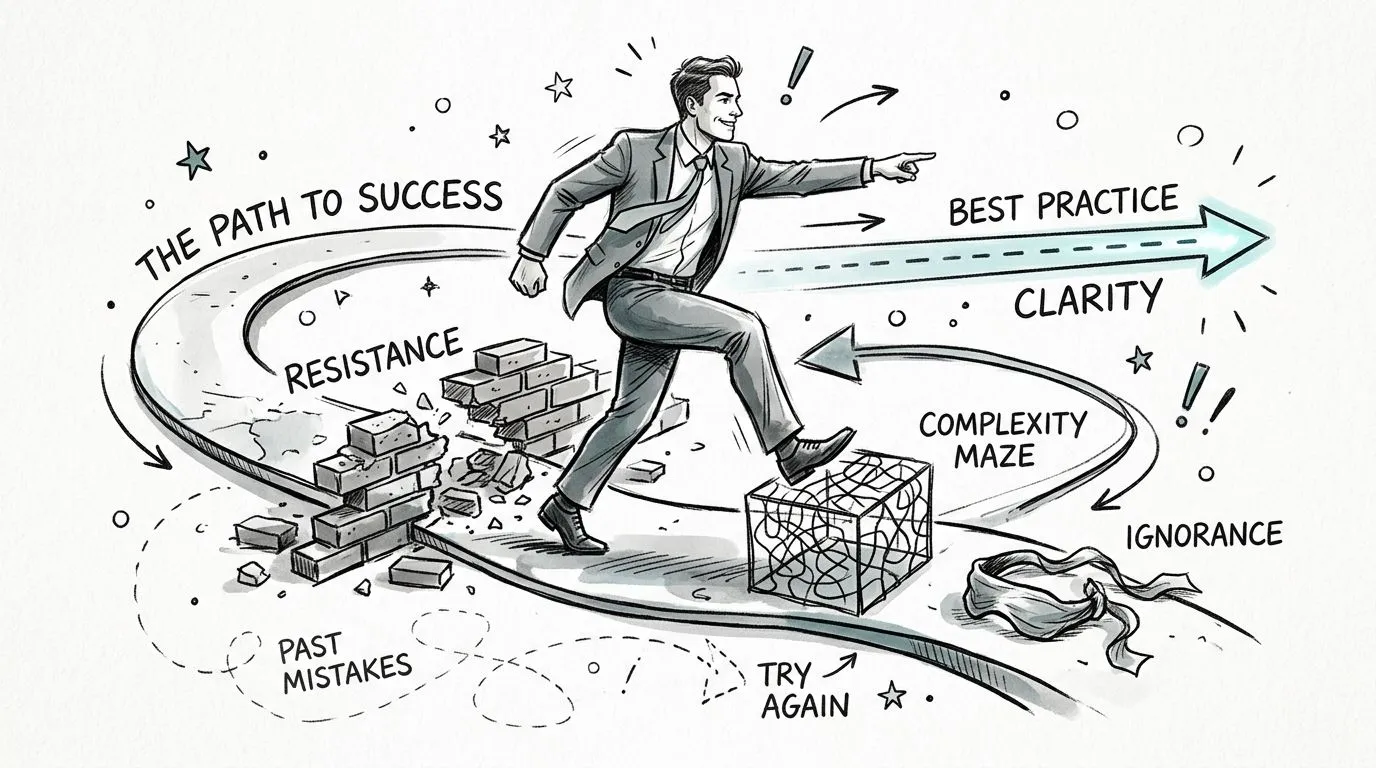
The mistakes that quietly weaken a framework
Pitfall one is treating the framework like a one-time project.
A risk register gets created, stored, and forgotten. Six months later, owners changed, tools changed, and half the controls no longer reflect reality. Fix this with a recurring review cadence and visible ownership.
Pitfall two is drowning the process in spreadsheets.
If updating the framework feels like homework, people stop using it. Keep the register lean. Track only what drives decisions.
Pitfall three is designing it from the top without frontline input.
Managers and analysts know where work breaks. If they aren't involved, the framework will miss real failure points and create fake ones.
Pitfall four is weak senior support.
If leadership doesn't ask about open risks, nobody believes the process matters. Senior leaders don't need to run the framework, but they do need to reinforce it.
A practical way to avoid all four is to apply three habits consistently:
- Review live work: Use real incidents, real delays, and real exceptions as inputs.
- Assign one owner: Shared accountability usually means no accountability.
- Keep proof simple: Meeting notes, dashboards, checklists, and action logs are often enough.
One more caution matters for modern teams. The most underserved area in current operational risk guidance is practical AI use for non-technical roles. Verified background provided for this article notes that only 18% of non-financial firms have embedded AI into their risk workflows, which highlights how early many teams still are with automation in day-to-day risk reporting and monitoring, based on PagerDuty's operational risk management framework resource. That means you don't need a perfect AI stack. You need a few useful workflows that save time and improve visibility.
From Reactive Firefighting to Proactive Resilience
A good operational risk management framework doesn't remove uncertainty. It gives you a better way to live with it.
The shift is cultural as much as procedural. Teams stop saying, “We'll deal with it if it happens,” and start asking, “How would we detect this earlier, reduce the chance, and recover faster?” That's a healthier organization. It's also a more competitive one.
The practical version is within reach for non-technical teams. You can identify risks in workshops, track them in a simple register, assign treatments, monitor KRIs, and use AI tools to summarize incidents and produce cleaner reporting. If your work includes disruption planning, CloudCops' cloud-native incident guide is a useful companion for thinking through response automation and escalation. And if you want to extend ORM into continuity planning, a focused business continuity planning course can help connect day-to-day control thinking with resilience planning.
The payoff is straightforward. Less scrambling. Fewer surprises. Better decisions under pressure.
That's what mature operational risk management looks like in practice.
If you want hands-on help using AI for workflows like risk reporting, process mapping, incident summaries, dashboard support, and documentation, AI Academy is a practical place to start. It's built for working professionals who need fast, job-ready lessons on tools like ChatGPT, Claude, Midjourney, Perplexity, and many others, with step-by-step tutorials that help non-technical teams automate real work instead of just learning theory.