Prompt engineering is the skill of giving AI precise instructions so it produces useful, reliable results. It has become a serious business capability fast, with one 2026 industry estimate valuing the global prompt engineering market at $0.85 billion in 2024, $1.13 billion in 2025, and $1.52 billion in 2026.
If you're using ChatGPT, Claude, Gemini, or another AI tool at work, you've probably had this experience already. You ask for help with a campaign brief, customer email, report summary, or content plan. The AI replies with something polished-looking but generic, off-target, or oddly formatted. Then you spend more time fixing the output than if you'd written the first draft yourself.
That's where prompt engineering matters.
For non-technical professionals, what prompt engineering is has less to do with coding and more to do with communication. It's the difference between saying "help me with marketing" and handing over a clear brief with audience, goal, tone, constraints, and deliverable. In other words, it's structured delegation for AI.
From Vague Questions to Clear Commands
A lot of AI frustration starts with a vague request.
You type something like, "Write me a LinkedIn post about our new product." The tool gives you a bland paragraph full of buzzwords, no clear audience, no angle, and no reason anyone would stop scrolling. The problem usually isn't that the model is broken. The problem is that it was given almost nothing to work with.
Prompt engineering is the practice of designing and refining instructions that guide AI toward the result you want. In plain English, it's how you turn a fuzzy ask into a clear command.
That matters because AI doesn't read your mind. It responds to the signal you provide. If the signal is weak, the output will often be weak too.
Why this moved from niche skill to real business capability
For a while, prompting sounded like a niche internet trick. That's changed. One industry forecast says the global prompt engineering market was $0.85 billion in 2024 and projects it to reach $3.43 billion by 2029 (prompt engineering market forecast).
That kind of growth tells you something useful. Companies aren't treating structured prompting as a hobby. They're treating it as part of how work gets done with AI.
A good prompt doesn't make AI smarter. It makes your intent clearer.
For marketers, analysts, managers, and consultants, this is a practical shift. The person who can brief AI clearly can often move faster, produce cleaner drafts, and spend less time rewriting generic output.
If you want a fast way to start improving today, a simple ChatGPT prompt cheat sheet for work tasks can help you move from ad hoc prompting to more repeatable instructions.
What Prompt Engineering Really Means
If the term sounds technical, it can help to swap it for a more familiar idea.
Think of AI as a chef. If you say, "Make something nice for dinner," you might get anything. Pasta. Soup. A salad you didn't want. Something with ingredients your guests can't eat. The chef isn't failing. You just gave a vague brief.
If instead you say, "Cook a vegetarian dinner for four, ready in 30 minutes, using chickpeas and spinach, high in protein, and plate it plainly," the result is far more likely to fit the need.
A prompt is more like a brief than a question
That's what prompt engineering really is. Not clever wording. Not magic phrases. It's writing a usable brief.

IBM describes prompt engineering as a control layer for LLM behavior. It combines instructions, context, input data, and output constraints so the model conditions its response on your objective, which directly affects specificity, formatting, and accuracy (IBM's explanation of prompt engineering).
That phrase, control layer, clears up a common misunderstanding. Many people think prompting means "finding the right question." A better way to think about it is "providing enough structure for the model to perform the task well."
Why structure changes the output
When you give AI more than a topic, you narrow the range of possible responses.
A stronger prompt usually includes pieces like:
- The job: What exactly should the AI do?
- The context: Who is this for, and what's happening?
- The boundaries: What should it avoid?
- The shape of the answer: Do you want bullets, a table, a memo, or a draft?
This is especially useful in marketing workflows, where the same raw material often needs to become several assets. If you're curious about how AI content repurposing works, you'll notice the process depends on exactly this kind of structured instruction. The model performs better when the source material, target channels, and content goals are explicit.
The AI is rarely asking, "What words did the user type?" It's effectively asking, "Given these instructions and constraints, what kind of response fits best?"
That is why prompt engineering works. You're not just chatting with a tool. You're managing a system through language.
Why Prompting Is Your New Professional Superpower
The biggest mistake people make is thinking prompt engineering belongs only to developers.
It doesn't.
If your job involves briefs, drafts, research, messaging, planning, customer communication, or decision support, then prompting is part of your job now. You may not have that phrase in your title, but you're already doing a version of it every time you guide AI toward a useful outcome.
The shift from casual use to operational use
Oracle draws an important distinction between writing one good prompt and embedding a repeatable base prompt into a workflow. That reflects a broader shift. Prompt engineering is increasingly a systems skill, not just a writing skill (Oracle on prompt engineering in workflows).
That change matters in real teams.
A casual AI user writes a fresh prompt every time. A strong operator builds reusable instructions for recurring tasks like:
- Campaign briefs: Same format, different product
- Sales follow-ups: Same structure, new account context
- Report summaries: Same output style, new source material
- Customer replies: Same tone rules, different issue
Once you start creating prompt templates, you're no longer just "using AI." You're designing a repeatable way for AI to help your team work.
Why non-technical teams benefit most
Non-technical professionals often get the largest immediate payoff because they already know how to brief humans. Prompting transfers that same skill to AI.
If you manage freelancers, agencies, or internal teams, you already understand this principle. Better briefs produce better work. AI follows the same pattern.
Here are the practical advantages:
- Less rework: You spend less time correcting vague or misaligned drafts.
- Better first outputs: The initial response is closer to what you need.
- More consistency: Reusable prompts help teams maintain voice, structure, and expectations.
- Stronger delegation: You can hand off more of the first-pass work without losing control.
For marketers who want a practical example of how structured instructions shape brand visibility workflows, this article on how to master prompt engineering is a useful complement.
The real skill isn't typing longer prompts. It's translating business intent into clear instructions that a machine can execute.
That is why prompting feels so valuable in day-to-day work. It turns AI from a novelty into a reliable assistant.
The 5 Core Principles of Effective Prompting
Most good prompts aren't long because they need to be. They're structured because they need to reduce ambiguity.
A peer-reviewed article on AI-assisted statistical reasoning calls prompt design a critical determinant of output quality and highlights a structured approach that includes setting the goal, describing context, specifying the output, and adding constraints (peer-reviewed guidance on prompt design). Even if you never work in medical statistics, the lesson carries over cleanly to business use.
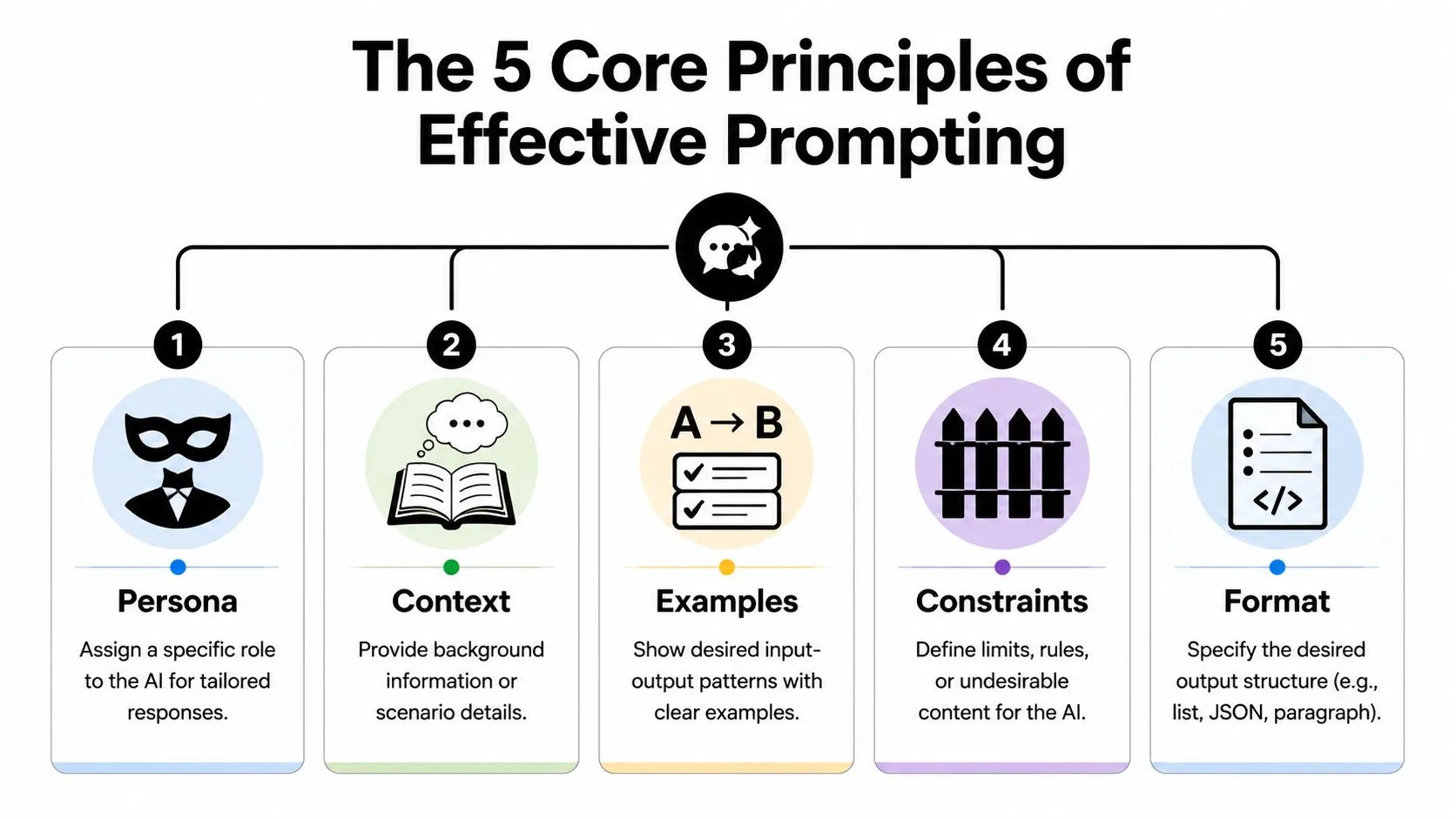
Persona
Tell the model what role to take.
That doesn't mean pretending the AI has a real job history. It means giving it a lens for the task. "Act as a B2B SaaS content strategist" is usually more helpful than "write a post."
Example:
You are a product marketing manager for a B2B software company. Write a launch email for existing customers.
This influences tone, priorities, and vocabulary.
Context
Context answers the question the AI can't ask well enough on its own. Who is the audience? What's the business situation? What are you trying to achieve?
Without context, AI fills in the gaps with generic assumptions.
Example:
- Weak: Write a webinar promotion email.
- Better: Write a webinar promotion email for current leads who downloaded our analytics guide but haven't booked a demo. The goal is registration, not a hard sell.
Examples
Examples show the pattern you want.
If you care about voice, structure, or style, examples often do more work than abstract instructions. One sample intro, one approved headline style, or one preferred output format can sharply improve consistency. That's one reason brand teams care about prompt design. If you're thinking about repeatability, this guide to AI consistency for brands is useful background reading.
Example:
Use this style as a guide: concise, plain language, no hype, one practical takeaway per paragraph.
Constraints
Constraints tell the AI where the walls are.
People often skip this, then wonder why the output drifts. If you don't set limits, the model will improvise. Sometimes that helps. Often it doesn't.
Useful constraints include:
- Length limits: Under 150 words
- Tone limits: Professional, not playful
- Content limits: Don't mention pricing
- Process limits: Use only the information provided below
Working rule: Constraints don't reduce creativity. They reduce irrelevant creativity.
Format
Format is where many prompts either succeed or fall apart.
If you want a table, ask for a table. If you want bullets with headers, say so. If you want a three-part memo with clear recommendations, define that shape.
Example:
Return the answer as a table with three columns: audience segment, key pain point, campaign angle.
A lot of prompting problems disappear when you specify the final container.
For a deeper practice set built around reusable approaches, this short course on five prompting techniques you need to know gives you a strong next step.
Prompt Makeovers Real-World Before and After Examples
The easiest way to understand prompt engineering is to compare a weak prompt with a stronger one for the exact same task.
Below is a common request a marketing manager might make.
Prompt Makeover Social Media Content Plan
| Element | Before: Vague Prompt | After: Structured Prompt |
|---|---|---|
| Task | Create a 30-day social media content plan for our SaaS product. | Create a 30-day social media content plan for a new B2B SaaS product that helps remote marketing teams organize campaign approvals. |
| Audience | Not specified | Audience is marketing managers at small and mid-sized companies who struggle with feedback delays and version confusion. |
| Goal | Not specified | Goal is to build awareness and generate interest in demos. Focus on practical pain points and simple workflow benefits. |
| Persona | Not specified | Act as a senior social media strategist for a B2B software launch. |
| Brand voice | Not specified | Tone should be clear, credible, useful, and conversational. Avoid hype and avoid slang. |
| Channels | Not specified | Prioritize LinkedIn. You may include ideas adaptable to X or email snippets, but LinkedIn should lead. |
| Content mix | Not specified | Include a balanced mix of educational posts, pain-point posts, founder perspective posts, customer-objection posts, and soft CTA posts. |
| Constraints | Not specified | Don't invent customer quotes, metrics, or testimonials. Don't use clichés like "game-changer" or "revolutionary." |
| Format | Unclear | Return the plan as a table with columns for day, post angle, hook, key message, CTA, and suggested format. |
| Extra instruction | None | For each week, vary the angle so the content doesn't feel repetitive. Keep each hook short and suitable for LinkedIn. |
The "before" version sounds normal because it's how people talk to AI all the time. But it leaves too many unanswered questions. What kind of SaaS product? Which audience? What tone? Which platform? What business goal?
The "after" version gives the AI enough information to make decisions that fit the task.
Why the structured version works better
Notice what changed. The prompt didn't become technical. It became managerial.
It now includes:
- A role for the AI
- Business context about the product and audience
- Clear success criteria around awareness and demos
- Constraints to prevent fabricated claims and tired language
- An output format the user can work with immediately
Better prompts don't sound smarter. They sound more responsible.
You can apply the same makeover pattern to almost any business task:
- Email draft: Add audience, tone, purpose, and call to action
- Meeting summary: Add participants, decision focus, and output format
- Research brief: Add the business question, assumptions, and comparison criteria
- Landing page copy: Add buyer stage, objection handling, and voice rules
To determine if your prompt is strong enough, ask one simple question: could a capable human do a good job from this brief? If the answer is no, the AI probably can't either.
Common Prompting Mistakes and How to Fix Them
Most prompting problems come from a small set of avoidable mistakes.
When the output disappoints you, don't assume the tool is useless. Check whether the instructions were incomplete.
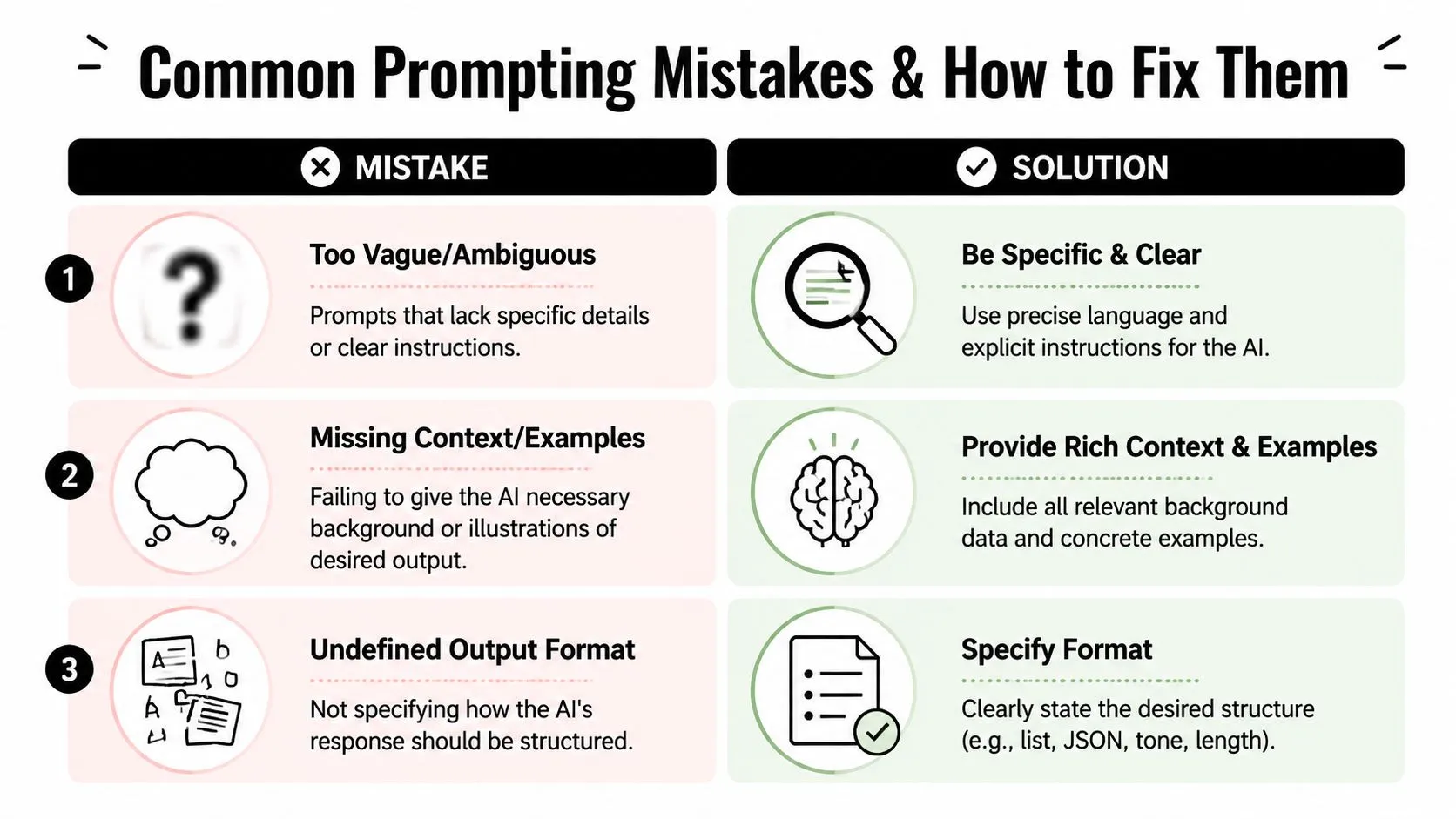
Mistake one being too vague
Prompt: "Write something about our product."
Why it fails: The model doesn't know the audience, the angle, the objective, or the tone. It fills the gaps with generic copy.
Fix: "Write a short LinkedIn post announcing our new reporting dashboard for current customers. Focus on time saved in weekly reporting workflows. Tone should be practical and confident."
Mistake two leaving out context
Prompt: "Summarize this meeting."
Why it fails: Summarize it for whom? A teammate? An executive? A client? Different readers need different levels of detail.
Fix: "Summarize this meeting for the executive team. Use bullet points. Include decisions made, unresolved issues, and next actions with owners if mentioned."
Mistake three skipping the output format
Prompt: "Give me ideas for a campaign."
Why it fails: The ideas may come back as a messy paragraph, a random list, or broad themes with no structure.
Fix: "Give me 10 campaign ideas for a B2B webinar launch. Return them in a table with columns for idea, target audience, message angle, and best channel."
Small prompt fixes often create big quality improvements because they remove guesswork.
A useful habit is to review your own prompt before sending it. Check for three gaps:
- Missing objective: What outcome do you want?
- Missing context: What background does the AI need?
- Missing format: What should the answer look like?
If one of those is absent, the output usually suffers.
The Future of Prompting and Your Learning Path
Prompt engineering isn't disappearing as models improve. It's changing shape.
Google Cloud describes the shift well: the skill is moving away from precise wording and toward higher-level specification of goals, constraints, examples, and evaluation criteria (Google Cloud on the evolution of prompt engineering). That means the lasting skill isn't "knowing the secret phrase." It's knowing how to define good work clearly.
If you're learning this from scratch, keep the path simple.
A simple path to get better
- Master the basics: Practice persona, context, examples, constraints, and format until they feel natural.
- Build your own prompt library: Save prompts that work for recurring tasks like summaries, campaign drafts, outreach, and analysis. A personal AI prompt library becomes more valuable over time.
- Move into workflows: Start combining prompts with templates, documents, and repeatable processes instead of starting from a blank box every time.
A short walkthrough can help make that shift more concrete.
The professionals who get the most from AI usually aren't the ones chasing tricks. They're the ones who can define a task clearly, set guardrails, and evaluate the result with judgment.
If you want a practical place to build that skill, AI Academy is designed for working professionals who need usable AI training, not theory-heavy courses. It offers step-by-step lessons, proven prompt templates, structured learning paths, and a free prompt library so you can get better at using ChatGPT, Claude, Perplexity, Midjourney, and other job-ready AI tools in real workflows.