Most advice on how to become AI expert starts in the wrong place. It tells you to learn Python, grind through math, and chase model-building skills before you've solved a single business problem. That path matters for engineers. It isn't the only path to expertise.
In practice, many companies don't need another person who can fine-tune a model from scratch. They need someone who can spot a broken workflow, choose the right AI tool, redesign the process, and show leadership why the change matters. That is a real form of expertise, and it is badly under-taught.
The gap is obvious in the market. A Forbes-cited 2025 industry survey says 90% of guides focus on the coding path, while non-technical professionals now drive 60% of enterprise AI adoption using AutoML and prompt-engineered workflows, and 78% abandon traditional courses that don't give them immediately usable workflows.
I've seen the same pattern repeatedly in non-technical teams. The people who move fastest are rarely the ones reciting transformer theory. They're the ones who can turn ChatGPT, Claude, Perplexity, and no-code automations into better reporting, faster research, cleaner handoffs, and sharper decisions.
You Don't Need to Code to Be an AI Expert
Coding is one path into AI. It is not the only one, and for a large share of professionals, it is not the highest-value path.
I know this firsthand. I moved into AI strategy from a non-technical role, and the work that created results was rarely about model architecture. It was about spotting slow, expensive decisions, choosing the right tools, and turning vague interest in AI into measurable output.
If you already own a business process, you have an advantage. The person who understands why reporting stalls in finance, why sales follow-up slips, or why content reviews drag for days can often create more value with a well-designed prompt flow and a no-code automation than someone who can explain the math but has never handled the workflow.
That is the fundamental shift. AI expertise in business starts with judgment, process design, and tool fluency.
What companies reward
Companies do not pay a premium for AI vocabulary alone. They reward people who cut cycle time, improve quality, and help teams make better decisions with less manual work.
A practical benchmark helps here.
Practical rule: If AI improves your output, shortens your process, and helps you make decisions faster, you are doing expert-level work, even if you never write code.
For many professionals, practical business learning beats abstract theory. A strong starting point is this guide on learning AI for business, which focuses on applying tools to real work instead of chasing technical status.
The trade-off is straightforward. Technical specialists build models and infrastructure. Non-technical AI experts select tools, map workflows, test prompts, evaluate outputs, set guardrails, and make sure adoption sticks. Both paths matter. Only one of them requires becoming a programmer.
There is one more skill that gets overlooked. If your job touches writing, client communication, hiring materials, or executive summaries, you also need to know where AI output fails. Weak tone, generic phrasing, and confident mistakes can damage trust fast. Resources on AI writing for undetectable submissions are relevant for that reason. They sharpen your judgment on when AI text is usable, when it needs revision, and when a human should rewrite it from scratch.
Redefining the Modern AI Expert
"AI expert" used to imply one thing. It now covers two very different jobs, and confusing them sends a lot of professionals down the wrong path.
Some people build AI systems. Some people make AI useful inside real businesses.
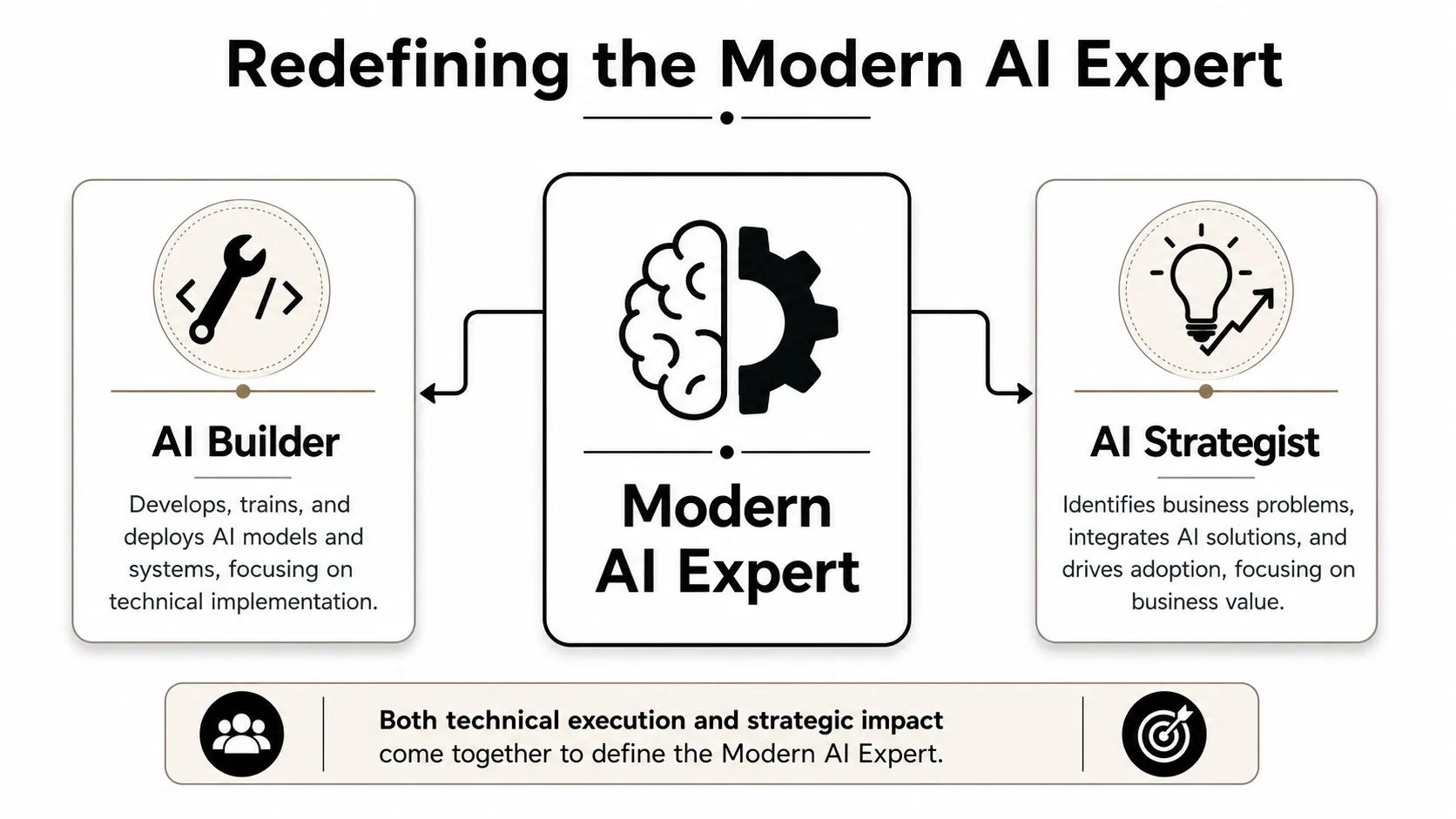
The builder and the orchestrator
The AI Builder handles model development, data pipelines, deployment, and infrastructure. That path belongs to data scientists, ML engineers, and software teams.
The AI Orchestrator handles business problems, process design, tool selection, prompt systems, adoption, governance, and workflow integration. That role fits marketers, analysts, consultants, operators, HR leaders, and team managers who need results without writing production code.
Both count as real expertise. The difference is in what each role is accountable for.
| Role | Primary focus | Proof of expertise |
|---|---|---|
| AI Builder | Models, code, infrastructure | Technical projects, deployment, architecture |
| AI Orchestrator | Workflows, adoption, ROI | Process improvement, tool implementation, business outcomes |
I have seen this distinction matter in practice. Teams rarely struggle because they lack another model explainer. They struggle because nobody owns the gap between tool capability and day-to-day execution.
That gap creates an opening for non-technical professionals.
As noted earlier, the adoption data points in the same direction. A large share of professionals trying to learn AI do not need theory-heavy training. They need applicable workflows they can copy, test, and adapt in their own roles. That is why no-code tools, prompt frameworks, and workflow design now carry real weight inside companies.
A good modern benchmark is simple. Can you spot a repetitive task, choose the right tool, set up a repeatable process, review the output, and show that the process saves time or improves quality? If yes, you are operating like an AI expert in a business setting.
Why non-technical expertise carries weight
Non-technical professionals win by owning the translation layer. Domain knowledge makes that possible.
A recruiter can identify where screening slows down and where AI should stop. A marketing lead can see which content tasks can be templated and which still need editorial judgment. An operations manager can tell whether an AI workflow reduces handoffs or just creates another review step.
That is the part many articles miss. Expertise does not start with building a model. It starts with making useful decisions about where AI belongs, what good output looks like, and how to keep risk under control.
For professionals building that judgment, a hands-on review of AI learning apps can help you compare tools built for practice instead of theory.
What this means for your path
If your goal is to become the person everyone consults about AI at work, focus on applied competence. Learn the tools well enough to use them under deadline. Build workflows that another teammate can follow. Measure what changed after adoption.
That path is narrower than "learn everything about AI," but far more useful.
In many companies, the missing expert is not the person who can train a model from scratch. It is the person who can connect no-code AI tools to real work, prove ROI, and help a team use them with confidence.
Your First 30 Days Foundational Tool Mastery
The first 30 days decide whether AI becomes part of your work or stays as background noise.
Early progress does not come from studying model architecture or collecting prompt tips from social media. It comes from using a small set of tools on real tasks, under deadline, with enough repetition that you know what each tool does well, where it fails, and how much time it saves. For a non-technical professional, that is the fastest path to credible expertise.
Use a narrow stack. ChatGPT is strong for drafting, formatting, and iteration. Claude is reliable for synthesis, long-context review, and clearer reasoning on messy inputs. Perplexity helps with current research and source gathering. Add Midjourney or another image tool only if your job includes presentations, campaigns, or creative direction. That stack covers the 80/20 for knowledge work.
The target in month one is simple. Build repeatable judgment. You should finish the month knowing which tool to reach for, what input format gets better output, and how to turn one recurring task into a process another teammate could follow.
Week by week operating plan
Days 1-7
Start with work you already own. Rewrite emails, summarize notes, clean up reports, and research live questions from customers or leadership.
- ChatGPT for rewriting: Paste a real email, brief, or update. Ask for a shorter version, a version for executives, and a version for a cross-functional audience.
- Claude for synthesis: Drop in meeting notes, policy drafts, or rough project documents. Ask for key decisions, open risks, and missing information.
- Perplexity for research: Use it for competitor scans, vendor comparisons, industry developments, or terminology you need to explain clearly.
- Habit to build: Save every prompt that produces useful output. Label it by task, such as "weekly status update" or "client follow-up email."
Days 8-14
Pick one recurring task and run it through the same tool sequence several times. Weekly reporting works well because the inputs repeat and the value is easy to see.
- Compare the same prompt across ChatGPT and Claude.
- Track where each tool performs better. One may write cleaner copy. The other may produce safer summaries.
- Replace one-off prompts with reusable variables such as audience, objective, format, constraints, and examples.
If you want a stronger framework for how individual tools later connect into repeatable systems, this guide to agentic AI workflows for business teams is a useful next reference.
Days 15-21
Add a review layer. In this layer, professionals separate useful output from polished nonsense.
Create a simple checklist:
- Is the output accurate?
- Is anything missing that a stakeholder would expect?
- Does the tone fit the audience?
- Are there claims that need verification?
- Can this be reused next week with minor edits?
If visuals matter in your role, test an image tool for presentation concepts, rough campaign assets, or internal mockups. Keep the standard high. If the image saves no time or creates more editing work, drop it from the stack.
Days 22-30
Package what you have learned into assets you can reuse.
- Build a small prompt library by task category: research, writing, analysis, meeting follow-up, planning
- Save before-and-after examples
- Write a short note on time saved, quality improved, or review cycles reduced
- Choose one use case to show your manager or team
That last step matters. Tool fluency turns into business credibility when you can show a concrete input, a repeatable process, and a measurable output.
Prompt patterns that help
Good prompts reduce revision time. They do not need to be clever. They need to be structured.
-
For email drafting
Prompt: "Rewrite this email for a busy executive. Keep it direct, respectful, and under 150 words. End with a clear next step." -
For report summarization
Prompt: "Summarize this report into five bullets, three risks, and three recommended actions for a non-technical manager." -
For meeting notes
Prompt: "Convert these notes into decisions made, open questions, owners, and deadlines." -
For first-pass analysis
Prompt: "Review this document and return three sections: what matters most, what is unclear, and what needs human review before sharing."
Structured prompts improve consistency. Consistency is what makes a workflow usable at work.
What to avoid in month one
Avoid tool hopping. Professionals new to AI often test six products in a week, get mixed results, and conclude the category is overhyped. The better move is to stay with a small stack long enough to understand its strengths.
Avoid passive learning too. Watching demos feels productive, but it does not build judgment. Real fluency comes from putting your own documents through the tools, checking the output, and refining the process. A curated review of AI learning apps can help if you want practice environments built for application instead of theory.
Avoid chasing technical depth too early. You do not need to explain transformer architecture to become the person who improves reporting, speeds up research, and reduces drafting time across a team. In business settings, that is what expertise looks like first.
By day 30, the benchmark is practical. You should have a small tool stack you trust, a prompt library tied to real job tasks, and one repeatable AI-assisted workflow that saves time without lowering quality.
Your First 90 Days Building AI Workflows
By day 30, the question changes. It is no longer "Which tool is best?" It is "Where can I remove repeated work without creating new risk?"
That shift matters because business value rarely comes from a clever prompt in isolation. It comes from a repeatable sequence that saves time, improves consistency, and still leaves a human checkpoint where judgment matters. For non-technical professionals, this is the phase where credibility starts to build. You stop looking like someone testing AI on the side and start looking like someone who can improve how work gets done.
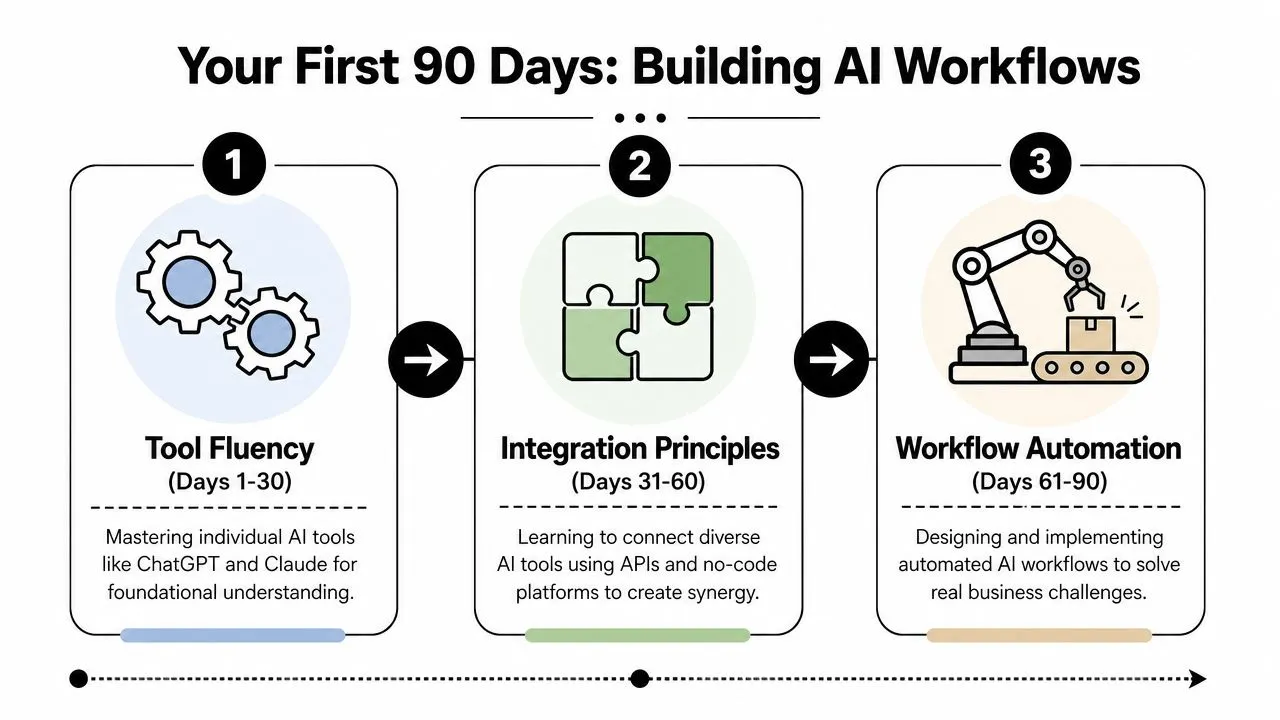
A practical workflow often starts with one tool for research, one for reasoning, and one for final formatting. For example, use Perplexity to gather current information, move the findings into Claude to extract patterns and recommendations, then use ChatGPT to turn that material into an email, brief, or slide draft. Add Zapier, Make, or Notion AI only when the process is stable enough to automate. Automating a weak process just helps you make mistakes faster.
A simple workflow design model
Use this four-part model before you build anything:
| Step | Question to answer | Example |
|---|---|---|
| Input | What starts the process | Meeting transcript, report, CRM notes |
| Transformation | What the AI should do | Summarize, classify, draft, rewrite |
| Output | What useful asset gets produced | Brief, email, slide outline, checklist |
| Review | How quality gets checked | Accuracy, tone, relevance, risk |
This model sounds basic. It catches a surprising number of bad workflow ideas.
If you cannot define the input clearly, the output will be inconsistent. If you skip the review step, the workflow becomes hard to trust. In client teams, I have seen far more value come from tightening these four decisions than from adding another model or another app.
Three workflows worth building early
Start with work that already exists on your calendar. That is the fastest way to prove ROI.
-
Research to strategy workflow
- Gather current market context in Perplexity.
- Ask Claude to turn the findings into a one-page strategic brief.
- Ask ChatGPT to convert that brief into presentation bullets for leadership.
-
Meeting to action workflow
- Drop a transcript or rough notes into Claude.
- Have it extract decisions, blockers, owners, and deadlines.
- Send the cleaned summary into ChatGPT to draft follow-up emails for different stakeholders.
-
Content repurposing workflow
- Start with a long article, webinar transcript, or internal memo.
- Use Claude to identify key themes.
- Use ChatGPT to produce LinkedIn drafts, newsletter blurbs, and sales enablement snippets.
These are strong first projects because the before-and-after is easy to measure. You can compare turnaround time, revision count, and whether the final output is usable by someone else on the team.
A lot of professionals need examples before they can picture a workflow that fits normal office work. If you're exploring practical stacks, it's worth discovering GPT for Work's automation insights because they show how AI task automation tools fit into actual office workflows.
This short walkthrough helps anchor the idea before you build your own system:
The trap most learners fall into
The common failure pattern is building demos instead of workflows. A copied prompt that works once is not operational capability. A reusable process with defined inputs, outputs, and review rules is.
That is why I push people to document handoffs, not just prompts. Who starts the workflow? What file goes in? What format should come out? Who approves it? Those questions matter more at work than whether you know model architecture.
If you want a useful mental model for multi-step systems, read this guide to agentic AI workflows. The goal is not to chase advanced architecture. The goal is to start thinking in stages, roles, and decision points so your workflows hold up outside a demo.
Working standard: Build something your team can run again next week. If it only works when you babysit every step, it is still an experiment.
What strong progress looks like by day 90
By the end of this phase, you should have a small set of workflows tied to actual business problems and a record of what changed because of them. Keep the proof simple and practical:
- A repeatable workflow your team can run weekly
- A documented prompt system with versioned improvements
- A clear review process showing where human judgment stays in the loop
- A short explanation of business value in plain language
That explanation can be as direct as: "This cuts first-draft time from two hours to thirty minutes," or "This gives account managers a consistent client follow-up format after every meeting."
That is enough to change how colleagues see your role. You do not need to code your own model to become the AI expert in the room. You need to use the tools well, map the process clearly, and show where the business gets the return.
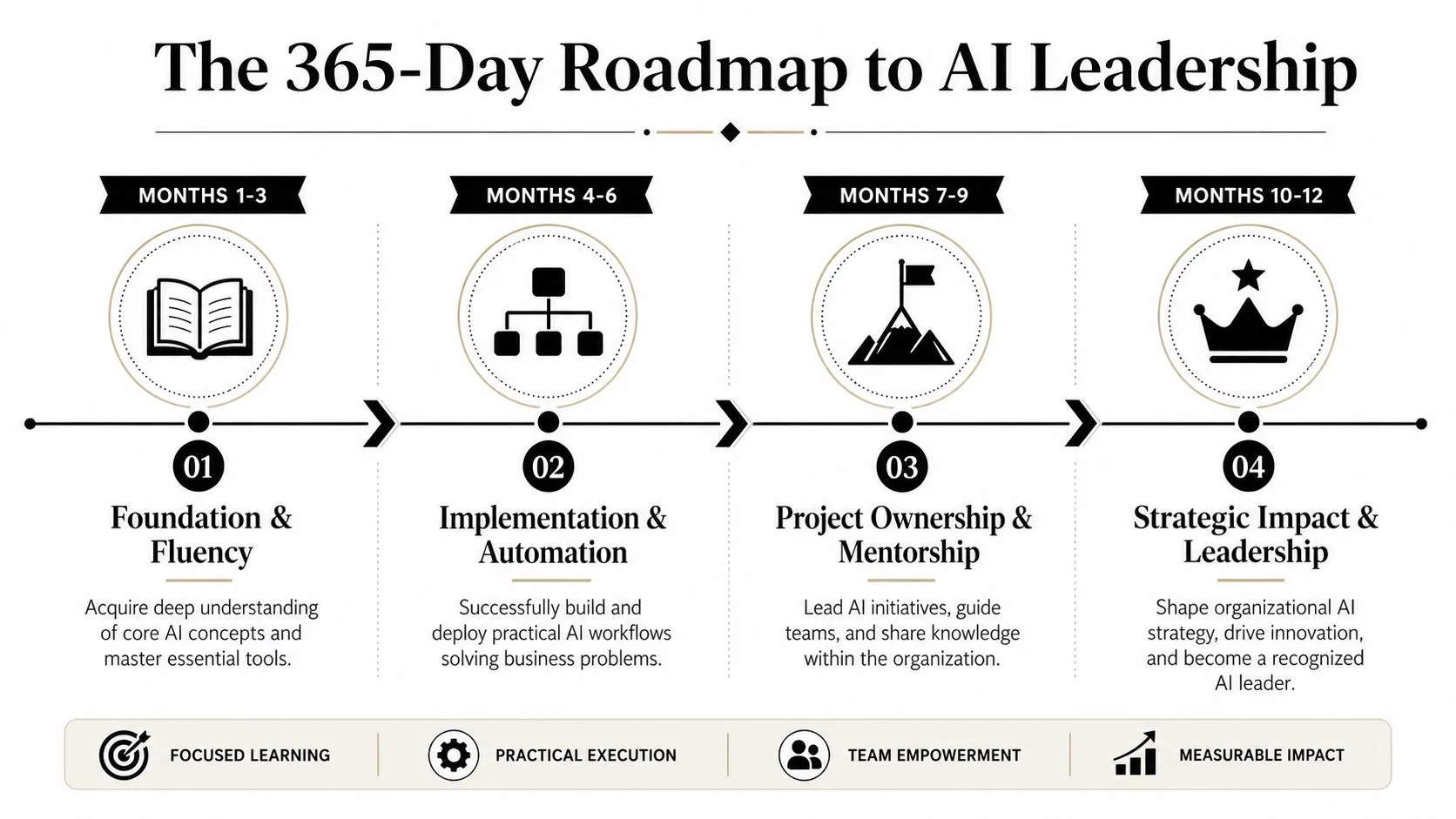
The 365-Day Roadmap to AI Leadership
A year is enough time to change your role inside a company, but not enough time to master everything. That distinction matters.
The long-term benchmark is much broader. According to Tavus' career path analysis, becoming a recognized AI expert typically takes 3 to 5 years of dedicated learning and practical application, including end-to-end projects that serve as proof of expertise to employers. For a non-technical professional, the first year is not the finish line. It is the period where you become credible enough to lead.
Quarter one building personal credibility
The first quarter is about getting your own hands dirty. You use AI every day, improve your prompt systems, and identify where your team loses time.
The key shift here is from curiosity to reliability. Colleagues should start noticing that your documents are sharper, your research cycle is shorter, and your follow-up is more structured.
Use this checklist:
- Document one recurring use case that consistently works
- Create one internal template others can copy
- Keep a log of AI failures so your judgment improves along with your speed
Quarter two running a small pilot
Many people often stall at this stage. They stay productive individually but never prove organizational value.
Pick one low-risk process that is repetitive, visible, and annoying enough that people want relief. Internal summaries, first-draft proposals, content repurposing, interview debriefs, and customer research synthesis all work well. The pilot should be simple enough to supervise and clear enough to explain to a manager in a few sentences.
Pick a process with pain, repetition, and a human review step. That combination gives you the best chance of adoption.
You don't need a complex business case. You need a believable one. Explain the current process, the AI-assisted version, the review controls, and the expected operational benefit.
Quarter three teaching others
Leadership starts when people begin asking how you did it.
Run a short internal session. Show one workflow. Walk through the prompt logic. Explain where human review matters. Give people a template they can try the same day. You are not trying to impress them with breadth. You are trying to lower the barrier to adoption.
This quarter is also where reputation compounds. If you answer practical questions, fix weak processes, and keep your advice grounded, people start treating you as the default AI resource.
A useful career lens here is future-proofing your career with AI skills. The professionals who become influential aren't the loudest about AI. They're the ones who can guide a team from uncertainty to competent use.
Quarter four shaping strategy
By the final quarter, your work should move beyond isolated use cases. You should be able to answer questions at the department level.
For example:
- Which functions are ready for AI support
- Which workflows need stricter review because of risk
- Which tools fit the team's actual habits
- Where should the company avoid adopting AI too casually
Often, non-technical experts become AI leads, operations partners, enablement owners, or strategic advisors inside their team.
What leadership actually looks like
A leader in AI doesn't need to know everything about model architecture. They need to know where AI belongs, where it doesn't, and how to make adoption stick.
By the end of the year, the strongest signal is not that you've used many tools. It's that you can connect workflows, people, decisions, and business value without overpromising.
That is how the first year feeds the larger 3 to 5 year path. Not through title inflation, but through repeated, visible proof.
Building Your AI Portfolio Without Code
A no-code AI portfolio should do one job well. It should make a hiring manager, client, or executive believe you can improve work with AI and do it responsibly.
That standard is higher than showing a few polished outputs. Anyone can paste a prompt into a model and generate a memo, image, or chatbot draft. The stronger signal is judgment. Can you spot a process worth improving, choose the right tool, set review rules, and show a result that matters to the business?
Your portfolio does not need GitHub. It can live in Notion, Google Slides, a PDF case study, or a simple personal site. I have seen non-technical candidates stand out with three clear case studies because each one showed the workflow, the decision logic, and the business impact.
For practical examples of how non-coders present project work, CareerFoundry's guide to building a portfolio is a useful reference. The format matters less than the clarity of the evidence.
What to include in a no-code AI portfolio
Build the portfolio around business problems you can explain in plain language.
-
Process automation case study
- Start with a repeated task that wastes time
- Map the original process step by step
- Show the AI-assisted workflow
- Include the prompts, tool settings, review checks, and final output
- State what improved, such as turnaround time, consistency, or workload reduction
-
Tool evaluation or workflow comparison
- Compare two or three no-code AI tools for a specific use case
- Score them on setup time, output quality, usability, privacy fit, and review burden
- End with a recommendation and the reason you would reject the other options
-
Implementation proposal
- Pick one realistic team problem
- Recommend a tool stack and a workflow design
- Show where human review stays in place
- Write it like an internal memo a department lead could approve
A portfolio structure decision-makers can scan quickly
Use a repeatable structure for every project:
| Section | What to show |
|---|---|
| Business problem | What was slow, expensive, inconsistent, or hard to scale |
| Current workflow | How the task was handled before |
| AI approach | Which tools, prompts, and logic you used |
| Quality control | How you checked accuracy, tone, and risk |
| Result | What improved and what still required human input |
This structure works because it matches how business leaders assess value. They want proof that you can improve a workflow without creating new failure points.
What strong portfolios do differently
Strong portfolios show trade-offs.
For example, if you built a meeting-summary workflow in ChatGPT, do not stop at the summary. Show why that task was a good candidate for AI, what prompt structure reduced hallucinations, what information still needed manual verification, and why full automation was the wrong choice. That level of detail signals maturity.
It also helps to include one project that did not fully work. Explain what broke, what you changed, and what you would do differently. In consulting and internal strategy work, that is often more convincing than a perfect-looking sample because it shows operating judgment under real constraints.
What weak portfolios get wrong
Weak portfolios usually have one of three problems:
- They show outputs without context
- They describe tools without showing a business use case
- They make big claims about transformation without any review process or adoption plan
A generated slide deck alone proves very little. A chatbot mockup alone proves very little. A portfolio becomes credible when the reader can see your reasoning from problem to tool choice to control points to result.
Your portfolio should read like evidence of business thinking supported by AI.
If you can document three to five projects this way, you will already look more credible than many candidates who know the vocabulary of AI but cannot show how they would use it inside an actual team.
How to Become the Go-To AI Person at Work
Becoming the go-to AI person has less to do with brilliance than consistency. You need to be the person who makes AI useful, safe, and understandable.
That starts with communication. Don't talk to colleagues the way AI vendors talk. Skip jargon unless it helps a decision. Explain a workflow in terms of time saved, friction removed, review required, and who benefits.
Behaviors that build influence
A few habits matter more than most certifications:
- Translate technical noise into business language: If a tool changes, explain what your team needs to know.
- Share small wins: A clean example of one better workflow builds more trust than broad claims about transformation.
- Reduce fear: Show where human review stays in place. People adopt faster when they know AI won't take over critical decisions without notice.
- Create reusable assets: Templates, prompt libraries, and SOPs make your knowledge portable.
How to build internal authority
You don't need a formal title to become the internal default.
Run a short lunch-and-learn. Write a brief internal update on useful tools. Offer to review one broken workflow each month. Help one skeptical colleague solve a real problem. Most influence comes from solving nearby problems well and repeatedly.
Another smart move is to become the person who asks better questions than everyone else. Not "Can AI do this?" but "Should this task be automated, assisted, or left manual?" That distinction shows maturity.
People trust AI guidance more when it includes limits, not just enthusiasm.
If you stay practical, your reputation changes. First you're the person experimenting. Then you're the person others ask for tool advice. Eventually you're the person leadership consults before buying software or pushing a new initiative.
That is what the non-technical version of how to become AI expert looks like in real life. It isn't based on pretending to be a machine learning engineer. It's based on becoming unusually good at turning AI into reliable business execution.
If you want a practical way to build these skills fast, AI Academy is a strong option for working professionals. It focuses on step-by-step tutorials for tools like ChatGPT, Claude, Midjourney, and Perplexity, with short lessons, prompt templates, and workflow training designed for marketers, analysts, managers, and operators who want real results on the job.