Most advice on human in the loop automation gets one thing wrong. It treats the human as a permanent brake pedal.
That framing leads teams to design slow approval chains, overloaded reviewers, and AI systems that never improve. People end up checking everything, trusting nothing, and adding labor without getting better outcomes.
A better model is simpler. Use automation for the routine path. Insert people at the points where ambiguity, risk, or business judgment matter. Then tighten that design over time so humans review fewer, better-chosen cases instead of rubber-stamping a flood of low-risk outputs.
What Is Human in the Loop Automation Really
Human in the loop automation isn't “AI plus manual approval.” It's a workflow design where software handles the repetitive path and people step in only where judgment adds value.
That matters because full automation isn't the default win. According to the World Economic Forum, 42% of business tasks will be automated by 2027, and the practical response isn't to remove humans from every process. It's to build systems that combine human judgment for ambiguous or high-risk cases with machine speed for routine work, as explained in this overview of HITL and business automation.
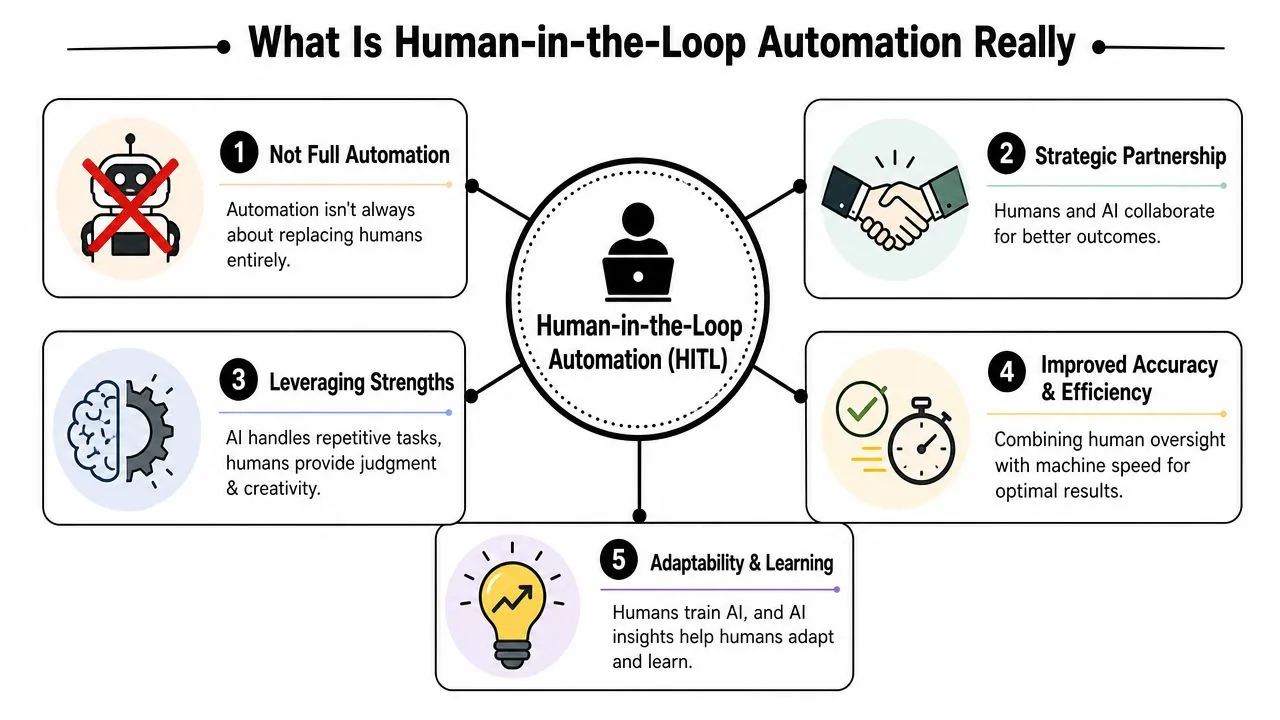
It's not replacement. It's task allocation
The easiest way to explain HITL to a non-technical team is this. Think of AI as a smart intern.
It can summarize a report, draft a reply, classify a ticket, or extract fields from an invoice. It can often get most of the way there quickly. But when the case is unusual, high-stakes, or politically sensitive, the intern shouldn't act alone. It should flag the item for a manager.
That's what a good HITL workflow does:
- Machines handle volume: repetitive data entry, sorting, extraction, first drafts, and pattern matching.
- People handle uncertainty: exceptions, policy interpretation, edge cases, and decisions with customer or financial impact.
- The process stays fast: only selected items go to review instead of sending every task through a human queue.
Practical rule: If a person reviews every AI output, you haven't designed human in the loop automation. You've just added software to a manual process.
Why this model works better in operations
Teams often assume human review means lower productivity. In practice, the opposite is true when the review points are deliberate.
A customer support lead doesn't need to read every suggested reply. A finance manager doesn't need to inspect every clean invoice match. A content lead doesn't need to rewrite every draft. They need visibility into the cases where a bad decision would cost time, trust, or money.
That's why HITL works best as an operating model, not a patch. It sets clear control points, keeps accountability with people, and lets the system run quickly everywhere else. If you're also evaluating more autonomous systems, this guide to agentic AI automation is a useful companion because it helps clarify where agent autonomy should stop and human review should begin.
The business mindset shift
The old question was, “How do we automate this process end to end?”
The better question is, “Which parts should run automatically, and which decisions still belong to a person?”
Once a team starts there, human in the loop automation becomes much easier to implement. It stops being a debate about replacing jobs and becomes a practical design choice about speed, quality, and risk.
How the HITL Workflow Actually Functions
At a workflow level, HITL is straightforward. The system does the first pass. A rule checks confidence or risk. Then only selected items go to a person.
That's the whole mechanism. The hard part isn't understanding it. The hard part is deciding where the gate should sit.
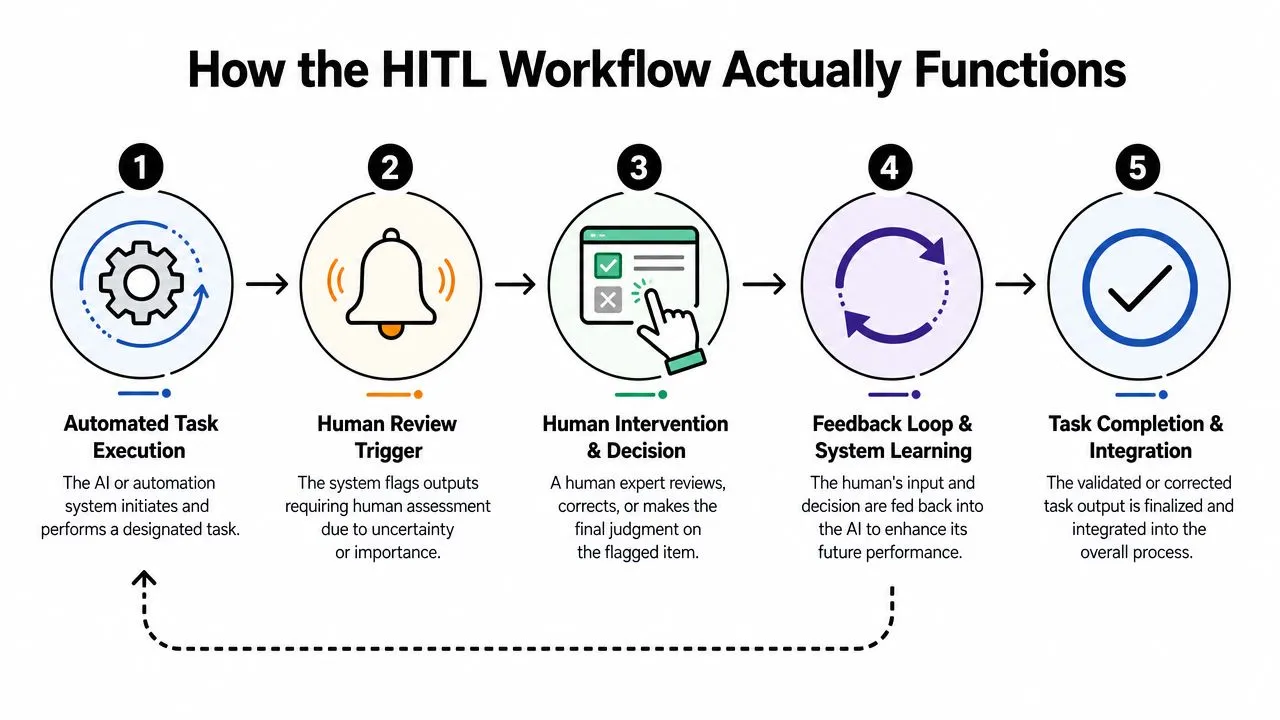
Stage one AI does the initial pass
Start with a familiar example. A support team receives a stream of inbound tickets through Zendesk or Intercom. An AI layer classifies each ticket, drafts a suggested response, and tags urgency.
For many tickets, that first pass is enough to save time. Password reset requests, shipping questions, and standard refund policy explanations follow predictable patterns. The system can sort and prepare those quickly.
Stage two the threshold decides what happens next
This is the part most non-technical teams need to understand. HITL systems use dynamic confidence thresholds to trigger escalation. Outputs outside high-confidence parameters, often defined as less than 90% probability, are routed to a human for review, approval, or correction before execution, as described in this explanation of confidence-based HITL routing.
In plain language, the threshold acts like a gatekeeper:
- High confidence and low risk: the task proceeds automatically.
- Low confidence: the item goes to a reviewer.
- High business risk: it goes to a reviewer even if the model appears confident.
A support team might auto-route ordinary tickets but escalate anything mentioning legal threats, billing disputes, or cancellation risk. A finance team might auto-code routine expenses but hold unusual vendors or inconsistent invoice fields for human review.
The threshold should reflect business consequences, not just model confidence.
Stage three the reviewer makes a bounded decision
The human role should be narrow and explicit. Reviewers shouldn't have to reconstruct the whole case from scratch.
Give them the original input, the AI recommendation, the reason it was flagged, and the actions they can take. Usually that means approve, edit, reject, or reroute. That's enough for most business processes.
For teams exploring multi-step systems, this look at agentic AI workflows for business users helps clarify how routing, approvals, and handoffs fit together once a process expands beyond a single AI prompt.
What a healthy workflow feels like
A good HITL process feels calm. The queue is manageable. Reviewers see the weird stuff, not the boring stuff. Overrides are meaningful because they point to real blind spots instead of random noise.
A bad one feels busy but unproductive. People click approve all day, exceptions pile up anyway, and no one learns which rules are working.
If you want a quick test, ask one question: are humans spending their time making decisions, or just confirming that the machine already made one?
Real-World HITL Workflows for Your Role
The fastest way to understand human in the loop automation is to stop thinking about “AI strategy” and look at actual work. The pattern shows up differently in marketing, analysis, and customer-facing roles, but the principle stays the same. Let the system absorb the coordination work. Keep people focused on judgment.
Research from MIT found that implementing humans in the loop for generative AI was not associated with significant layoffs or structural workforce reductions across the companies studied. The model emphasized augmentation, with AI taking on the coordination tax of routine work while people focused on higher-impact decisions, as discussed in this MIT Industrial Performance Center paper.
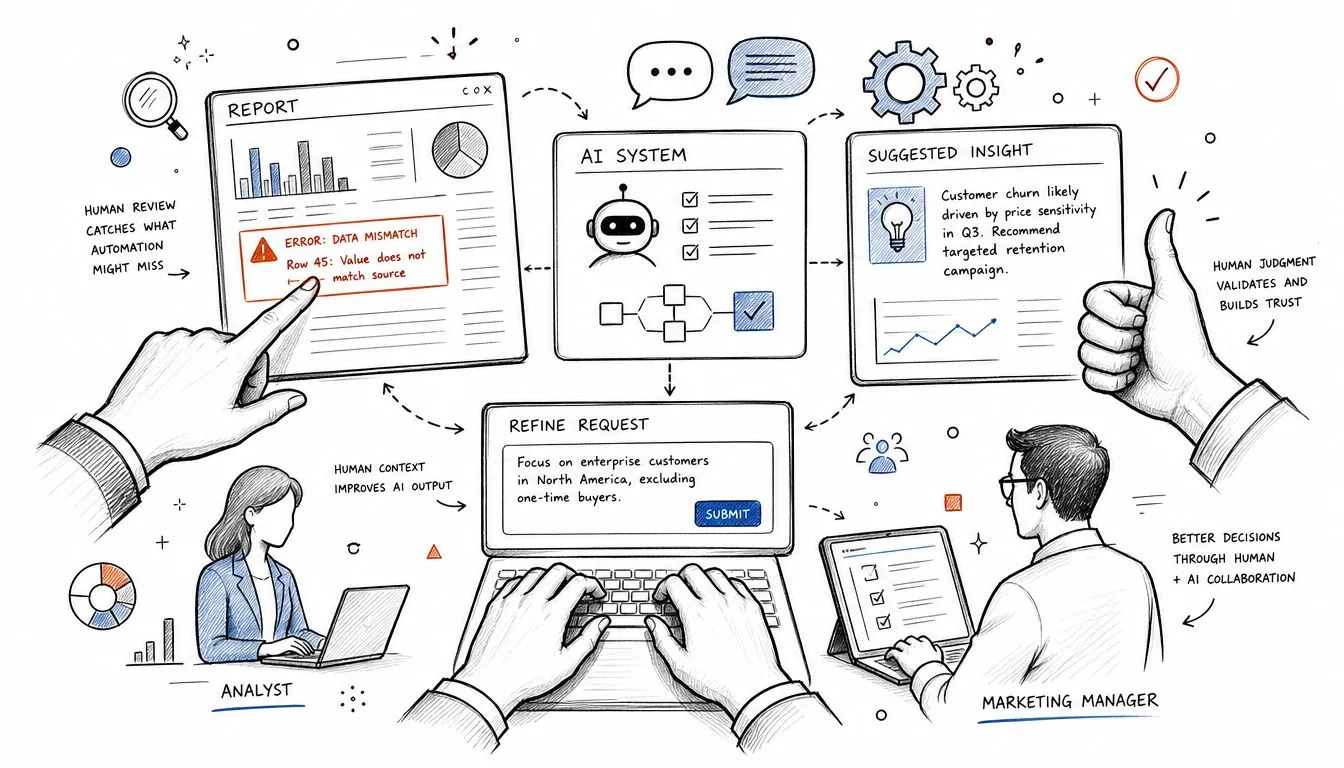
Marketing teams
Before HITL, a marketer or community manager often scans every comment, every brand mention, and every message thread. That creates backlog fast, especially during launches or campaigns.
With HITL, the system can hide obvious spam, suggest replies for common questions, group comments by theme, and flag sentiment shifts. The human doesn't disappear. Their job gets sharper. They step in when tone matters, when a customer complaint could escalate, or when a public response needs context the model won't reliably infer.
A practical setup looks like this:
- Auto-handle routine moderation: spam, duplicate questions, and standard policy responses.
- Escalate nuanced issues: complaints from important accounts, legal concerns, or emotionally charged threads.
- Capture corrections: if the AI misclassifies a complaint as routine, that correction should be saved for future tuning.
Analysts and finance operations
Analysts spend too much time cleaning and checking material before they ever get to interpretation. AI is good at the first part. It can summarize documents, extract key lines from reports, and prepare a draft set of findings.
The human value sits later. The analyst checks whether the summary missed a buried risk, whether the chart tells the wrong story, or whether the recommendation matches the business question.
That changes the workday. Instead of copying figures into a slide or reconciling notes across tools, the analyst reviews the draft package and concentrates on what leadership needs to know.
When HITL is working, the person doesn't spend less effort. They spend it later in the process, where it matters more.
A finance operations example is similar. Software ingests invoice data, matches it to a purchase order, and prepares the record. Human review is reserved for anomalies, unclear vendors, or exceptions that cross an internal approval boundary.
Later in the workflow, a short explainer can help teams align around the moving parts:
Customer success and sales
Customer success teams usually feel the pain first because they sit closest to churn risk and urgent customer context. A triage model can score incoming tickets, identify likely escalation themes, and draft internal summaries. That means the CSM starts the day knowing which accounts need a human call, not just which inbox items arrived overnight.
Sales teams can use the same pattern. AI can draft outreach, prep call notes, and enrich account context. The rep still decides what to send, what not to send, and when a prospect requires a customized approach.
Three changes usually matter most:
- The queue gets reordered. Teams stop working first-in, first-out and start working by business impact.
- Review gets narrower. People edit the important parts instead of rebuilding every draft.
- Knowledge compounds. The team's edits reveal where the model misses policy, tone, or timing.
That's the practical promise of HITL. It doesn't remove people from the workflow. It moves them to the decision points that need them.
Beyond the Safety Net Shifting from Review to Optimization
The most expensive HITL design isn't the one with too little oversight. It's the one with too much low-value oversight.
A team that reviews everything feels safe for a while. Then the backlog grows, attention drops, and approvals become mechanical. People stop evaluating. They start clearing queues.
Why rubber-stamping is a design failure
Many implementations stall because reviewers get flooded with easy cases, leading the process to produce the appearance of control instead of actual control.
That problem isn't theoretical. One of the clearest critiques in the current discussion is that most HITL guidance ignores the productivity cost of rubber-stamping. The same analysis argues that successful systems tighten thresholds over time, for example moving from broader review settings toward narrower exception-based review, rather than leaving humans stuck checking everything. It also notes that blanket review can reduce error detection rates by up to 40% in high-stakes settings like healthcare, which is why this discussion of rubber-stamping and threshold design matters beyond technical teams.
The lesson for business users is direct. If reviewers see too many low-risk items, they stop noticing the few that deserve careful attention.
What a maturing loop looks like
A healthy HITL system becomes more selective over time. The first version often starts broad because the team doesn't yet trust the model or understand where it fails. That's fine. Early caution is part of rollout.
What shouldn't happen is staying there forever.
The better path looks like this:
- Start with broad review coverage: especially for external messages, financial records, or anything customer-facing.
- Track where people disagree with the system: not just whether they clicked approve.
- Find repeatable patterns: maybe the model struggles with refund edge cases, regional terminology, or missing source data.
- Tighten the gate: once certain categories become reliable, let them flow through automatically.
Feedback loops are important. Human corrections aren't just protective. They create better examples for future training and workflow tuning. In practice, the organization is doing two jobs at once: operating the current process and teaching the system where not to fail.
A mature human in the loop automation program tries to earn back human time every quarter.
There's also a practical managerial point here. Don't measure review volume as success. A large queue can mean your threshold is too loose, your rules are too broad, or the model hasn't been taught what “good” looks like in your environment.
What doesn't work
Several patterns usually fail in live operations:
- Universal approval steps: every output waits for a person, even when the case is routine.
- Weak reviewer context: people see the AI answer but not the original inputs or the reason for escalation.
- No feedback capture: corrections happen, but no one stores them in a way the system can learn from.
- Static rules: the same threshold stays in place long after the model or business process changes.
Good HITL design is dynamic. It uses people to improve the machine, then reshapes the workflow so people spend less time on predictable cases and more on consequential ones.
Your Implementation Checklist and Toolkit
A grand AI transformation plan isn't always the starting point. What's needed is one process, one clear owner, and one review rule that makes sense.
Pick a workflow that already has repetition, visible decision points, and manageable downside if something goes wrong. Ticket triage, invoice classification, lead routing, report summarization, and first-draft content review are all common starting points.
HITL implementation starter checklist
| Phase | Action Item | Key Question to Answer |
|---|---|---|
| Select the process | Choose one workflow with repeatable inputs and clear outputs | Where does the team currently spend time on routine review or rework? |
| Define the decision point | Identify exactly where a human should step in | Which cases need judgment, policy interpretation, or customer sensitivity? |
| Set the first routing rule | Decide what gets auto-completed and what gets escalated | What signals will trigger review: low confidence, high risk, or both? |
| Design the reviewer screen | Show inputs, output, flag reason, and allowed actions | Can the reviewer decide quickly without digging through other tools? |
| Capture corrections | Store approvals, edits, rejections, and reasons | Will the team learn from overrides, or will those decisions disappear? |
| Choose the metrics | Track workflow quality, not just speed | Are humans catching meaningful issues, or just clearing a queue? |
| Review and tighten | Adjust thresholds and escalation logic regularly | Which categories can move from full review to exception review? |
For leaders rolling this out across a wider team, this guide to AI adoption strategies for practical workplace rollout is useful because it focuses on change management, not just tooling.
The metrics that matter in practice
You don't need a complex dashboard on day one. You do need a few signals that reveal whether the design is working.
Use a short scorecard such as:
- Escalation rate: what share of tasks are being sent to humans.
- Resolution time: how long flagged items sit before someone resolves them.
- Override rate: how often reviewers change or reject the AI output.
- Reason codes: the most common causes of escalation or correction.
Those metrics tell different stories. A high escalation rate may mean the threshold is too conservative. A high override rate can reveal weak prompts, poor source data, or a category the system doesn't understand yet. Slow resolution time often means the reviewer role wasn't designed into someone's real job.
The tool categories that usually matter
Most business teams can assemble an initial HITL workflow using tools they already know.
A typical stack includes:
- Automation platforms: Make, Zapier, or n8n for moving data between apps and triggering approval paths.
- Work management tools: Airtable, Notion, Trello, Asana, or ClickUp for reviewer queues and status handling.
- AI layers: ChatGPT, Claude, or built-in AI features in tools like HubSpot, Zendesk, Intercom, or Microsoft products.
- Forms and approvals: Typeform, Jotform, Slack approvals, email approvals, or internal task comments for lightweight review.
- Process-heavy environments: BPM or RPA products when the workflow spans multiple teams, systems, or formal controls.
The mistake is buying a “HITL platform” before defining the decision logic. Start with the operational design. Tool choice gets easier once you know who reviews what, why it gets escalated, and what should happen after a decision.
Governance and Accountability Who Owns the Decision
A workflow can be fast, elegant, and still fail if no one can explain who approved what. Governance is where many AI projects stop sounding exciting and start becoming useful.
The operational question is simple. If a human overrides an AI recommendation and the result creates a problem, who owns that outcome? If the human approves a flawed AI output without reading it properly, who answers for that? If no record exists, the team won't know whether the failure came from the model, the process, or the reviewer.
What needs to be logged every time
In higher-risk environments, the answer is increasingly clear. 70% of enterprises adopting HITL in high-risk domains now mandate audit trails that log both AI outputs and human overrides to support compliance expectations such as the EU AI Act, according to this analysis of accountability and HITL audit trails.
That requirement isn't only for banks or hospitals. Any team using AI for approvals, customer communications, hiring workflows, or revenue decisions should think the same way.
A usable audit trail should record:
- The original input: what the system received.
- The AI recommendation: what it suggested or produced.
- The reason for escalation: confidence, policy trigger, value threshold, or exception type.
- The human action: approve, edit, reject, or reroute.
- The rationale if needed: especially when a reviewer overrides the recommendation.
For outreach-heavy teams, the same accountability logic applies to prospecting and message automation. If your team is using AI-assisted selling, strong process discipline matters as much as copy quality. These GTM LinkedIn outreach strategies are useful partly because they highlight how fast automated communication can create operational risk when controls are weak.
How to assign responsibility without confusion
Ownership should follow decision rights. If the AI is only recommending and the human gives final approval, the human owns the final action. If the system is allowed to auto-complete low-risk cases, the process owner owns the policy that permitted that automation. Those are different responsibilities, and teams should name both.
A simple model works well:
- Process owner: defines the rules, thresholds, and acceptable automation scope.
- Reviewer: makes case-level decisions on escalated items.
- System owner: maintains prompts, routing logic, integrations, and logs.
- Team lead or manager: monitors patterns in overrides and decides when controls should tighten or loosen.
The audit trail isn't there to blame people. It's there to let the team improve the process without guessing.
Good governance also protects trust. When an employee knows the system logs what the AI suggested and what the human changed, review becomes more thoughtful. When leadership can inspect those records, conversations shift from opinion to evidence.
For teams formalizing these operating standards, this set of AI best practices for business teams is a strong reference point because it focuses on day-to-day execution, guardrails, and responsible use.
If you want human in the loop automation to last, treat governance as part of the workflow, not a compliance layer bolted on later.
If you want practical help building skills around AI workflows, approvals, prompts, and day-to-day automation, AI Academy is built for working professionals who need fast, hands-on training. It focuses on short, applied lessons for marketers, analysts, managers, and operators who want to use AI effectively at work without getting buried in theory.