Your day probably starts with good intentions and ends in tab overload.
A marketer is pulling campaign numbers from three dashboards, pasting them into a slide, then drafting a summary email. An HR manager is screening resumes, chasing interview feedback, and sending the same follow-up messages again and again. A sales manager is checking pipeline updates, cleaning CRM notes, and trying to spot what changed this week before the team meeting starts.
None of that work is useless. But a lot of it is repetitive, structured, and mentally expensive in the worst way. It eats attention without adding much judgment.
That's why AI agents for automation have become such a practical topic for non-technical teams. They're not just chat tools that answer questions. They can take a goal, use software, complete steps, and return work in a form you can review. And this shift is already moving into real operations. By the end of 2026, an estimated 31% of enterprises are projected to run at least one AI agent in live operations, up from under 5% in 2025, according to enterprise AI agent adoption projections.
For working professionals, the question isn't whether the idea sounds impressive. It's much simpler. Can you trust an agent with real work on your team, and if so, when?
The End of Busywork Introducing AI Agents for Automation
Leah runs marketing at a mid-sized company. Every Monday, she does the same dance. Open ad platforms. Export campaign data. Compare last week against this week. Pull website numbers. Draft a summary for leadership. Then answer the same question from sales: “Which leads look most engaged?”
She isn't blocked by strategy. She's blocked by glue work.
That kind of work used to sit in an awkward middle zone. It was too variable for old-school automation, but too repetitive to justify a human doing it manually every time. AI agents for automation are changing that middle zone. They act more like a digital team member than a one-click script. You give them an objective, access to tools, and boundaries. They handle the steps that normally slow people down.
Work that feels small but drains the week
A lot of “busywork” doesn't look dramatic on its own:
- Reporting chores: pulling numbers from dashboards, formatting summaries, and sending updates
- Follow-up admin: scheduling, routing, status-checking, and reminder emails
- Research prep: collecting background information before someone can make a decision
- System handoffs: copying the same information from one app into another
Each task may take only a few minutes. Together, they crowd out the work people were hired to do.
Busywork often survives because no single task feels worth fixing. The stack of them is what causes the problem.
This is why so many teams are now paying attention. AI agents are no longer sitting only in innovation demos. Leaders are testing them in customer support, internal operations, reporting, and workflow coordination because those are the places where small frictions pile up fast.
A different way to think about automation
Traditional automation is like a vending machine. Press the same button, get the same output. AI agents are closer to a new hire who can read instructions, use tools, and adapt when the input changes a little.
That doesn't mean they're magical. It means they fit a wider range of office work than macros, rigid workflows, or simple bots ever could.
For marketers, HR teams, analysts, and managers, that's the opening. You don't need to automate your whole department. You need to identify the work that repeats, requires light judgment, and has a clear definition of “done.”
Understanding AI Agents Beyond the Hype
Think of an agent as a super-intern
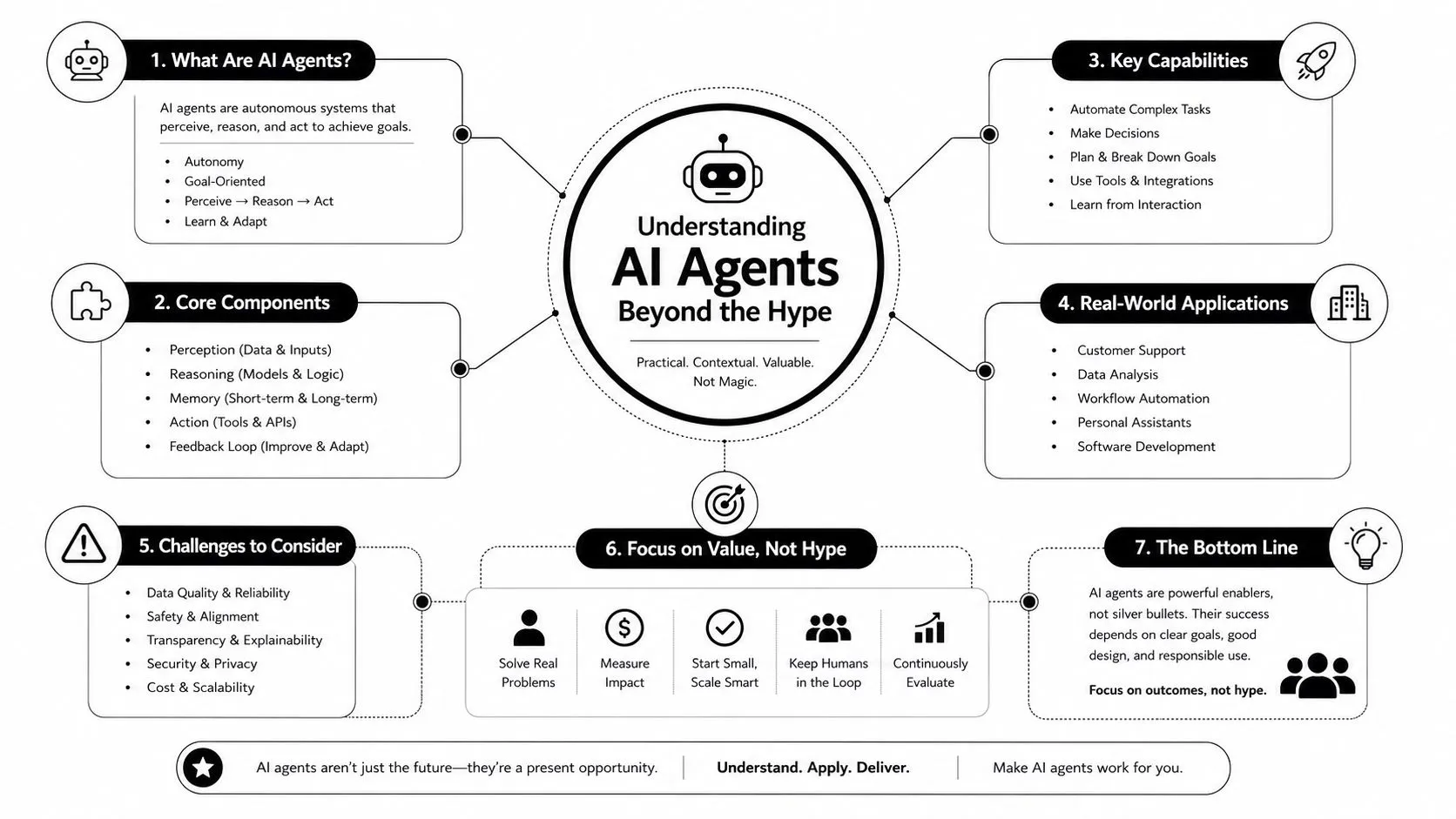
The easiest way to understand an AI agent is to stop picturing a chatbot and start picturing a super-intern.
A strong intern can take a goal, break it into steps, use the tools you give them, and come back with a draft or recommendation. They still need direction, review, and limits. But they don't need you to spell out every tiny click.
An AI agent works in a similar way. It usually has three practical parts:
-
A brain
This is the language model. It interprets instructions, reasons through the task, and decides what to do next. -
Hands
These are the tools. A CRM, spreadsheet, email app, calendar, database, browser, or internal knowledge base. -
A goal
This is the assignment. “Summarize this week's campaign performance.” “Screen resumes against this role.” “Route support requests to the right owner.”
If you've seen the phrase “AI coworker,” that's a helpful mental model. Supercenter's AI coworker explanation does a good job of describing this idea in plain language for business users.
What makes an agent different from a chatbot
A chatbot usually waits for a prompt and responds in text. It's reactive.
An agent can be proactive. It can move through a sequence of actions. That's the key difference.
Here's a simple comparison:
| Tool type | What it does | Where it breaks |
|---|---|---|
| Chatbot | Answers a question or drafts text | Stops when action is needed |
| Rule-based automation | Repeats a fixed workflow | Breaks when inputs vary |
| AI agent | Interprets a goal, uses tools, and completes steps | Needs guardrails when the task is ambiguous or high risk |
People often get confused on this point. If a tool writes an email, that doesn't automatically make it an agent. If a workflow moves data from one app to another, that isn't automatically agentic either.
Practical test: If the system can handle changing inputs, choose actions, and use multiple tools toward one outcome, you're probably looking at an agent.
For non-technical teams, the value isn't in the label. The value is that agents can handle work with a bit more variation and context than old automation could.
That's why they feel less like “software features” and more like a digital team member with a narrow job description.
From To-Do List to Done How Agents Execute Tasks
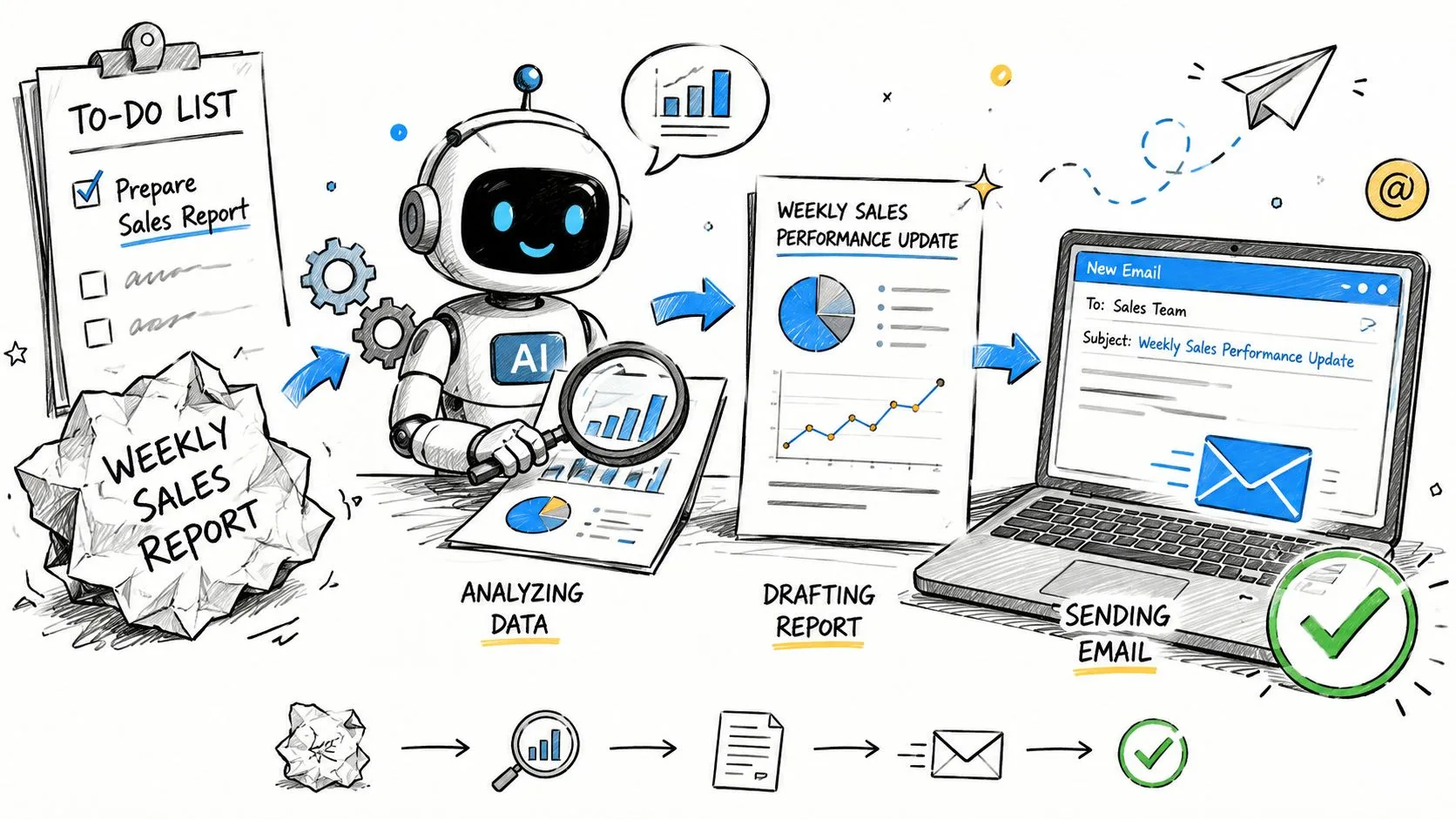
Let's make this concrete. Say your weekly task is: Create and send the sales performance summary.
A person might do that by checking Salesforce, exporting data, spotting trends, drafting notes, then emailing the team. An agent follows the same general shape, but it does it faster and more consistently when the workflow is well defined.
A weekly report example
You tell the agent:
“Every Friday, review sales activity from the last 7 days, identify top-performing reps, note stalled deals, draft a short summary, and prepare an email for the sales team.”
The agent's job might look like this behind the scenes:
- Step one: Open the CRM and pull this week's sales data
- Step two: Compare against the previous period
- Step three: Flag notable changes, such as unusually active accounts or deals that haven't moved
- Step four: Draft a plain-English summary
- Step five: Prepare the message in Gmail or Outlook for review
That's not magic. It's structured task execution.
What matters is that the agent can move from instruction to action. It isn't only producing words. It's doing workflow work.
For a deeper look at how these systems are assembled in practice, agentic AI workflows for business teams can help you connect the concept to real operating steps.
Why this matters at work
The business case becomes easier to understand when you frame agents as labor for routine digital tasks. By 2027, AI agents are projected to automate between 15% and 50% of routine business tasks, and employees using them report a 61% increase in personal efficiency, according to AI agent workflow projections and efficiency data.
That doesn't mean every workflow will suddenly run on autopilot. It means there's now a meaningful slice of office work that can move from manual handling to supervised automation.
A few examples look especially natural for non-technical teams:
- A campaign assistant: gathers performance data, summarizes changes, and drafts the weekly recap
- A recruiting assistant: screens incoming resumes, tags likely fits, and drafts outreach
- A support coordinator: reads incoming requests, sorts them, and prepares suggested responses
- A research helper: compiles competitor updates or account notes before a meeting
One quick explainer is worth watching here:
The easiest mistake is assuming an agent should replace the whole workflow. Usually it shouldn't. It should take the repetitive middle steps off your plate so you can review, decide, and move faster.
AI Automation in Action for Your Team
The best use cases for AI agents for automation don't start with “Where can we use AI?” They start with “Where does our team repeat the same thinking pattern every week?”
That question produces much better ideas.
Marketing
Marketing teams often live inside recurring analysis and content prep.
An agent can monitor campaign results across ad platforms and analytics tools, draft a weekly summary, and flag changes that deserve a human decision. It can also gather competitor updates from public channels, organize them by theme, and prepare a digest for the next team meeting.
Email workflow is another practical area. If your team is building outbound sequences or customer lifecycle campaigns, delivery quality matters. When teams start connecting agents to messaging systems, resources like email deliverability for AI Agents are useful for understanding how agent-driven email workflows connect to sending infrastructure.
Sales
Sales teams lose time in coordination work.
An agent can prepare account research before a call, summarize recent activity from the CRM, and draft follow-up emails based on meeting notes. It can also review stale opportunities and produce a manager-ready list of deals that need attention, grouped by likely blocker.
For SDR or account management support, agents are often strongest when they prepare the work rather than sending messages fully autonomously on day one.
HR
HR teams deal with structured judgment all day.
An agent can review incoming resumes against role criteria, surface likely matches, and prepare outreach drafts for recruiters to approve. It can also collect interview feedback from different stakeholders, organize it into a consistent format, and highlight missing evaluations before a hiring meeting.
For internal HR operations, agents can help answer repeat policy questions by pulling from approved documentation and routing edge cases to a person.
Analytics and operations
Analysts and operations managers often do manual synthesis across tools.
An agent can gather data from dashboards, check for anomalies, and package findings into a readable summary for stakeholders. It can also monitor recurring process exceptions, such as incomplete records or unresolved tickets, and prepare a cleanup queue with suggested next actions.
Here's a simple way to map use cases by department:
| Department | Automated Task | Potential Business Impact |
|---|---|---|
| Marketing | Weekly campaign summaries and competitor monitoring | Faster reporting, better visibility, less manual prep |
| Sales | Account research and follow-up drafting | More selling time, cleaner handoffs, better prep |
| HR | Resume screening and interview feedback collection | Shorter admin cycles, more consistent review |
| Analytics | Dashboard summaries and anomaly flagging | Faster insights, fewer repetitive reporting tasks |
| Operations | Ticket routing and exception monitoring | Smoother workflows and clearer ownership |
The strongest early use cases usually combine repeatable structure with light judgment. They don't require the agent to make a final business decision on its own.
If you're choosing where to begin, avoid the flashiest workflow. Pick the one your team already understands thoroughly and repeats often.
Your First AI Agent Project A Practical Checklist
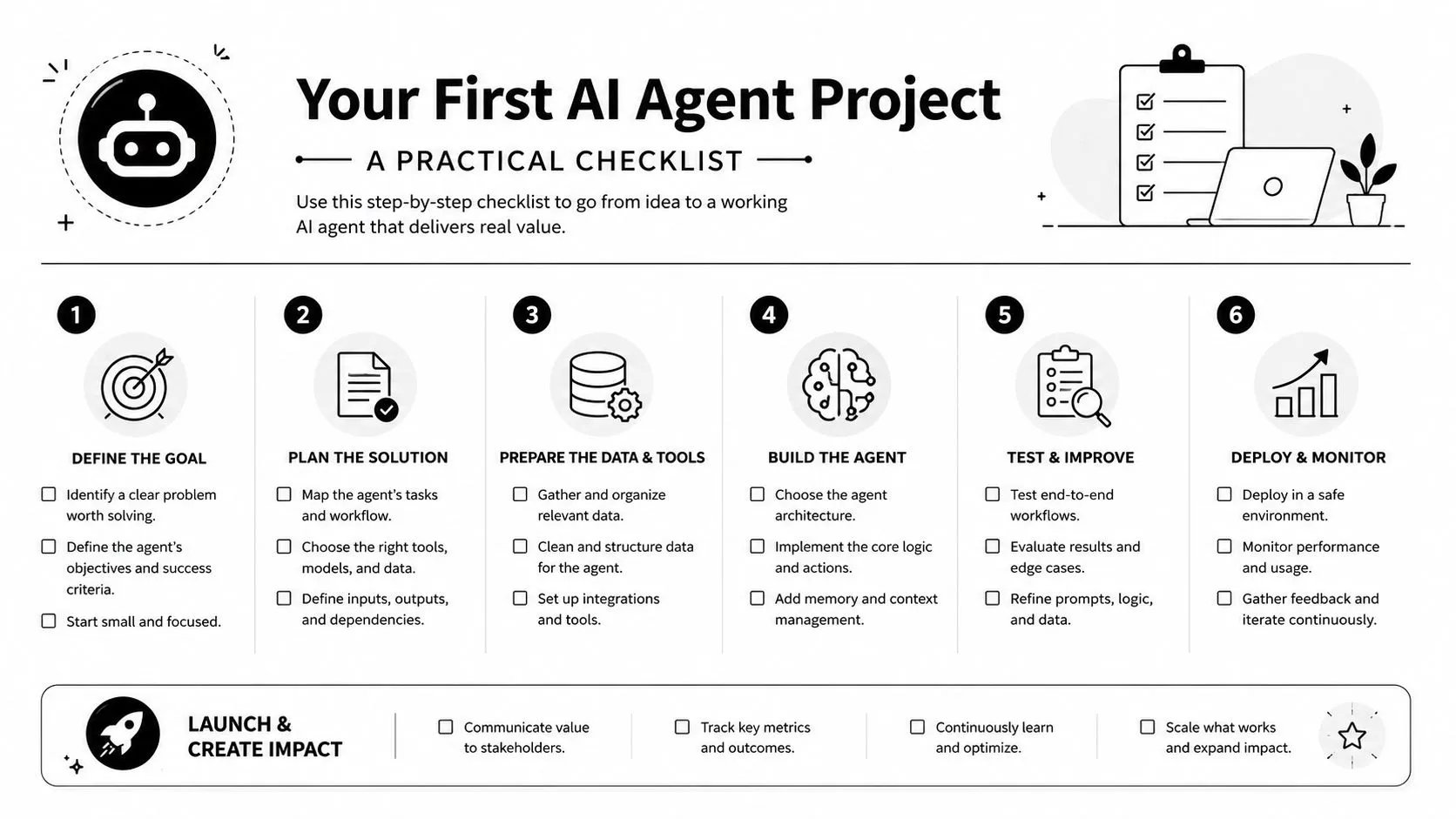
The safest first project is rarely the most exciting one. It's the one where you already know what “good” looks like.
A low-risk way to start
Start with a task that meets most of these conditions:
- It repeats often: weekly reporting, lead research, candidate screening, status updates
- It has visible inputs: a CRM, inbox, spreadsheet, dashboard, or knowledge base
- It ends in a draft or recommendation: not an irreversible action
- A person can review it quickly: approval should be easy
Then define the goal in plain language. “Summarize all support trends” is vague. “Review support tickets from the last week, group them by issue type, and draft a one-page summary for operations” is much better.
A practical rollout often looks like this:
-
Choose one workflow
Don't start with a department-wide transformation. Start with one annoying task. -
Write the success criteria
Decide what a good output includes. Format, tone, fields, deadlines, and what counts as an exception. -
Connect only the needed tools
Give the agent access only to the apps required for that single job. -
Run it in observation mode
Let it produce drafts, suggestions, or summaries without changing live systems.
For small teams that want guided, non-technical training on setting up workflows like this, AI automation for small business teams is one practical learning resource. AI Academy also offers hands-on training focused on no-code automation and agent setup for working professionals.
What good guardrails look like
This is the part many teams skip. They rush from demo to deployment.
That's risky, especially for non-technical roles. True agent value is earned in workflows requiring judgment, but write access should be withheld until 90 days of read-only reliability is proven, according to practical guidance on AI agent reliability for business teams.
That single rule clears up a lot of confusion.
Let the agent watch first, draft second, and write last.
In practice, that means:
- Read-only first: the agent can inspect records and prepare outputs, but not change anything
- Human review next: someone checks drafts, tags mistakes, and refines instructions
- Write access later: only after consistent, boring reliability
- Escalation path always: unusual cases still go to a person
This approach protects your team from the most common trap. People hear “autonomous” and assume hands-off. In reality, trust should be earned in layers.
A good first project should feel almost conservative. That's a sign you're building something durable.
Navigating the Risks AI Agent Safety and Integration
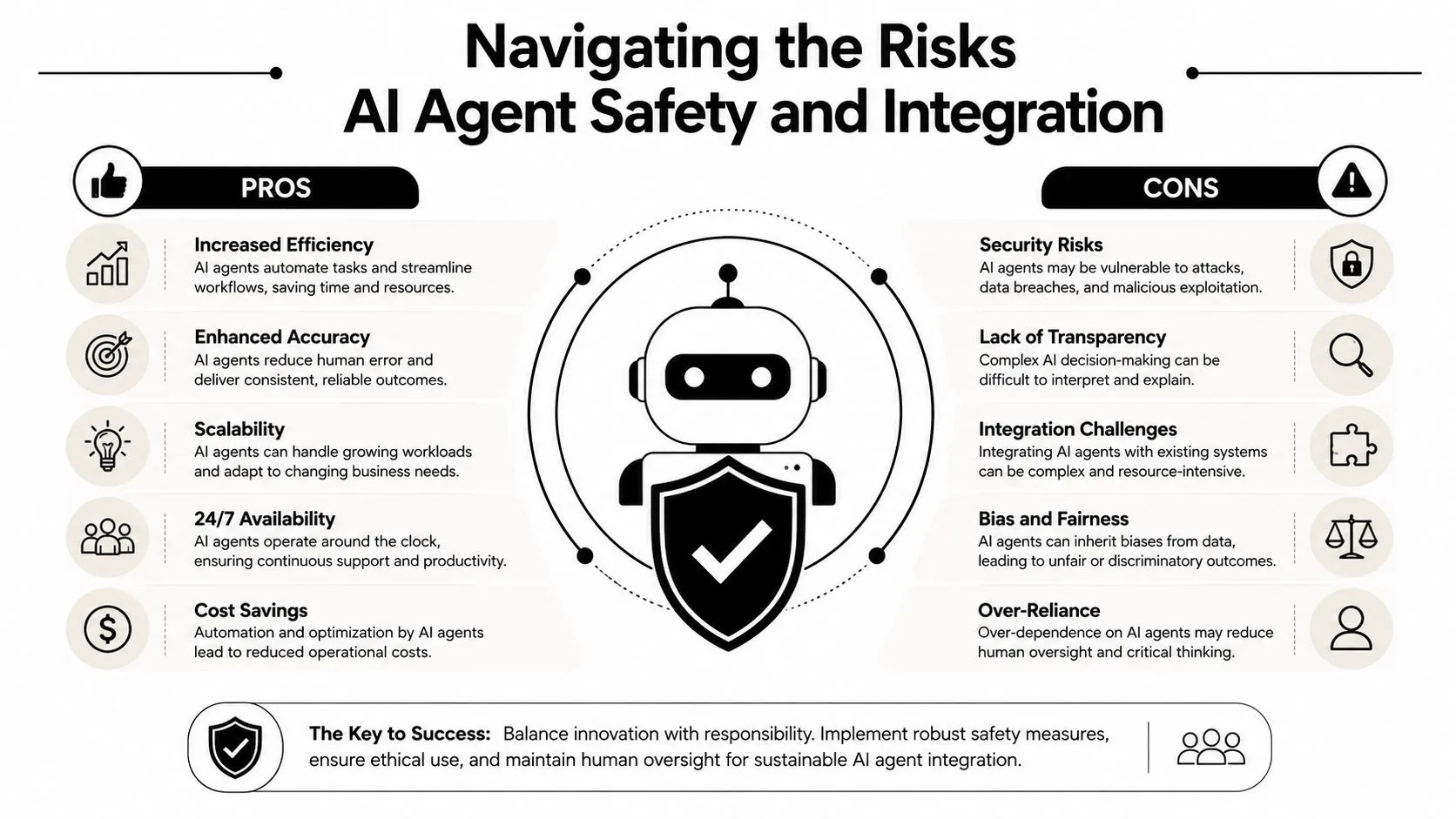
Managers usually ask the right questions first. What if the agent gets something wrong? What data can it see? Who checks the output? Those aren't roadblocks. They're exactly the questions that lead to usable systems.
Why agents fail on complex work
AI agents are usually weaker on long, tangled workflows than on shorter, bounded ones. That matters because teams often try to start with the hardest possible task.
A major benchmark found that even top-tier LLMs struggle with multi-step, cross-application tasks, and reliability drops significantly when tool coordination exceeds three concurrent APIs, according to the AgentArch benchmark on enterprise agent reliability.
For a non-technical reader, the takeaway is simple. The more tools, branches, and moving parts you add, the more opportunities the agent has to misunderstand the task or lose the thread.
That's why a “do everything” agent often performs worse than a narrow one.
How to manage safety without becoming technical
You don't need to become an engineer to manage agent risk well. You need a few operating rules.
First, use the principle of least privilege. Give the agent only the access it needs. If it's creating weekly summaries, it doesn't need permission to edit CRM records or send customer emails.
Second, break large workflows into smaller units. Instead of one agent that researches, decides, writes, updates records, and sends messages, split the process:
- Agent A: collects information
- Agent B: drafts a recommendation
- Human: approves or corrects
- System: logs the action
Third, insist on visibility. A trustworthy setup should show what the agent looked at, which tools it used, and what output it produced. If your IT team or vendor can't explain that, you'll have a hard time troubleshooting errors or proving compliance later. This is one reason many teams also review guidance on AI data security for business workflows.
Smaller scopes produce safer automation. Broad permissions produce expensive mistakes.
One more helpful habit is to define failure before launch. What counts as an unacceptable error? Sending the wrong message, using the wrong source, editing the wrong record, or missing a required approval all belong on that list.
Good agent adoption isn't about blind trust. It's about controlled trust.
Becoming Your Team's AI Automation Expert
The people who become valuable with AI agents for automation usually aren't the ones chasing the loudest demo. They're the ones who can tell the difference between a task that should be automated now and a task that still needs a human.
That's a career skill.
If you want to become the go-to person on your team, keep your approach simple. Find repetitive work with clear inputs. Start read-only. Require review. Expand only after the system proves it can be trusted. That mindset works in marketing, HR, sales, analytics, and operations.
It also helps you spot bigger opportunities. Some of the strongest future use cases aren't in saturated admin tasks. The highest-fundability agent opportunities are projected to be in industries with expensive human experts and complex workflows, such as healthcare and legal, while 90% of automation guides focus on lower-value tasks in marketing and sales, according to this analysis of underserved AI agent opportunities.
That doesn't mean non-technical teams should wait. It means your first project can build the judgment you'll need for larger, more strategic systems later.
The path is straightforward. Learn what agents are good at. Learn where they fail. Build one useful workflow. Then become the person who can scale that knowledge responsibly across the team.
If you want a practical place to build that skill, AI Academy offers step-by-step lessons, templates, and workflow training designed for marketers, analysts, managers, and other non-technical professionals who want to use AI well on the job.