You're probably looking at two tables right now that almost answer your question, but not quite.
One table has your customers. Another has their orders. Separately, each one is useful. Together, they tell the full story. Which customers never bought. Which ones bought twice this month. Which campaigns brought in buyers instead of just signups. That's where SQL joins become practical, not academic.
If you work in marketing, sales, ops, or analytics, joining two tables in SQL is one of the first skills that turns disconnected data into decisions. The good news is that the logic is simpler than the terminology makes it sound. You're mostly asking one question: how should rows from table A connect to rows from table B?
Why Your Data Lives in Different Tables
A company rarely stores everything in one giant spreadsheet-style table, and that's a good thing. Customer details change at one pace. Orders arrive at another. If you tried to keep every customer attribute and every order in one table, you'd repeat the same customer name, email, and location over and over.
That repetition creates mess fast. One team updates an email in one row but misses three others. Someone writes “CA” in one place and “California” in another. This is why databases split information into related tables, and why data teams care about clean structure and normalizing data.
Here's the simple business story we'll use throughout:
Customers
| customer_id | customer_name | state | |
|---|---|---|---|
| 101 | Maya Chen | [email protected] | CA |
| 102 | Luis Torres | [email protected] | TX |
| 103 | Priya Shah | [email protected] | NY |
| 104 | Ben Carter | [email protected] | CA |
Orders
| order_id | customer_id | order_date | amount |
|---|---|---|---|
| 5001 | 101 | 2026-01-10 | 120.00 |
| 5002 | 101 | 2026-02-03 | 75.00 |
| 5003 | 103 | 2026-02-08 | 200.00 |
| 5004 | 105 | 2026-02-11 | 90.00 |
The shared column is customer_id. That's the bridge between the two tables. A join uses that bridge to line up related rows.
Practical rule: A join isn't about combining everything with everything. It's about matching rows through a shared key.
This structure also connects to broader data governance. If your teams struggle with duplicate customer records or conflicting IDs across systems, the benefits of MDM solutions become easier to understand. Better master data makes joins more reliable because the key values are more consistent.
Once you see joins this way, the syntax becomes easier. You're not memorizing SQL keywords. You're deciding what business question you want answered from two separate lists.
The Core Four Mastering the Main SQL JOIN Types
Our running example
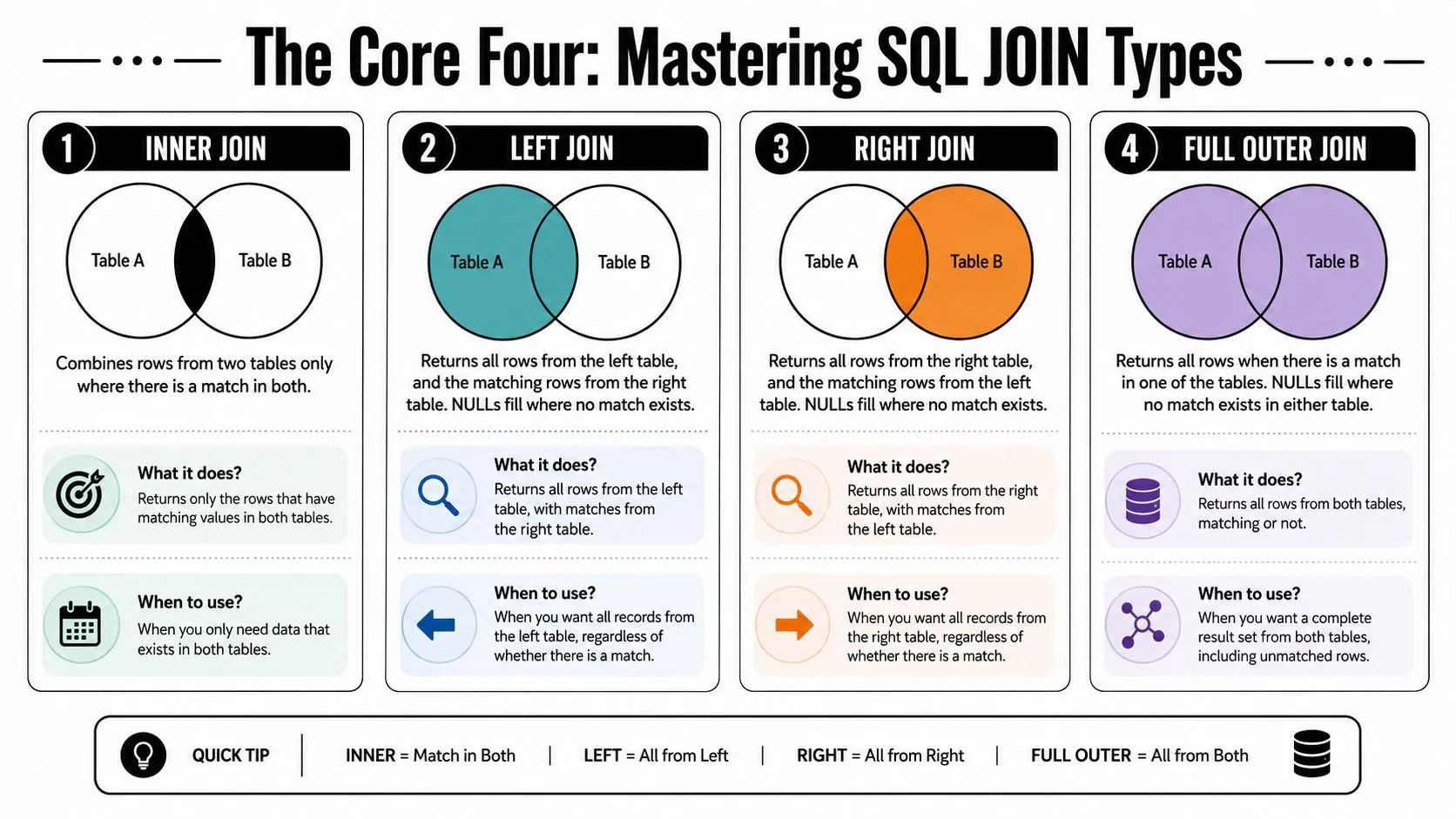
Let's stay with the same company. Marketing wants to know who bought, who didn't, and whether any order records exist without a matching customer record. Those are all different questions, and each one maps to a different join.
If you're learning this for interviews as well as daily work, these patterns show up often in SQL interview questions for 2026, especially the “why would you choose this join” kind of question.
INNER JOIN
An INNER JOIN keeps only rows that match in both tables.
In our story, that means only customers who have at least one order, and only orders tied to a known customer. If a customer never bought, they won't appear. If an order has a customer_id that doesn't exist in Customers, it won't appear either.
SELECT
  c.customer_id,
  c.customer_name,
  o.order_id,
  o.order_date,
  o.amount
FROM Customers AS c
INNER JOIN Orders AS o
  ON c.customer_id = o.customer_id;
Use this when you care only about confirmed relationships. A common example is revenue analysis. If you're building a report of customers and purchase amounts, you usually want matched records only.
Think of INNER JOIN as the overlap in a Venn diagram. Helpful, but limited. It answers, “Where do these two tables agree?”
LEFT JOIN
A LEFT JOIN returns all rows from the left table and matching rows from the right table. If there's no match, SQL fills the right-side columns with NULL.
That's useful when the left table is your main audience. In our case, if Customers is on the left, you'll get every customer, including the ones who never placed an order.
SELECT
  c.customer_id,
  c.customer_name,
  o.order_id,
  o.amount
FROM Customers AS c
LEFT JOIN Orders AS o
  ON c.customer_id = o.customer_id;
This is the join marketers use all the time without realizing it. You might want a re-engagement list of customers who signed up but haven't purchased. A LEFT JOIN gives you the structure for that.
SELECT
  c.customer_id,
  c.customer_name
FROM Customers AS c
LEFT JOIN Orders AS o
  ON c.customer_id = o.customer_id
WHERE o.order_id IS NULL;
That query says: give me all customers, then keep only the ones with no matching order.
One important logic warning belongs here. The verified data notes that LEFT and RIGHT joins are not interchangeable, and switching table order without switching join type can lead to 100% data loss of the intended unmatched rows. It also notes that 75% of SQL developers find LEFT JOIN syntax more intuitive for retaining unmatched rows. That's why many analysts default to LEFT JOIN when they want a “keep my main table intact” result.
Use LEFT JOIN when you know which table you want to preserve. That one decision prevents a lot of confusion later.
RIGHT JOIN
A RIGHT JOIN does the opposite. It returns all rows from the right table and matching rows from the left table.
Using our example, if Orders is on the right, you'll keep every order even if the customer record is missing.
SELECT
  c.customer_name,
  o.order_id,
  o.amount
FROM Customers AS c
RIGHT JOIN Orders AS o
  ON c.customer_id = o.customer_id;
This can be useful for audits. Suppose finance cares more about preserving every order record than preserving every customer record. RIGHT JOIN fits that question.
Still, many teams avoid it in everyday work. Not because it's wrong, but because it's easier to read the query left to right when the “main” table appears first and you use LEFT JOIN. In practice, many analysts rewrite RIGHT JOINs as LEFT JOINs by swapping table positions.
FULL OUTER JOIN
A FULL OUTER JOIN keeps everything from both tables. Matched rows come together. Unmatched rows from either side still appear, with NULLs filling the missing columns.
SELECT
  c.customer_id,
  c.customer_name,
  o.order_id,
  o.amount
FROM Customers AS c
FULL OUTER JOIN Orders AS o
  ON c.customer_id = o.customer_id;
This is the broadest view. It's useful when you're auditing data quality or reconciling systems. In our story, it shows:
- customers with orders
- customers without orders
- orders without valid customers
That makes it valuable for spotting broken relationships, migration issues, or missing master records.
Here's a quick comparison you can keep in mind:
| Join type | Keeps what | Good for |
|---|---|---|
| INNER JOIN | Only matched rows | Revenue and conversion analysis |
| LEFT JOIN | All left rows, matched right rows | Finding non-buyers or missing activity |
| RIGHT JOIN | All right rows, matched left rows | Preserving records from the right table |
| FULL OUTER JOIN | All rows from both tables | Audits and reconciliation |
If joining two tables in SQL still feels abstract, reduce it to one sentence: which table must stay complete, and what counts as a match? Once you can answer that, the right join usually becomes obvious.
Beyond the Basics SELF CROSS and Multi-Table Joins
The basic join types answer most day-to-day questions. But business data doesn't always stop at two tables or simple customer-order matching.
SELF JOIN for reporting lines
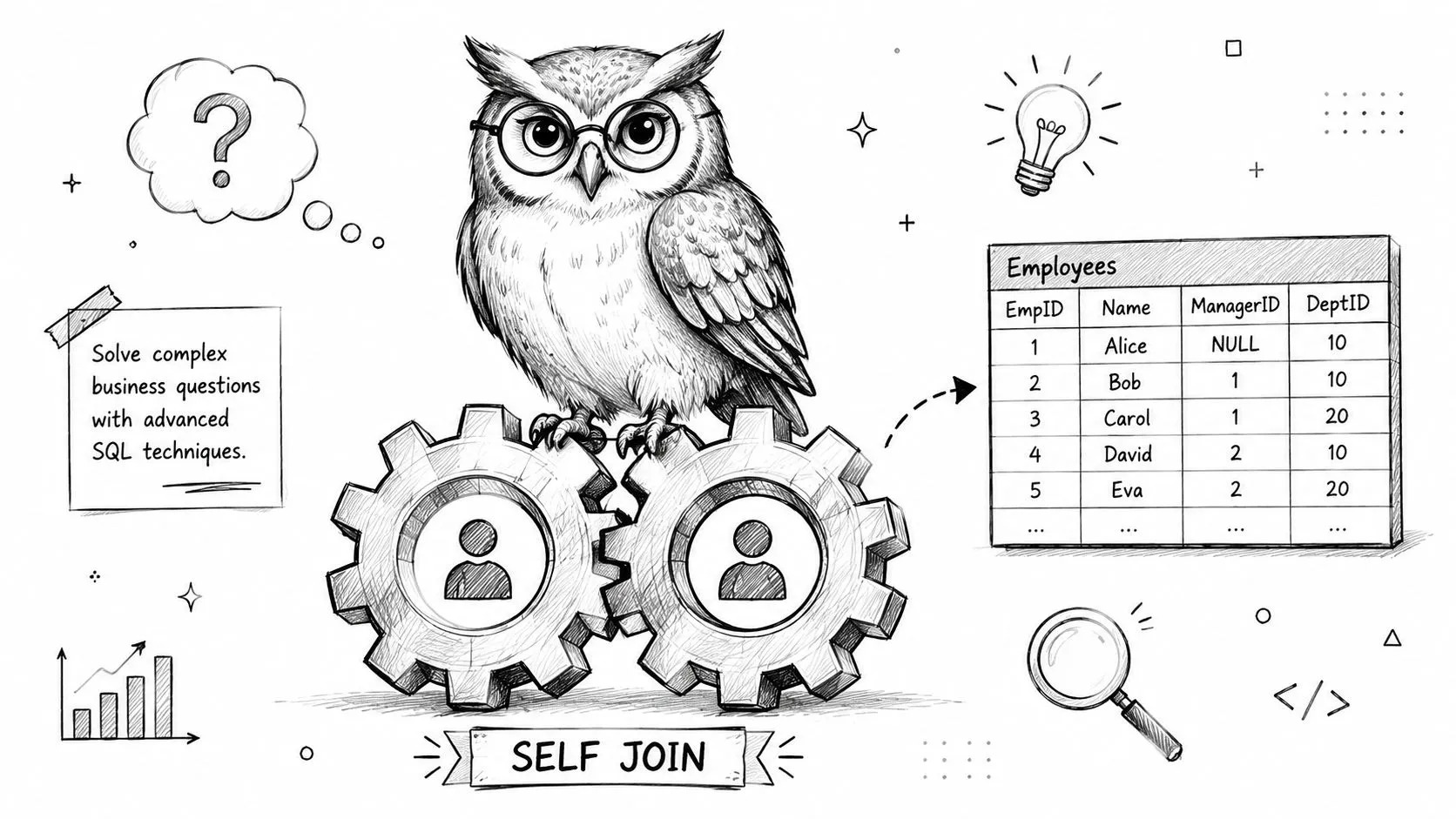
A SELF JOIN joins a table to itself. That sounds odd until you see a real use case.
Say you have an Employees table with both employee_id and manager_id. Each employee row points to another employee row. You can join Employees to itself to show who reports to whom.
SELECT
  e.employee_name AS employee,
  m.employee_name AS manager
FROM Employees AS e
LEFT JOIN Employees AS m
  ON e.manager_id = m.employee_id;
The aliases matter here. e represents the employee row. m represents the manager row from the same table. Without aliases, the query would be hard to read.
This pattern comes up anytime one record relates to another record in the same entity. Employees and managers. Products and parent products. Categories and parent categories.
CROSS JOIN and why it often causes trouble
A CROSS JOIN returns every row from the first table paired with every row from the second. If you have 4 customers and 3 products, you get 12 combinations.
Sometimes that's intentional. Maybe you want to generate every customer-product pairing for a recommendation model or build all combinations of campaign messages and audience segments in a planning table.
But most of the time, a CROSS JOIN appears by accident when someone forgets the ON condition. The verified data is blunt here: missing or malformed ON conditions can create Cartesian products that inflate result sets by 10,000% or more.
A join without a clear match condition can stop being analysis and turn into a data explosion.
If you spend part of your week cleaning spreadsheet exports before loading them into SQL, practical automation workflows from AI for spreadsheets can help reduce the messy inputs that often lead to bad joins later.
A short visual walkthrough can make the idea stick:
Joining more than two tables
Here, SQL starts answering richer questions.
Suppose your database also has a Products table and an OrderItems table. You can connect customers to orders, then orders to products, and ask something like: which product categories are most popular among California customers?
SELECT
  c.state,
  p.category,
  COUNT(*) AS line_items
FROM Customers AS c
JOIN Orders AS o
  ON c.customer_id = o.customer_id
JOIN OrderItems AS oi
  ON o.order_id = oi.order_id
JOIN Products AS p
  ON oi.product_id = p.product_id
WHERE c.state = 'CA'
GROUP BY c.state, p.category;
Notice the pattern. Each join adds one more layer of context. Customers tell you who. Orders tell you when and how much. Products tell you what they bought.
That's why joining two tables in SQL is really the foundation for joining many tables later. Once you understand the relationship between two tables, extending the chain becomes much less intimidating.
Refining Your Joins ON vs WHERE Aliases and NULLs
Small syntax choices can subtly change your result set. Many otherwise solid queries fail for this reason.
Why ON and WHERE are not interchangeable
With an INNER JOIN, filtering in ON versus WHERE often appears to behave similarly. With an OUTER JOIN, it doesn't.
Suppose you want every customer, plus only orders over a certain amount. If you place that filter in the ON clause, you keep all customers and only match qualifying orders.
SELECT
  c.customer_name,
  o.order_id,
  o.amount
FROM Customers AS c
LEFT JOIN Orders AS o
  ON c.customer_id = o.customer_id
 AND o.amount > 100;
If you move that same filter into WHERE, you remove rows where the joined order is NULL. That can effectively turn your LEFT JOIN into something closer to an INNER JOIN.
SELECT
  c.customer_name,
  o.order_id,
  o.amount
FROM Customers AS c
LEFT JOIN Orders AS o
  ON c.customer_id = o.customer_id
WHERE o.amount > 100;
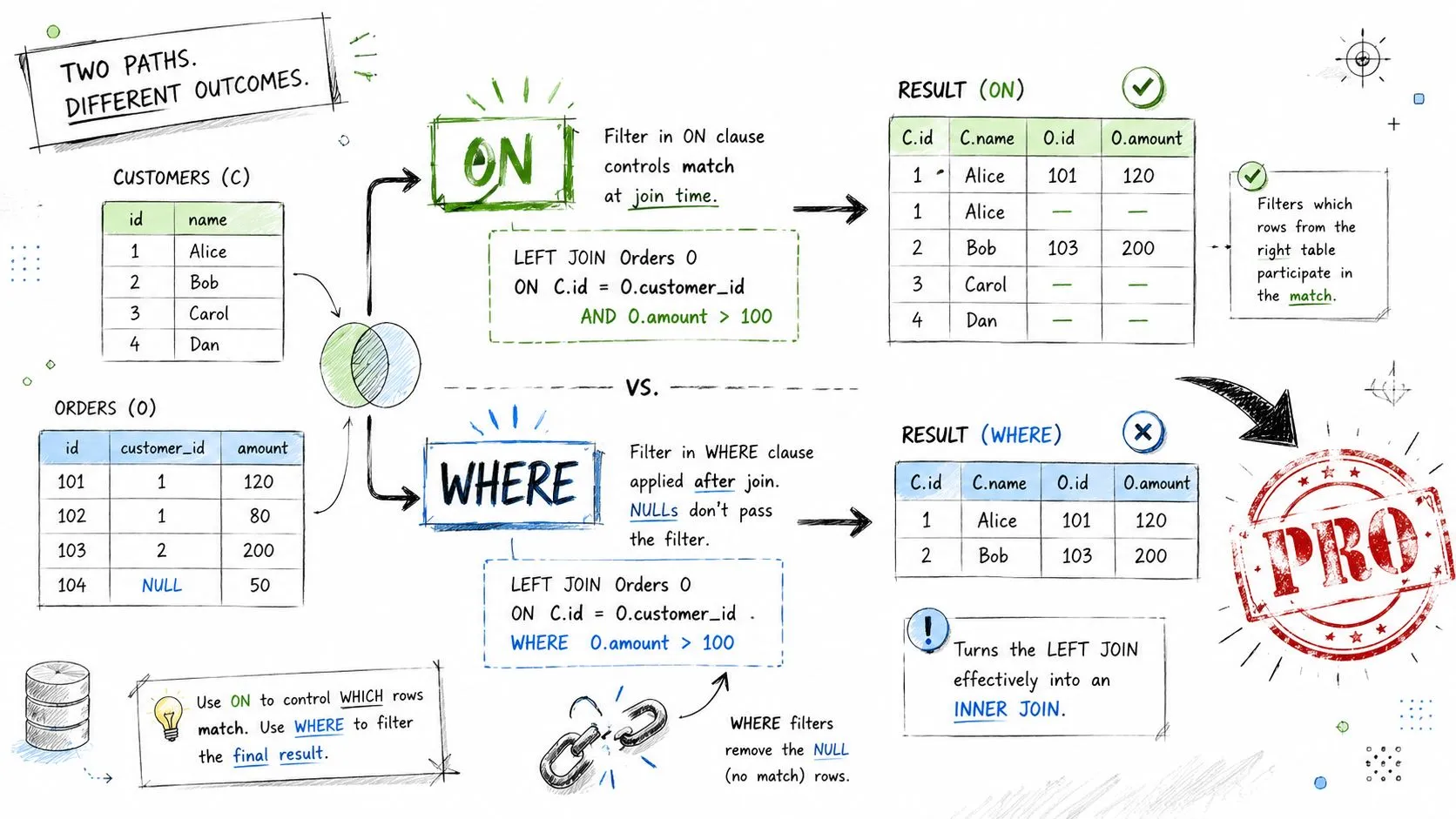
The rule of thumb is simple:
- Use
ONfor match logic between tables - Use
WHEREfor filtering the final result set
That guideline isn't absolute, but it will save you from many accidental logic errors.
Aliases make queries readable
Aliases shorten your query and make relationships easier to scan.
SELECT
  c.customer_name,
  o.order_date
FROM Customers AS c
JOIN Orders AS o
  ON c.customer_id = o.customer_id;
Without aliases, repeated table names make multi-join queries noisy. With aliases, your eye can follow the logic faster. That matters even more when you're debugging.
If you're still developing the habit of cleaning fields before analysis, this kind of detail pairs well with a structured course on cleaning and formatting data, because join problems often start with inconsistent values rather than SQL syntax.
NULL is where many joins go wrong
A major blind spot in beginner content is NULL and mismatch behavior. Microsoft notes that null values do not match each other in joins, and null-containing rows are only returned with an outer join unless filtered out by WHERE conditions in its documentation on join behavior in SQL Server.
That matters because a row can look like it should match, but if the key is NULL, it won't. Verified data also notes that 15-20% of expected records may be dropped if an INNER JOIN is used instead of an OUTER JOIN when NULL mismatching is involved, and that 25% of NULL values in join keys cause missing-data paradoxes in INNER JOINs. To mitigate this, it recommends COALESCE or ISNULL before joining, which can support a 99% data retention rate when replacing NULLs with a default value.
Don't treat NULL like an empty string or a zero. SQL treats it as unknown, and unknown doesn't equal unknown in a join.
Example:
SELECT
  c.customer_id,
  o.order_id
FROM Customers AS c
LEFT JOIN Orders AS o
  ON COALESCE(c.customer_id, -1) = COALESCE(o.customer_id, -1);
You wouldn't always use -1 specifically. The point is to choose a safe default that can't be mistaken for a real key value.
Performance Tuning and Common Pitfalls
A correct join that takes forever isn't much help in a live workflow. Good SQL balances logic and speed.
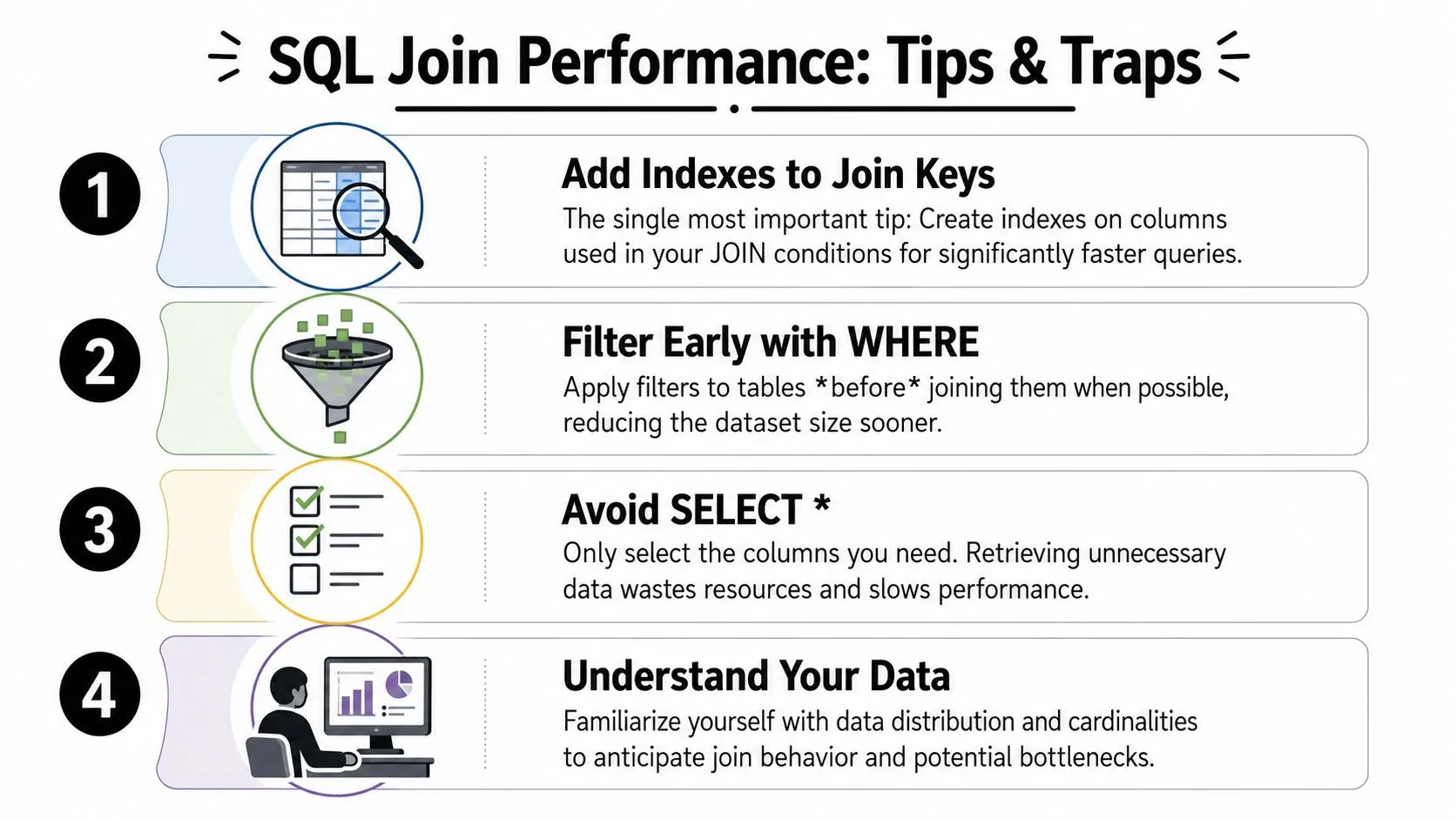
The habits that keep joins fast
The single most important habit is indexing the columns you join on. Verified data says unindexed join keys are the most common cause behind 60% of query failures, and for a 1-million-row dataset, an unindexed join can take 45 seconds versus 0.2 seconds when indexed. It also notes that a Hash Join on indexed columns achieves a 90% success rate within 100ms, while unindexed joins can exceed 5000ms with a 40% failure rate.
Another practical habit is filtering early. Verified data recommends a Filter First strategy, where WHERE conditions reduce the intermediate result set by 50-70%, improving complex joins before they become expensive.
A third habit is checking the query plan. Verified data says using EXPLAIN ANALYZE is essential for 90% of production queries because it reveals inefficient join orders that could otherwise cause 300% slower execution times.
Mistakes that break queries or logic
Some mistakes hurt performance. Others return the wrong answer.
Here are the big ones:
- Missing
ONconditions: This is the classic accidental Cartesian product. Verified data notes that result sets can inflate by 10,000% or more when this happens. - Joining on the wrong grain: If one table has one row per customer and another has many rows per customer, the output may duplicate customer records. Check whether your key is unique on one side and repeating on the other.
- Using non-equality join conditions casually: Verified data notes that standard Hash or Merge joins require equality conditions like
table1.col = table2.col. Non-equality joins such as>orBETWEENforce a Nested Loop Join, which has an 80% higher failure rate on large datasets. - Skipping sorted-input opportunities: When both inputs are sorted on join columns, the verified data says a Merge Join can reach 95% performance efficiency with a 30% reduction in I/O operations compared to unsorted inputs.
Check three things before you run a large join: match condition, key quality, and indexes on both join columns.
Sometimes a join isn't the best tool. If you only need to know whether a related row exists, EXISTS can be clearer. If you need a one-off calculated result, a subquery may be simpler. Good SQL isn't about forcing every problem into a join. It's about choosing the cleanest path to the answer.
Conclusion From Separate Lists to Business Insights
Two separate tables often hold the answer you need. They just don't reveal it until you connect them correctly.
INNER JOIN helps you focus on matched activity. LEFT JOIN helps you keep your main audience visible. RIGHT JOIN and FULL OUTER JOIN help with special cases, audits, and reconciliation. Then the finer points, especially ON versus WHERE, aliases, NULL handling, and indexing, turn a basic query into a reliable one.
That's the core value of joining two tables in SQL. You stop looking at isolated records and start seeing customer behavior, process gaps, and business opportunities.
If you want to build practical data and AI skills without sitting through bloated theory, AI Academy is worth a look. It's designed for working professionals who want short, hands-on lessons they can apply right away across reporting, automation, research, and day-to-day workflows.