Your team already uses AI in small ways. Someone asks ChatGPT for draft copy. Someone else uses Zapier to move leads into a spreadsheet. Your analyst pulls numbers from Google Analytics and your CRM, then spends half the afternoon turning them into a slide for leadership.
The work gets done, but it still feels stitched together. One tool writes. Another tool moves data. A person has to remember what happened, decide what comes next, and keep nudging the process forward. That handoff work is where time disappears.
Agentic AI workflows matter because they change that pattern. Instead of using AI as a single helpful tool, you start using it more like a coordinated team of digital assistants that can interpret a goal, break it into steps, use tools, and keep going until they produce an outcome. If you've been trying to figure out whether this is real progress or just new buzzwords, the practical answer is simple. It's a new way to automate work that used to be too messy, too cross-functional, or too judgment-heavy for standard automation.
Beyond Simple Automation What Are Agentic AI Workflows
A marketing team launches a new campaign. The manager writes a brief. A copywriter drafts email copy. A designer finds visuals. Someone checks competitor pages. An analyst pulls last quarter's conversion data. Then the manager pieces it all together, notices a gap, asks for revisions, and chases status updates across Slack, docs, and dashboards.
Traditional automation helps with slices of that process. It can send a notification, move a file, or trigger an email when a form is submitted. But it usually can't understand the broader goal and decide the next best action when things change.
That's where agentic AI workflows come in. Think of them as a small digital team. One agent researches. Another summarizes. Another drafts. Another checks whether the output matches your brand rules or business objective. Instead of waiting for a person to orchestrate every micro-step, the workflow keeps moving toward the goal.
A more useful definition
An agentic workflow is goal-oriented automation. You give it an outcome, not just a trigger.
A normal automation sounds like this:
- If form submitted: Add contact to HubSpot.
- If invoice arrives: Save PDF to Google Drive.
An agentic workflow sounds more like this:
- Goal: Prepare a launch-ready campaign summary by tomorrow morning using internal notes, competitor signals, and last quarter's performance data.
That difference matters. The second request requires interpretation, planning, decisions, and coordination across tools.
Practical rule: If the work involves judgment, multiple steps, and changing inputs, it's a candidate for agentic design.
Non-technical teams don't need to understand the engineering stack to get the concept. You just need to recognize the pattern. Instead of asking, “What task can I automate?” ask, “What outcome keeps requiring five tools and three people to coordinate?”
If you want a broader industry view before going deeper, this guide to explore agentic automation solutions gives helpful context around where these systems fit in the wider automation environment.
From Goal to Action How Agentic AI Workflows Think
Most confusion starts here. People hear “AI agent” and picture a magic bot that somehow knows what to do. In practice, the logic is more understandable than it sounds.
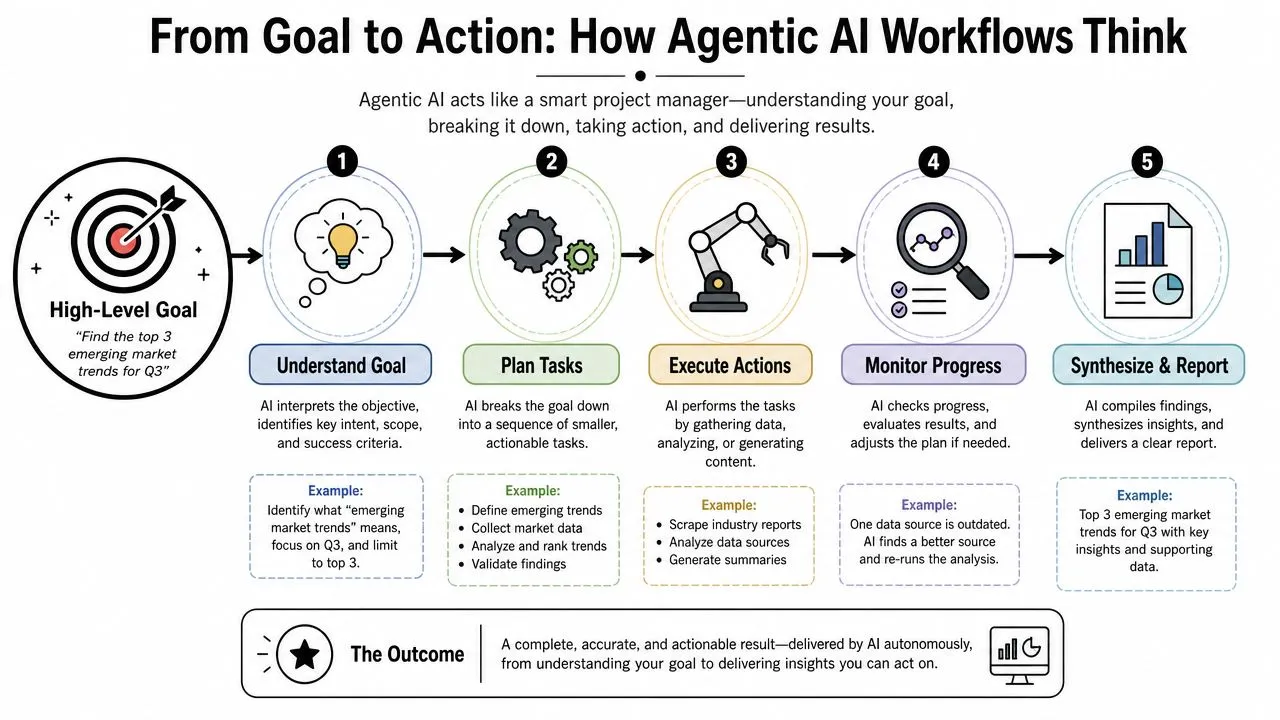
A simple mental model
Treat the workflow like a strong project manager. You don't tell that person every keystroke. You give them a goal, the constraints, the deadline, and access to the right information. Then they translate the goal into actions.
According to Atlassian's explanation of how agentic workflows operate, these systems run on an “observe, think, act” loop. They perceive the environment, reason through the next step, and execute actions through tools such as APIs or robotic process automation, without constant human supervision.
Here's what that looks like in plain English:
-
Observe The system reads your request, checks available context, and notices what tools or data it can use.
Example: “Find the top three emerging market opportunities for our new product.” -
Think It creates a plan. That plan might include checking competitor messaging, reviewing internal sales patterns, scanning customer feedback, and comparing regions.
-
Act It carries out the plan using connected systems. That might mean querying a CRM, searching the web, drafting a summary, or flagging gaps for human review.
-
Check It evaluates whether the answer is complete or whether another step is needed.
-
Deliver It returns a report, recommendation, draft, or action list.
What makes this different from normal automation
Standard automation is rigid. It follows a script. If the input is messy or the situation changes, the workflow often breaks.
Agentic workflows are more flexible because they can adapt mid-process. If one source looks unreliable, the system can try another. If the data conflicts, it can note the uncertainty and ask for approval before moving forward.
That's why these workflows are useful for business problems that don't come in clean, predictable packages.
A simple comparison helps:
| Type | Best for | Limitation |
|---|---|---|
| Rule-based automation | Repetitive, fixed tasks | Struggles when inputs vary |
| Single AI prompt | One-off drafting or summarizing | No memory of the larger process |
| Agentic workflow | Multi-step goals across tools | Needs guardrails and oversight |
The real leap isn't that AI can write a paragraph. It's that AI can keep working through a chain of tasks toward a business outcome.
For a marketing manager, the “so what” is clear. You stop using AI like a smart intern for isolated tasks and start using it more like a coordinator that can move a project forward.
The Real Business Impact of Agentic AI Workflows
A marketing manager often loses hours to work that seems small on paper but sprawls in real life. Pull the campaign notes. Check what sales is hearing. Review last quarter's performance. Draft options. Chase approvals. Update the brief. Agentic workflows matter because they reduce that coordination load across connected tasks, not because they shave a few minutes off a single prompt.
That shift changes what teams can get done in a week.
They take on coordination-heavy work
Traditional automation works best when the path is fixed. Agentic workflows are more useful when the task has loose ends, changing inputs, and a few judgment calls along the way.
For example, routing a lead to sales is basic automation. Preparing that lead for a good follow-up is a different job. An agentic workflow can gather context from the CRM, compare the account against campaign intent, summarize likely needs, draft outreach angles, and hand the rep a tighter brief. The rep still decides what to do. The busywork shrinks.
That is why software buyers are paying attention. Gartner's forecast, summarized in Dynamiq's overview of agentic workflows, suggests agentic capabilities will become a common expectation inside enterprise software. For business teams, the implication is simple. The question soon will not be “Does this tool have AI?” It will be “Can this tool carry a goal across steps, tools, and review points?”
They change what good management looks like
As workflows handle more prep, synthesis, and recommendation work, managers spend less time pushing tasks forward by hand and more time setting direction.
That sounds abstract until you see it in practice. A weak brief produces scattered output. A clear goal, clear rules, and a clear approval path produce work your team can effectively use. Managing agentic workflows works a lot like managing a strong assistant team. You do not need to dictate every click. You do need to define the assignment, the limits, and when to bring you in. This piece on Productivity Radar leadership insights is a useful reminder that better systems still depend on better management habits.
A few business effects show up quickly:
- Research gets closer to decision-ready: Instead of a folder full of links, teams get a synthesized draft with gaps and next steps called out.
- Personalization becomes more practical: Workflows can adapt messages using customer signals and business rules without forcing your team to build every version manually.
- Cycle times shrink: Teams spend less time collecting context from scattered sources and more time reviewing options and making calls.
- Specialists protect more focus time: Marketers, analysts, and managers can spend more of the day on judgment, not stitching together inputs.
For non-technical teams, this is the useful mental model. Agentic AI is less like a faster copy tool and more like a small assistant bench that can research, organize, draft, and hand work back in a form you can review.
If you are still building your foundation, these AI tools for business automation can help you see where agentic workflows fit alongside simpler automations.
Manager's lens: The biggest payoff is not fewer people. It is fewer hours lost to gathering, formatting, chasing, and re-explaining work that should have moved faster already.
That is the business impact for day-to-day teams. More momentum. Better handoffs. Less coordination drag.
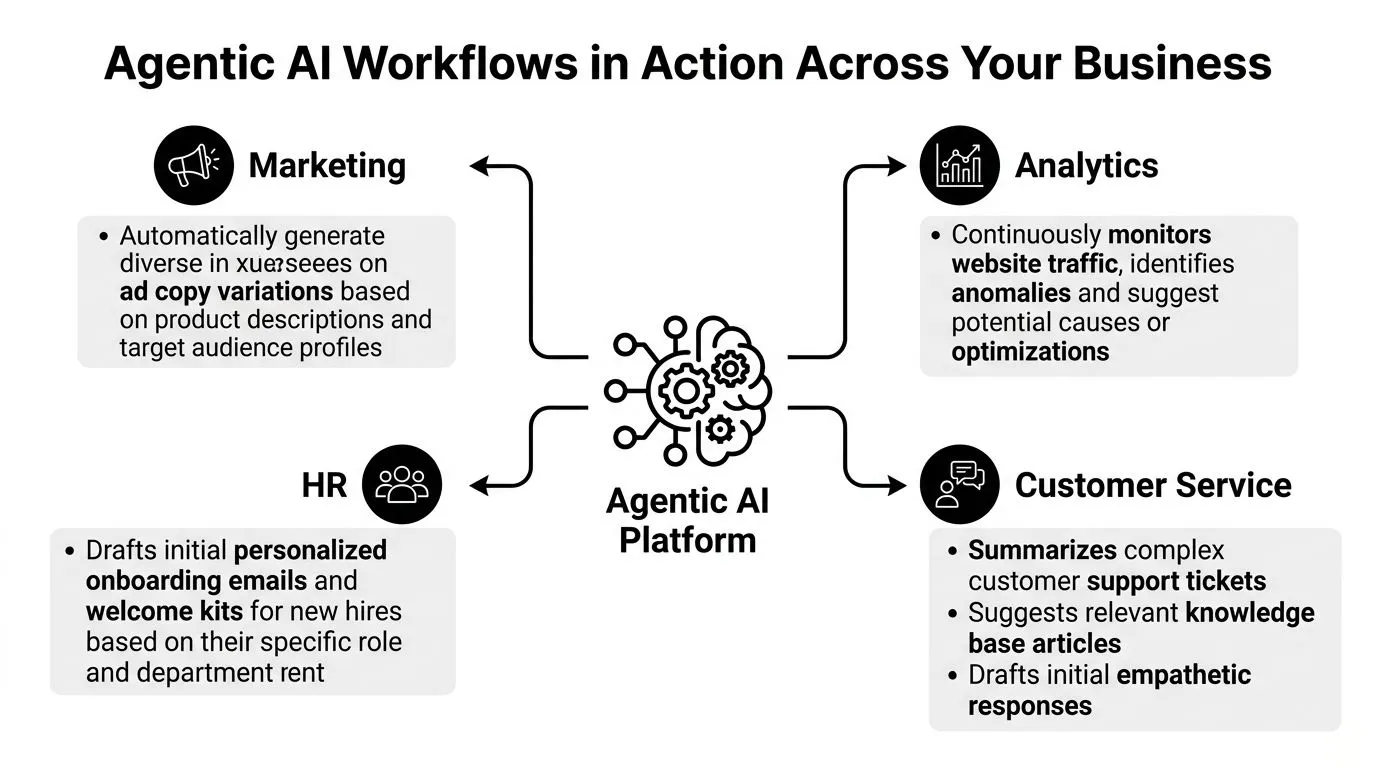
Agentic AI Workflows in Action Across Your Business
Monday morning, a marketing manager opens five tabs, two spreadsheets, Slack, and a half-finished campaign brief. By noon, the substantive work still has not started. The team is still collecting context, chasing inputs, and turning scattered information into something usable.
That is where agentic AI workflows become practical for business teams. They act less like a single chatbot and more like a small assistant bench that can gather inputs, sort them, draft options, and hand back work in a format a manager can review quickly.
If you are still building the basics first, this guide to AI tools for business automation shows where simpler automations fit before you add more agent-like behavior.
The easiest way to understand this is to look at familiar team workflows. In each example below, the AI handles coordination-heavy prep work. The human keeps control of judgment, approvals, and tradeoffs.
Marketing
A content plan usually breaks down into many small jobs. Someone reviews campaign priorities, checks product timing, scans recent winners, brainstorms angles, drafts copy, and spots gaps before anything gets approved.
An agentic workflow can handle much of that setup work in sequence:
- Review inputs: Campaign brief, audience segments, recent high-performing posts, product priorities
- Generate options: Topic ideas by channel, audience, and funnel stage
- Draft assets: Social posts, email subject lines, blog outlines, ad variations
- Check for issues: Repeated themes, missing landing pages, weak message to audience fit
For a marketing manager, the benefit is simple. You spend less time getting to a first draft and more time choosing the best direction. That is especially useful if you are running lean and still want campaigns to feel customized instead of generic.
Analytics
Weekly reporting often looks simple from the outside and messy on the inside. Data lives in Google Analytics, HubSpot, Salesforce, paid media dashboards, and the occasional spreadsheet someone forgot to standardize.
A good workflow can turn that into a clearer handoff:
| Step | What the workflow does |
|---|---|
| Collect | Pulls data from connected sources |
| Interpret | Flags notable changes, anomalies, and trend shifts |
| Add context | Connects changes to recent campaigns, launches, or business events |
| Draft | Produces a summary a manager can review and refine |
That does not replace the analyst. It gives the analyst a stronger starting point.
The practical win is speed with structure. Instead of spending the first hour gathering numbers and writing basic explanations, the analyst can spend that time checking whether the story is true and what action it suggests.
HR
Hiring teams deal with a different kind of drag. Resumes pile up fast. Feedback from hiring managers varies in quality. Recruiters end up doing repetitive comparison work before real conversations even begin.
An agentic workflow can compare resumes against a role, summarize likely strengths and gaps, group candidates by fit, and prepare recruiter outreach drafts for review. That creates a more consistent first pass, especially when job requirements are clear but stakeholder feedback is vague.
The value here is not just speed. It is consistency. The workflow applies the same screening logic every time, which makes early-stage review less dependent on who happened to be the first person scanning the inbox.
A strong agentic workflow reduces the mental overhead between steps, not just the time spent inside each step.
Customer Success
Customer Success work rarely arrives in neat, isolated tickets. A single account issue might involve product usage, open support requests, renewal timing, sales promises, and internal notes spread across several systems.
An agentic workflow can pull those threads together. It can summarize account history, surface relevant help articles, draft a response, and suggest whether the issue needs escalation. The rep still decides how to respond and how to handle the relationship.
For managers, this matters because service quality often drops when context is scattered. A workflow that assembles the full picture helps teams respond faster without sounding rushed or robotic.
Across marketing, analytics, HR, and customer success, the pattern stays consistent. Agentic workflows are best at collecting, organizing, drafting, and checking. People stay responsible for judgment, priorities, and final decisions.
That is the practical lens non-technical teams need. You do not need custom software to start seeing the value. You need a clear workflow, a defined goal, and prompts or tools that let AI act like a coordinated set of helpers instead of a one-shot text generator.
Your First Agentic Workflow Prompts and Templates
You don't need to build a full software system to start thinking agentically. You can simulate a lot of this behavior with strong prompts in ChatGPT or Claude, or with no-code tools like Zapier, Make, or Airtable connected to AI steps.
The trick is to stop giving one-shot instructions. Instead, ask the model to behave like a workflow with a role, a process, tools, checks, and an output format.
If you want more copy-paste examples after these, the AI prompt library has useful starting points.
Template one market research agent
Use this when you need structured exploration instead of a quick opinion.
Role: You are a market research agent for a business team.
Goal: Identify the most promising market opportunities for [product/service].
Instructions:
- Clarify the business objective in one sentence.
- Break the task into research steps.
- Identify what information is missing.
- Analyze competitor positioning, customer pain points, and demand signals using available sources I provide.
- Synthesize your findings into themes, not just raw notes.
- Highlight risks, assumptions, and confidence level qualitatively.
- Produce a final report with these sections: summary, opportunities, risks, recommended next actions.
Constraint: If evidence is weak or conflicting, say so clearly instead of guessing.
Template two campaign assistant workflow
This works well for marketers who need a planning partner.
- Role: Act as a campaign operations agent.
- Goal: Build a campaign execution plan for [offer] targeting [audience].
- Tasks: Review the brief, identify missing inputs, draft channel recommendations, suggest messaging angles, create first-pass copy assets, and produce a launch checklist.
- Rules: Stay aligned to brand tone. Don't invent customer evidence. Flag anything that needs human approval.
- Output: Present results as a table with priority, owner, draft asset, dependency, and approval status.
This kind of prompt forces the AI to behave less like a copy generator and more like a workflow coordinator.
Template three weekly reporting agent
Use this for analytics or ops reporting.
You are a reporting agent for a business manager. Your job is to turn raw performance notes into an executive summary. First, identify the key trends. Second, separate signal from noise. Third, explain possible causes. Fourth, draft a concise summary with three sections: what changed, why it matters, what needs attention. End with unresolved questions and recommended follow-ups.
A few prompt-writing habits make these templates work better:
- Give the AI a role: “Act as a reporting agent” is stronger than “summarize this.”
- Define the job to be done: State the business outcome, not just the content format.
- Set boundaries: Tell it when to ask for approval and when to admit uncertainty.
- Specify output shape: Tables, bullet summaries, action lists, and checklists reduce rambling.
For non-technical users, this is the easiest on-ramp. You're not building the final version yet. You're testing which workflows are worth formalizing later.
How to Implement Agentic AI Safely and Measure ROI
At this juncture, enthusiasm often confronts reality. Leaders get excited by the demos, then ask the hard questions. What if the system makes a bad call? What if costs drift? How do we prove this is worth funding?
MIT Sloan notes that “ensuring economic value” is a “heavy lift” for AI agents because their reasoning and collaboration can be unpredictable, so ROI isn't straightforward and teams need empirical cost-range exploration upfront, as described in its analysis of deploying AI agents.
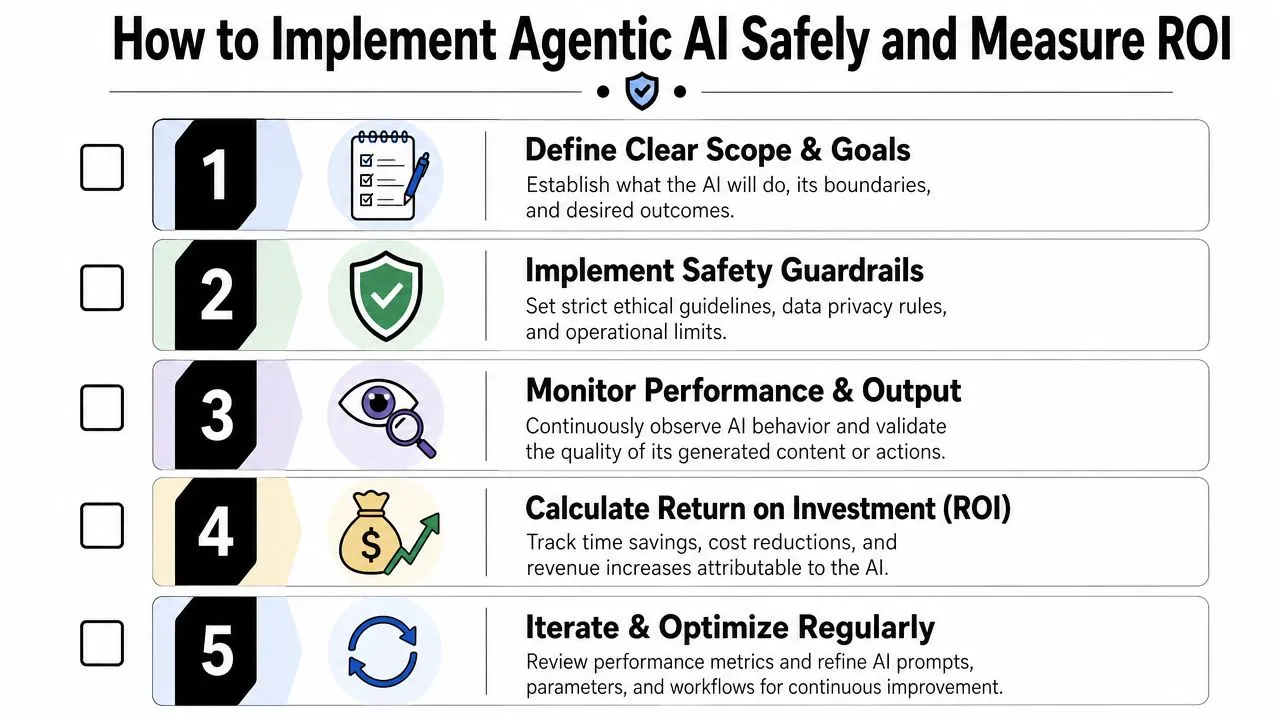
That sounds intimidating, but a practical rollout is manageable. If you need a broader operating framework, these AI best practices are a useful complement.
Start small and visible
Don't begin with a fully autonomous customer-facing workflow. Start with a pilot that is useful, bounded, and easy to review.
Good first candidates include:
- Internal reporting: Weekly summaries, trend spotting, and first-draft commentary.
- Research preparation: Competitive scans, source gathering, and synthesis drafts.
- Content operations: Draft calendars, briefing documents, and repurposing recommendations.
Set clear guardrails from day one.
- Approval rules: Define what must be reviewed by a human.
- Data boundaries: Limit what data the workflow can access.
- Action limits: Forbid direct external actions unless someone approves them.
- Escalation logic: Tell the workflow what to do when confidence is low or evidence conflicts.
Use a simple ROI scorecard
You don't need a complex financial model for the first pilot. You need a repeatable way to judge whether the workflow is helping.
Try a simple scorecard with four questions:
| Measure | What to check |
|---|---|
| Time | Did the workflow reduce manual effort on a recurring task? |
| Quality | Was the output usable, accurate, and easier to refine? |
| Speed to action | Did the team make decisions faster with the result? |
| Risk | Did human review catch issues before anything high-stakes happened? |
Operating advice: Measure one workflow at a time. Broad claims are hard to defend. Narrow wins are easier to validate and expand.
The safest implementation pattern is human-in-the-loop. Let the workflow propose, summarize, draft, and recommend. Let your team approve, reject, or refine. That model gives you real value without handing over too much control too early.
Frequently Asked Questions About Agentic AI
What's the difference between an AI agent and a chatbot
A chatbot usually responds to a prompt in a single exchange. An AI agent is designed to pursue a goal across multiple steps. It can decide what to do next, use tools, and keep track of progress. That's why agentic workflows are better suited to complex business tasks than simple chat interactions.
Do I need to code to use agentic workflows
No. Many teams start with structured prompts in tools like ChatGPT or Claude, then add no-code platforms such as Make or Zapier when they want repeatability. You only need deeper technical work when you're connecting many systems, adding governance, or deploying at larger scale.
Will this replace marketing and analytics jobs
In most business settings, it's better to think in terms of job redesign. The workflow handles prep work, synthesis, and coordination. People still set goals, judge edge cases, approve risky actions, and decide what matters. Teams that learn to supervise these workflows well will likely become more effective.
Why are agentic workflows better than simple automation for research
Because research is rarely linear. Benchmark examples discussed in Vonage's overview of agentic workflows show that these systems perform better in complex task resolution than traditional automation by handling sub-topics, grounded searches across multiple sources, and report synthesis with less manual intervention than scripted workflows.
What's the biggest beginner mistake
Treating the workflow like magic. If you give unclear goals, weak constraints, or no review process, the output will wander. The best results come from clear instructions, narrow scope, and active human oversight.
If you want hands-on help applying these ideas at work, AI Academy is built for non-technical professionals who want practical AI skills, fast tutorials, and ready-to-use workflows instead of theory-heavy courses.