You're probably already doing parts of this by hand.
A lead fills out your website form. Someone copies the details into a CRM. A follow-up email gets drafted. Another person checks whether the lead is worth calling. Customer questions pile up in Gmail. Invoices get nudged manually when cash flow starts to feel tight. None of this is hard work in the strategic sense. It's just work that keeps stealing time from the work that actually grows the business.
That's why AI automation for small business matters now. It's no longer a niche experiment. 77% of small businesses now use at least one AI tool, and early adopters report productivity increases up to 40%, while 66% of organizations save between $500 and $2,000 monthly according to this small business AI adoption summary. The opportunity is real, but the hype also creates a trap. Many owners buy tools before they've fixed the process underneath.
The businesses that get value fastest usually do something that sounds backwards. They slow down first. They map one process, run it manually, tighten the handoffs, and only then automate it. That manual-first habit is what keeps a cheap, no-code workflow from turning into a messy digital version of an already broken system.
Finding Your First Automation Win
Most small businesses don't have an automation problem. They have a prioritization problem.
Owners often start with whatever feels annoying that week. That leads to low-value experiments, disconnected tools, and the feeling that AI is interesting but unreliable. A better first move is to find a task that is frequent, structured, and expensive in terms of attention.
What the best first wins look like
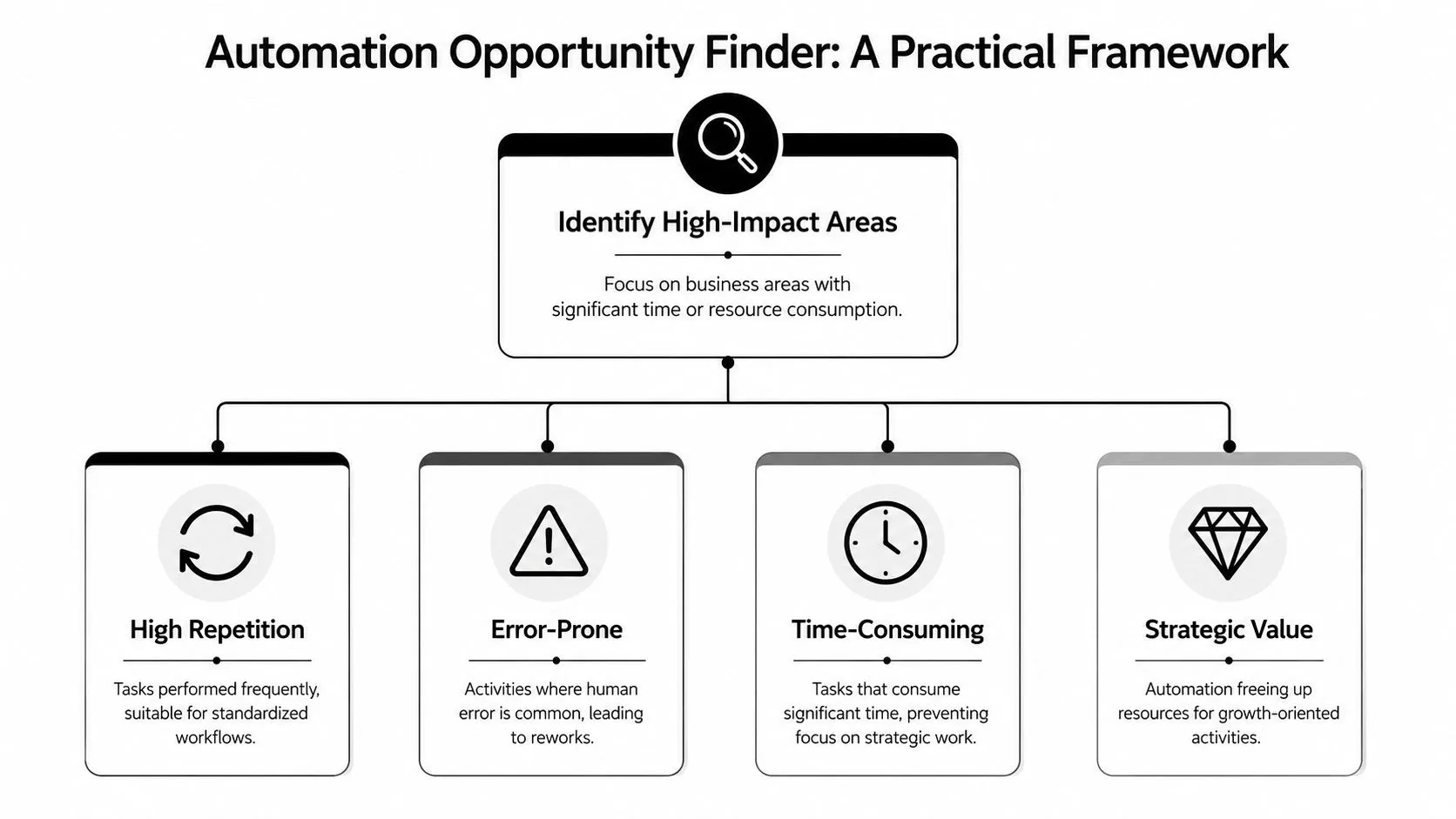
The strongest first automation candidates usually sit in an automation sweet spot:
| Task trait | What it means in practice | Good example |
|---|---|---|
| High repetition | The task happens daily or several times a week | Copying form fills into a CRM |
| Low judgment | The rules are mostly clear | Sending a confirmation email |
| Error-prone | Small mistakes create rework | Manual invoice follow-up |
| Visible payoff | You can see the result quickly | Faster lead response |
Marketing, operations, and customer service all have tasks like this. A marketing manager might spend too much time turning one blog post into social captions. An operations lead may re-enter order data into multiple systems. A service business owner may answer the same booking questions again and again.
Practical rule: If a task follows the same path most of the time, it's a better candidate than a task that depends on taste, negotiation, or exception-heavy decision making.
A simple audit that works
Track your own work and your team's work for one week. Don't overcomplicate it. Use a spreadsheet or a shared doc and log the tasks that repeat.
Look for patterns such as:
- Tasks that interrupt focus: Things that pull people out of real work, like status updates or sorting inbound requests.
- Tasks that create bottlenecks: Steps that wait on one person, often the owner.
- Tasks with obvious handoffs: One app receives information, another app stores it, and a person moves the data in between.
- Tasks customers feel directly: Slow replies, missed follow-ups, inconsistent answers.
Once you've listed them, rank each task by time drain, frequency, and process clarity. You don't need a complicated scoring model. You need one candidate that's easy enough to ship and useful enough to matter.
Three realistic first-project candidates
- Customer questions: Start with FAQs, intake, and routing. If that's your use case, this comprehensive guide to AI chatbots is useful because it focuses on practical small-business chatbot setups rather than enterprise theory.
- Lead handling: Form submission, qualification, CRM entry, and alerting are ideal because they combine speed with straightforward logic.
- Admin follow-up: Payment reminders, appointment confirmations, and internal notifications often produce clean wins because they're repetitive and rule-based.
A first automation win should feel a little boring. That's a good sign. Boring processes are where small businesses usually reclaim time fastest and with the least risk.
The Manual-First Automation Blueprint
The biggest mistake I see is not choosing the wrong tool. It's automating a process nobody has ever run cleanly by hand.
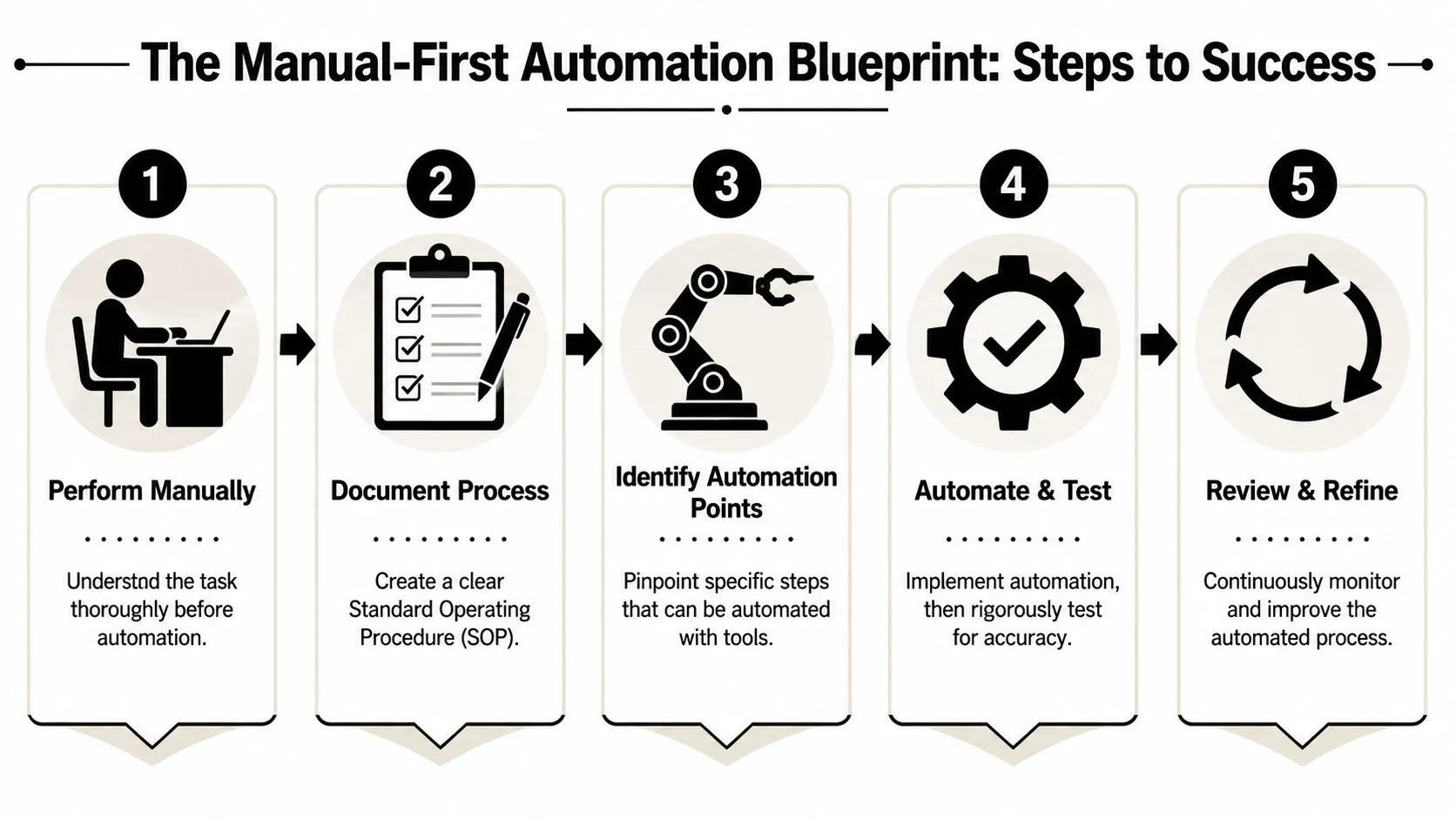
That sounds harsh, but it's the root issue. Experts advise proving a process works through manual teamwork before automating. This approach, which involves documenting every step and validating it with a goal-oriented experiment, avoids technical over-engineering and ensures automation replicates a verified workflow rather than an untested hypothesis, as outlined in this manual-first automation guidance.
Run the process by hand first
If you want to automate lead intake, do it manually for a defined period. Receive the lead. Review it. Assign a status. Send the reply. Log the next step. If you want to automate invoice reminders, manually send reminders on a consistent schedule first.
That manual pass exposes things software won't invent for you:
- Missing inputs: You realize the form doesn't ask for the detail needed to route the lead correctly.
- Hidden decisions: A staff member checks one extra field before deciding which follow-up to send.
- Exception cases: VIP clients, incomplete submissions, and edge cases appear quickly when humans execute the flow.
- Unclear outputs: Nobody agrees on what “done” means, so the automation would have no stable endpoint.
Do the manual teamwork first. Automation should copy a working process, not guess at one.
Document the workflow like an operator
You don't need a complex process map. A plain-language SOP is enough if it captures the logic. For each workflow, document four things:
-
Input
What starts the process? A form fill, an email, a payment status change, a support request. -
Steps
List the actions in order. Keep each step short and concrete. -
Decision points
Where does the process branch? Example: if the lead budget is unknown, send sequence A. If the budget is qualified, alert sales. -
Output
What finished result should the workflow produce? A CRM record, a sent email, a tagged ticket, a task for a human.
A lot of “AI” problems are really documentation problems. Teams think the automation is failing when the underlying issue is that nobody agreed on the exact process.
Validate before you automate
Run a small manual pilot. Use a limited sample, review results, and note where the process breaks. Then clean the workflow before touching Make, Zapier, or Activepieces.
The manual-first method saves money. It prevents two expensive habits. First, overbuilding. Second, trying to use AI for work that basic rules could handle more reliably.
Here's the practical test:
| Question | If yes | If no |
|---|---|---|
| Is the trigger clear? | Automate the trigger | Fix intake first |
| Are the steps repeatable? | Build the workflow | Simplify the process |
| Are exceptions known? | Add checkpoints | Run more manual tests |
| Is the output measurable? | Track outcomes | Define success first |
Teams that skip this stage often end up with fragile workflows that look impressive in a demo and break in day-to-day use. Teams that do it well usually find the first automation becomes much easier to build than expected.
Choosing Your No-Code Automation Stack
Once the workflow is proven, tool selection gets easier. You're no longer asking, “What can this platform do?” You're asking, “Can this platform connect the apps we already use without creating a maintenance problem?”
That distinction matters. While 77% of small businesses feel more competitive with AI, the promised productivity gains are often lost to the integration complexity gap. For non-coders, what matters is how easily tools like Zapier or open-source options like Activepieces connect AI responses with CRMs and other business apps according to this JPMorgan Chase Institute discussion of small business AI use.
How to choose without getting distracted by features
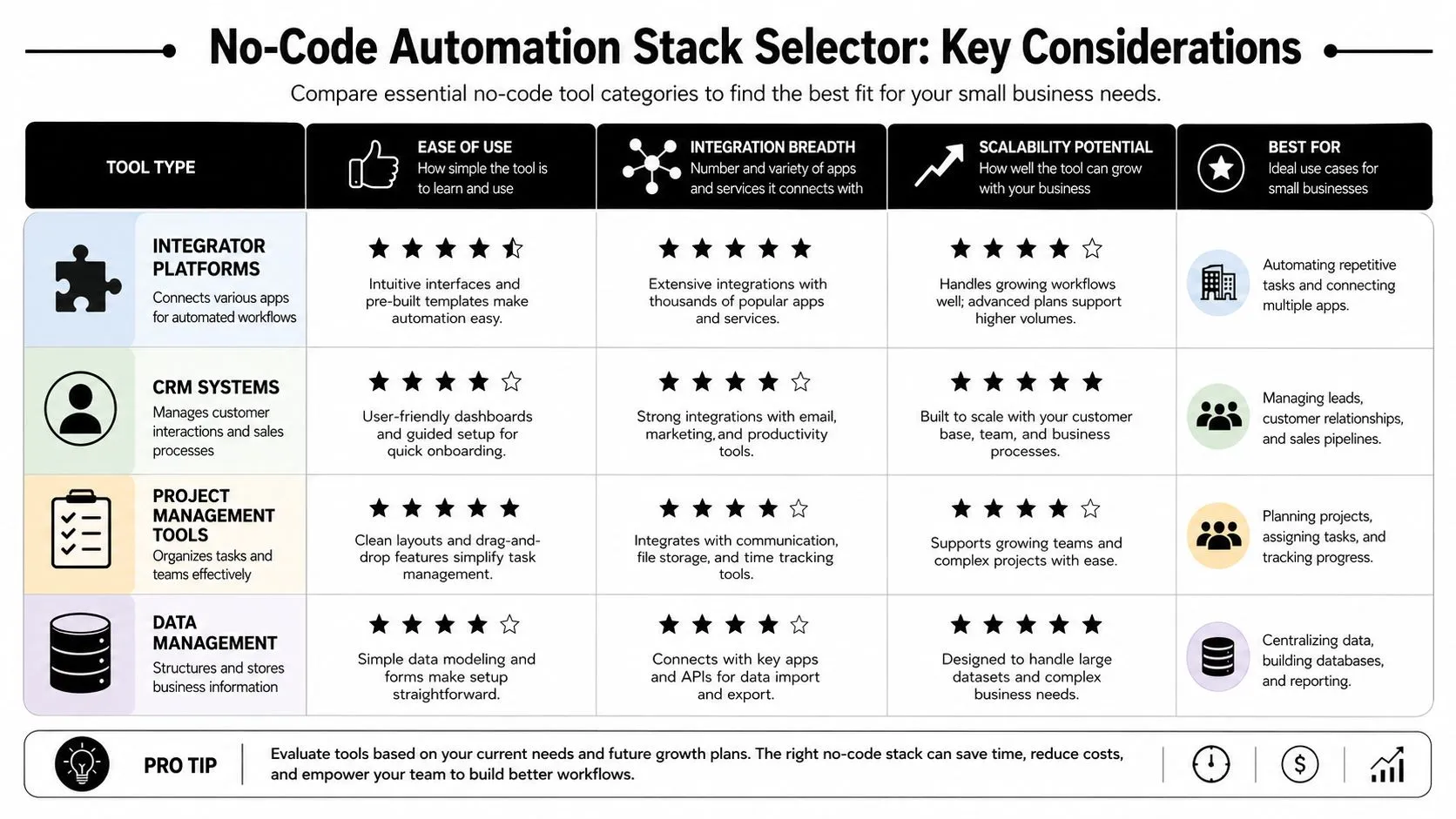
Non-technical teams usually care about three things more than anything else:
- Ease of setup: Can someone in marketing, operations, or admin build and edit the workflow?
- Connector quality: Does the tool already connect well to Gmail, Google Sheets, Slack, HubSpot, QuickBooks, Stripe, or your CRM?
- Scaling logic: Will the pricing and workflow structure still make sense once volume increases?
If you're comparing Zapier, Make, and Activepieces, don't start with feature lists. Start with your process map and your current app stack.
A practical comparison lens
| Platform type | Best fit | Watch out for |
|---|---|---|
| Zapier-style tools | Fast setup, simple app-to-app workflows | Costs can climb as workflow volume grows |
| Make-style tools | More control over branching and logic | Slightly steeper learning curve |
| Activepieces-style tools | Good option for teams that want flexibility and open-source direction | Support and setup comfort may vary by team |
A founder with no ops support usually benefits from the shortest path to a working result. A more process-heavy team may prefer extra control once they've built confidence.
Buy the simplest tool that supports the workflow you've already proven. Don't buy the most “powerful” platform and hope a use case appears later.
Match the stack to the workflow
For example, if your first project is finance admin, your core stack may be accounting software, an email tool, a spreadsheet, and an automation layer. In that case, practical reading on ReceiptsAI on accounting automation can help you think through the operational side of reminders, reconciliation, and bookkeeping workflows.
If you're still comparing categories and want a broader tool shortlist, this overview of AI tools for business automation is a useful reference point.
A good stack doesn't feel advanced. It feels maintainable. The right platform is the one a non-coder on your team can understand, audit, and improve six months from now.
Quick-Win Automation Playbooks
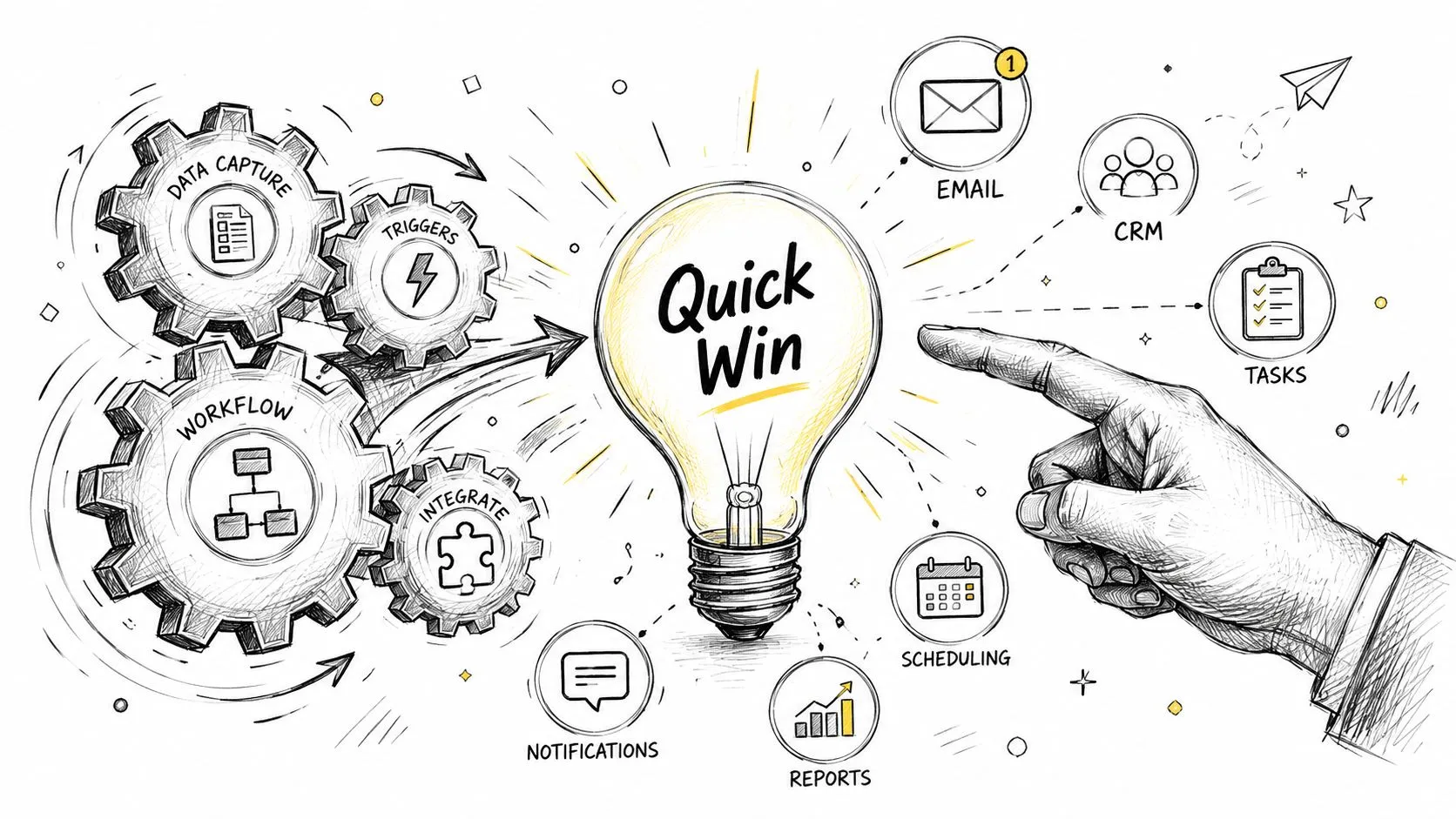
AI automation for small business becomes concrete.
The best early workflows save time immediately and don't require a developer standing by. Small businesses using AI automation save an average of 114 hours per employee annually, and the average business earns $3.70 for every $1 invested in AI, according to these AI automation statistics for small businesses. That return shows up fastest in workflows with clear triggers and repeatable outputs.
Marketing content repurposing
A common bottleneck is turning one good piece of content into multiple usable assets. The workflow is simple.
- A blog post is marked “ready” in a content tracker.
- The automation sends the post text to an AI prompt.
- The AI drafts social posts, an email summary, and a short LinkedIn version.
- Drafts land in Google Docs, Notion, or your social scheduler.
- A human reviews and edits before publishing.
Use a prompt like this:
Turn the article below into three LinkedIn posts, two short X posts, and one email teaser. Keep the tone practical. Do not invent claims. Pull only from the source text.
This saves time without giving the AI final publishing control. If email is part of your first use case, this guide to AI for email marketing is a strong companion because it stays focused on workflow execution rather than generic campaign advice.
Lead intake and routing
A second quick win is website lead handling. This one works well because the logic is usually obvious and the speed gain matters.
Workflow logic
- Trigger: new website form submission
- Action: send form fields to an AI model for classification
- Rule: categorize as sales, support, partnership, or spam
- Action: create or update contact in CRM
- Action: notify the correct owner in Slack or email
- Action: send a customized acknowledgment message
Useful classification prompt:
Classify this inbound lead into one of four categories: sales, support, partnership, or spam. Return only the category and a short reason based on the submitted text.
Keep the AI's role narrow. Let it classify and summarize. Let your CRM and routing rules handle the deterministic work.
After you've seen one example, watch this walkthrough for more implementation ideas:
Invoice reminder workflow
Operations teams often get fast value from payment follow-up because it's rule-based and easy to govern.
A workable no-code recipe looks like this:
| Step | Action |
|---|---|
| Trigger | Invoice becomes overdue in accounting software |
| Check | Confirm customer status and reminder stage |
| Draft | AI prepares a polite reminder using your template |
| Review | Human approves if the account needs sensitivity |
| Send | Email goes out and the CRM or sheet logs the action |
Prompt example:
Draft a professional overdue invoice reminder. Be polite, brief, and clear. Mention the invoice is overdue and invite the customer to reply if there is a billing issue. Do not add discounts or threats.
The pattern across all three playbooks is the same. AI handles drafting, summarizing, and classification. Your business systems handle records and triggers. A person stays in the loop where tone, trust, or exceptions matter.
Common Pitfalls and How to Avoid Them
Most failed automation projects don't fail because the model was weak. They fail because the business tried to automate confusion.
That's why the “automate everything” mindset is dangerous. Up to 95% of AI automation failures stem from automating without clear goals. Businesses improve their odds by defining measurable use cases, governing data inputs, and enforcing human review checkpoints, as described in this guide to costly AI automation mistakes.
The five mistakes that show up first
-
No clear use case
“We need AI” is not a use case. “We need to reduce lead response lag” is a use case. One creates motion. The other creates waste. -
Unchecked AI outreach
Spammy email copy, generic follow-ups, and weak personalization hurt trust fast. If your outbound workflow sounds machine-written, customers notice. -
Unapproved tools
Staff members sign up for apps on their own, connect business data, and create hidden workflows nobody governs. -
Over-automation
Teams remove human review too early. Then errors stack up in customer messages, CRM records, or internal routing. -
No training
A workflow gets built, but nobody knows what to do when it fails or when an exception appears.
What to do instead
A safer operating model is straightforward:
- Define the business outcome first: Pick one measurable problem. Faster response. Fewer errors. Better follow-up consistency.
- Control the inputs: Clean fields, approved sources, and clear ownership matter more than fancy prompts.
- Add review points: Human approval is essential for external messaging and sensitive workflows.
- Pilot before scale: A smaller rollout reveals problems while the cost of failure is still low.
- Train the operators: The people closest to the process need to know how to monitor, edit, and pause the automation.
The fastest way to lose trust is to let AI send messages no one reviewed.
Unchecked outreach creates a second-order problem. Even when the workflow “works,” the brand voice can drift, emails can sound generic, and customers can tune out. That's why human review isn't bureaucracy. It's quality control.
If you're putting guardrails around prompts, approvals, and tool usage, these AI best practices are worth reviewing with the team that will own the workflows.
A better default mindset
Don't ask, “Can this be automated?”
Ask, “What part of this should stay human?”
That one shift usually leads to better implementations. AI drafts. Humans approve. Automation routes. Humans handle exceptions. The process becomes faster without becoming careless.
Scaling From a Workflow to an Automation Engine
A single working automation is useful. A small portfolio of governed automations changes how the business runs.
The shift happens when you stop treating each workflow as a one-off experiment and start managing them like operating assets. That means naming owners, tracking outcomes, reviewing failures, and maintaining a backlog of the next processes worth improving.
Build a backlog, not a pile of ideas
Teams are often aware of where the friction is. The problem is that those ideas live in inboxes, Slack threads, and hallway conversations. Put them in one place and rank them.
A simple backlog should include:
- Process name: What the workflow does
- Current pain: Why it matters
- Manual effort: Where staff time gets spent
- Risk level: Whether mistakes affect customers, revenue, or compliance
- Next action: Document, pilot, automate, or refine
This keeps the team from chasing random requests and helps you scale in a deliberate sequence.
Measure what actually matters
At this stage, the right questions become operational.
Are leads routed faster? Are reminders going out consistently? Are staff members spending less time on repetitive admin? Are exceptions handled cleanly? Those are the signals that tell you whether the automation is helping the business, not just running in the background.
You don't need a complex analytics program to manage this. You need workflow owners who can answer three things: what changed, what broke, and what should be improved next.
Small businesses scale automation well when one person owns the workflow, another person can audit it, and the team knows when human intervention is required.
Expand carefully
There's a balance here. Move too fast and you create brittle systems nobody fully understands. Move too slowly and the early wins never turn into a broader operating advantage.
A smart sequence often looks like this:
| Stage | Focus |
|---|---|
| First | One contained workflow with visible payoff |
| Next | Adjacent workflow in the same function |
| Then | Cross-functional handoffs between marketing, sales, and ops |
| Later | Standardized templates, governance, and team ownership |
For teams thinking beyond one department, this perspective on how to scale growth with automation workflows is useful because it frames automation as an operating system, not a collection of isolated hacks.
The long-term advantage isn't that you use AI. Plenty of businesses now use AI tools. The advantage is that your team knows how to identify a process, test it manually, automate it without drama, and improve it over time. That discipline is what turns AI automation for small business from a software purchase into a capability.
AI tools change quickly. Practical skills matter more than theory. If you want a hands-on way to learn workflows, prompts, and automation use cases without wading through bloated courses, AI Academy is a strong place to build that muscle. It's designed for working professionals who need short, actionable lessons they can apply immediately.