Your team is probably already feeling this. One person is experimenting with ChatGPT for emails. Another is using Claude to summarize long documents. Someone in marketing has tried Midjourney. A manager wants faster onboarding, but no one has time for another bloated course library that people abandon after lesson two.
That's where an AI based learning platform starts to matter. Not as a shiny tool category, but as a practical way to help non-technical teams learn what they need, when they need it, and apply it to real work the same week.
As an educator and L&D practitioner, I've found that most confusion comes from one simple issue. People hear “AI learning” and think it means either a chatbot or a pile of AI courses. In reality, the useful platforms do something more specific. They guide people toward job-relevant skills, adapt as they learn, and reduce the manual work that usually slows training down.
The Future of Professional Upskilling Is Here
The old training model assumed skills changed slowly. You could take a course, save your notes, and rely on that knowledge for a while. AI has broken that rhythm.
Now the problem isn't lack of information. It's too much of it, changing too fast. Managers are trying to decide which tools matter, which workflows are safe to adopt, and how to help teams build confidence without losing hours each week to trial and error.
That urgency isn't limited to corporate learning. AI use has already become mainstream in education. During the 2024 to 2025 school year, 85% of teachers and 86% of students reported using AI, and student use for school-related work rose 26% year over year. In higher education, 92% of students now use generative AI, up from 66% in 2024, according to Engageli's review of AI in education statistics.
For managers, that matters for a simple reason. The people joining your workforce are arriving with new habits. They already expect AI support for research, drafting, summarizing, and problem-solving. If your internal learning still looks like a fixed slideshow followed by a quiz, it will feel outdated the moment they log in.
Why managers feel the pressure
A lot of teams are facing the same three pressures at once:
- Work is speeding up: Reports, presentations, content drafts, and internal summaries still need human judgment, but leaders expect them faster.
- Tools keep changing: ChatGPT, Claude, Perplexity, Midjourney, and workflow tools all create moving targets for training.
- Traditional courses age badly: By the time a long course is approved, part of it may already be out of date.
Practical rule: If a skill needs to help someone this month, training can't wait for the next quarterly learning cycle.
The shift toward an AI based learning platform is really a shift in how capability gets built. Instead of sending people away to learn in isolation, the platform supports learning in the flow of work. A marketer learns how to draft campaign angles faster. An analyst learns a cleaner research workflow. A manager learns how to coach a team using AI responsibly.
Why this is different from another trend
Some trends stay at the “interesting experiment” stage. This one has moved beyond that. The adoption figures above show that AI-supported learning is quickly becoming normal behavior, not fringe behavior.
For workplace learning, the implication is clear. Teams don't need more theory about AI. They need structured, practical guidance that helps them use it well, safely, and productively.
Demystifying the AI Based Learning Platform
Many misunderstand the term because they picture a course catalog with an AI label on top. That's not the useful version.
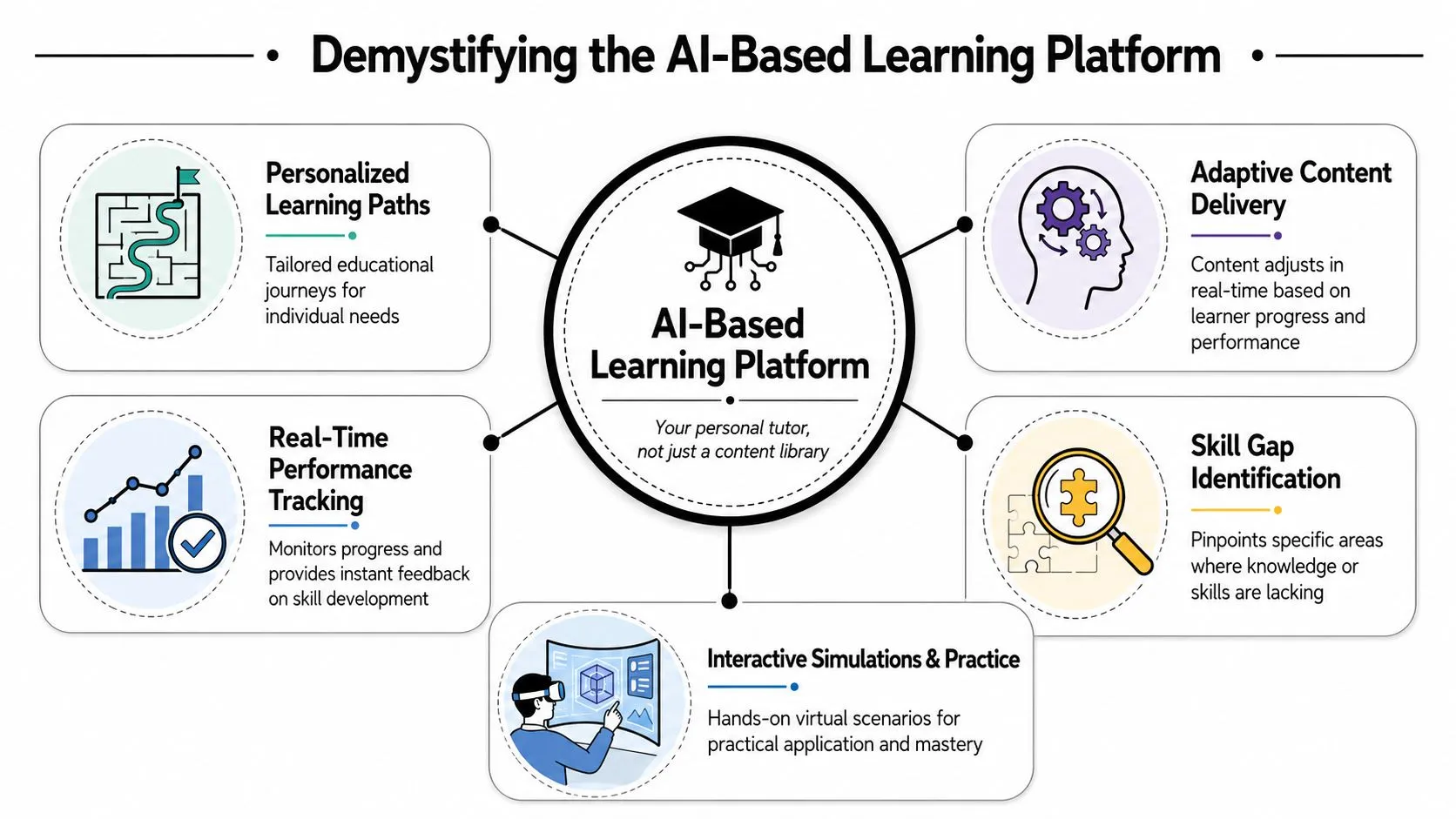
A real AI based learning platform works more like a personal tutor than a digital shelf of videos. It pays attention to what a learner can already do, where they get stuck, and what they should practice next.
Why a static course library falls short
A traditional LMS is usually linear. Everyone gets the same sequence. Watch lesson one, then lesson two, then lesson three. That works fine for compliance topics where everyone must receive the same material.
It works poorly for fast-changing job skills. A marketing manager may already understand prompting basics but need help creating reusable content workflows. A business analyst may not need a broad AI overview at all. They may only need to learn how to summarize stakeholder interviews or automate a weekly reporting routine.
That's why static learning often feels inefficient. People spend too much time proving they know things they already know.
How adaptive learning works in plain English
The useful technical idea here is adaptive learning. According to eLearning Industry's explanation of adaptive AI learning platforms, these systems use machine learning to identify knowledge gaps from learner interaction data, then change the sequence or difficulty of content in real time rather than serving a fixed curriculum.
In plain language, the platform notices patterns.
If someone answers confidently on beginner material, it can move them ahead. If they struggle with a task, it can slow down, offer a simpler explanation, or suggest practice on that exact skill. Instead of treating all learners the same, it adjusts the path.
Here's a simple comparison:
| Learning approach | What it feels like | Likely outcome |
|---|---|---|
| Traditional LMS | Everyone takes the same road | Efficient for standard content, inefficient for mixed skill levels |
| AI based learning platform | The route changes based on performance | Faster help on real gaps and less wasted time |
That adaptive layer is what makes these platforms useful for managers. You don't want every employee sitting through identical generic modules. You want each person to reach competence faster.
A good platform doesn't just ask, “What content do we have?” It asks, “What does this person need to do their job better this week?”
What this looks like for daily work
For a non-technical employee, the difference shows up in small moments:
- A shorter lesson path: The platform skips basics the learner has already shown.
- More relevant practice: Instead of abstract exercises, it suggests work-like tasks such as summarizing research, drafting outreach, or refining prompts.
- Better timing: Help arrives when a learner is stuck, not weeks later in a scheduled workshop.
That's the practical value. The platform becomes a decision aid for development, not just a storage system for training content.
How These Platforms Drive Real Workplace Results
Managers don't buy learning tools because “personalization” sounds nice. They invest when training removes friction from work.
That's why the strongest case for an AI based learning platform isn't that it feels modern. It's that it helps teams do common work tasks faster and with less rework.

A non-technical team usually doesn't need to build models or write code. They need to improve familiar tasks. Think research summaries, first-draft reports, onboarding documents, customer response templates, meeting notes, and recurring internal updates.
What managers actually gain
The fastest wins usually come from workflow support, not from formal certification. When a platform teaches people how to use AI inside everyday tasks, you start seeing gains in places that managers care about:
- Research moves faster: Staff can learn structured ways to summarize long documents, compare options, and pull out key points without starting from a blank page.
- Reporting gets lighter: Analysts and operations teams can build repeatable AI-assisted workflows for status reports, weekly recaps, and stakeholder updates.
- Writing improves: Marketing, HR, and customer-facing teams can produce better first drafts for emails, briefs, and internal communications.
- Onboarding becomes smoother: New hires can get targeted support based on role and progress instead of being buried in generic material.
AI learning moves beyond content delivery. It becomes performance support.
Where the ROI shows up first
The clearest business case often comes from reduced manual work. Docebo's overview of AI learning platforms reports that AI-powered learning systems can generate course content from existing materials, provide role-based recommendations, and connect analytics to business outcomes. It also cites examples where Brooks Automation cut training costs by 20% and Booking.com reduced onboarding admin time by 80%.
Those examples matter because they point to the source of ROI. The payoff doesn't only come from “better learning.” It comes from less time spent on repetitive admin, faster content creation, and more relevant support for each learner.
For managers, that often means fewer hours lost to:
- rebuilding training materials from scratch
- assigning the same content manually to every role
- chasing onboarding progress through email and spreadsheets
After the basics, a useful next perspective is operational. This short video gives a good overview of how AI support can connect learning to business workflows:
When people can learn a workflow and use it immediately, training stops being overhead and starts acting like a productivity system.
The so what for non-technical roles
A marketer might use the platform to learn how to turn one campaign brief into multiple ad variations. A people manager might learn how to draft cleaner feedback summaries. A project lead might use it to standardize meeting recaps and action lists.
None of those examples require technical depth. They require guided practice, relevant templates, and a learning path that respects time.
That's why these platforms are most valuable when they are tightly connected to real work outputs, not broad theory about AI.
Choosing the Right Platform What to Look For
Once you move past the marketing, most platforms separate into two categories. Some mainly package content. Others help people perform better at work.
The distinction matters. A team doesn't need another library that looks impressive in a demo but doesn't change behavior after login. They need a platform that helps someone solve a concrete work problem with less effort and more consistency.
Start with the job not the feature list
Before comparing vendors, ask a blunt question: what work problem are you trying to reduce?
If your issue is slow onboarding, the right platform should shorten the path from “new hire” to “can do the job.” If your issue is weak research quality, it should help employees learn repeatable AI-assisted research habits. If your team is losing time on reporting, it should support those workflows directly.
That lens aligns with a broader shift in the market. District Angels' workforce transformation report notes that professional use cases are moving beyond course completion and toward measurable workforce ROI, including personalized learning paths, skills mapping, and just-in-time AI support inside daily workflows.
Must-have features in an AI learning platform
Use this checklist to evaluate substance over buzzwords.
| Feature | Why It Matters | What to Look For |
|---|---|---|
| Adaptive learning paths | People start at different skill levels | The platform changes pace, sequence, or difficulty based on learner progress |
| Short practical lessons | Busy teams won't finish long theory modules | Bite-sized lessons tied to tasks like research, writing, reporting, or onboarding |
| Role-specific guidance | Generic AI training rarely sticks | Content by role, team function, or business context |
| Templates and examples | Learners need a fast starting point | Prompt templates, workflow examples, and job-relevant practice |
| Progress visibility | Managers need to coach, not guess | Clear signals on skill gaps, completion, and application |
| Workflow support | Learning should help real output | Just-in-time help that fits daily work, not only formal training windows |
A second pass should test the platform in action. Ask a manager, a marketer, and an analyst to use it for a real task. Their feedback will tell you more than a polished demo.
If your team is still sorting through the broader range of tools, this curated AI tools list for business users can help managers understand the surrounding ecosystem before they commit to a learning platform.
Look harder at governance and inclusion
Many buyers stop too early. They check content quality, maybe analytics, then move on. That's risky.
A platform might look strong for power users and still fail parts of your workforce. Teams need to ask whether the learning experience works for people with different language backgrounds, different levels of digital confidence, and different job contexts.
Here are the less flashy questions worth asking:
- Can the platform support diverse learners? Multilingual support and culturally relevant examples matter if your workforce isn't uniform.
- Does it validate what “good” looks like? Recommendations should be useful across different user groups, not just early adopters.
- Can managers trust the outputs? The platform should make it easier to review, coach, and improve use, not hide decisions behind black-box automation.
Manager check: If a platform can't explain how it supports different user groups and real job performance, it's not ready for broad rollout.
The best buying decision usually comes from combining two lenses. First, does it help people do the work? Second, can you trust it across the people who need to use it?
Putting AI Learning into Practice at Work
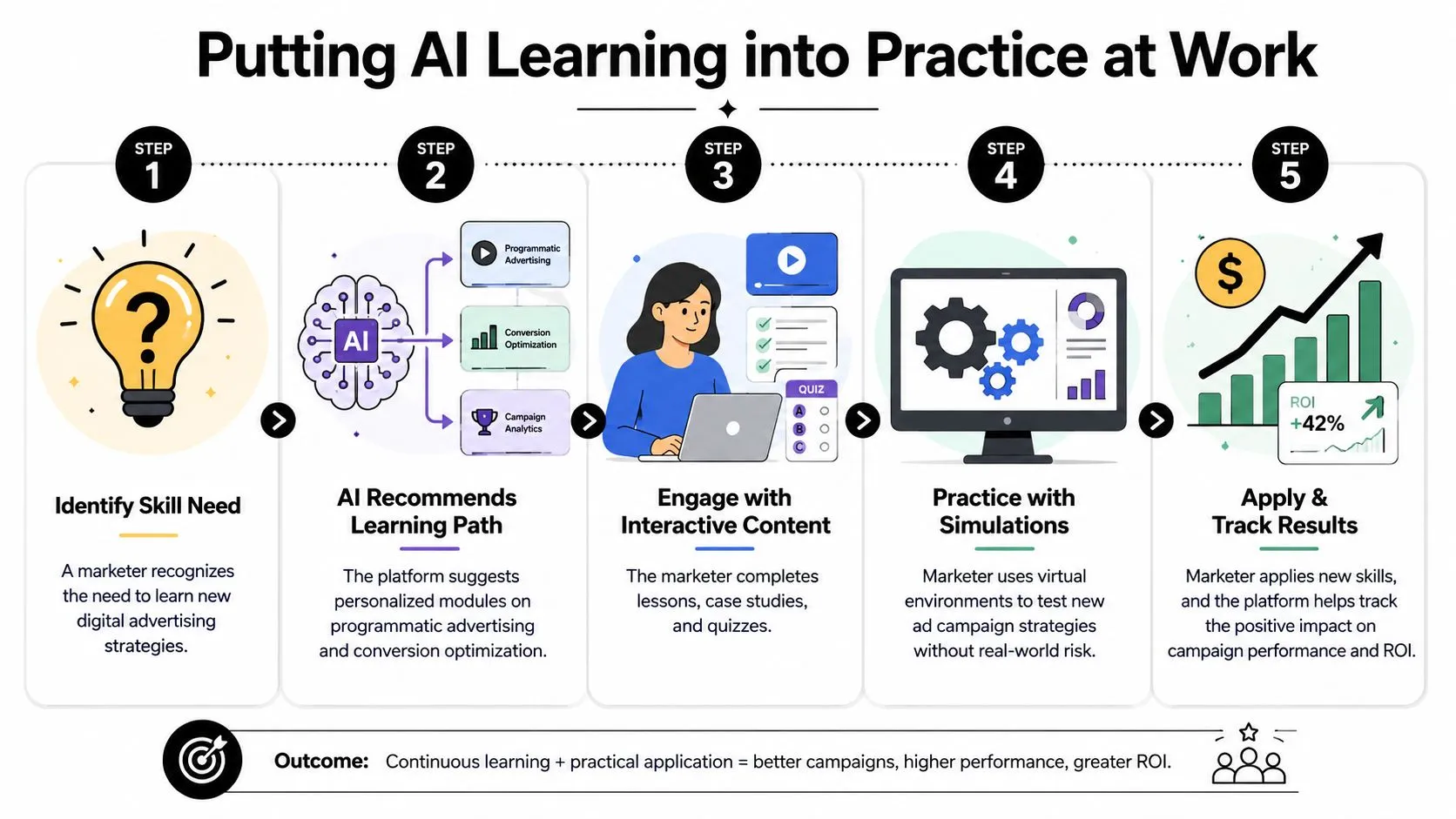
The easiest way to understand an AI based learning platform is to see it through normal workdays. Not idealized demo days. Actual workdays with deadlines, interruptions, and limited time.
A marketer who needs output this week
A marketing manager is under pressure to produce a month of social content tied to an upcoming campaign. She doesn't need a long certification on artificial intelligence. She needs a better process by this afternoon.
She opens the platform and gets a short lesson on turning one campaign brief into multiple post angles. The lesson includes examples, prompt patterns, and a quick exercise. She tests the workflow, edits the outputs, and builds a draft content bank she can refine with her team.
That matters because the learning sits next to the job. It doesn't interrupt it.
An analyst who wants Fridays back
A business analyst spends too much time every week turning notes, spreadsheets, and project updates into the same recurring report. The problem isn't knowledge in the abstract. The problem is repetition.
The platform guides him through an AI-assisted workflow for organizing source material, summarizing themes, and drafting a first report version he can verify. He learns the sequence in small pieces, practices it, and saves a repeatable process.
The gain here isn't magical automation. It's reduced friction. He still owns the judgment, but he stops rebuilding the workflow from zero every Friday.
For teams working with internal documentation and shared knowledge, this broader guide to AI for knowledge management is a useful complement because it connects individual learning to how information moves across the business.
A manager building team capability
A team lead wants her direct reports to get better with AI, but she doesn't want everyone disappearing into long training sessions that stall delivery. She needs selective upskilling.
She uses the platform to assign different learning paths based on role. One employee focuses on research and summarization. Another focuses on client communication drafts. A third learns how to structure internal process documentation.
This is also where inclusion matters. A platform only works at team level if people can use it with confidence. The need for multilingual adaptation, culturally relevant examples, and support for learners with limited digital access is highlighted in this discussion of multilingual AI learning for underserved communities.
Good workplace learning doesn't assume every learner starts from the same language, context, or confidence level.
What these stories have in common
Each person starts with a work problem, not a technology fascination. The platform succeeds because it meets them there.
That's the practical test I'd give any manager. If your team can't point to a task they now handle more clearly, more quickly, or more consistently, the learning experience may be interesting, but it isn't yet useful.
How to Start Upskilling with AI Today
Teams often make this harder than it needs to be. They wait for a perfect rollout plan, a final tool stack, or a complete training curriculum.
You don't need any of that to get moving. You need a narrow starting point and a routine your team can keep.
Pick one work problem first
Start with a pain point that repeats often and wastes energy.
Good starting examples include:
- Weekly reporting: Too much time spent turning updates into a clean summary
- Research prep: Slow review of long documents, interview notes, or competitor material
- Content drafting: Too much blank-page time for emails, briefs, or social posts
Avoid starting with “learn AI.” That goal is too vague. Start with “reduce the time it takes to do X.”
Build a habit that fits real schedules
The best upskilling plan is small enough to survive a busy week.
Try this simple rhythm:
- Choose one task: Pick a task the learner already does.
- Spend a short block daily: A short, repeatable learning slot is better than a rare marathon session.
- Use the lesson immediately: Apply the idea to live work before the skill fades.
That pattern is why bite-sized learning works well for non-technical professionals. They don't need long theory sessions. They need focused help, repeated often enough to stick.
Apply before you feel ready
A common mistake is waiting until someone feels confident enough to use AI in real work. Confidence usually comes after use, not before it.
Encourage employees to test low-risk tasks first. Draft a meeting summary. Rework a research outline. Create internal talking points. Review the output, improve the prompt, and repeat.
That cycle teaches better judgment than passive watching.
Working advice: Don't ask, “Has everyone completed the training?” Ask, “What task can they do better now?”
If you want a deeper starting point for business-focused learning, this guide on how to learn AI for business is a helpful next step because it frames AI as a practical capability rather than a technical specialty.
The main thing is to begin with useful repetition. A platform earns its place when it helps people solve real problems faster, with better support and less wasted effort.
AI Academy is a strong fit if you want that kind of practical upskilling without bloated coursework. It helps working professionals learn ChatGPT, Claude, Midjourney, Perplexity, and many other job-relevant tools through focused lessons, prompt templates, and structured paths built for marketers, analysts, managers, and other non-technical roles. You can explore AI Academy if you want a faster, more applied way to build AI skills that show up in daily work.