Your strategy team is probably facing a familiar problem. By the time the pre-read is assembled, the market picture has already shifted, competitors have said something new on an earnings call, and half the room no longer trusts the assumptions behind the plan. The bottleneck usually isn't strategic thinking. It's the grind of collecting, sorting, summarizing, and pressure-testing too much information under too little time.
That's where AI for strategic planning has become useful in a practical sense. Not as an autopilot for strategy, and not as a substitute for executive judgment, but as a way to shorten the slowest parts of the planning cycle and give leaders better material to debate. Used well, AI helps teams scan markets faster, structure messy inputs, draft scenario options, and spot weak assumptions before they harden into commitments.
Beyond the Buzzword What AI Really Means for Strategy
Most executive teams don't need another explanation of what AI is. They need clarity on what it changes inside a real planning process. The shift is simple: modern AI is finally good at information-layer work. That matters because strategic planning is full of information-layer work, including market scans, internal document review, competitor synthesis, and assumption testing.
A major turning point came with the 2017 release of the Transformer architecture, which became the technical foundation for modern large language models and made AI far more useful for summarizing, forecasting, and synthesizing large volumes of text and data, as noted by The Strategy Institute's discussion of AI in strategic planning. That same source notes that AI can compress planning work that used to take weeks into days when it's used to automate data gathering and analysis.
This is why the conversation has moved out of the lab and into boardrooms. A 2026 roundup reports that 83% of companies say AI use in business strategy is a top priority, according to National University's AI statistics and trends summary. That doesn't mean every company has a good AI strategy. It means leaders now see AI as part of how planning gets done.
What AI should and should not do in strategy
The right mental model is co-pilot, not strategist. AI can draft a first-pass market summary, cluster themes from customer feedback, compare competitor language across investor materials, and generate alternative scenarios for discussion. It can't decide which trade-offs your business should make.
Practical rule: Let AI expand the option set and compress the research cycle. Keep humans responsible for priorities, commitments, and risk acceptance.
That distinction matters because speed can create false confidence. A well-written AI output often looks more certain than the evidence behind it. Strong teams treat it like a junior analyst that works fast, never tires, and still needs review.
A useful companion resource is this guide to best practices for AI strategy in 2025. It's helpful if your team is trying to separate broad AI ambition from the narrower question of where AI should sit inside business planning.
Why this changes planning cadence
Traditional planning often bunches work into long cycles. Teams collect inputs, produce a static deck, debate it, and then struggle to keep it current. AI changes that rhythm because it supports faster scans, faster synthesis, and faster updates after new information appears.
That doesn't eliminate uncertainty. It makes uncertainty easier to work with.
| Traditional planning bottleneck | Better use of AI |
|---|---|
| Too many reports to review | Summarize and compare recurring themes |
| Slow competitor tracking | Pull patterns from public statements and updates |
| Static assumptions | Stress-test assumptions with alternative scenarios |
| Weak post-meeting follow-through | Turn decisions into structured action summaries |
The executive value isn't novelty. It's a shorter path from raw information to decision-ready discussion.
Your First Move Pinpointing High-Value AI Use Cases
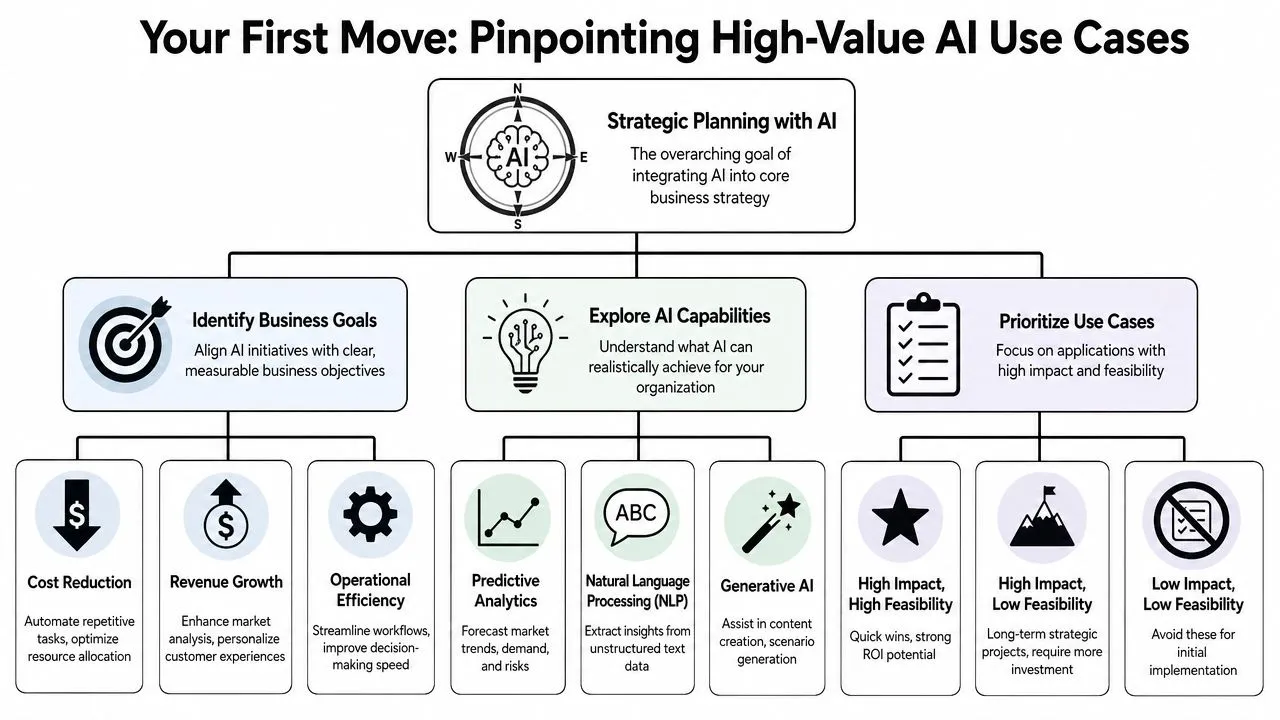
The biggest mistake teams make early is trying to “do AI” at the enterprise level before they've identified where it solves a painful planning problem. Start smaller. Look for points in the strategy cycle where work is repetitive, text-heavy, slow, or inconsistent across business units.
Start with planning friction, not technology
A non-technical leadership team doesn't need to begin with model types or architecture choices. Begin with three questions:
-
Where does planning slow down?
Common answers include market research, competitor review, meeting synthesis, and cross-functional input gathering. -
Where does the team keep reinventing the same analysis?
SWOT updates, PESTEL scans, recurring board summaries, and risk reviews are common candidates. -
Where does quality vary too much by person?
If one strategist produces clear synthesis and another produces scattered notes, AI can help standardize the first draft.
Modern large language models became meaningfully more useful for this kind of work after the Transformer breakthrough in 2017, which is why they're now practical for summarizing, forecasting, and synthesizing large volumes of text and data rather than just answering simple prompts.
Where AI adds value first
The easiest wins usually sit in the early and middle phases of strategic planning.
- Environmental scanning: Use tools like ChatGPT, Claude, or Perplexity to summarize market developments, extract signals from news, or group policy and regulatory themes into a clean brief.
- Competitive intelligence: Feed in earnings-call transcripts, website copy, product announcements, and public positioning statements. Ask the model to compare strategic language, likely priorities, and changes in emphasis.
- Internal synthesis: Upload survey comments, planning workshop notes, or business-unit memos and ask AI to identify recurring concerns, disagreements, and missing evidence.
- Scenario drafting: Ask for multiple plausible scenarios based on a few key assumptions, then use those outputs to sharpen leadership debate.
- Planning document support: Generate initial outlines for strategic narratives, executive summaries, and decision logs after meetings.
The strongest early use case usually isn't “create my strategy.” It's “help me process a large amount of messy input so the leadership team can think more clearly.”
Use cases that look flashy but often disappoint early include fully automated strategy generation, broad forecasting without clean data, and any workflow where teams expect the model to produce facts without validation.
A simple prioritization screen
Before approving a use case, pressure-test it against business reality.
| Use case | Value if it works | Risk if it fails | Good first pilot? |
|---|---|---|---|
| Meeting-note synthesis | High | Low | Yes |
| Competitor messaging analysis | High | Medium | Yes |
| Scenario generation | Medium to high | Medium | Yes, with review |
| Automated strategic recommendations | High | High | No |
| External fact generation without verification | Low | High | No |
A practical rule is to choose high-value, low-regret use cases first. If the output is wrong, a manager can catch it quickly. If the output is strong, the team saves time immediately.
A better starting portfolio
For most organizations, a sensible starting mix looks like this:
- One research use case such as market or competitor scanning
- One internal productivity use case such as synthesis of notes or reports
- One decision-support use case such as scenario options or assumption challenge prompts
That gives the team exposure to AI across different parts of planning without handing the model too much authority too early.
The Pilot-to-Scale Roadmap Integrating AI into Your Workflow
Most strategy teams don't fail because the pilot was weak. They fail because the pilot never became a repeatable workflow. The transition from experimentation to operating rhythm is where discipline matters.
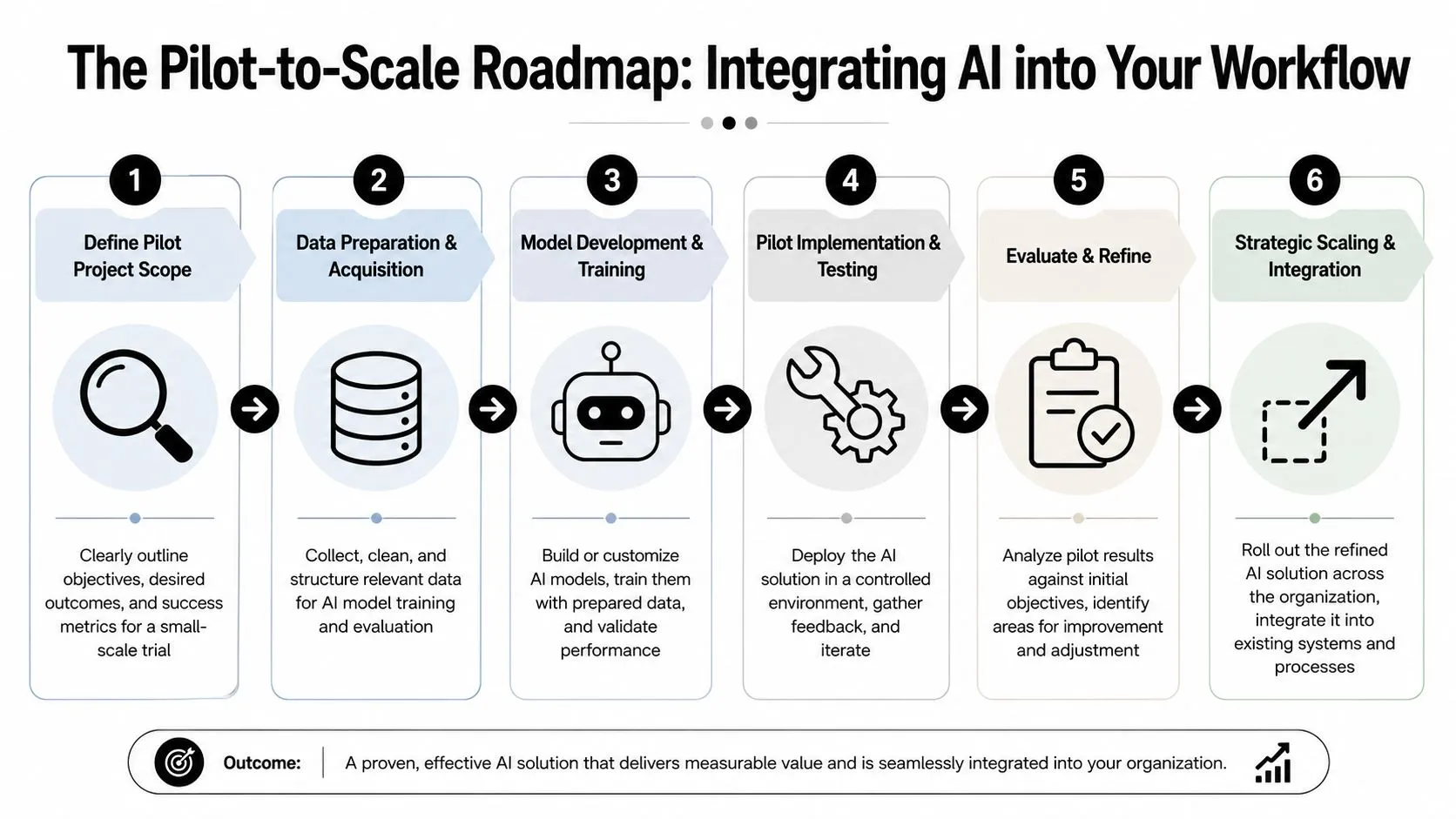
A practical AI-enabled planning sequence recommended by PrometAI is to define objectives, gather and analyze data, formulate strategy, plan implementation, then monitor and adjust continuously, with AI used to uncover patterns, forecast trends, and support real-time course correction in that flow, as described in PrometAI's guide to using AI for strategic planning. That sequence is a good operating backbone because it starts with business intent instead of tool selection.
What a good pilot actually looks like
Keep the first pilot narrow. One team, one use case, one decision window.
A weak pilot sounds like this: “Let's explore AI for strategic planning across the company.”
A strong pilot sounds like this: “For the next planning cycle, use ChatGPT or Claude to produce a first-pass competitor brief from public materials for one business unit, then compare turnaround time and usefulness against the current manual process.”
Use this structure:
- Define the planning moment: Annual planning, quarterly review, market entry analysis, portfolio review
- Specify the output: One briefing note, one scenario pack, one synthesis memo
- Choose the human reviewer: Strategy lead, business-unit head, chief of staff
- Set decision criteria: Faster prep, clearer options, fewer missed signals, easier meeting follow-up
If your team needs a broader implementation template, this roadmap for AI from pilot to profit is a useful reference because it frames rollout as an operational design problem, not just a software purchase.
How to embed AI into the existing planning rhythm
Don't bolt AI on as a novelty. Put it where work already happens.
A practical integration pattern looks like this:
-
Before the planning session
Use AI for rapid competitive scanning, macro trend synthesis, and assumption stress-testing. The aim is to improve the quality of pre-read material. -
During planning discussions
Use a live assistant carefully. Ask it to summarize points of agreement, list unresolved assumptions, or generate alternative framings of a decision. Don't let it settle the debate. -
After the session
Use AI to convert notes into a structured strategic narrative, draft action summaries, and create follow-up prompts for business owners.
Here's a simple workflow view:
| Planning stage | Human lead | AI role |
|---|---|---|
| Pre-read development | Strategy team | Synthesize, compare, draft |
| Planning workshop | Executive team | Summarize, challenge assumptions |
| Decision documentation | Chief of staff or strategy lead | Turn notes into structured outputs |
| Ongoing monitoring | Business owners | Surface changes and prompt review |
For non-technical teams, the tooling can stay simple. ChatGPT, Claude, Microsoft Copilot, Perplexity, and notebook-style internal tools are often enough for early use cases. The primary issue is workflow discipline, not tool variety. If the team needs guided, role-based learning on practical business use, resources like AI training for business workflows can help standardize how managers prompt, review, and implement outputs.
A short video can help your team visualize the broader implementation journey before designing the workflow details:
When to scale and when to stop
Not every pilot deserves expansion. Scale only when the use case meets three tests.
- The output is consistently usable: Reviewers find that the first draft saves real effort.
- The workflow is repeatable: Different team members can run it without relying on one prompt expert.
- The governance is clear: People know what must be checked before the output informs decisions.
If a pilot saves time but creates confusion, don't scale it. Clean process beats clever demos.
Stop or redesign a pilot when users keep correcting the same kinds of errors, when source verification becomes too labor-intensive, or when the AI output sounds polished but doesn't improve the decision.
Strategic Guardrails AI Governance and Risk Management
The governance issue isn't theoretical. It shows up the moment a leadership team starts asking, “Can we trust this?” If you don't answer that directly, the team will swing between two bad extremes: blind faith in the output or blanket rejection of the tool.
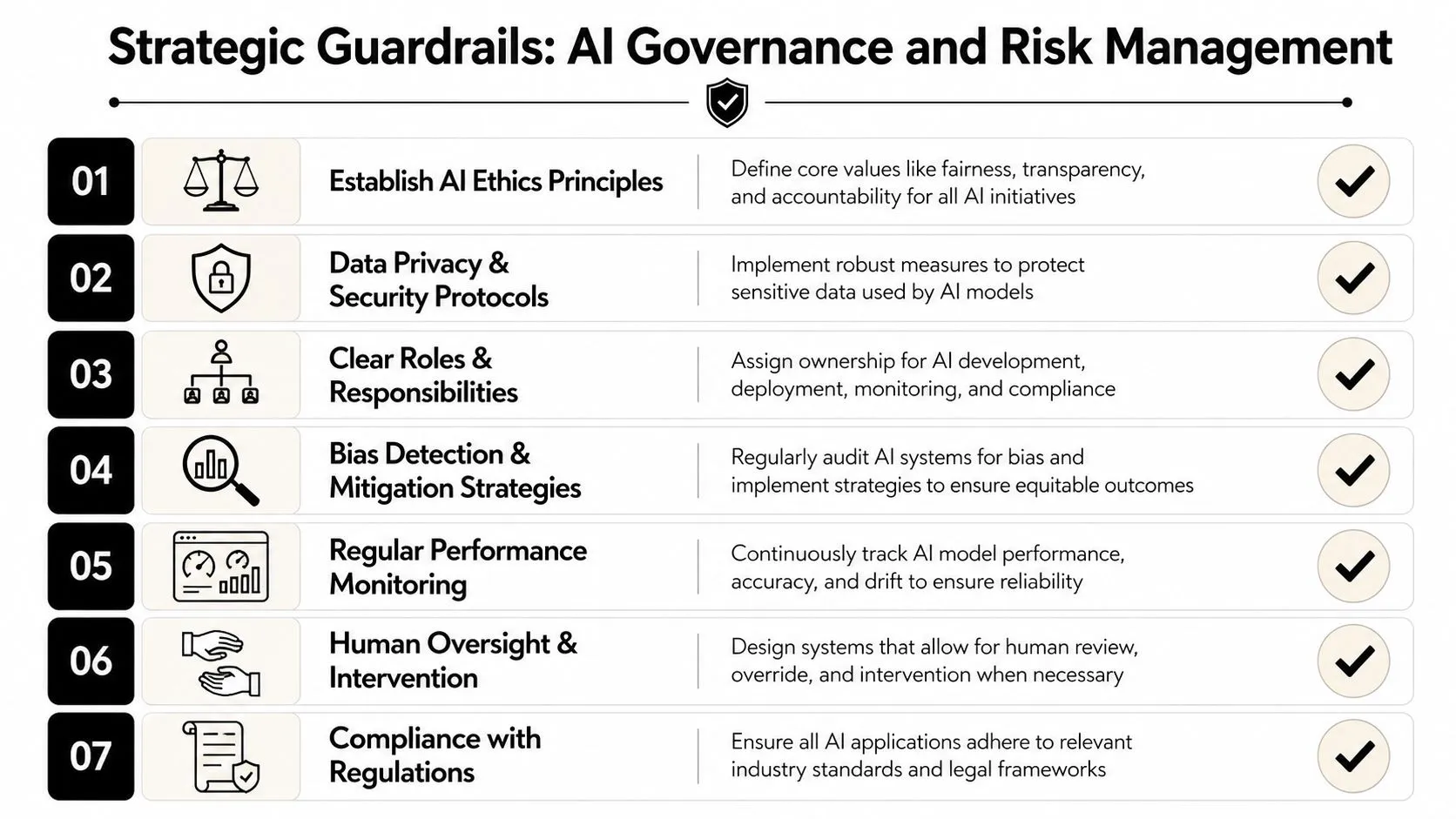
The Balanced Scorecard Institute warns that poor-quality or biased data can skew analyses and that the most effective approach is a hybrid of AI and human judgment, as outlined in its article on the promise and pitfalls of AI in strategic planning. That's the right starting point for governance. AI should inform the decision process. It should not own it.
Where leaders should challenge the model
Executives don't need to inspect every output with the same intensity. They should intervene hardest when the output affects commitment, capital, or risk.
Challenge AI outputs when they do any of the following:
- Present facts without evidence: If a model states market positions, customer behavior, or competitor moves without source support, treat it as unverified.
- Recommend strategic moves with no trade-offs: Real strategy forces choices. Generic “do everything” outputs usually mean shallow reasoning.
- Mirror old assumptions too neatly: AI often reflects patterns in existing data. That can reinforce yesterday's logic instead of exposing new options.
- Flatten disagreement: If the model summarizes leadership input into false consensus, you lose the productive tension that strategy needs.
Ask two questions before using any AI output in a planning discussion: “What evidence supports this?” and “What would make this wrong?”
A practical governance model
A workable governance model for AI for strategic planning doesn't need to be bureaucratic. It does need named checkpoints.
First checkpoint: input control
Decide what information can be entered into the tool. Sensitive commercial data, personnel issues, legal matters, and acquisition-related material need tighter handling than public information or anonymized summaries.
Second checkpoint: output review
Assign a human reviewer for each workflow. That person doesn't just proofread. They verify logic, challenge weak claims, and confirm whether the output is fit for executive use.
Third checkpoint: decision accountability
The business owner remains accountable for the final recommendation, even if AI supported the analysis.
A simple operating table helps:
| Governance area | Minimum control |
|---|---|
| Data quality | Check source relevance and recency before prompting |
| Bias risk | Compare outputs against counterarguments and missing stakeholder views |
| Transparency | Record what inputs and prompts shaped the recommendation |
| Review | Require human sign-off before strategic use |
| Accountability | Keep decision ownership with named leaders |
Teams that need a practical baseline for everyday usage standards should establish shared prompt rules, review habits, and privacy norms. A concise reference like these AI best practices for teams can help operationalize that without overcomplicating the process.
The Strategist's AI Toolkit Prompts and Mini-Playbooks
Most executives don't need advanced prompt engineering. They need a reliable way to ask for useful work. Good prompts do three things: define the role, define the task, and define the output format.
Prompt pattern one competitive analysis
Use this when you've gathered public inputs such as website pages, earnings-call commentary, product announcements, and leadership statements.
Prompt template
Act as a strategy analyst preparing a briefing for an executive team. Review the materials below and identify the competitor's apparent priorities, positioning shifts, target customer focus, and likely strategic bets. Separate confirmed statements from inferred conclusions. Highlight contradictions, missing information, and areas that require human verification. Present the output as:
- executive summary
- strategic themes
- likely implications for our business
- confidence level by point
Why this works: it forces separation between what the company said and what the model is inferring. That reduces one of the most common planning errors, which is treating interpretation as fact.
Prompt pattern two PESTEL scanning
This works well for market-entry work, annual planning refreshes, or category reviews.
Prompt template
You are supporting a strategic planning process for a leadership team. Using the information below, organize the key external factors into Political, Economic, Social, Technological, Environmental, and Legal categories. For each factor, explain whether it is likely to create an opportunity, risk, or mixed effect. Then identify the three issues most likely to matter in the next planning cycle and explain why. Do not invent facts. If evidence is thin, state the uncertainty clearly.
Add a follow-up prompt after the first response:
Now challenge your own analysis. Which factors might be overstated, backward-looking, or based on weak evidence? What additional data would a human team need before using this in a planning decision?
That second prompt often matters more than the first.
Prompt pattern three scenario stress testing
AI can sharpen executive discussion if you constrain it properly.
Prompt template
We are evaluating a strategic plan built on the following assumptions: [insert assumptions]. Generate three plausible scenarios that would test those assumptions. For each scenario, list:
- the trigger conditions
- early warning signs
- which assumptions break first
- strategic response options
- questions executives should debate before committing resources
Use the result to frame discussion, not to choose the answer.
A strong scenario prompt doesn't ask AI to predict the future. It asks AI to expose where your current plan is fragile.
A mini-playbook for non-technical users
If your team is new to this, use a simple three-pass method:
- Pass one: Ask for structure, summary, and categorization.
- Pass two: Ask for critique, contradiction, and uncertainty.
- Pass three: Ask for a board-ready output with clear sections and caveats.
That sequence produces far better material than a single broad prompt.
For teams that want more copy-ready examples across common business tasks, a resource like this AI prompt library for work can save time and help standardize prompt quality across managers and analysts.
From Output to Outcome Measuring Impact and Driving Adoption
The first proof point for AI in strategic planning isn't whether people liked the tool. It's whether the planning process got better. Better means stronger inputs, faster cycles, clearer options, and more confident follow-through.
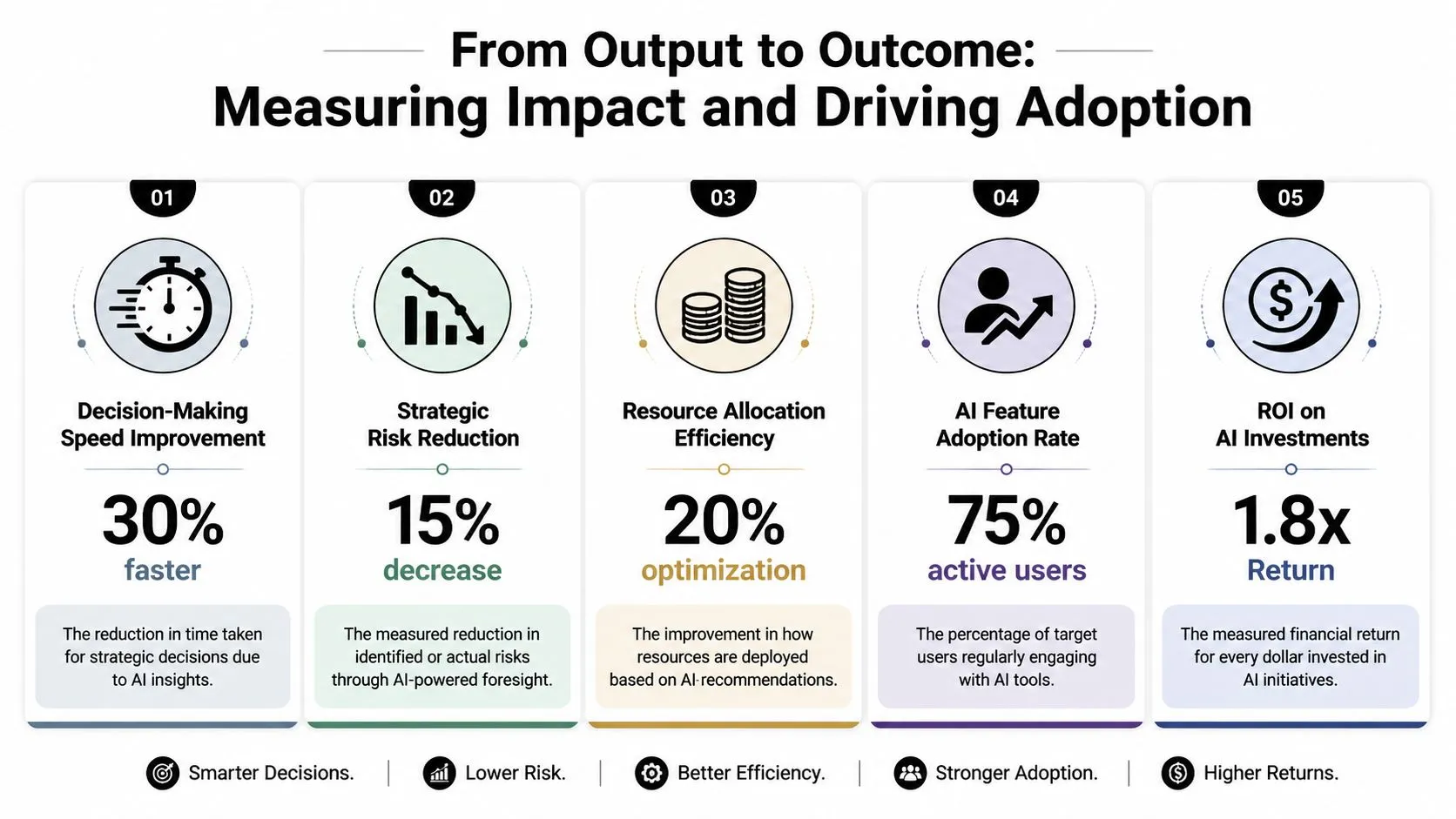
Reported gains can be meaningful when AI is integrated across the planning cycle. One research summary cited by Venture Planner says AI adoption can deliver 40% higher-quality output and 25% faster output, while another claims up to 50% better forecast accuracy and 95% quicker decision-making in AI-enabled strategic planning, according to Venture Planner's review of AI in the strategic planning cycle. Those figures should be treated as context, not a promise. Execution quality, governance, and data discipline determine whether any team gets close to those outcomes.
Measure planning quality, not just activity
Avoid vanity metrics like number of prompts run or licenses assigned. Track whether AI improved the work that leaders use.
Useful measures include:
- Cycle-time reduction: Did pre-read creation, market scanning, or post-meeting synthesis happen faster?
- Decision readiness: Did executives get clearer choices with better framing of trade-offs?
- Forecast usefulness: Did scenario discussions become more grounded and more actionable?
- Adoption quality: Are managers using AI to support judgment, or are they pasting outputs without review?
- Repeatability: Can different team members produce consistently usable outputs from the same workflow?
A simple leadership dashboard can combine qualitative review with a few operational measures. Keep it tied to planning moments, not general AI enthusiasm.
| Measure | What to look for |
|---|---|
| Pre-read quality | Fewer missing issues, clearer synthesis |
| Time to first draft | Faster preparation for planning meetings |
| Strategic option quality | More distinct and testable choices |
| Review burden | Reasonable correction effort, not constant cleanup |
| Team confidence | Growing trust in process, not blind trust in output |
Adoption rises when teams trust the process
Change management matters because strategy work is political as well as analytical. People need to know AI won't replace judgment, flatten expertise, or slip unchecked claims into executive decks.
The fastest way to build adoption is to make the review process visible. Show people how outputs are checked, who owns the final call, and when the model must be challenged. That creates confidence without overselling capability.
Practical adoption habits include:
- Train on live work: Don't teach prompting in the abstract. Use actual planning materials and real business questions.
- Publish a review standard: Define what must be verified before AI-supported analysis goes into a strategy pack.
- Create prompt examples by role: The CFO, strategy lead, and business-unit head need different prompt templates.
- Reward critical use: Praise people who improve the process by questioning AI output, not just those who use it often.
The end state isn't a company that uses AI everywhere. It's a company that uses AI where it improves decision quality and avoids it where it creates noise.
AI Academy gives non-technical professionals a practical way to build these skills through short tutorials on tools like ChatGPT, Claude, Perplexity, and other workplace AI products, with material on prompt design, workflow automation, governance, and implementation. If your team wants hands-on training instead of abstract AI theory, AI Academy is a relevant option to explore.